
About Copilot MCP Search for VSCode
Copilot MCP Search for VS Code is a VS Code extension for discovering, installing and managing open-source MCP servers and agent skills. It lets Copilot access MCP tools and resources from within the IDE.
Key features
- 01MCP server connection and management interface
- 02Skill search and installation from skills.sh
- 03Installed skill viewing and uninstall controls
- 04MCP tool exposure to Copilot, Claude and Codex
- 05Automatic discovery of open-source MCP servers
Use cases
- 01Adding MCP tools to GitHub Copilot Chat in VS Code
- 02Searching and installing skills for different agents
- 03Running npx or uvx based servers remotely through Cloud MCP
MCP support
The extension acts as an MCP client interface that connects and manages multiple MCP servers. It exposes their tools to Copilot, Claude and Codex.
Details
From the project READMECopilot MCP Search for VS Code
Want remote MCP in ~30s? Try Cloud MCP — paste a URL → OAuth → done.
Works with Copilot & Claude (no keys, no terminal).
Get started at cloudmcp.run
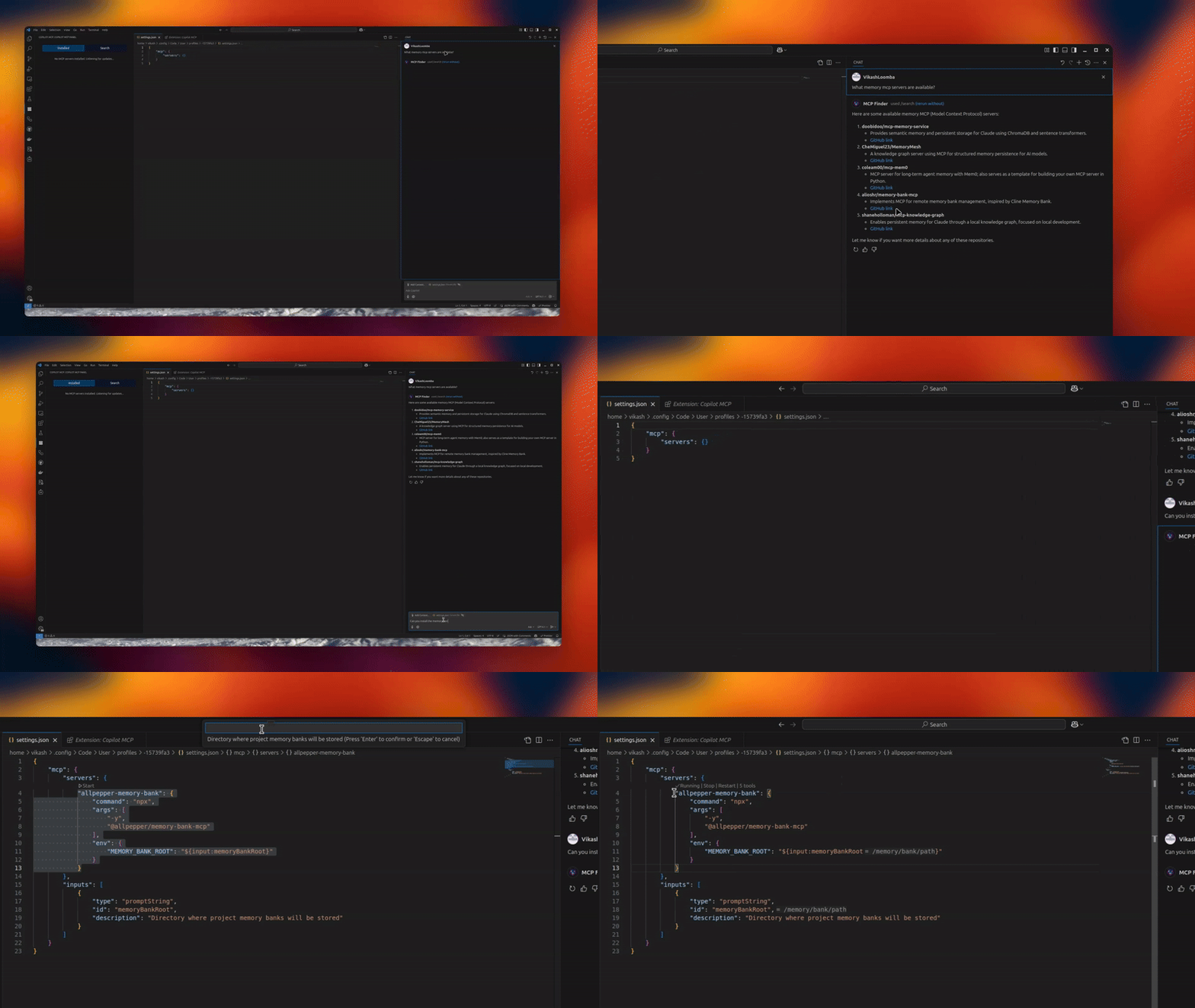




A powerful VS Code extension that lets you discover, install, and manage open‑source MCP servers and agent skills from one place.
✨ Features
- 🔧 MCP Server Management – connect/manage multiple servers via an intuitive UI
- 🧠 Skills Search & Install – discover skills from
skills.shand install to your agents - 🗂️ Installed Skills Management – view installed skills and uninstall with agent-level controls
- 🚀 Claude/Codex/Copilot Integration – expose MCP tools directly to your agents
- 🎯 Server Discovery – automatically discover open‑source servers
📦 Installation
- Install from the VS Code Marketplace.
- Open MCP Servers in the Activity Bar, or configure in Settings.
Optional: Remote MCP (no local setup)
If you don’t want to run servers locally, use Cloud MCP (remote, OAuth‑only).
Paste the MCP URL into Copilot/Claude and you’re done:
- Learn More: https://cloudmcp.run
🛠️ Configuration
Configure via the UI or VS Code settings. Look for the MCP Servers icon in the Activity Bar.
🚀 Usage
- Open the MCP Servers view
- Connect or search for servers
- Switch to Skills to search and install skills, and manage installed skills
- Use Copilot Chat with your newly added tools and skills
Tip: When a server supports
npx/uvx, the Server Discovery panel shows a “Deploy via Cloud MCP” option so you can run it remotely without installing anything.
🔗 Requirements
- VS Code
- GitHub Copilot Chat extension
🌟 Benefits
- Give Copilot standardized tools via MCP
- Local or remote workflows (Cloud MCP)
- Join a growing, interoperable ecosystem
Telemetry
Copilot MCP collects a small set of anonymous usage events — searches, install attempts, and clicks on in-extension links/CTAs — so we can understand which features are useful.
- What is collected: anonymous event names with a small set of properties: the search terms you type in the extension (sidebar search and
@mcpchat prompts, truncated to 100 characters), public GitHub repository names/URLs and skill source locators for items you search for or act on, your OS platform/architecture and the extension version, and error messages/diagnostics (truncated) when something fails. - What is never collected: file contents, workspace or repository contents, or account identifiers (no emails, usernames, or tokens) — account-shaped properties are stripped out before anything is sent.
- VS Code settings are respected: the extension honors VS Code's
telemetry.telemetryLevelsetting. If you have disabled telemetry in VS Code, the extension sends nothing.
To opt out, set telemetry.telemetryLevel to off in your VS Code settings.
🔄 Maintainer: Vendored Copilot Provider Sync
This repo vendors an upstream Copilot provider from anomalyco/opencode under:
vendor/opencode-copilot/src/**
Sync it with:
npm run sync:copilot-provider
Check drift without writing files:
npm run sync:copilot-provider:check
Automated daily sync PRs are created by:
.github/workflows/sync-opencode-copilot.yml
👥 Contributing
PRs and feature requests welcome! See issues.
✍️ Author
Vikash Loomba
Website: https://cloudmcp.run
X: @DevAutomata
GitHub: @vikashloomba
📝 License
GPL‑3.0 — see LICENSE.
Part of the MCP Client Ecosystem
Comments
New to MCP?
From what the protocol is to installing your first server, these answers cover most first questions.
An open protocol that defines how AI applications connect to external tools and data in a uniform way. Clients talk to the model; MCP servers provide tools, resources and prompt templates. They exchange standard messages, so one server can be reused by many clients.