
Tester Client for Model Context Protocol (MCP)
About Tester Client for Model Context Protocol (MCP)
Tester Client for MCP is an MCP client that connects to a server over HTTP streamable and shows the conversation in a chat UI. It runs as an Apify Actor and is aimed at testing remote MCP servers, including the Apify MCP Server.
Key features
- 01Connects to MCP servers over HTTP streamable
- 02Chat UI showing tool calls and results
- 03Supports Authorization headers and API keys
- 04Runs as an Apify Actor on the platform
- 05Open source and available for local development
Use cases
- 01Testing tool calls of a remote MCP server
- 02Trying Apify Actors through the Apify MCP Server
- 03Running the client locally to debug an MCP server
MCP support
As an MCP client, it connects to a specified MCP server over HTTP streamable and displays model output and tool usage in its interface.
Details
From the project READMETester Client for Model Context Protocol (MCP)
Implementation of a model context protocol (MCP) client that connects to an MCP server using HTTP streamable (recommended) transport and displays the conversation in a chat-like UI. It is a standalone Actor server designed for testing MCP servers over HTTP streamable. It uses Pay-per-event pricing model.
For more information, see the Model Context Protocol website or blogpost What is MCP and why does it matter?.
Once you run the Actor, check the output or logs for a link to the chat UI interface to interact with the MCP server. The URL will look like this and will vary each run:
Navigate to https://...apify.net to interact with chat-ui interface.
🚀 Main features
- 🔌 Connects to an MCP server using HTTP streamable
- 💬 Provides a chat-like UI for displaying tool calls and results
- 🇦 Connects to an Apify MCP Server for interacting with one or more Apify Actors
- 💥 Dynamically uses tools based on context and user queries (if supported by a server)
- 🔓 Use Authorization headers and API keys for secure connections
- 🪟 Open source, so you can review it, suggest improvements, or modify it
🎯 What does Tester MCP Client do?
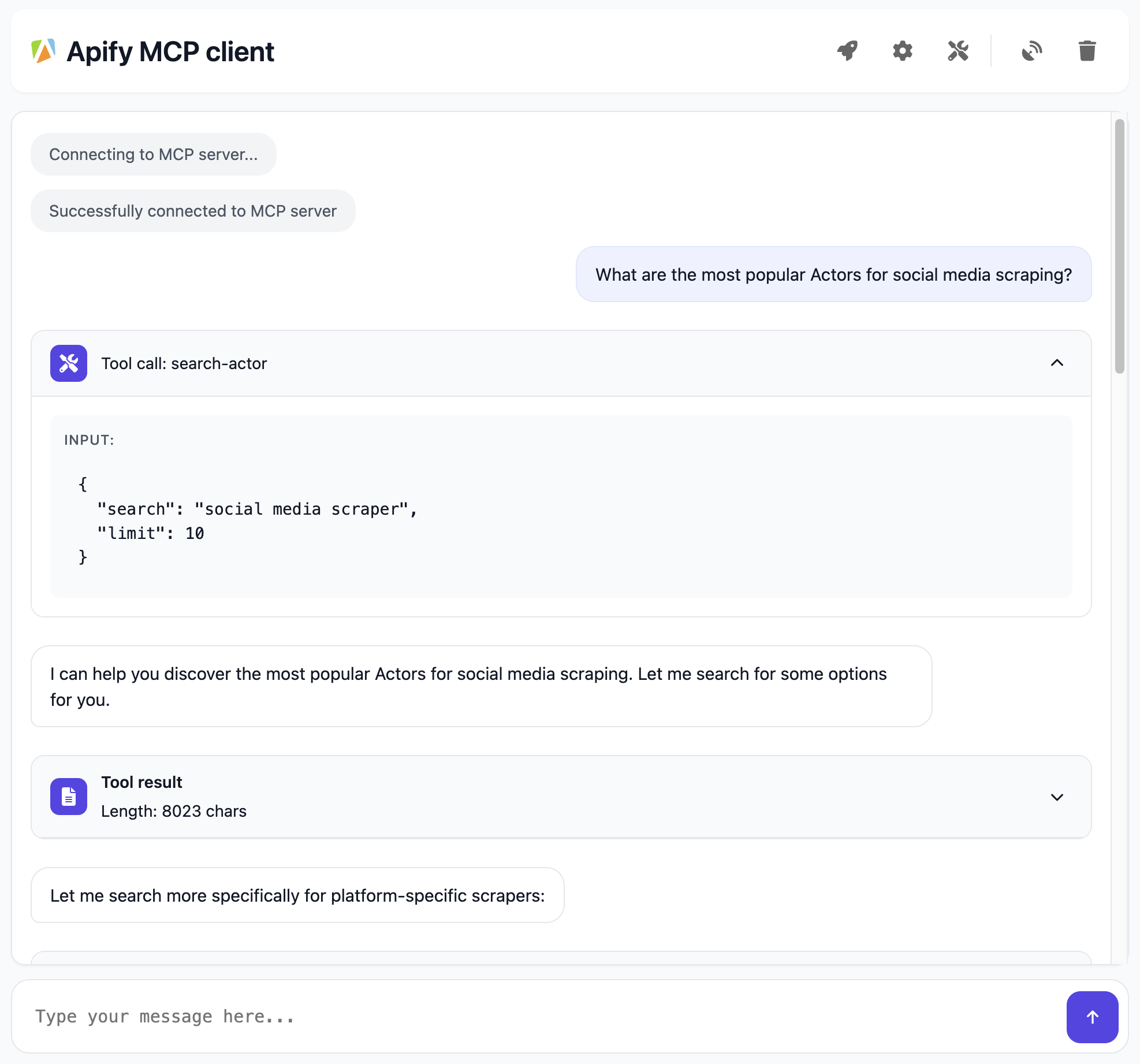
When connected to Apify MCP Server the Tester MCP Client provides an interactive chat interface where you can:
- "What are the most popular Actors for social media scraping?"
- "Show me the best way to use the Instagram Scraper"
- "Which Actor should I use to extract data from LinkedIn?"
- "Can you help me understand how to scrape Google search results?"
📖 How does it work?
The Apify MCP Client connects to a running MCP server over HTTP streamable and it does the following:
- Initiates a streamable HTTP connection to the MCP server.
- Sends user queries to the MCP server.
- Receives real-time streamed responses that may include LLM output, and tool usage blocks
- Based on the LLM response, orchestrates tool calls and displays the conversation
- Displays the conversation
⚙️ Usage
- Test any remote MCP server
- Test Apify MCP Server and the ability to dynamically select amongst thousands of tools
Learn about the key features and capabilities in the Apify MCP Server Tutorial: Integrate 5,000+ Apify Actors and Agents Into Claude video
Apify MCP Server Tutorial: Integrate 5,000+ Apify Actors and Agents Into Claude
Normal Mode (on Apify)
You can run the Tester MCP Client on Apify and connect it to any MCP server that supports HTTP streamable. Configuration can be done via the Apify UI or API by specifying parameters such as the MCP server URL, system prompt, and API key.
Once you run Actor, check the logs for a link to the Tester MCP Client UI, where you can interact with the MCP server: The URL will look like this and will be different from run to run:
INFO Navigate to https://......runs.apify.net in your browser to interact with an MCP server.
💰 Pricing
The Apify MCP client uses a modern and flexible approach for AI Agents monetization and pricing called Pay-per-event. You only need to have Apify account and you can use it, LLM provider API key is not required but you can supply it if you want to use your own LLM provider.
Supported models
Current models:
- Claude Sonnet 4.5 (
claude-sonnet-4-5-20250929) - Default for Sonnet - Claude Haiku 4.5 (
claude-haiku-4-5-20251001) - Default model, faster and more cost-effective
Deprecated models (still supported with automatic migration):
- Claude Sonnet 4.0 (
claude-sonnet-4-0) → migrates to Sonnet 4.5 - Claude Sonnet 3.7 (
claude-3-7-sonnet-latest) → migrates to Sonnet 4.5 - Claude Haiku 3.5 (
claude-3-5-haiku-latest) → migrates to Haiku 4.5
Events charged
- Actor start (based on memory used, charged per 128 MB unit)
- Running time (charged every 5 minutes, per 128 MB unit)
- Query answered (depends on the model used, not charged if you provide your own API key for LLM provider)
Token pricing
- Claude Sonnet: $3/1M input tokens, $15/1M output tokens
- Claude Haiku: $1/1M input tokens, $5/1M output tokens (default model)
When you use your own LLM provider API key, running the MCP Client for 1 hour with 128 MB memory costs approximately $0.06. With the Apify Free tier (no credit card required 💳), you can run the MCP Client for 80 hours per month. Definitely enough to test your MCP server!
📖 How it works
Browser ← (SSE) → Tester MCP Client ← (HTTP streamable) → MCP Server
We create this chain to keep any custom bridging logic inside the Tester MCP Client, while leaving the main MCP Server unchanged. The browser uses SSE to communicate with the Tester MCP Client, and the Tester MCP Client relies on HTTP streamable to talk to the MCP Server. This separates extra client-side logic from the core server, making it easier to maintain and debug.
- Navigate to
https://tester-mcp-client.apify.actor?token=YOUR-API-TOKEN(or http://localhost:3000 if you are running it locally). - Files
index.htmlandclient.jsare served from thepublic/directory. - Browser opens SSE stream via
GET /sse. - The user's query is sent with
POST /message. - Query processing:
- Calls Large Language Model.
- Optionally calls tools if required using
- For each result chunk,
sseEmit(role, content)
Local development
The Tester MCP Client Actor is open source and available on GitHub, allowing you to modify and develop it as needed.
Download the source code:
git clone https://github.com/apify/tester-mcp-client.git
cd tester-mcp-client
Install the dependencies:
npm install
Create a .env file with the following content (refer to the .env.example file for guidance):
APIFY_TOKEN=YOUR_APIFY_TOKEN
LLM_PROVIDER_API_KEY=YOUR_API_KEY
Default values for settings such as mcpUrl, systemPrompt, and others are defined in the const.ts file. You can adjust these as needed for your development.
Run the client locally
npm start
Navigate to http://localhost:3000 in your browser to interact with the MCP server.
Happy chatting with Apify Actors!
ⓘ Limitations and feedback
The client does not support all MCP features, such as Prompts and Resource.
References
Comments
New to MCP?
From what the protocol is to installing your first server, these answers cover most first questions.
An open protocol that defines how AI applications connect to external tools and data in a uniform way. Clients talk to the model; MCP servers provide tools, resources and prompt templates. They exchange standard messages, so one server can be reused by many clients.