
About 小红书MCP服务
A MCP server for Xiaohongshu (Little Red Book) that searches notes, reads note content and comments, and posts comments. It signs requests by reverse-engineering x-s and x-t in JavaScript and calls the HTTP endpoints directly, without Playwright.
Key features
- 01JS-reversed x-s and x-t request signing
- 02Direct HTTP requests without Playwright
- 03Keyword note search and home feed
- 04Note content and comment retrieval
- 05Post comments to a specified note
Use cases
- 01Search Xiaohongshu notes by keyword
- 02Read note bodies and comments through an AI assistant
- 03Post comments on a specified note
MCP support
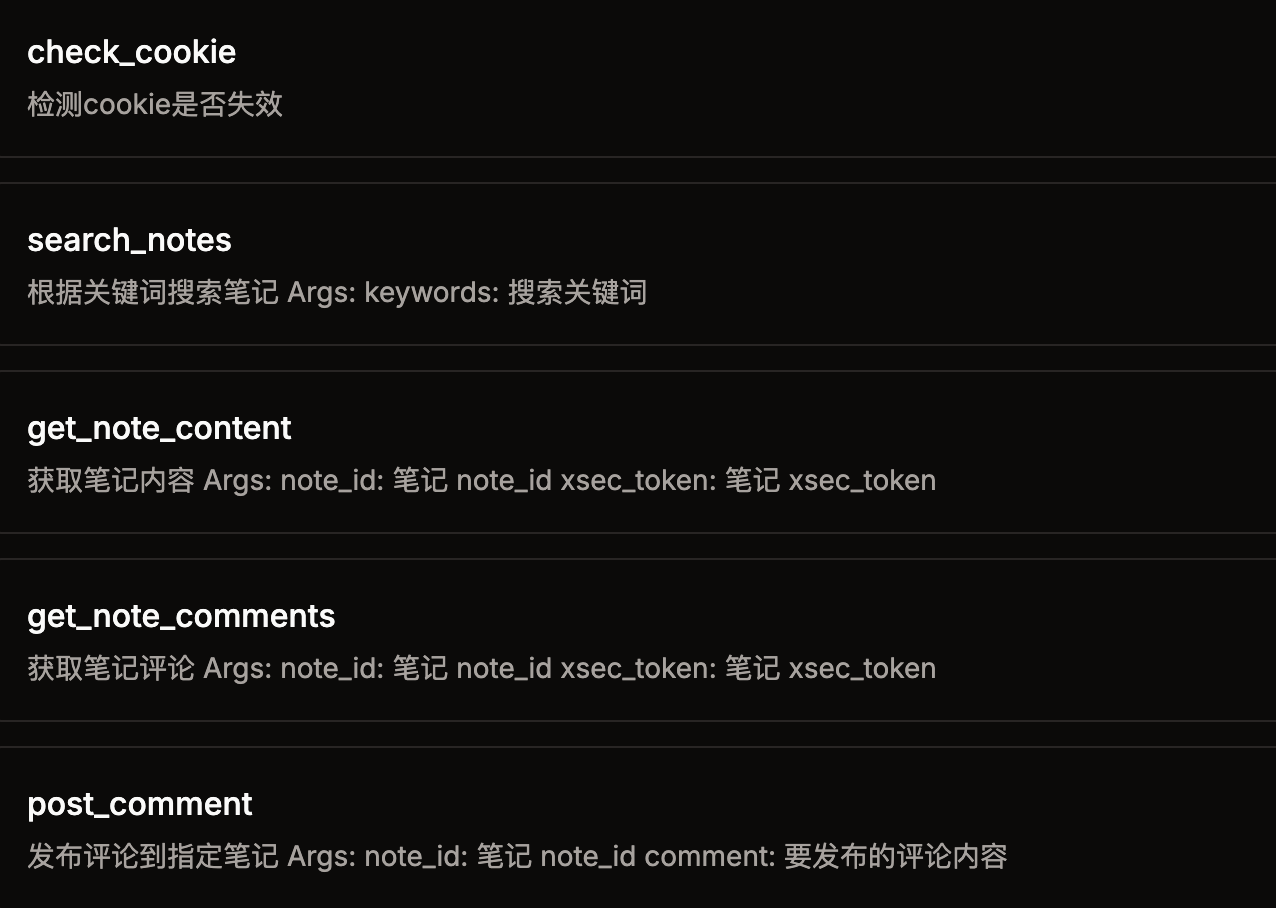
This project is an MCP server that exposes tools such as check_cookie, home_feed, search_notes, get_note_content, get_note_comments and post_comment to MCP clients. It requires the XHS_COOKIE environment variable.
Details
From the project README小红书MCP服务

一个用于小红书API的MCP(Model Context Protocol)服务器,支持搜索笔记、获取内容、查看评论和发表评论等功能。
特点
- 采用js逆向出x-s,x-t,直接请求http接口,无须笨重的playwright
- 搜索笔记
- 获取笔记内容
- 获取笔记的评论
- 发表评论
快速开始
方法一:使用uvx(推荐)
1. 环境要求
- Python 3.12+
- uv (安装方法:
pip install uv)
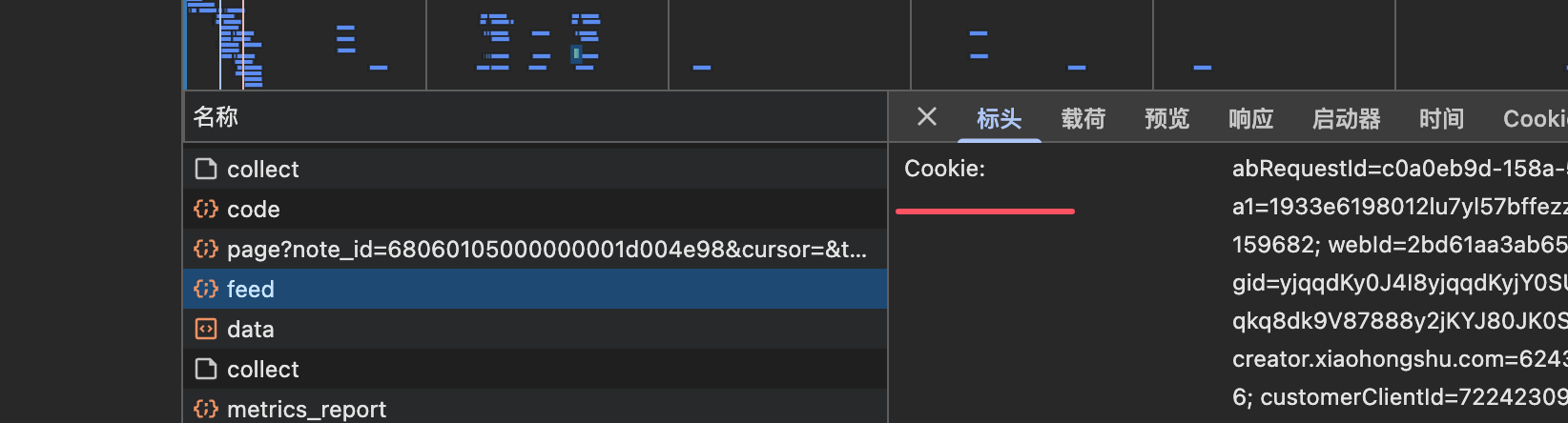
2. 获取小红书的cookie
打开web小红书
登录后,获取cookie,将cookie配置到下一步的 XHS_COOKIE 环境变量中
3. 配置MCP服务器
在你的MCP客户端配置文件中添加以下配置:
{
    "mcpServers": {
        "xhs-mcp": {
            "command": "uvx",
            "args": [
                "--from",
                "jobson-xhs-mcp",
                "xhs-mcp"
            ],
            "env": {
                "XHS_COOKIE": "你的小红书cookie"
            }
        }
    }
}
4. 测试运行
# 设置环境变量
export XHS_COOKIE="你的小红书cookie"

# 直接运行测试
uvx --from jobson-xhs-mcp xhs-mcp --help
方法二:从源码安装
1. 环境要求
- node
- python 3.12
- uv (pip install uv)
2. 克隆并安装
git clone [email protected]:jobsonlook/xhs-mcp.git
cd xhs-mcp
uv sync
3. 获取小红书的cookie
打开web小红书
登录后,获取cookie,将cookie配置到下一步的 XHS_COOKIE 环境变量中
4. 配置MCP服务器
{
    "mcpServers": {
        "xhs-mcp": {
            "command": "uv",
            "args": [
                "--directory",
                "/path/to/xhs-mcp",
                "run",
                "xhs_mcp/__main__.py"
            ],
            "env": {
                "XHS_COOKIE": "你的小红书cookie"
            }
        }
    }
}
可用工具
本MCP服务器提供以下工具:
check_cookie()- 检测cookie是否失效home_feed()- 获取首页推荐笔记search_notes(keywords)- 根据关键词搜索笔记get_note_content(url)- 获取笔记内容(需要带xsec_token的完整URL)get_note_comments(url)- 获取笔记评论(需要带xsec_token的完整URL)post_comment(comment, note_id)- 发布评论到指定笔记
使用示例
在Claude Desktop中使用
- 打开Claude Desktop的设置
- 找到MCP服务器配置
- 添加上述JSON配置
- 重启Claude Desktop
- 现在你可以在对话中使用小红书相关功能了
常见问题
Q: Cookie如何获取? A: 在浏览器中登录小红书网页版,打开开发者工具,在Network标签页中找到任意请求,复制Cookie头的值。
Q: 为什么提示cookie失效? A: 小红书的cookie有时效性,需要定期更新。重新登录网页版获取新的cookie即可。
Q: uvx命令找不到?
A: 请先安装uv:pip install uv,然后确保PATH环境变量包含uv的安装路径。
免责声明
本项目仅用于学习交流,禁止用于其他用途,任何涉及商业盈利目的均不得使用,否则风险自负。
Comments
New to MCP?
From what the protocol is to installing your first server, these answers cover most first questions.
An open protocol that defines how AI applications connect to external tools and data in a uniform way. Clients talk to the model; MCP servers provide tools, resources and prompt templates. They exchange standard messages, so one server can be reused by many clients.