
About y-cli 🚀
y-cli is a terminal chat app that has evolved into y-agent, a personal workspace for delegating coding and other tasks across web and Telegram. It links task context to shared files and records, with Claude Code as its coding-agent runtime.
Key features
- 01Shared workspace for code and other tasks
- 02Task-linked discussions and progress
- 03Multi-session task orchestration
- 04Approval and review inbox
- 05Hot-loadable UI, API, CLI, and data modules
- 06Remote MCP connectors with tool approval
Use cases
- 01Delegate coding work from different devices
- 02Resume tasks using workspace context
- 03Split larger work into planning and review
- 04Connect approved remote tools to Claude Code sessions
MCP support
Connects remote HTTPS MCP servers with OAuth, static-header, or no authentication. Tools are explicitly approved and made available to Claude Code sessions through a launch-scoped gateway.
Details
From the project READMEy-agent
One Entry Point, a Cloud Workspace
Hand over a task from your phone, tablet, or desktop. Let the agent work in the same cloud workspace, and come back when there's a decision to make or work to check.
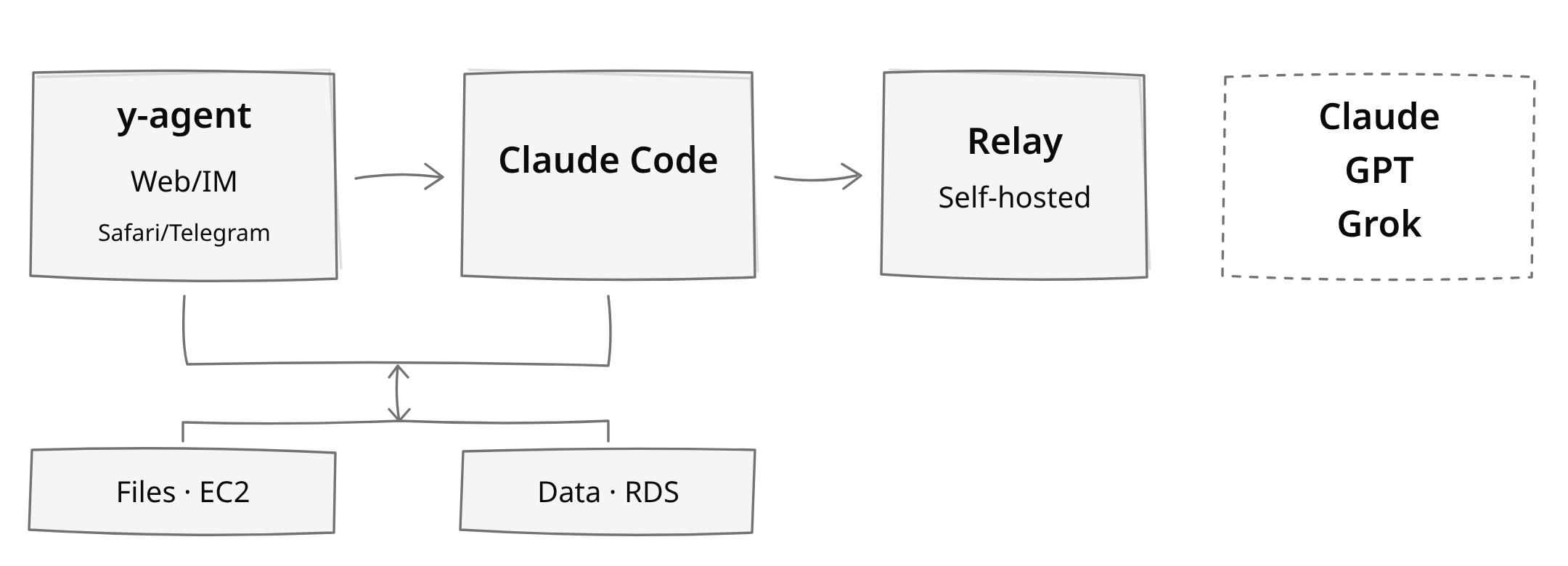
I keep the workspace on EC2 and use y-agent as one entry point. Telegram is another way into the same system, not a separate mobile agent. Code, notes, task records, and results stay in my own workspace rather than belonging to a particular chat window. Switching devices doesn't mean introducing the project all over again.
Read the full story: My AI Dev Setup: One Entry Point, a Cloud Workspace.
How it fits together
These are the layers of my deployment, not five services in a linear pipeline:
| Layer | Role | My setup |
|---|---|---|
| Client | Hand over tasks and read results | y-agent web UI, with Telegram as a chat input interface |
| Memory | Keep project context and task state | Files on EC2; structured records in PostgreSQL on RDS |
| Runtime | Read code, edit files, run commands | Claude Code on EC2 |
| Gateway | Connect and forward model requests | A self-hosted relay: my fork of claude-relay-service |
| Models | Supply model capabilities | Claude / GPT / Grok |
Files and database records are read and written as work needs them. They aren't a stop every model request passes through. The runtime and model source are separate choices: Claude Code is the only agentic CLI backend in this repository. Other model sources depend on the configured gateway, interface compatibility, and provider subscription terms; a subscription isn't a general-purpose API entitlement. The relay is a separate service, not bundled with y-agent. Model context still leaves the workspace for inference.
Under the hood, a React web UI and Telegram feed a FastAPI API. The API queues work through SQS to a worker, which starts Claude Code over SSH in EC2 tmux sessions and streams results back into chat records. API, worker, and admin jobs deploy with AWS SAM/Lambda; PostgreSQL holds structured state. Local development uses Celery with a filesystem broker instead of SQS.
What it does
- One workspace beyond code. Work with todos, notes, links, calendars, email, and domain modules through the web and
yCLI. The agent uses the same files and records, rather than a separate copy of your context. - Task-linked context. A todo connects discussions, plans, progress, and reviews. A new session reads that material instead of needing the entire previous conversation in its prompt.
- Orchestration outside the runtime. One session can finish a small task; larger tasks can split into planning, implementation, and review sessions, each loading the skill it needs. A shared
trace_idconnects the tree, and sub-task chats remain visible and steerable. - An inbox for your turn.
awaitingmarks work needing a decision, authorization, or acceptance check. Publication approval is a separate boundary from implementation and review. - Extensible surfaces. Hot-loadable modules can add UI, API, CLI, and data. Chat can render Mermaid diagrams, Vega-Lite charts, and sanitized SVG artifacts. See the module contract.
- MCP connectors. Connect remote HTTPS MCP servers (OAuth, static header, or no auth; Alpha Vantage first) once (OAuth via
y mcp connectloopback login), approve tools explicitly, and every Claude Code session gets them from its next launch. Credentials stay central in the API and are never returned by any read; sessions only see approved tools through a launch-scoped gateway. See the MCP connectors PRD and runbook.
See a real task trace.
Get started
This is my personal system, not a hosted service or a supported product. It is not supported for public use or third-party deployment.
If you're an advanced user who wants to deploy your own, use this project as a reference, not a turnkey installation guide. Expect to adapt the code and infrastructure to your environment and maintain them yourself.
Domain modules live in a separate y-module repository; their source and published bundles are not included in this checkout. Backups, permissions, provider access, and infrastructure maintenance remain yours to manage.
More
- CHANGELOG: release history.
- Earlier y-agent introduction: background and design rationale.
- Formerly y-cli: y-cli wrapped model APIs; y-agent wraps coding agents.
Comments
New to MCP?
From what the protocol is to installing your first server, these answers cover most first questions.
An open protocol that defines how AI applications connect to external tools and data in a uniform way. Clients talk to the model; MCP servers provide tools, resources and prompt templates. They exchange standard messages, so one server can be reused by many clients.