
About Agent_go
Agent_go is an MCP service for AI agents that provides blockchain identity verification, agent scoring, and market data analysis. It also supports Sigma certification applications and market data visualizations.
Key features
- 01Blockchain-based identity verification
- 02Query agent scores and market data
- 03Apply for and manage Sigma certification
- 04Retrieve market data bubble charts
Use cases
- 01Verify identity with a wallet
- 02Query an agent's Sigma score
- 03View price, score, or market-share bubble charts
- 04Apply for Sigma certification
MCP support
The service exposes prompts and tools through MCP for authentication, agent scoring, market data queries, and certification applications.
Configuration
Local server config is the same for every client. Copy it into your client’s MCP config file.
We haven’t collected a package or remote endpoint for this server. Follow the instructions in the project README.
Tools
Local servers expose tools only once running on your machine, and the maintainer has not provided a tool list.
Details
From the project READMEAgentGo MCP Service Documentation
Table of Contents
Overview
AgentGo MCP Service is an authentication and data query service designed specifically for AI agents, providing blockchain identity authentication, agent scoring queries, market data analysis, and other core capabilities for AI assistants through the MCP protocol.
Main Features
- Secure Authentication - Blockchain-based identity verification system
- Data Queries - Real-time agent scoring and market data retrieval
- Certification Applications - Sigma certification badge application and management
- Visualization Analysis - Multi-dimensional market data bubble chart display
Demo Video
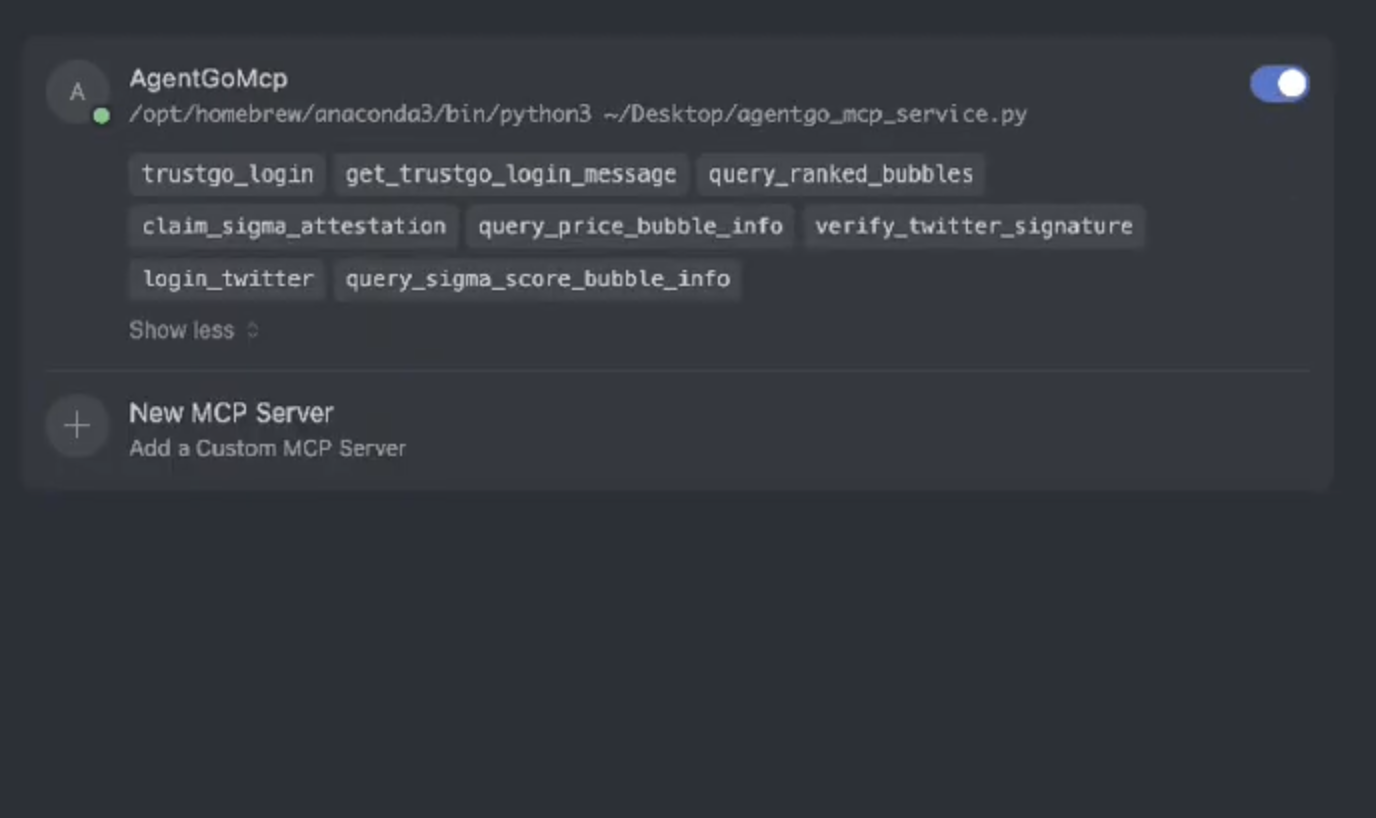
This demo video shows how the AgentGo MCP Service is used in Cursor to support authentication, agent scoring, and market data visualization
Architecture
graph TB
    subgraph "User Layer"
        A[User/AI Assistant]
    end

    subgraph "Protocol Layer"
        B[MCP Protocol Layer]
    end

    subgraph "AgentGo MCP Service"
        C[Service Gateway]
        D[Authentication Module]
        E[Data Query Module]
        F[Certification Module]
    end

    subgraph "External Services"
        G[TrustGo API]
        H[AgentGo API]
        I[Sigma Certification System]
    end

    subgraph "Blockchain"
        J[EIP-191 Signature Verification]
        K[Wallet Address Verification]
    end

    A --> B
    B --> C
    C --> D
    C --> E
    C --> F

    D --> J
    D --> K
    E --> G
    E --> H
    F --> I

    style A fill:#e1f5fe
    style C fill:#f3e5f5
    style G fill:#e8f5e8
    style H fill:#e8f5e8
    style I fill:#e8f5e8
    style J fill:#fff3e0
    style K fill:#fff3e0
- User Layer: AI assistants or user interfaces
- Protocol Layer: MCP standard protocol processing
- Service Layer: AgentGo core business logic
- External Services: Third-party APIs and data sources
Integration with Cursor
To connect to the MCP server from Cursor:
- Open Cursor and go to Settings (gear icon in the top right)
- Click on "MCP" in the left sidebar
- Click "Add new global MCP server"
- Enter the following details:
Default mode
{
   "mcpServers": {
      "AgentGoMcp": {
      "command": "python3",
      "args": ["gentgo_mcp_service.py"],
      "env": {
         "AGENT_ADDRESS": "0x39a39981bF87EE0e8E9D6434A56f00758c9666f0"
      }
      }
   }
}
Prompts and Tools
Prompts
| Name | Description | Usage Example |
|---|---|---|
basic_login_flow | Complete authentication process with wallet verification | "I want to authenticate with my wallet address 0x742d35..." |
query_agent_score | Get detailed agent performance metrics and ratings | "What's the Sigma score for agent aixbt?" |
market_data_query | Retrieve various market visualization data and trends | "Show me the current price bubble chart" |
certification_application | Apply for official Sigma certification badges | "I want to apply for Sigma certification for aixbt" |
Tools
| Name | Description |
|---|---|
trustgo_login | Execute login verification with blockchain wallet |
query_sigma_score | Query agent Sigma score and capability metrics |
query_price_bubble | Get price bubble chart data for market visualization |
query_sigma_score_bubble | Get score bubble chart data for agent analysis |
query_market_share_bubble | Get market share bubble chart data with time options |
apply_sigma_certification | Apply for Sigma certification (personal or proxy) |
License
This project is licensed under the MIT License - see the LICENSE file for details.
Comments
New to MCP?
From what the protocol is to installing your first server, these answers cover most first questions.
An open protocol that defines how AI applications connect to external tools and data in a uniform way. Clients talk to the model; MCP servers provide tools, resources and prompt templates. They exchange standard messages, so one server can be reused by many clients.