
About Contexo
Contexo is a project-scoped knowledge sync tool for teams using AI agents, storing research, decisions, and rejected alternatives as versioned pages. Its Git-backed server preserves commit history and surfaces concurrent edits as conflicts instead of overwriting local or teammates’ changes.
Key features
- 01Organize project knowledge as Markdown pages
- 02Sync local pages with team updates
- 03Preserve commit history and authorship
- 04Detect and explicitly resolve conflicts
- 05Inspect page diffs and evolution
Use cases
- 01Share agent research across a team
- 02Sync project decisions and rejected options
- 03Trace the origin of knowledge-page edits
MCP support
Contexo provides an stdio MCP server that lets agents push project knowledge to the server and pull teammates’ changes. The CLI can configure clients including Claude, Cursor, VS Code, and Codex.
Configuration
Local server config is the same for every client. Copy it into your client’s MCP config file.
We haven’t collected a package or remote endpoint for this server. Follow the instructions in the project README.
Tools
Local servers expose tools only once running on your machine, and the maintainer has not provided a tool list.
Details
From the project README




Contexo
GitHub for AI agent knowledge, scoped per project.
When one developer researches a topic deeply with their AI agent, the resulting decisions, rejected alternatives, and dead-ends live only in their session. Contexo lets the team share that distilled knowledge so every teammate's agent starts from the same baseline — without re-deriving it (or deriving it worse).
How it works
Each project gets a .contexo/ directory containing markdown pages (the same layered structure as llm-wiki: raw/sessions/, wiki/concepts/, wiki/entities/, wiki/analyses/, plus an always-loaded index.md). Pages have YAML frontmatter with author, agent, tags, and a reasoning_summary.
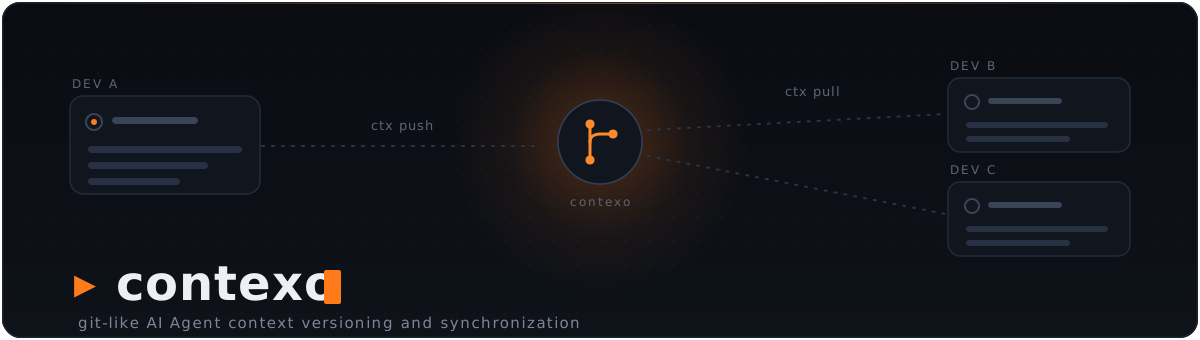
ctx push uploads the pages you changed to a Contexo server. ctx pull brings teammates' changes down. The server is a git repository under the hood — every pushed page lands as a real commit with author attribution, you get history and timeline for free, and neither command ever overwrites someone else's work: when both sides changed a page, it becomes a conflict you settle explicitly (see Safe sync).
Agents drive sync from natural language via MCP tools: when the user says "sync my Stripe knowledge to contexthub", the agent invokes ctx_push(feature="stripe") directly.
The flow
Dev A's Claude  →  writes wiki/concepts/stripe-subscription.md
                   (including "## Rationale" — what was considered & rejected)
                ↘
                  ctx push --feature stripe   →   Contexo server (git-backed)
                                                  Dev A authored sha abc123
                                                ↗
Dev B's Claude  ←  ctx pull                ←
                ↓
                  MCP: reads ctx://index, then ctx://wiki/stripe-subscription
                  Sees Dev A's decision and the options Dev A rejected.
                  Doesn't repeat the dead-ends.
CLI
Setup
ctx init [--no-vscode]         Create .contexo/, wire MCP (Claude; Cursor + VS Code if found), install Stop hook
ctx detach [--keep-knowledge]  Reverse `ctx init` (purges .contexo/ by default)
ctx login                      Browser flow: sign in once, mint a token, done
                               (alias for `ctx auth login`; --no-browser to paste)
ctx login [--server <url>] [--dashboard <url>] [--token <pat>] [--browser|--no-browser]
          [--repo <id>] [--name <name>] [--email <email>]
ctx join <invite-key>          Join an existing repo with a ctxi_… invite key
ctx remote set <url>           Point at a Contexo server
ctx remote set-repo [<id>]     Set the repo ID (interactive picker if omitted)
ctx remote get                 Show current server + repo
--server and --dashboard default to the hosted service (https://api.contexo.live
and https://app.contexo.live). --token skips the browser, --no-browser asks
you to paste a token, and --browser forces the browser flow without a terminal.
--name / --email set the commit author.
Which server gets your token. A token is only ever sent to the server it was
saved for. If .contexo/config.json names a different server than your
credentials, ctx talks to the credentials' server and warns in ctx status
(server_url_mismatch in status --json). Global credentials without a server
URL are never sent anywhere: commands fail with server_unresolved until you
run ctx auth login --server <url>. For a self-hosted server,
ctx auth login --server <url> needs --dashboard <its dashboard> (browser
flow) or --token <a token that server issued>; the browser login refuses when
the project config names a non-hosted server but the hosted dashboard would mint
the token.
Sync
ctx status [--json] [--offline]        Each page's local, base and server state (--offline: no request)
ctx pull [--json]                      Bring in teammates' changes; never overwrites a local edit
                                       (--full is still accepted and does nothing)
ctx push [<path>...] [--json] [-m <msg>] [--dry-run] [--no-distill]
         [--feature X] [--tag Y] [--type concept|entity|source|analysis]
         [--yes] [--show-diff] [--no-preview]
ctx show <path> --at base|server|<sha>  Print a page's raw bytes: its last-synced base,
                                        the server's version, or the version at a commit
ctx resolve <path> --ours|--theirs [--if-server-sha <sha>] [--json]
ctx repair [--dry-run] [--json]        Backfill missing base snapshots, fix wrongly recorded shas
ctx log                                Server timeline (who changed what when)
ctx push sends only the pages you changed or created since the last sync — or
only the <path>s you name. Before sending, it previews each page as [NEW] or
[EDIT] ([SAME] when nothing changed) with a per-section summary of what your
push will change on the server. If any [EDIT] rows appear it asks
Proceed? [y/N]; without a terminal it refuses instead:
$ ctx push -m "Note usage_record_summaries caching"
About to push 1 page(s) to chompchat:
  [EDIT]  wiki/concepts/stripe-subscription.md  (frontmatter, ~ Decision)
✖ push: refusing to alter existing pages in non-interactive mode; pass --yes to confirm
try  ctx push --yes
Pass --yes to skip the prompt (required for non-interactive use), --show-diff
to see the full per-section diff inline, or --no-preview to skip the preview
round-trip. --dry-run prints the same list and sends or writes nothing.
--json never prompts or previews (it implies --yes and --no-preview).
Inspect a page's evolution
ctx history <slug> [--type=...] [--limit=N]    Commit timeline for one page
ctx diff <slug> [--from=<sha>] [--to=<sha>]    Section-aware diff between two
                [--type=...] [--json] [--blame]versions (defaults to parent..head)
ctx diff <slug> --local                        Diff your local copy vs server HEAD
                                               (what `ctx push` would change)
ctx evolution <slug> [--limit=N] [--show-diff] Full trajectory in one call: every
                     [--type=...] [--json]     commit + its per-commit diff
                     [--blame]
--blame annotates each section with the commit that originally introduced
its heading (works on both ctx diff and ctx evolution) — useful for
"who wrote this section?" questions.
Agent integration
ctx mcp                        Start the MCP server for the local agent (stdio)
ctx mcp install [--tool=X]     Wire the MCP server into an agent: claude|cursor|vscode|codex|all
ctx mcp uninstall [--tool=X]   Remove the MCP server wiring
ctx mcp status                 Show agent integrations (MCP + capture hook)
ctx mcp guide                  How to add Contexo to other agents (Windsurf, OpenCode, Hermes, ...)
ctx hooks install|uninstall|status [--tool=claude|codex|cursor|all]   Manage the capture hook
ctx capture status             Show pending capture buffers
Supported agents (MCP)
| Agent | MCP config it reads | Wired by |
|---|---|---|
| Claude Code | ./.mcp.json (project) | ctx init |
| Cursor | ./.cursor/mcp.json (project) | ctx init when Cursor is detected, else ctx mcp install --tool=cursor |
| VS Code | ./.vscode/mcp.json (project, servers key) | ctx init when VS Code is detected (~/.vscode or code on PATH), else ctx mcp install --tool=vscode; ctx init --no-vscode opts out |
| Codex | ~/.codex/config.toml (global) | ctx mcp install --tool=codex (prompts before touching the global file) |
The ctx mcp server is plain MCP over stdio, so any MCP-capable agent can use it.
ctx init only auto-wires the project-local configs (Claude always; Cursor and
VS Code when detected) — Codex's global config is opt-in via ctx mcp install --tool=codex.
VS Code's entry runs ctx mcp --root ${workspaceFolder}; .vscode/ is usually
committed, so teammates need ctx on their PATH. VS Code also reads the
.mcp.json written for Claude Code: with VS Code's default
chat.mcp.collisionBehavior: "disable" the .vscode/mcp.json entry wins and you
see one contexo server; with "suffix" you see two, so drop one with
ctx mcp uninstall --tool=vscode.
For any other agent or harness (Windsurf, OpenCode, Hermes, OpenClaw, …), run
ctx mcp guide for the exact per-tool MCP config. Per-turn capture (the Stop
hook) now works for Claude Code, Codex, and Cursor (ctx hooks install --tool=…, and ctx init auto-installs them when the agent is detected).
Maintenance
ctx update [--check]           Self-update to the latest release (--check: report only)
ctx version [--short|--json]   Print the installed version (--json: contract version + capabilities)
Terminal output
ctx colours its output on a terminal and prints plain text everywhere else,
so piping and redirecting stay parseable. Machine surfaces — ctx mcp,
ctx capture turn, shell completion, --json, and ctx version --short —
never carry styling at all.
NO_COLOR=1        Disable colour entirely (honoured automatically)
CTX_THEME=light   Use the light-background palette (default: dark)
CTX_ASCII=1       Use ASCII marks instead of ✔ ▲ ✖ ● (for consoles lacking the glyphs)
Safe sync
ctx keeps a base snapshot of every page it syncs — the version you and the
server last agreed on — in .contexo/.sync/. That directory ignores itself
through its own .gitignore (containing *), so it never reaches your
project's git history. It also holds recorded conflicts, the sync lock and the
backups ctx resolve --theirs makes. ctx writes it; don't edit it by hand.
Comparing each working file with its base and the server's listing gives every
page one of nine states (ctx status, ctx status --json):
| State | Meaning |
|---|---|
unchanged | Same as its base, and the server has not moved. |
modified | You edited it; the server has not moved. ctx push sends it. |
new | Only on your machine (never synced, or gone from the server). ctx push creates it. |
incoming | A teammate changed it and you did not. ctx pull updates it. |
incoming_new | Only on the server. ctx pull creates it. |
conflict | Both sides changed it since the base (both_modified), or both created the same path (both_added). Settle it with ctx resolve. |
deleted_local | You deleted a synced page. Deletes do not sync: push skips it and pull does not bring it back. |
invalid | The file does not parse or validate, or its path does not match its frontmatter. Fix the file. |
unverified | No usable base snapshot, so ctx cannot tell who changed what. Run ctx repair. |
Pull never overwrites a local edit. It updates pages you have not touched, creates new server pages and adopts pages whose content already matches. Pages with local edits, conflicts, invalid or locally deleted pages are left alone and listed as skipped, each with the command that settles it; skips still exit 0:
$ ctx pull
Pulled 0 page(s), adopted 0; HEAD=f3420bd8
Skipped 1 page(s):
  wiki/concepts/stripe-subscription.md: conflicts with the server version; run ctx resolve wiki/concepts/stripe-subscription.md --theirs|--ours
- Push sends only what changed — modified and new pages, or only the paths
you name. New pages carry a create guard (
expect_absent): if a teammate created the same path first, you get a conflict instead of overwriting their page. A page a teammate changed in the meantime is never overwritten. - Conflicts persist until you resolve them. Compare with
ctx show <path> --at server(and--at base), then runctx resolve <path> --ours(keep your file, re-based onto the server version; push afterwards) or--theirs(take the server version; a differing local file is first saved under.contexo/.sync/backup/).--if-server-sha <sha>refuses withstaleunless the server is still at that sha. - Coming from an older ctx? Older builds kept no base snapshots. The first
online
ctx statusbackfills them; pages it cannot verify stayunverified(warningbase_repair_skipped) and are neither pushed nor pulled, so runctx repair(ctx repair --dry-runfirst shows what it would do). push,pull,resolveandrepairhold.contexo/.sync/lock. A second run waits (10 s, orCONTEXO_LOCK_TIMEOUT) and then fails withbusy.
Share concept pages through your agent (distill guard). While an
un-distilled agent capture session is pending (a non-empty capture buffer from
the last 6 hours) and the batch contains concept or analysis pages,
ctx push refuses with distill_required (exit 9 with --json, 1 otherwise)
and prints a prompt to paste into your agent. Share those pages through your
agent instead: its ctx_push first distills the session into a source page (a
decision record), then pushes. --no-distill and CONTEXO_DISTILL_DISABLE=1
exist for parity with the agent tool and are discouraged.
Machine output (--json)
status, push, pull, resolve, repair and version take --json and
follow contract v1 (ctx version --json reports "contract_version": 1).
Each run writes exactly one JSON document to stdout (ctx.status.v1,
ctx.push.v1, ctx.pull.v1, ctx.resolve.v1, ctx.repair.v1,
ctx.version.v1); ctx show writes the raw page bytes. status --json reports
server problems inside its document (remote.error) and still exits 0.
On failure stdout is empty (except push with conflicts, which still writes its
document and exits 6) and the last line of stderr is the error envelope:
{"schema":"ctx.error.v1","exit_code":N,"error":{"code","message","advice":[],"retryable","http_status"?,"details"?}}
advice lists shell commands that fix the problem ([], never null);
http_status appears only when an HTTP response caused the error; details
only for the codes listed below. The envelope is printed only with --json and
for ctx show (always machine mode). Without --json, failures keep the human
text and exit 1. A recorded run:
$ ctx resolve wiki/concepts/stripe-subscription.md --ours --if-server-sha 0000000000000000000000000000000000000000 --json
{"schema":"ctx.error.v1","exit_code":6,"error":{"code":"stale","message":"resolve wiki/concepts/stripe-subscription.md: the server is at e25e68145898fbdce342e81ad01d1e46476c939c, not 0000000000000000000000000000000000000000","advice":[],"retryable":false,"details":{"path":"wiki/concepts/stripe-subscription.md","expected_sha":"0000000000000000000000000000000000000000","server_sha":"e25e68145898fbdce342e81ad01d1e46476c939c"}}}
(stdout empty, exit 6.) The code is authoritative; the exit code follows from
it (an unknown code exits 1):
| Exit | code | retryable | Meaning |
|---|---|---|---|
| 0 | — | — | Success |
| 1 | internal | no | Unexpected failure (and every failure in human mode) |
| 3 | usage | no | Bad flags or arguments |
| 3 | invalid_path | no | The path is not a valid page path |
| 4 | not_authenticated | no | No credentials: ctx auth login |
| 4 | auth_rejected | no | The server rejected the token (401) |
| 4 | forbidden | no | Not allowed on this repo (403) |
| 5 | not_initialized | no | No .contexo/: ctx init |
| 5 | repo_not_configured | no | No repo id: ctx remote set-repo <id> |
| 5 | server_unresolved | no | No server URL for these credentials: ctx auth login --server <url> |
| 6 | conflict | no | A teammate's change is in the way |
| 6 | stale | no | --if-server-sha no longer matches the server |
| 7 | network | yes | The server could not be reached |
| 7 | server_error | yes | 5xx, or an answer that does not decode |
| 7 | rate_limited | yes | 429 |
| 8 | repo_not_found | no | The repo does not exist on the server |
| 8 | page_not_found | no | The page does not exist |
| 8 | base_unavailable | no | No base snapshot for --at base: ctx repair |
| 8 | sha_not_found | no | Unknown commit for --at <sha> |
| 9 | distill_required | no | The distill guard refused the push: share through your agent |
| 9 | not_resolvable | no | ctx resolve on a page whose state that strategy cannot settle (e.g. --ours on an incoming page) |
| 10 | server_unsupported | no | The server lacks a capability (rebuild it at v0.7.0) |
| 10 | not_implemented | no | Pre-release stub; update ctx |
| 11 | quota_exceeded | no | Plan limit reached (402) |
| 12 | busy | yes | Another ctx process holds .contexo/.sync/lock |
Exit 2 is never used on purpose: it means the Go runtime panicked.
details by code:
code | details fields |
|---|---|
distill_required | pages (the concept/analysis pages in the refused batch), sessions (the pending capture sessions), agent_prompt (text to paste into the agent chat) |
conflict | paths |
stale | path, expected_sha, server_sha |
not_resolvable | path, state, strategy |
server_unsupported | missing (the server capabilities it lacks) |
busy | pid, host, command, started_at (the lock holder) |
quota_exceeded | quota_code, limit, upgrade_url (optional) |
Capabilities. ctx version --json is the handshake: callers check
contract_version and the capability list, never the version string. A v0.7.0
build lists the 11 v1 capabilities, then the optional repair, in this order:
$ ctx version --json
{
  "schema": "ctx.version.v1",
  "contract_version": 1,
  "version": "0.7.0-rc.1",
  "commit": "73669d4",
  "date": "unknown",
  "dev_build": false,
  "os": "darwin",
  "arch": "arm64",
  "capabilities": [
    "status.json",
    "status.offline",
    "show.base",
    "show.server",
    "show.sha",
    "pull.json",
    "push.json",
    "push.paths",
    "push.distill_guard",
    "resolve",
    "errors.envelope",
    "repair"
  ]
}
status.json / status.offline (ctx status --json [--offline]), show.base /
show.server / show.sha (ctx show --at base|server|<sha>), pull.json,
push.json, push.paths (ctx push <path>...), push.distill_guard (the
distill guard and --no-distill), resolve, errors.envelope (the envelope and
exit codes above), and repair (optional, outside the v1 list).
Reference: docs.contexo.live/cli/json-output
and internal/syncops/CONTRACT.md.
MCP
Resources (read-only):
ctx://index— always-loaded knowledge indexctx://tags— tag → page mappingctx://wiki/{slug}— a concept/entity/analysis pagectx://raw/{session-id}— a raw session underraw/sessions/ctx://search?q=&type=&tag=— substring + tag/type filter
Tools (agent-invokable, 10):
ctx_write_page— write a knowledge page with frontmatter and a Rationale section (the options considered and why the rejected ones were rejected)ctx_push,ctx_pull,ctx_status— sync against the team server, on the same safe engine as the CLIctx_history,ctx_diff— see how a page evolved before editing it (structured, section-aware diff rather than line-based git diff)ctx_evolution— full trajectory of a page (every commit + diff) in one call, for when you want the whole story before making any editctx_capture_session— the local capture buffer plus a template, so the agent can write asourcepage (a decision record) mid-sessionctx_migrate— bulk-import an existing knowledge base (catalog, pick, import)ctx_generate— seed a knowledge base from the codebase (via Graphify)
When the agent reads ctx://wiki/<slug> and the page has changed on the server
since it was last synced, the response is prefixed with a <DRIFT_NOTICE>
block summarizing what's new — the agent learns about drift before it edits
without having to remember to check. Set CONTEXO_DRIFT_DISABLE=1 to turn
the check off. ctx status shows such pages as incoming (or conflict when
you edited them too); pass --offline to skip its server request (the old
--no-drift flag stays as a hidden alias).
ctx_push never overwrites a teammate's change. When a page changed both
locally and on the server, the tool returns a <MERGE_REQUIRED> directive
carrying the ancestor + your + server versions and the sections both sides
changed; the local sync state is not touched, so the page stays a conflict. The
agent writes the merged page with ctx_write_page, then calls ctx_push with
resolved=["<path>"], which keeps the merged content, re-bases it onto the
server version it was shown and pushes it. If the server moved again meanwhile,
the agent gets a fresh <MERGE_REQUIRED> and nothing is overwritten.
ctx_pull is safe too: it never overwrites a page you edited, and pages changed
on both sides come back as <MERGE_REQUIRED>.
Editor extension (VS Code, Cursor, Windsurf)
Preview. The Contexo editor extension (
contexo.contexo) requires ctx 0.7.0 or later (contract v1); available with the v0.7.0 release.
It adds a Source Control view and a knowledge tree for .contexo/, driven by
your installed ctx through the machine contract above (status --json,
pull --json, push --json, show, resolve). It checks ctx version --json
(contract version and capabilities, never the version number) and offers
Update ctx when your ctx is too old.
- VS Code Marketplace: https://marketplace.visualstudio.com/items?itemName=contexo.contexo
- Open VSX (Cursor, Windsurf and other VS Code-based editors): https://open-vsx.org/extension/contexo/contexo
- Overview: https://contexo.live/vscode/
- Guide: https://docs.contexo.live/guides/vscode/
Install
Prebuilt binaries for Linux and macOS (amd64 + arm64) and Windows (amd64). No Go toolchain required.
Easiest (one line, handles PATH for you):
# macOS / Linux
curl -fsSL https://raw.githubusercontent.com/sugihAF/Contexo/main/scripts/install.sh | sh

# Windows (PowerShell)
iwr -useb https://raw.githubusercontent.com/sugihAF/Contexo/main/scripts/install.ps1 | iex
These download a checksum-verified binary from the latest GitHub Release, drop it in a user-writable dir (~/.local/bin, or %LOCALAPPDATA%\Programs\contexo on Windows), and add that dir to your PATH if needed. Idempotent — safe to re-run.
Manual (download a binary yourself): grab the archive for your platform from the Releases page, verify it against checksums.txt, extract ctx, and put it on your PATH.
With Go (if you already have the toolchain):
go install github.com/sugihAF/contexo/cmd/ctx@latest
A
go installbuild reports its version asdevand can't self-update — reinstall with the script (orgo installagain) to upgrade.
Updating
ctx update           # download + install the latest release in place
ctx update --check   # just report whether a newer version exists
ctx version          # show the installed version
ctx update verifies the new binary's checksum before swapping it in. On interactive commands, ctx also prints a one-line note when a newer version is available — set CONTEXO_NO_UPDATE_CHECK=1 to silence it.
After updating, restart your agent sessions (Claude Code, Cursor, Codex,
VS Code, …): a running ctx mcp process keeps the old code until its agent
restarts it. Coming from a release before 0.7.0, also run one online
ctx status in each project, then ctx repair --dry-run (see
Safe sync).
Build from source (server + CLI):
# Linux / macOS
go build -o bin/ctx ./cmd/ctx
go build -o bin/contexo-server ./cmd/contexo-server

# Windows (PowerShell)
go build -o bin\ctx.exe .\cmd\ctx
go build -o bin\contexo-server.exe .\cmd\contexo-server
The ctx CLI runs anywhere. The contexo-server binary is what the team's Contexo instance runs — typically via the Docker setup in docker/.
Run the server (host install):
# Linux / macOS
CONTEXO_DATA_ROOT=/var/contexo/repos PORT=8080 ./bin/contexo-server

# Windows (PowerShell)
$env:CONTEXO_DATA_ROOT="C:\contexo\repos"; $env:PORT="8080"; .\bin\contexo-server.exe
The server shells out to git, so git must be on PATH. The Docker image (docker/Dockerfile) bundles it.
Self-hosting? Rebuild contexo-server at v0.7.0 (the hosted service is
already updated). The v0.7.0 server adds per-page shas on no-op writes
(write.path_sha), reads at a past commit (pages.at), the create guard
(push.expect_absent), the X-Contexo-Capabilities and
X-Contexo-Server-Version headers, and push attribution through
X-Contexo-Client. ctx 0.7.0 still works against an older server with less
safety: ctx status warns server_outdated, and ctx show --at <sha> fails
with server_unsupported.
Uninstall
Per project — remove Contexo from a specific project:
ctx detach                   # prompts before purging .contexo/, MCP entries (Claude/Cursor/VS Code/Codex), .gitignore line, Stop hook
ctx detach --keep-knowledge  # remove the integration but preserve .contexo/
ctx detach -y                # skip the confirmation
ctx detach warns if local pages haven't been pushed yet so you can ctx push first.
The CLI itself — delete the binary the installer placed:
# macOS / Linux
rm ~/.local/bin/ctx

# Windows (PowerShell)
Remove-Item "$env:LOCALAPPDATA\Programs\contexo\ctx.exe"

# installed with `go install` instead? remove it from there:
rm "$(go env GOPATH)/bin/ctx"      # ctx.exe on Windows
Documentation
Full documentation — every CLI command and MCP tool, with worked examples — lives at docs.contexo.live.
docs/usage.md— admin setup + developer onboarding + daily flowdocs/vision.md— what Contexo is and the page formatinternal/syncops/CONTRACT.md— the--jsonmachine contract (v1)
Regenerating the docs command surface
The docs site renders its flag tables and MCP schemas from a JSON snapshot of the real cobra tree, so the reference can't drift from the code. Regenerate it whenever a command, flag or MCP tool changes — it's part of cutting a release:
go run -ldflags "-X github.com/sugihAF/contexo/internal/version.Version=$(git describe --tags --abbrev=0 | sed 's/^v//')" \
  ./cmd/ctxdocs > ../contexo-landing/apps/docs/src/data/contexo-cli.json
The -ldflags stamp matters: without it the snapshot records "version": "dev" and the docs site's "generated against ctx " headline
regresses. After regenerating, re-capture the terminal transcripts too —
npm run capture --workspace apps/docs from the contexo-landing checkout —
otherwise the site keeps showing the previous release's output.
cmd/ctxdocs is build-time tooling only: .goreleaser.yaml builds ./cmd/ctx
alone, so it never ships in a release binary.
Comments
New to MCP?
From what the protocol is to installing your first server, these answers cover most first questions.
An open protocol that defines how AI applications connect to external tools and data in a uniform way. Clients talk to the model; MCP servers provide tools, resources and prompt templates. They exchange standard messages, so one server can be reused by many clients.