
About Godprofile
GodProfile is an MCP server for developers that generates SVG visuals and layouts for GitHub profiles and READMEs. It combines rendering and live data-fetch tools with themes and GitHub Actions automation.
Key features
- 01Generate animated SVG widgets
- 02Create bento-grid layouts
- 03Render GitHub trophies and charts
- 04Fetch GitHub, WakaTime, and Spotify data
- 05Generate GitHub Actions workflows
- 06Offer four visual themes
Use cases
- 01Add animated banners to a GitHub README
- 02Show coding activity and currently playing music
- 03Automate updates to profile stat widgets
MCP support
GodProfile exposes SVG rendering, live data-fetching, and GitHub automation tools through MCP, and provides four themes as MCP resources.
Configuration
Local server config is the same for every client. Copy it into your client’s MCP config file.
Tools
Local servers expose tools only once running on your machine, and the maintainer has not provided a tool list.
Details
From the project README
GodProfile MCP Toolkit
The MCP server that turns your GitHub profile README into a god-tier art exhibit. Every visual in this README was generated by GodProfile itself.


Not sure it's worth it? See 7 animated SVGs running live — no install, no signup.

Give Claude Desktop this server and say: "Make my GitHub profile god-tier." It ships 16 tools that generate glassmorphic SVGs, animated banners, live data widgets, bento-grid layouts, and full GitHub Actions CI — all from a single MCP config line.
Quick Install · Tools · Themes · MCP Config · Contributing

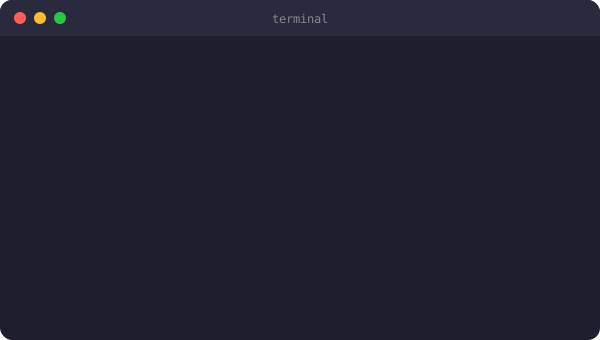
Terminal SVG — render_terminal_emulator_svg
Animated typewriter terminal with macOS window chrome. Every line types itself in.
Icon Marquee — generate_animated_icon_marquee
Infinitely scrolling CSS-animated band of tech badges. Seamless loop, zero JavaScript.

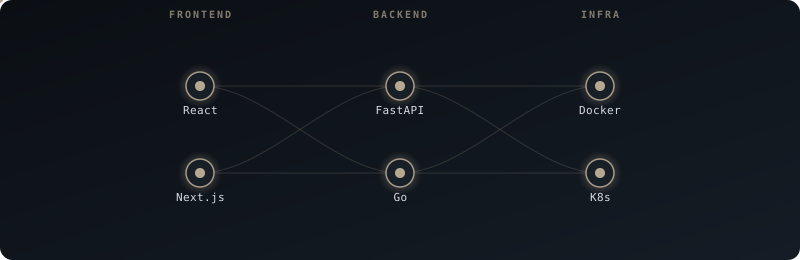
Neural Network Map — generate_neural_network_map
Your tech stack as a Bezier-connected animated neural graph. Nodes pulse, edges flow.
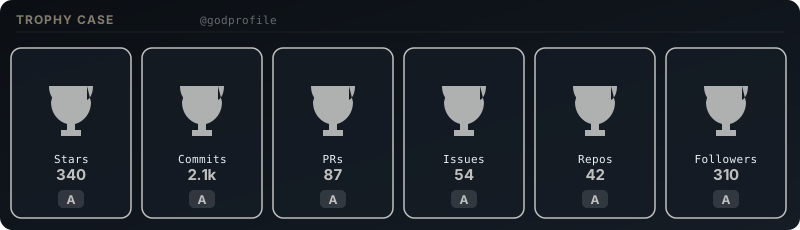
GitHub Trophies — render_github_trophies
Custom SVG trophy case with S/A/B/C rank tiers. S-rank trophies animate with a golden glow.
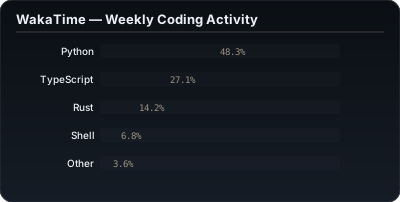
WakaTime Activity — render_wakatime_activity_chart
Animated horizontal bar chart of your weekly coding language breakdown.
Spotify Now Playing — render_spotify_now_playing
Branded "Now Playing" card with animated equalizer bars. Syncs via GitHub Actions cron.

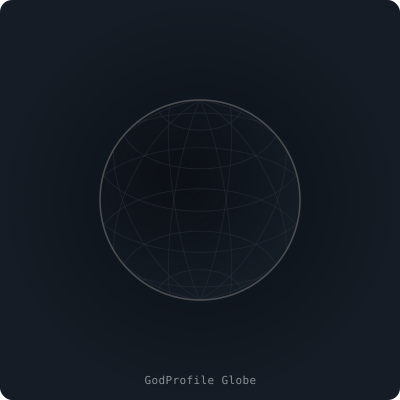
Isometric 3D Globe — render_3d_contribution_globe
Real spherical-to-isometric projection math. 12 longitude + 8 latitude lines. Slow animated rotation.
Quick Install
# Option 1 — uvx (zero install, runs directly)
uvx godprofile-mcp

# Option 2 — pip
pip install godprofile-mcp

# Option 3 — dev mode
git clone https://github.com/Luc0-0/GodProfile
cd GodProfile
pip install -e ".[dev]"
python examples/quickstart.py   # generates all SVGs to examples/output/
If this saved you time, a ⭐ helps others find it — and it takes 2 seconds.
Try it in 30 seconds
No Claude Desktop needed. Run this and open the output folder:
git clone https://github.com/Luc0-0/GodProfile
cd GodProfile
pip install -e ".[dev]"
python examples/quickstart.py
This generates 9 live SVGs into examples/output/ — open any file in your browser to see animated output instantly. No API keys, no config, no signup.
Or generate a single widget inline:
from godprofile_mcp.core import terminal_emulator
svg = terminal_emulator.create_typing_svg(["$ whoami", "you"], "luxury-glass")
open("demo.svg", "w").write(svg)
# open demo.svg in any browser
Live preview (no install) → luc0-0.github.io/GodProfile
MCP Config
Add to your claude_desktop_config.json:
{
  "mcpServers": {
    "godprofile": {
      "command": "uvx",
      "args": ["godprofile-mcp"]
    }
  }
}
macOS: ~/Library/Application Support/Claude/claude_desktop_config.json
Windows: %APPDATA%\Claude\claude_desktop_config.json
Restart Claude Desktop, then try:
"Use GodProfile to rebuild my README with the luxury-glass theme, a terminal SVG showing my stack, WakaTime coding stats, and an animated icon marquee."
16 Tools
Render Tools — pass your own data, get SVG back
| Tool | What it generates |
|---|---|
refactor_readme_to_bento | Asymmetric bento-grid HTML layout from your Markdown |
render_svg_widget | Glassmorphic SVG stat cards with 12px borders + theme tokens |
generate_neural_network_map | Animated Bezier-connected tech stack visualization |
setup_github_automation | GitHub Actions workflows for automated stat sync |
render_spotify_now_playing | "Now Playing" card with animated equalizer bars (placeholder) |
render_wakatime_activity_chart | Horizontal bar chart from provided language percentages |
setup_contribution_snake | Snake game eating your contribution grid (custom themed) |
render_3d_contribution_globe | Isometric 3D globe using real lat/lon projection math |
fetch_latest_blog_posts | RSS/Atom feed → styled SVG card of latest posts |
render_terminal_emulator_svg | Animated typewriter terminal with macOS window chrome |
generate_animated_icon_marquee | Infinite CSS-scrolling band of tech name badges |
capture_animated_banner_gif | Pure SVG animated banner with gradient + sequential fade-in |
render_github_trophies | Trophy case from provided stats dict, S/A/B/C tier rankings |
Live-Fetch Tools — hit real APIs, get live SVG back
| Tool | What it fetches |
|---|---|
fetch_github_trophies_live | Pulls real stars/commits/PRs/repos/followers from GitHub API, renders trophy case |
fetch_wakatime_chart_live | Calls WakaTime API with your key → renders last 7 days language chart |
fetch_spotify_now_playing_live | Calls Spotify API with OAuth token → renders current track card |
4 Themes
| Theme | Vibe | Background | Accent |
|---|---|---|---|
luxury-glass | Dark glassmorphic, gold accents | #0b0f14 | #b6a891 |
terminal-hacker | Green-on-black matrix terminal | #000000 | #00ff41 |
minimalist | Clean GitHub-native light mode | #ffffff | #111827 |
cyberpunk | Neon magenta/cyan high contrast | #0d0221 | #ff003c |
Architecture
godprofile_mcp/
├── server.py        ← 13 FastMCP @mcp.tool() endpoints
├── resources.py     ← 4 themes as theme://{name} MCP resources
├── prompts.py       ← Aesthetic design guide injected at generation time
└── core/
    ├── bento_layout.py          ← Asymmetric HTML table grid
    ├── svg_rendering.py         ← Glassmorphic SVG card engine
    ├── neural_bezier_engine.py  ← Bezier-connected tech stack map
    ├── github_ci_automation.py  ← GitHub Actions YAML generator
    ├── snake_game_injector.py   ← Contribution snake setup
    ├── blog_fetcher.py          ← RSS/Atom feed → SVG post card
    ├── terminal_emulator.py     ← Animated typewriter terminal SVG
    ├── icon_marquee.py          ← CSS infinite-scroll marquee SVG
    ├── animated_banner.py       ← Gradient animated banner SVG
    ├── github_trophies.py       ← Trophy case SVG with tier logic
    ├── spotify_now_playing.py   ← Spotify UI card + cron workflow
    ├── wakatime_metrics.py      ← Coding stats horizontal bar chart
    └── isometric_3d_globe.py   ← 3D isometric globe SVG
Design principles:
- Zero external deps beyond
mcp+pydantic— all SVG generation uses stdlib - Self-contained inline SVGs (no CDN, no external requests at render time)
- Deterministic output — same inputs always produce the same SVG
Why not a profile generator website?
| GodProfile | Static generators | Manual editing | |
|---|---|---|---|
| Conversational AI-driven | ✅ | ❌ | ❌ |
| Fully animated SVGs | ✅ | partial | ❌ |
| Live data (Spotify, WakaTime) | ✅ | some | ❌ |
| GitHub Actions automation | ✅ | ❌ | manual |
| Zero vendor lock-in | ✅ | ❌ | ✅ |
| Works offline / no API keys required | ✅ | ❌ | ✅ |
| Customizable themes | ✅ | limited | ✅ |
Contributing
See CONTRIBUTING.md. The short version:
- Pick an open issue or check the roadmap below
- Add your module to
src/godprofile_mcp/core/ - Wire it into
server.pywith@mcp.tool() - Keep deps to zero (stdlib only)
- Open a PR — all skill levels welcome
Roadmap
-
render_github_streak— SVG contribution streak card -
generate_skills_radar— Radar/spider chart for skills -
theme_editor— Interactive theme token customizer -
export_to_html— Full standalone HTML profile export - PyPI publish + versioned releases
Star the repo to follow progress.

Comments
New to MCP?
From what the protocol is to installing your first server, these answers cover most first questions.
An open protocol that defines how AI applications connect to external tools and data in a uniform way. Clients talk to the model; MCP servers provide tools, resources and prompt templates. They exchange standard messages, so one server can be reused by many clients.