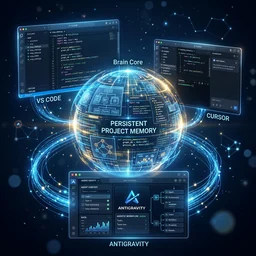
About IDE Memory MCP
IDE Memory MCP gives coding agents persistent project memory across IDEs. It is for developers who need context to carry between conversations and environments, using local Markdown sections with compact reads, version history, and workflow prompts.
Key features
- 01Keep project memory across IDEs
- 02Read summaries or selected sections
- 03Search and truncate stored memory
- 04Append entries and retain history
- 05Flag stale or oversized sections
- 06Store data in local Markdown files
Use cases
- 01Carry project context between IDEs
- 02Restore architecture and progress at session start
- 03Record technical decisions and work updates
- 04Review and prune stale or oversized memory
MCP support
The MCP server provides coding agents with project initialization, memory read/write, and project management tools, plus prompts for starting sessions, bootstrapping memory, and updating it.
Configuration
Local server config is the same for every client. Copy it into your client’s MCP config file.
We haven’t collected a package or remote endpoint for this server. Follow the instructions in the project README.
Tools
Local servers expose tools only once running on your machine, and the maintainer has not provided a tool list.
Details
From the project READMEIDE Memory MCP

Cross-IDE persistent memory for AI coding agents — your AI remembers every project, across every IDE.


The Problem
Every time you open a project in a new IDE or start a fresh AI conversation, your AI assistant forgets everything:
- What the project does
- Architecture decisions you've made
- What you're currently working on
- Your progress and milestones
You end up repeating yourself. Every. Single. Time.
The Solution
IDE Memory MCP gives AI coding agents a persistent memory layer that works across any IDE supporting the Model Context Protocol. Write project context once — the AI remembers it everywhere.
Cursor ←──→ IDE Memory MCP ←──→ VS Code
   ↑              ↓                 ↑
   └── same project memory ────────┘
Key Features
- Cross-IDE Memory — Project context persists across Cursor, VS Code, Windsurf, Claude Desktop, and any MCP-compatible IDE
- Context-Optimized — Default reads return a compact summary table, not a context-window-destroying content dump. The AI loads only what it needs.
- Smart Warnings — Automatically detects stale sections (>7 days), oversized content (>10k chars), and suggests pruning when memory gets old (>30 days)
- Agent Prompts — Built-in MCP prompts guide the AI on how to start sessions, bootstrap memory for new projects, and update memory after changes
- Smart Project Matching — Recognizes projects by path or git remote URL. Move folders, switch machines — your memory follows.
- Section-Based Storage — Organized into
overview,decisions,active_context,progress+ custom sections - Append Mode — Add incremental updates without rewriting entire sections
- Version History — Previous content auto-saved before each overwrite (last 5 snapshots)
- Zero Config — Works out of the box. No database, no cloud, just local markdown files.
Quick Start
1. Install
# Using uv (recommended)
uv pip install ide-memory-mcp

# Using pip
pip install ide-memory-mcp
2. Auto-Configure Your IDE
Run the setup command to automatically detect and configure installed IDEs (Cursor, VS Code, Windsurf, Claude Desktop):
ide-memory-mcp setup
💡 Restart your IDE after running this command to activate the MCP server.
CLI Commands
The ide-memory-mcp package includes practical commands to manage your setup:
ide-memory-mcp setup
Auto-configure MCP for your IDEs.
ide-memory-mcp setup              # auto-detect + configure all
ide-memory-mcp setup --cursor     # configure only Cursor
ide-memory-mcp setup --vscode     # configure only VS Code
ide-memory-mcp setup --windsurf   # configure only Windsurf
ide-memory-mcp setup --claude     # configure only Claude Desktop
ide-memory-mcp setup --all        # configure all supported
ide-memory-mcp doctor
Health check your installation.
ide-memory-mcp doctor
Verifies server import, storage disk usage, projects count, and which IDEs are configured.
ide-memory-mcp status
Quick overview of all projects.
ide-memory-mcp status
Lists registered projects with section counts, total size, and last updated date.
💡 Manual IDE Configuration (If setup fails or for advanced users)
Add the MCP server to your IDE's configuration file:
Cursor — ~/.cursor/mcp.json
{
  "mcpServers": {
    "ide-memory": {
      "command": "ide-memory-mcp"
    }
  }
}
VS Code — .vscode/mcp.json (or global settings)
{
  "mcpServers": {
    "ide-memory": {
      "command": "ide-memory-mcp"
    }
  }
}
Windsurf — ~/.codeium/windsurf/mcp_config.json
{
  "mcpServers": {
    "ide-memory": {
      "command": "ide-memory-mcp"
    }
  }
}
Claude Desktop
- macOS:
~/Library/Application Support/Claude/claude_desktop_config.json - Windows:
%APPDATA%\Claude\claude_desktop_config.json
{
  "mcpServers": {
    "ide-memory": {
      "command": "ide-memory-mcp"
    }
  }
}
Tools
IDE Memory MCP exposes 4 optimized tools to the AI agent:
init_project
Register or reconnect to a project. Call this first in every conversation.
init_project(projectPath, projectName?, gitRemoteUrl?)
- New project → creates memory storage, suggests next steps, mentions
bootstrap_memoryprompt - Known project → reconnects, returns memory summary with smart warnings:
- ⚠️ Empty sections that need filling
- ⏰ Stale sections (>7 days) that should be updated
- 📦 Large sections (>10k chars) that may need pruning
- 🧹 Old sections (>30 days) suggesting a full prune
read_memory
Context-aware memory loading. Optimized to avoid flooding the AI's context window.
read_memory(projectIdOrPath, sections?, query?, maxChars?, history?, prune?)
| Mode | Trigger | What it does |
|---|---|---|
| Summary (default) | No sections | Returns a compact table: section names, sizes, staleness, warnings. No content. |
| Selective | sections=["overview"] | Loads only the listed sections |
| Truncated | maxChars=500 | Caps each section at N characters |
| Search | query="auth" | Keyword search across all sections |
| History | history=True | Shows previous versions of a section |
| Prune | prune=True | Loads all with actionable cleanup instructions |
💡 Recommended workflow:
read_memory(projectId)→ get the summary table (~10 lines)- Decide which sections are relevant
read_memory(projectId, sections=["overview", "decisions"])→ load only what you need
write_memory
Write to one or more memory sections.
write_memory(projectIdOrPath, sections, append?, heading?)
- Overwrite mode (default): Replace entire section content. Previous content auto-saved to history.
- Append mode (
append=True): Add timestamped entries without rewriting. Great for decisions and progress logs.
Tool description includes behavioral guidance — it tells the AI agent when to call it:
- After significant code changes
- When important decisions are made
- At the end of productive sessions
- When the user asks to "remember" something
manage_projects
List or delete projects.
manage_projects(action, projectIdOrPath?, confirm?)
MCP Prompts
IDE Memory MCP includes 3 built-in prompt templates that guide the AI agent through common workflows. These solve the "agent doesn't know when to use memory" problem.
start_session
When: Beginning of every conversation.
Guides the agent through: initialize project → read summary → load relevant sections → check for stale content → plan memory updates for end of session.
bootstrap_memory
When: First time using IDE Memory on an existing project, or when the user says "learn about this project".
Guides the agent through: analyze README & package files → write comprehensive overview → document architecture decisions → set active context → record progress.
update_memory
When: End of a productive session, after significant changes, or when the user says "save what we did".
Guides the agent through: read current memory → update active_context → append new decisions → update progress → update overview if needed → check if pruning is needed.
Memory Sections
Default sections created for every project:
| Section | Purpose |
|---|---|
overview | What the project is, tech stack, architecture |
decisions | Key technical decisions and rationale |
active_context | What you're currently working on |
progress | Milestones, completed items, what's next |
Custom sections are fully supported — use any lowercase identifier:
write_memory(projectId, {"api_contracts": "...", "testing_notes": "..."})
Smart Warnings
The memory summary automatically includes actionable warnings:
| Warning | Trigger | Action |
|---|---|---|
| ⚠️ Empty | Section has <50 chars | Fill with write_memory |
| ⏰ Stale | Section not updated in >7 days | Review and update |
| 📦 Large | Section exceeds 10k chars | Consider pruning |
| 🧹 Prune | Any section >30 days old | Run read_memory(prune=True) |
Storage
All memory is stored as simple markdown files in ~/.ide-memory/projects/:
~/.ide-memory/
├── config.json              # Optional configuration
└── projects/
    └── <project_id>/
        ├── meta.json         # Project metadata + timestamps
        ├── overview.md
        ├── decisions.md
        ├── active_context.md
        ├── progress.md
        └── .history/         # Auto-saved snapshots
            ├── overview_20260314_120000.md
            └── decisions_20260314_130000.md
- No database required
- All files are human-readable markdown
- Easy to backup, version, or migrate
- No data ever leaves your machine
Configuration
Optional. Create ~/.ide-memory/config.json:
{
  "default_sections": [
    "overview",
    "decisions",
    "active_context",
    "progress"
  ]
}
Development
Prerequisites
- Python 3.11+
- uv (recommended) or pip
Setup
git clone https://github.com/prasanna-pmpeople/IDE-Memory-MCP.git
cd IDE-Memory-MCP
uv sync
Run the server
uv run ide-memory-mcp
Run tests
uv run pytest tests/ -v
Test with MCP Inspector
npx -y @modelcontextprotocol/inspector uv run ide-memory-mcp
See TESTING.md for the complete testing guide, including MCP Inspector walkthrough and cross-IDE battle testing.
Build the package
uv build
Install from built package
pip install dist/ide_memory_mcp-1.0.0-py3-none-any.whl
How It Works

Comments
New to MCP?
From what the protocol is to installing your first server, these answers cover most first questions.
An open protocol that defines how AI applications connect to external tools and data in a uniform way. Clients talk to the model; MCP servers provide tools, resources and prompt templates. They exchange standard messages, so one server can be reused by many clients.