
About Termcard
Termcard creates interactive terminal business cards from a validated JSON file, for people who want to share contact details and profiles through a command. It includes an MCP server for creating cards by chat and looking up, saving, or drafting messages about other cards without publishing or sending anything automatically.
Key features
- 01Generate interactive terminal business cards
- 02Configure layouts, themes, wording, and menu items
- 03Display cards in 14 languages
- 04Validate and sanitize card data and links
- 05Create cards and look them up through MCP
Use cases
- 01Publish a terminal card visitors can run with npx
- 02Preview or validate a card configuration
- 03Look up someone’s card in an AI assistant
- 04Save a contact or draft an email from a card
MCP support
Termcard includes an MCP server for AI assistants. It supports creating a card through chat, looking up cards, saving contacts, and drafting emails; it does not publish cards or send messages on the user’s behalf.
Configuration
Remote servers need no local install. Pick your client, then copy the config or install in one click.
https://mcp.termcard.dev/mcpclaude mcp add --transport http aepasahan-termcard https://mcp.termcard.dev/mcp{"mcpServers":{"aepasahan-termcard":{"type":"http","url":"https://mcp.termcard.dev/mcp"}}}Open in Cursor{"servers":{"aepasahan-termcard":{"type":"http","url":"https://mcp.termcard.dev/mcp"}}}Open in VS Code{"mcpServers":{"aepasahan-termcard":{"type":"http","url":"https://mcp.termcard.dev/mcp"}}}{"mcpServers":{"aepasahan-termcard":{"serverUrl":"https://mcp.termcard.dev/mcp"}}}Run commands in a terminal; paste JSON into the client’s MCP config and restart. Servers that need sign-in will prompt on first connect.
Tools
Details
From the project README





What is it?
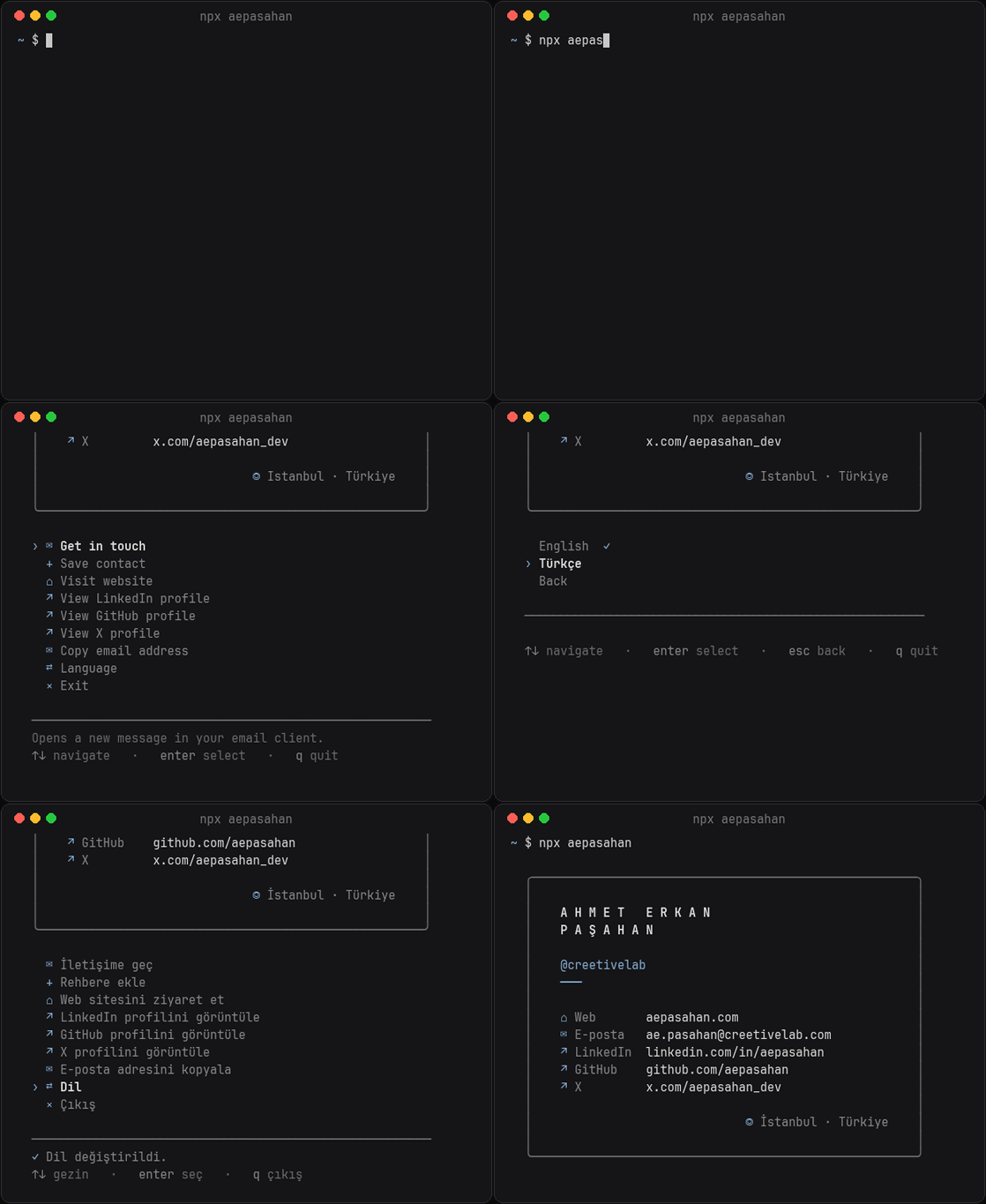
termcard is the engine behind interactive terminal business cards. You describe yourself in a small JSON file; termcard draws the card, runs the menu, speaks your visitor's language and keeps everything safe. Anyone can then meet you with:
npx yourname
You don't need to install this package yourself. To create a card, run the wizard — it sets everything up and publishes the card for you:
npm create termcard@latest
What your visitors can do
- Get in touch — opens a new email to you in their mail app
- Save contact — adds your vCard to their address book
- Visit your website and profiles — LinkedIn, GitHub, X, Behance, Dribbble and more
- Copy your email or phone number to the clipboard
- Switch language — 14 languages, from English, Chinese and Hindi to Arabic and Urdu (right to left), detected automatically
Flags such as --lang tr, --card (no menu) and --vcard work on every card.
Features
- One validated JSON file instead of code to fork and edit.
- Eight seasonal themes (thaw, bloom, blossom, solstice, ember, harvest, frost, midwinter) that read well on dark and light terminals.
- Three layouts, optional icons (symbols, emoji or Nerd Font), a short description, and full control over which details and menu items appear — or a menu-only card.
- Your own wording and languages — every text can be changed and new languages added.
- Zero dependencies, no tracking. Values are validated and sanitized, links are restricted to web, email and phone, and no command ever runs through a shell.
Ask your AI assistant
termcard includes an MCP server, so in Claude and other AI assistants you can create your card by chatting and look up anyone's card by name, save them as a contact or draft an email. Nothing is ever published or sent on your behalf.
claude mcp add termcard -- npx -y termcard mcp
Claude Desktop extension and setup for Cursor, VS Code and other clients: termcard for AI assistants.
For card owners
npx termcard preview     # see your card exactly as visitors will
npx termcard validate    # check card.config.json and explain any mistakes
npx termcard build       # optional: web page, vCards and curl files for your own website
npx termcard mcp         # MCP server for AI assistants
Using termcard in your own package takes two lines:
#!/usr/bin/env node
import { start } from 'termcard';

await start(new URL('../card.config.json', import.meta.url));
Every option is described in the configuration guide.
Requirements
Node.js 18.18 or newer, on macOS, Linux or Windows.
Designed and built by Ahmet Erkan Paşahan ·
LinkedIn · GitHub ·
try it: npx aepasahan
MIT License
Comments
New to MCP?
From what the protocol is to installing your first server, these answers cover most first questions.
An open protocol that defines how AI applications connect to external tools and data in a uniform way. Clients talk to the model; MCP servers provide tools, resources and prompt templates. They exchange standard messages, so one server can be reused by many clients.