
About membase
membase provides shared long-term memory for people and their AI agents, accessible through Python and TypeScript clients, a CLI, and MCP. It stores facts, documents, web pages, and chat exports, organized into containers for search, questions, or deletion.
Key features
- 01Store facts, documents, web pages, and chat exports
- 02Separate project memories with containers
- 03Search memories and ask questions about them
- 04Use through Python and TypeScript SDKs
- 05CLI and local storage options
Use cases
- 01Reuse personal memories across AI tools
- 02Find previously recorded project decisions
- 03Import Claude or ChatGPT chat exports
- 04Let coding agents retrieve and add working memories
MCP support
membase provides an MCP server that clients can connect to through the hosted API or local storage. MCP tools expose memory operations, with access determined by the connection method and credentials.
Configuration
Remote servers need no local install. Pick your client, then copy the config or install in one click.
https://api.app.membase.com/mcp-httpclaude mcp add --transport http ai-membase-membase https://api.app.membase.com/mcp-http{"mcpServers":{"ai-membase-membase":{"type":"http","url":"https://api.app.membase.com/mcp-http"}}}Open in Cursor{"servers":{"ai-membase-membase":{"type":"http","url":"https://api.app.membase.com/mcp-http"}}}Open in VS Code{"mcpServers":{"ai-membase-membase":{"type":"http","url":"https://api.app.membase.com/mcp-http"}}}{"mcpServers":{"ai-membase-membase":{"serverUrl":"https://api.app.membase.com/mcp-http"}}}Run commands in a terminal; paste JSON into the client’s MCP config and restart. Servers that need sign-in will prompt on first connect.
Tools
Details
From the project README

Membase
One memory. Every AI. Only yours.
Teach it once. Every AI remembers.



Website · Docs · Web app · Discord · X
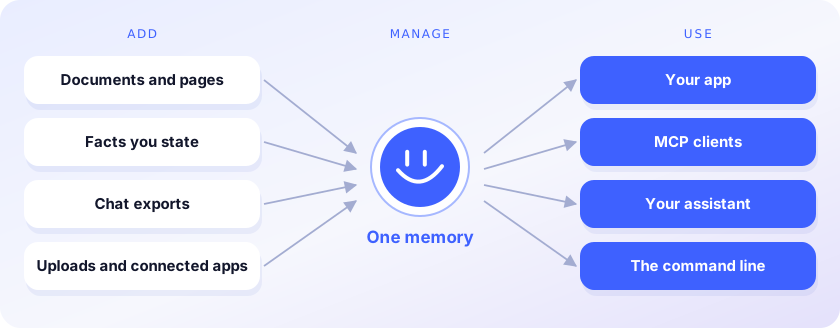
Membase is the memory layer for AI agents. It keeps one memory for everything you and your agents know, and every AI you use reads it. You stop re-explaining yourself each time you switch models or tools.
- Add. Facts, documents, web pages and chat exports from Claude or ChatGPT go into one memory.
- Manage. Containers keep projects apart; search it, ask it questions, forget what should go.
- Use. Your code, Claude Code, Cursor, Codex and ChatGPT read the same memory through the SDK or MCP.
This repository is the developer side: Python and TypeScript clients, the membase command line
and an MCP server. The memory lives in your Membase account, which the
web app and browser extension also fill, or on your machine with
unibaseio-membase[local].
Write once, read from any AI
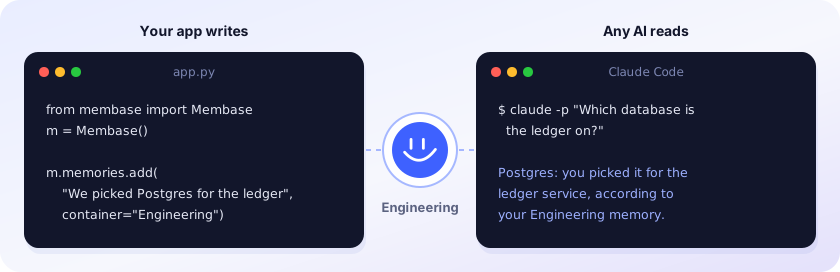
Recordings: Python SDK (57 s) · Claude Code (1 min 33 s). The answer above is illustrative.
Accuracy

93.1% on LoCoMo, 92.6% on LongMemEval_S and 92.2% on DMR, using about 3× fewer tokens than the full history on LoCoMo and 11× fewer on LongMemEval_S. Method and results: membase.com/research
Quickstart
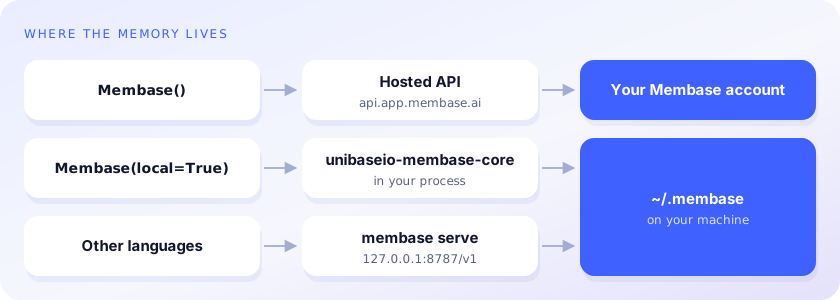
pip install unibaseio-membase              # hosted · Python 3.10+ · needs MEMBASE_API_KEY
pip install 'unibaseio-membase[local]'     # local  · Python 3.12 or 3.13 · needs OPENAI_API_KEY
npm install @unibaseio/membase              # TypeScript · Node 18+
npm install -g @unibaseio/membase-cli       # the `membase` command (hosted) without Python
from membase import Membase

m = Membase()                    # hosted
# m = Membase(local=True)        # local, in ~/.membase

m.memories.add("We picked Postgres for the ledger service.", container="Engineering")
m.search("what database is the ledger on?")
m.add("Design notes …", container="Engineering", custom_id="design-1")   # a document
m.ask("Which database did we choose for the ledger?")
Every method, its REST route and MCP tool, and the access it needs: SDK reference.
The Python package is unibaseio-membase (import membase); membase on PyPI is unrelated.
Command line
membase --local add "We picked Postgres for the ledger" --container Engineering
membase --local search "what did we pick for the ledger?"
membase --local ask "Which database is the ledger on?"
membase --local import ~/Downloads/claude-export.json     # Claude, ChatGPT, markdown or JSON chats
membase --local agent ingest trace.json --agent coder
membase --local agent search "fix flaky deploy" --agent coder
Without --local (or --store DIR, both before the command) commands use the hosted API; agent,
import and serve need unibaseio-membase[local].
MCP
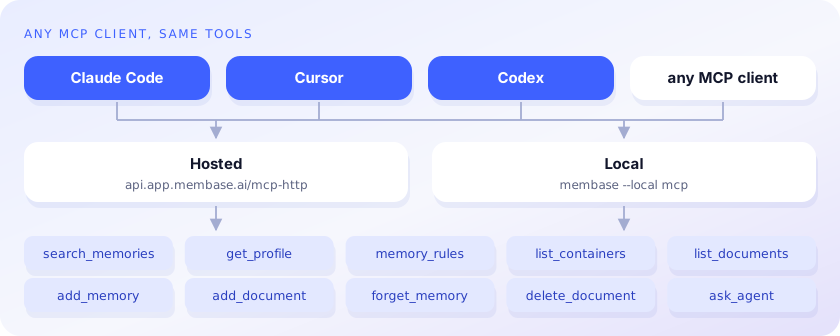
claude mcp add membase -- membase --local mcp                                   # local
claude mcp add --transport http membase https://api.app.membase.com/mcp-http \
  --header "Authorization: Bearer $MEMBASE_API_KEY"                             # hosted
Hosted without the header, the connection signs you in and is read-only. Setup for Claude, ChatGPT, Cursor, Codex and other clients: Connect your AI.
Docs
- SDK reference: methods, REST routes, MCP tools, access levels
- Memory operations: containers, documents, memories, profile, ask
- Authentication: keys and what each one can reach
- Connect your AI: per-client MCP setup
- Local engine: what it stores,
membase serve, settings
License
Copyright © 2026 Unibase. All rights reserved. Proprietary; see
LICENSE. unibaseio-membase[local] also
installs unibaseio-membase-core, the compiled engine, under its own Unibase license.
Comments
New to MCP?
From what the protocol is to installing your first server, these answers cover most first questions.
An open protocol that defines how AI applications connect to external tools and data in a uniform way. Clients talk to the model; MCP servers provide tools, resources and prompt templates. They exchange standard messages, so one server can be reused by many clients.