
About Almega
Almega is an open-source MCP server that places fixed policy boundaries around AI agent actions, including payments and other sensitive operations. Operators define limits and approval rules, while agents use gated tools and every attempt is recorded.
Key features
- 01Per-agent action boundaries
- 02Payment caps and category allowlists
- 03Human approval for sensitive actions
- 04Block or allow actions by policy
- 05Append-only audit ledger
- 06Tools and resources for policy status
Use cases
- 01Limit an agent’s payment amount and categories
- 02Require approval before deployments or deletions
- 03Review pending actions before execution
- 04Inspect an agent’s policy and audit history
MCP support
Exposes policy, request, payment, approval, and audit tools to MCP clients, along with ledger, frame, and pending-action resources.
Configuration
Local server config is the same for every client. Copy it into your client’s MCP config file.
We haven’t collected a package or remote endpoint for this server. Follow the instructions in the project README.
Tools
Local servers expose tools only once running on your machine, and the maintainer has not provided a tool list.
Details
From the project README🛡️ Almega — the immutable delegation frame for AI agents
Delegate everything to your agents — within limits they can't cross.
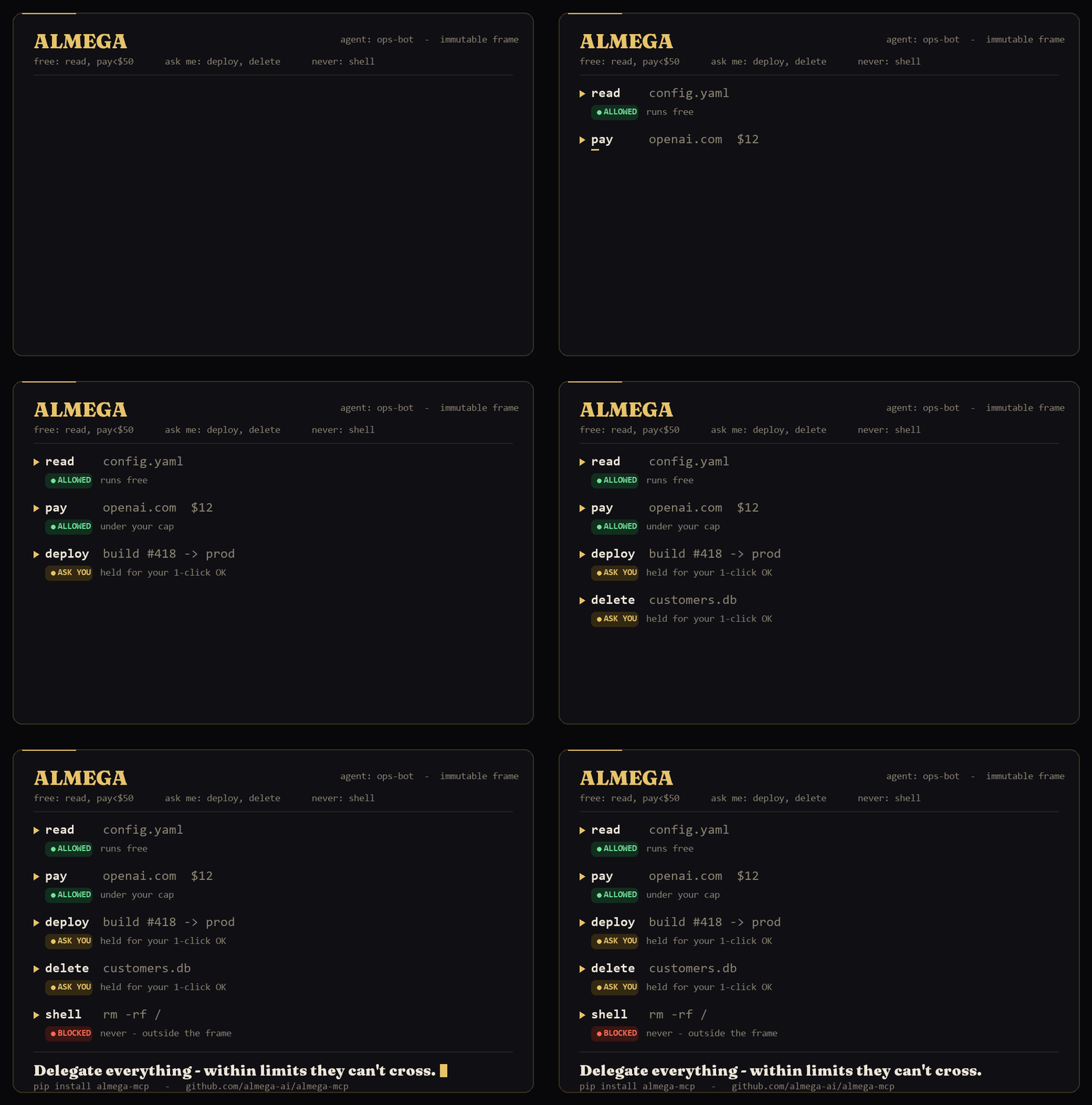
Set the boundaries once. Your agent runs free inside them. Anything sensitive — spending money, deleting a file, deploying to prod, sending an email — pauses for a one-click human OK. Everything is logged. An MCP server, open source.
The problem: you want to delegate, not babysit
The whole point of an agent is to hand it the work and walk away. But the moment it acts on its own, it can spend money, touch production, delete data, call tools — and you have no real control over what it actually does.
The tempting fix is to put the rules in the prompt: "don't spend over $50, don't touch prod." This does not hold. A model honors an instruction right up until it's task-motivated not to — or until a prompt injection from a webpage overrides it, or a loop bug ignores it entirely. An instruction is a wish.
The boundary has to live outside the agent — where a bug, an attack, or the agent itself can never talk its way past it. That's Almega.
How it works
A human sets the frame once (the agent has no tool to change it):
set_frame(
    "ops-bot",
    allow=["read", "search"],                              # runs free
    require_approval=["payment", "deploy", "file.delete"], # pauses for you
    block=["shell.exec"],                                  # never
    default="approval",                                    # unknown action → ask you (fail-safe)
    monthly_limit=200, allow_categories=["api", "saas"], approve_above=50,  # payment sub-frame
)
Then the agent asks before anything sensitive — and Almega decides, outside it:
request("ops-bot", "read",   "read config.yaml")            # → ALLOWED   (runs free)
request("ops-bot", "deploy", "deploy build #418 to prod")   # → AWAITING_YOU
request("ops-bot", "shell.exec", "rm -rf /")                # → BLOCKED
pay("ops-bot", "openai.com", 12, "api")                     # → ALLOWED   (under your cap)
pay("ops-bot", "vendor.io",  800, "retail")                # → BLOCKED   (off-frame)
Held actions wait for your one click:
approve("act_0002")            # deploy → cleared to run
reject("act_0003", "not that database")
Every attempt — allowed, blocked, or held — lands in an append-only audit ledger.
Payments are just one kind of guarded action
Almega started as a wallet for agents — per-agent spend limits + human approval, with a real Stripe Issuing test-mode backend (no real money). That wallet is still here: run almega-wallet. In the gate, pay() is built in as the flagship action — same gate, same approval flow. The point is that it guards anything you'd want a human in the loop for before it happens, not just money.
The tools
| Tool | What it does |
|---|---|
set_frame | Define an agent's immutable boundaries (operator only) |
request | The gate — agent asks before a sensitive action → ALLOWED / BLOCKED / AWAITING_YOU |
pay | Flagship payment example (sugar over request) |
approve / reject | Human resolves a held action |
pending | The approval inbox |
ledger | The full audit log |
get_frame | Inspect a frame + spend so far |
Plus resources: almega://ledger, almega://frames, almega://pending.
Gate your own tools
Wrap any tool with @gated and its real code can't run outside the frame — the action is gated, not just the response:
from almega_gateway import gated, approve_and_run

@gated("file.delete")
def delete_file(path): ...          # the dangerous part

delete_file("customers.db")          # → held; the file is NOT deleted
# ...you review and approve, then:
approve_and_run(action_id)           # → only now does it actually run
A blocked or unapproved call's side effect simply never happens. The transparent Gateway — drop Almega in front of any MCP server and auto-gate every tool, zero instrumentation — builds on this, and is next.
Install
pip install almega-mcp # or: uvx almega-mcp
Listed in the official MCP registry as io.github.almega-ai/almega-mcp. MIT.
Why Almega, not the big players' stack
Stripe, Rain and AWS are building agent payment controls — closed, payment-only, locked to their platform. Almega is the opposite, on purpose:
- Open-source & MCP-native — your agent gets the gate as native tools, no glue.
- Guards everything, not just money — payments, tool calls, deletes, deploys, emails.
- No vendor lock-in — your control layer sits above any rail; swap the rail, keep Almega.
The thing that decides whether an agent should act shouldn't be owned by a single payment vendor.
What's next (roadmap)
- The Almega Gateway — drop it in front of your other MCP tools and every sensitive call is auto-gated, no instrumentation. (This is the magic; the tools above are the foundation.)
- Persistence, an approval dashboard, team policies, audit export, SSO — the governance layer teams pay for.
Today it's a demonstrator (in-memory). The point is to make the model obvious in five minutes.
Building agents that actually do things? I'd love feedback on the frame model and the MCP surface — what would you want to gate, and what's missing?
(Founding members get the hosted version — gateway + approval dashboard — at a founder rate locked for life: alemgaai.netlify.app. The server above is free and yours to keep.)
Comments
New to MCP?
From what the protocol is to installing your first server, these answers cover most first questions.
An open protocol that defines how AI applications connect to external tools and data in a uniform way. Clients talk to the model; MCP servers provide tools, resources and prompt templates. They exchange standard messages, so one server can be reused by many clients.