
About AppDog
AppDog is a Python package for developers who build around OpenAPI-based APIs. It generates typed async clients and MCP servers, and provides a CLI to manage API definitions and server setup.
Key features
- 01Generate typed async Python clients
- 02Create MCP servers from OpenAPI
- 03Manage multiple API definitions
- 04Lock and sync API specifications
- 05CLI for client and server management
Use cases
- 01Build an async client from an OpenAPI specification
- 02Mount several APIs in one MCP server
- 03Update and lock API definitions in a project
MCP support
AppDog generates MCP server files from registered APIs and can install, run, or launch them in development mode. Generated servers expose API operations to MCP clients.
Configuration
Local server config is the same for every client. Copy it into your client’s MCP config file.
We haven’t collected a package or remote endpoint for this server. Follow the instructions in the project README.
Tools
Local servers expose tools only once running on your machine, and the maintainer has not provided a tool list.
Details
From the project READMEAppDog





Compose and generate effortlessly async API clients and MCP servers from any OpenAPI specifications.
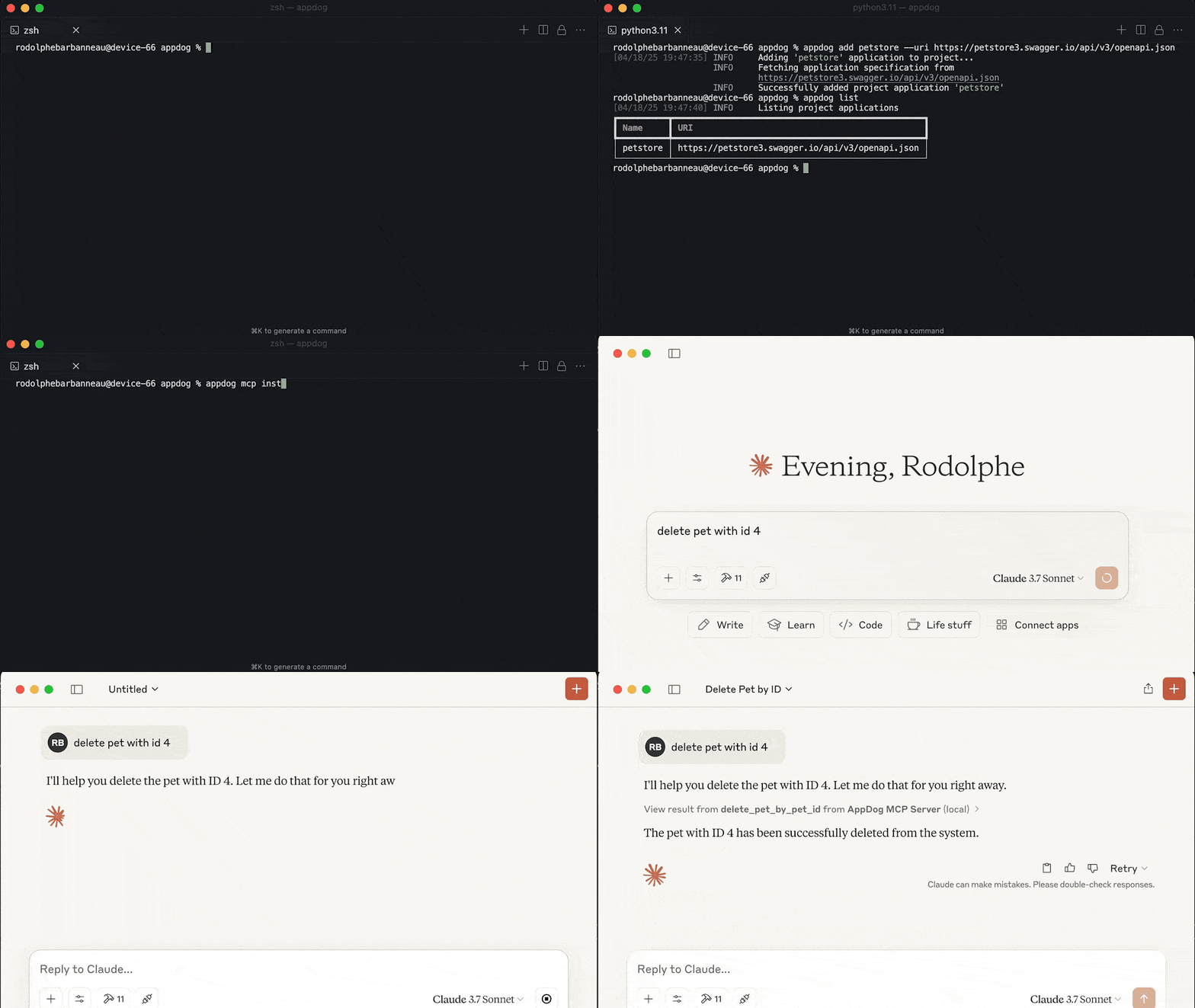
Claude Desktop doesn't handle yet resource templates (i.e. resource with parameters).
For Windows users, MCP Install command needs a manual edit of the generated Claude configuration. See this issue for more details.
Overview
AppDog is a Python package that simplifies working with OpenAPI-based APIs by:
- Automatically generating fully typed Python clients from OpenAPI specifications
- Creating ready-to-use MCP (Model Context Protocol) servers for API integrations
- Managing multiple API clients in a single project with version locking
- Providing a simple CLI for adding, removing, managing API clients, and installing MCP servers
Installation
uv add appdog
Quick Start
Initialize a project
# Create a new project in the current directory
appdog init

# Or specify a project directory
appdog init --project /path/to/project
Add an API client
# Add a new API client from an OpenAPI spec URL or file
appdog add petstore --uri https://petstore3.swagger.io/api/v3/openapi.json
List and show available APIs
# List all API clients in the project
appdog list

# Show details for a specific API client
appdog show petstore
Upgrade API clients
# Sync API clients with the project registry
appdog sync --upgrade

# Lock API clients
appdog lock --upgrade
Generate an MCP server
# Generate and install an MCP server with all registered APIs
appdog mcp install -n "My API Server"

# Or run the server directly
appdog mcp run -n "My API Server"

# Or run in development mode with inspector
appdog mcp dev -n "My API Server"
Project Structure
After initializing a project and adding APIs, your project will have:
project/
├── apps.yaml     # Installed API appdog settings (auto-generated)
├── apps.lock     # Lock file with app specs and hashes (auto-generated)
└── ...           # Project files
Using Generated Clients
After adding an API client, you can import and use it in your code:
# Import generated client
import appdog.petstore

# Use the client
async def main() -> None:
    async with appdog.petstore.client as client:
        pets = await client.get_pet_find_by_status(status='available')
        print(pets)
And compose your own MCP server:
import appdog.petstore
from mcp.server import FastMCP

mcp = FastMCP()

@mcp.tool()
async def hello_petstore() -> str:
    async with appdog.petstore.client as client:
        pets = await client.get_pet_find_by_status(status='available')
        return pets
Environment Variables
API credentials can be configured using environment variables:
APPDOG_<CLIENT_NAME>_TOKEN=your_token
APPDOG_<CLIENT_NAME>_API_KEY=your_api_key
MCP Integration
The package includes full support for MCP server generation:
-
Generate an MCP server file:
appdog mcp install -n "My API Server" -
Use with FastMCP or other MCP clients:
from appdog import Project
from mcp.server import FastMCP

mcp = FastMCP()

project = Project.load(project_dir=PROJECT_DIR)
project.mount(mcp)
CLI Usage
Global Options
--verbose,-v: Enable verbose output--debug,-d: Enable all debug logs, including dependencies--project,-p: Specify project directory (defaults to current directory)
Commands
Show CLI version
appdog version
Initialize Project
appdog init [--force] [--project PATH]
--force: Force initialization even if config already exists
Add API Client
appdog add NAME --uri URI [--base-url URL] [OPTIONS]
NAME: Application name--uri: OpenAPI specification URL or file path--base-url: Base URL for API calls--include-methods: Methods to include--exclude-methods: Methods to exclude--include-tags: Tags to include--exclude-tags: Tags to exclude--force: Overwrite application if it already exists with a different URI--frozen: Skip adding application specification in project lock file--upgrade: Force upgrading application specification--sync: Sync application specification with project registry
Remove API Client
appdog remove NAME [OPTIONS]
NAME: Application name--frozen: Skip removing application specification from project lock file--sync: Sync application removal with project registry
List API Clients
appdog list [--project PATH]
Show API Client Details
appdog show NAME [--project PATH]
NAME: Application name
Lock API Specifications
appdog lock [OPTIONS]
--force: Overwrite application if it exists with a different URI--upgrade: Overwrite application specification with a different URI
Sync API Clients
appdog sync [OPTIONS]
--force: Overwrite application if it exists with a different URI--frozen: Skip updating application specification in project lock file--upgrade: Force upgrading application specification
Generate MCP Server
appdog mcp [COMMAND] [OPTIONS]
Commands:
install: Install applications in MCP clientrun: Run MCP applications in production modedev: Run MCP applications in development mode with inspector
Each command supports specific options:
Common Options (all commands)
--name,-n: Name of the MCP server (default: "AppDog MCP Server")--force: Overwrite server file if it exists--project,-p: Project directory (defaults to current)--output,-o: Output path for MCP server file
Install Command
appdog mcp install [OPTIONS]
--env-var,-v: Environment variables in KEY=VALUE format--env-file,-f: Environment file with KEY=VALUE pairs--with: Additional packages to install in dev mode--with-editable,-e: Local packages to install in editable mode
Run Command
appdog mcp run [OPTIONS]
--transport,-t: Transport to use for MCP run (stdio or sse)
Dev Command
appdog mcp dev [OPTIONS]
--with: Additional packages to install in dev mode--with-editable,-e: Local packages to install in editable mode
Advanced Usage
Client Configuration
Create a custom apps.yaml to configure your API clients:
petstore:
  uri: https://petstore3.swagger.io/api/v3/openapi.json
  base_url: https://petstore3.swagger.io/api/v3
  include_tags:
    - pet
    - store
Custom Authentication
For MCP usage, see environment variables section
Create a client with custom authentication:
from appdog.petstore import PetstoreClient

# Custom API key
client = PetstoreClient(api_key="YOUR_API_KEY")

# Custom headers
client = PetstoreClient(
    headers={"Authorization": "Bearer YOUR_TOKEN"}
)
Contributing
See CONTRIBUTING.md for information on contributing to the project.
License
This project is licensed under the MIT License - see the LICENSE file for details.
Comments
New to MCP?
From what the protocol is to installing your first server, these answers cover most first questions.
An open protocol that defines how AI applications connect to external tools and data in a uniform way. Clients talk to the model; MCP servers provide tools, resources and prompt templates. They exchange standard messages, so one server can be reused by many clients.