
About Ast Metrics
AST Metrics is a static code analyzer for developers and coding agents. It measures complexity, architectural coupling, risk, and test quality locally, and compares pull requests for new or worsened findings. It also provides an MCP server for agents to query codebase metrics.
Key features
- 01Measure complexity, maintainability, and code volume
- 02Analyze coupling, architecture, and communities
- 03Inspect commit history and bus factor
- 04Lint architecture and code against thresholds
- 05Generate reports in multiple formats
Use cases
- 01Review only new or worsened pull request findings
- 02Block rule violations in CI
- 03Find high-risk files and refactoring hotspots
- 04Let coding agents query dependencies and coupling impact
MCP support
The MCP server exposes code complexity, coupling, dependencies, and risk information for on-demand queries by AI coding agents. Start it with `ast-metrics mcp .`.
Configuration
Local server config is the same for every client. Copy it into your client’s MCP config file.
We haven’t collected a package or remote endpoint for this server. Follow the instructions in the project README.
Tools
Local servers expose tools only once running on your machine, and the maintainer has not provided a tool list.
Details
From the project README
No server. No account. One binary.
Code is written faster than it can be reviewed. AST Metrics measures your codebase
(complexity, architecture, coupling, bus factor, test quality) and, on every pull request,
flags only what got worse.
Deterministic: same code, same verdict. Works offline: no data leaves your machine.
Fast: 20,000+ lines of code analyzed per second, on a laptop.
Go · PHP · Python · Rust · Java · C# · TypeScript









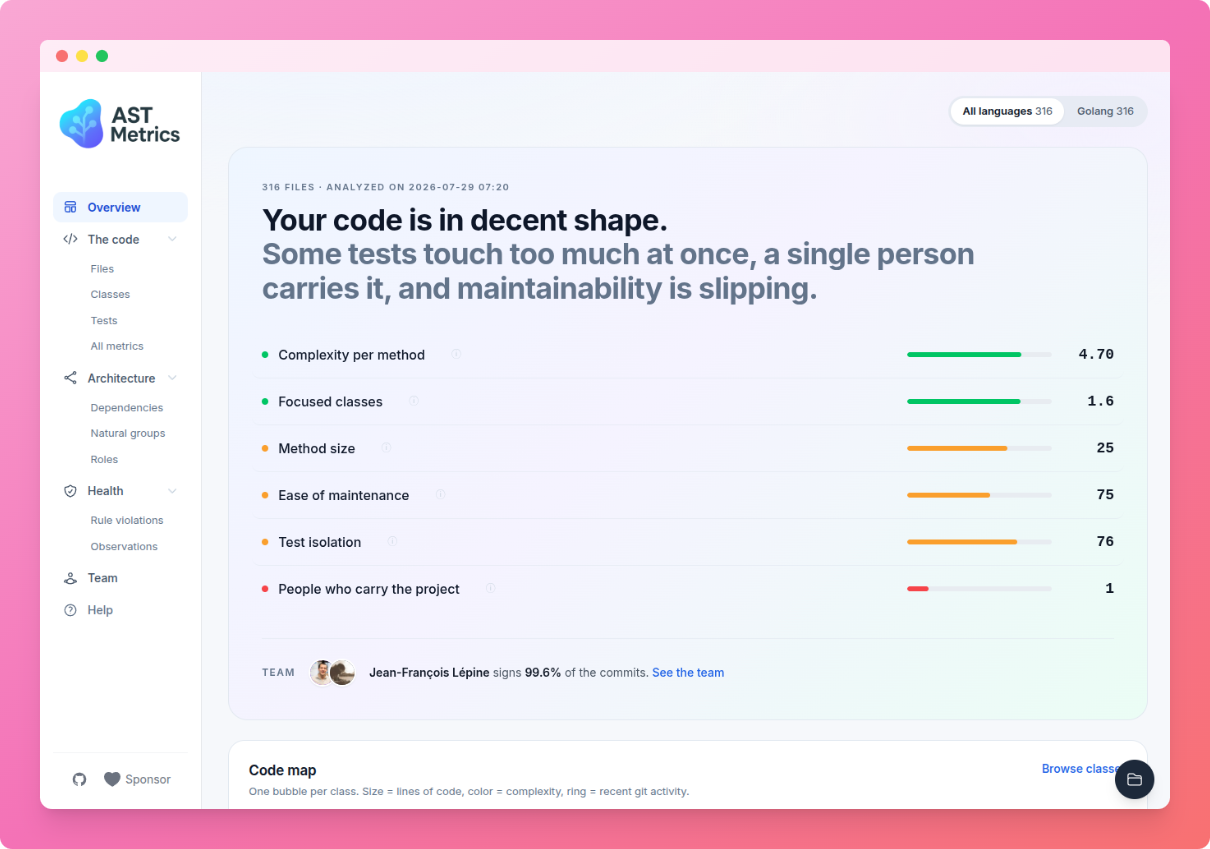
AST Metrics analyzing itself. Explore this report live, or try it on any public repository, without installing anything.
Getting Started
Install with Homebrew (macOS, Linux):
brew install ast-metrics/tap/ast-metrics
or with the install script (any platform, downloads an ./ast-metrics binary in the current directory):
curl -fsSL https://install.ast-metrics.dev | sh
Then analyze your project:
ast-metrics analyze /path/to/your/code
You get a summary right in your terminal: maintainability, estimated bug probability, coupling, and the hotspots worth refactoring first. Add --report-html=<dir> when you want a full report, or --tui to explore the results in a full-screen dashboard. Nothing is written to disk unless you ask for it.
Docker image, npm, pip, Composer,
.deb/.rpmpackages and manual downloads: see the installation instructions.
Review a pull request, without the noise
ast-metrics review
It compares your branch with its base and reports only new or worsened findings: a new overly complex function, a coupling regression, a class that lost maintainability. Legacy code stays quiet. Unlike AI code reviewers, it is deterministic and free: same code, same verdict, no per-seat pricing. Add --fail-on=high when you want it to block the merge.
What you get
| PR review | ast-metrics review flags only what got worse against the base branch |
| Architectural analysis | Coupling, instability, community detection: catch design drift early |
| Code metrics | Cyclomatic complexity, maintainability index, lines of code |
| Activity metrics | Commit history and bus factor: know who owns what |
| Linter | Enforce thresholds on complexity, coupling, volume and architecture |
| CI/CD ready | GitHub Actions, GitLab CI, any pipeline; exits non-zero on violations |
| Report formats | HTML dashboard, JSON, Markdown, SARIF, OpenMetrics |
| MCP server | Give AI coding agents architectural awareness |
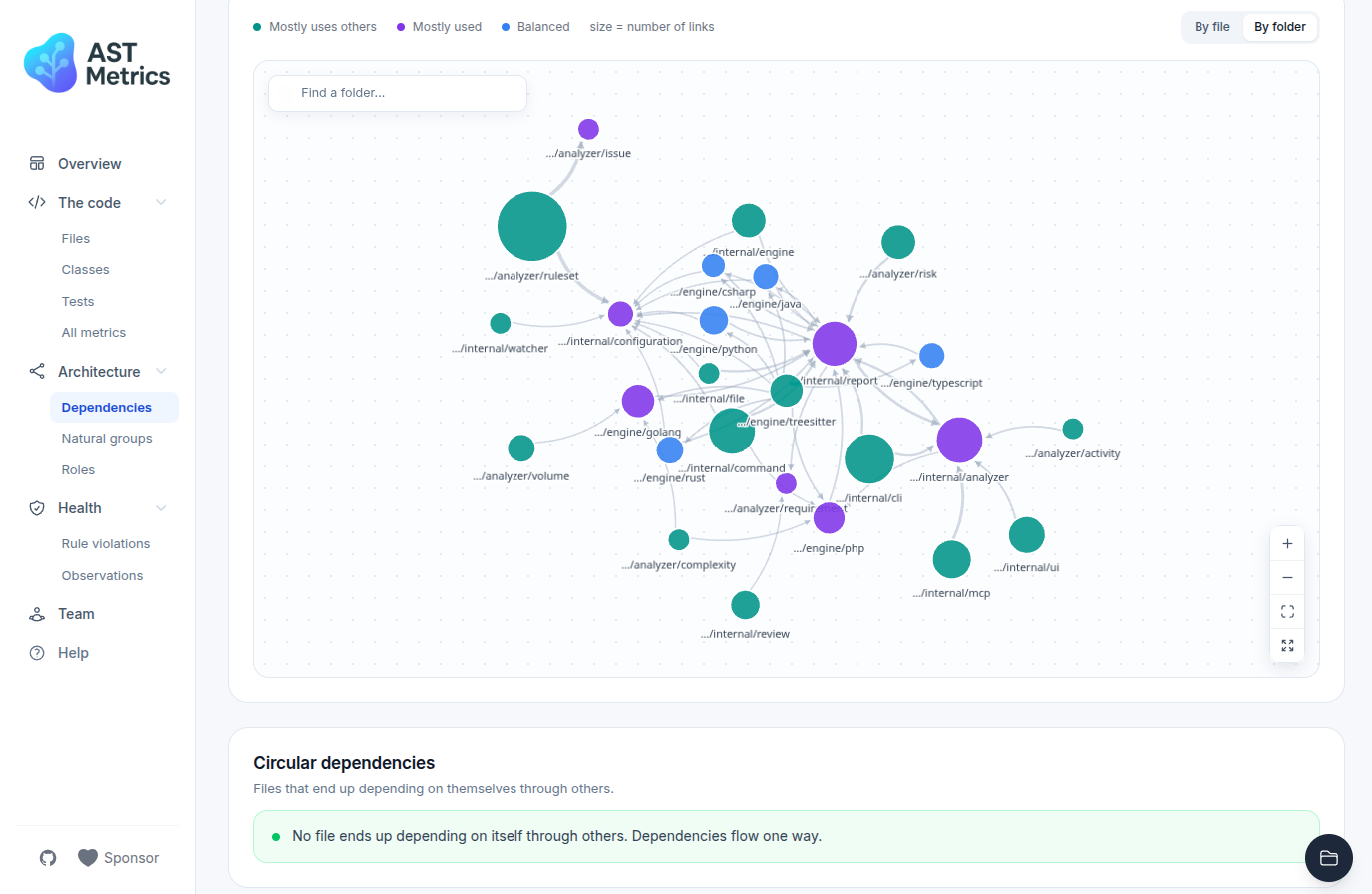
The dependency graph: hubs, natural communities and circular dependencies at a glance.
Lint your architecture
ast-metrics init                      # create a .ast-metrics.yaml config file
ast-metrics ruleset add architecture  # pick rulesets (volume, complexity...)
ast-metrics lint
Thresholds live in your YAML config: maximum complexity, coupling limits, forbidden dependencies between components, size limits per method... Legacy codebase with hundreds of violations? Run ast-metrics baseline once: it snapshots today's violations, and lint only fails on new ones.
➡️ Rulesets, thresholds and baseline
Run it in CI
ast-metrics ci runs the linter, generates every report (HTML, JSON, Markdown, SARIF, OpenMetrics) and exits non-zero when violations are found. On GitHub, a single step is enough:
- uses: ast-metrics/action-ast-metrics@v2
On each pull request, the action runs ast-metrics review and comments with only the new or worsened findings.
➡️ CI/CD guides: GitHub Actions, GitLab CI
Give your AI agent architectural awareness
AI coding agents read code linearly. Running as an MCP server, AST Metrics gives Claude Code, Cursor or Copilot on-demand access to complexity, coupling, dependencies and risk, so you can ask things like "What are the riskiest files to refactor?" or "What would break if I change the UserService class?".
ast-metrics mcp .
Supported languages
Go, PHP, Python, Rust, Java, C# and TypeScript.
Contributing
Discussions, bug reports and pull requests are welcome: start here. AST Metrics is open-source software licensed under the MIT license.
Support the project
AST Metrics is built and maintained on free time. If it saved you some of yours:
- ⭐ Star the repository. It costs nothing and it is how most developers discover the tool.
- ❤️ Become a sponsor. Sponsorship directly funds maintenance time and the addition of new languages and metrics.
Comments
New to MCP?
From what the protocol is to installing your first server, these answers cover most first questions.
An open protocol that defines how AI applications connect to external tools and data in a uniform way. Clients talk to the model; MCP servers provide tools, resources and prompt templates. They exchange standard messages, so one server can be reused by many clients.