
About bricksentry
bricksentry checks the data impact, downstream dependencies, and rollback path of Databricks pipeline changes before release. It is for data engineers and AI agents, with deterministic policy verdicts and local DuckDB demos alongside Databricks workflows.
Key features
- 01Key-based data diffs and schema checks
- 02Unity Catalog downstream impact analysis
- 03Policy verdicts with rollback SQL
- 04CLI, Python API, MCP server, and GitHub Action
- 05Sandbox previews for write statements
Use cases
- 01Review pipeline changes in a pull request
- 02Check downstream effects before editing a table
- 03Preview a write without touching production
- 04Give agents deterministic safety checks
MCP support
Its MCP server exposes tools to inspect downstream assets, create rollback plans, preview writes on disposable clones, assess changes, explain diffs, and check whether a change is safe to ship.
Configuration
Local server config is the same for every client. Copy it into your client’s MCP config file.
uvx bricksentry-mcpBRICKSENTRY_CONFIGPath to your bricksentry.yml (backend, tables and policy).DATABRICKS_HOSTDatabricks workspace URL, when using the Databricks backend.DATABRICKS_TOKENSecretDatabricks access token, when using the Databricks backend.Local servers need a runtime on your machine (e.g. Node.js 18+). Config file locations differ by client; see your client’s docs.
Tools
Local servers expose tools only once running on your machine, and the maintainer has not provided a tool list.
Details
From the project READMEWelcome to bricksentry






The safety check for data changes in the AI era.
Change-safety for Databricks pipelines and the AI agents that edit them: know what a change does to your data before it ships.
Try it in 30 seconds · Run the Databricks notebook · Docs: bricksentry.org · LinkedIn
Built by Brahmareddy, Databricks Champion. Open source under Apache-2.0.
Why the name? Bricks plus entry. Your tables and pipelines are the bricks of the lakehouse, and every change to them is an entry. bricksentry checks each entry, reports what it does, and stands guard before it lands.
Try it in 30 seconds (no Databricks needed)
pip install "bricksentry[duckdb]"
bricksentry demo
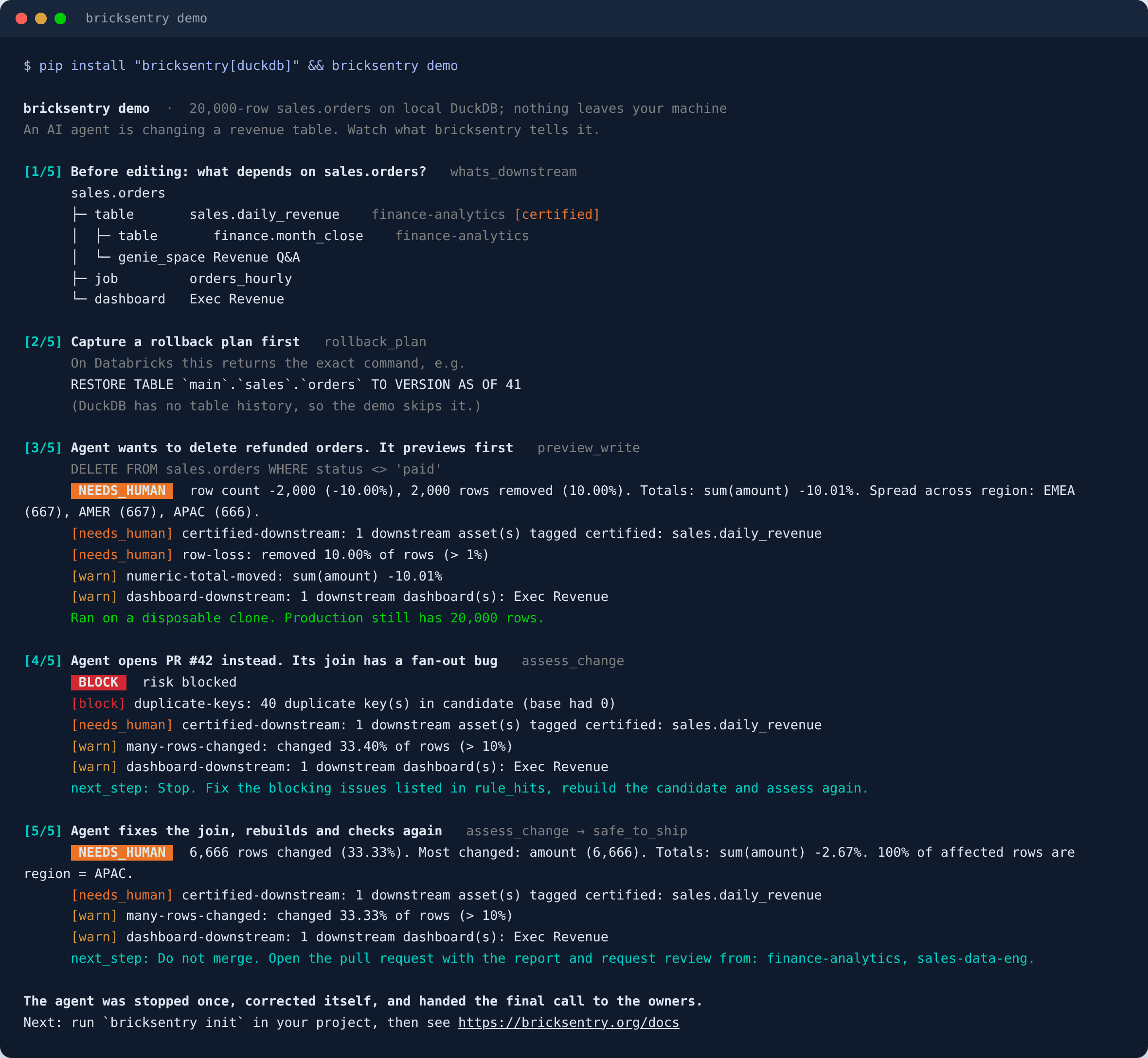
An AI agent changes a 20,000-row revenue table. bricksentry previews its DELETE on a clone (production untouched), blocks its pull request for a join that duplicates 40 orders, and routes the fixed version to the owners of a certified table downstream. Everything runs locally on DuckDB.
Run it in your Databricks workspace
What did your last pipeline run do? (10 minutes, read-only)
Check-my-table notebook: in your workspace, go to Workspace → Import → URL and paste
https://raw.githubusercontent.com/bricksentry/bricksentry/main/examples/databricks/bricksentry_check_my_table.py
Point the check-my-table notebook at a Delta table your pipeline writes to. It finds the latest data change in the table's history (a WRITE, MERGE, UPDATE or DELETE), compares it with the version before, and shows the verdict a reviewer would have seen before that change shipped: rows added, removed and changed, duplicate keys, totals that moved, what depends on the table, and the RESTORE command to undo it. Your table is only read; the comparison uses two shallow clones in a scratch schema, dropped at the end.
If it shows you something, please share what it found (no table names needed). Real results decide what gets built next.
Guided tour on demo data
Databricks quickstart notebook: in your workspace, go to Workspace → Import → URL and paste
https://raw.githubusercontent.com/bricksentry/bricksentry/main/examples/databricks/bricksentry_quickstart.py
The quickstart notebook creates a small demo table in a schema you choose and runs the same loop on Databricks: Unity Catalog blast radius, a real RESTORE rollback plan, a preview on a shallow clone, a blocked pull request and the fix. Then it checks one of your own tables, read-only, and cleans up after itself.
You need a SQL warehouse, CREATE TABLE on the schema you pick, and SELECT on system.access.table_lineage for the blast radius. A Jupyter copy is in bricksentry_quickstart.ipynb.
What it does
Before a change reaches production, bricksentry answers three questions, in a pull-request comment for humans and in structured JSON for agents:
- What does it do to the data? A key-based data diff: added, removed and changed rows, schema changes, per-column changes, numeric totals, duplicate keys, and where the change is concentrated ("100% of affected rows are region = APAC").
- Who gets hurt? The downstream blast radius from Unity Catalog lineage: tables, jobs, notebooks, Lakeflow pipelines, dashboards and queries, with owners and tags. Down to the column: which columns the change touched, whether they are tagged (for example
pii), and which downstream columns they feed. - Is it safe, and how do I undo it? A deterministic policy verdict (
pass·warn·needs_human·block) and the exactRESTORE TABLE … VERSION AS OF nrollback.
For your Databricks workspace:
pip install "bricksentry[databricks,mcp]"
bricksentry init        # writes bricksentry.yml and policy.yml
Why it exists
AI now writes much of our pipeline code, and checking what that code does to the data hasn't kept up. Code review can't see a silent 3% revenue shift or a join that fans out. The tools that do catch this mostly cover dbt, or need a paid platform. Most Databricks work is PySpark notebooks, Jobs and Lakeflow pipelines, and bricksentry is built for that work:
- Unity Catalog runtime lineage, not SQL parsing, so PySpark notebooks and jobs are included.
- SQL pushdown: all diffing runs on your SQL warehouse, so no Spark session is needed and calls stay cheap enough for an agent loop.
- One engine, three faces: CLI and GitHub Action · Python API · MCP server.
For AI agents: the MCP server
The quickest way to connect an agent is the bricksentry-mcp package, which installs bricksentry with its MCP and Databricks extras. With uv there is nothing to install first:
# Claude Code
claude mcp add bricksentry -- uvx bricksentry-mcp --config /full/path/to/bricksentry.yml
{
  "mcpServers": {
    "bricksentry": {
      "command": "uvx",
      "args": ["bricksentry-mcp", "--config", "/full/path/to/bricksentry.yml"]
    }
  }
}
The JSON works for the Claude desktop app, Cursor and other MCP clients. Use a full path to bricksentry.yml, because clients start the server from their own working folder. If an app can't find uvx, use its full path (which uvx). To share the setup through a repo, claude mcp add -s project ... writes it to .mcp.json; a relative path then works when Claude Code starts from the repo root. No config yet? uvx --from bricksentry bricksentry init writes a starter one.
Already installed bricksentry with pip? pip install "bricksentry[mcp,databricks]" and run bricksentry mcp --config /full/path/to/bricksentry.yml instead. Add --transport streamable-http for remote agents.
bricksentry is listed in the official MCP Registry as io.github.bricksentry/bricksentry.
| Tool | What the agent gets |
|---|---|
whats_downstream(table, depth, columns?) | Downstream assets with owners and tags. Call it before editing. Pass the columns you'll change to see the downstream columns they feed and their tags. |
rollback_plan(table) | The restore SQL. Capture it before changing anything. |
preview_write(sql, target, keys?) | Runs one write against a disposable shallow clone, never production, and returns the diff plus verdict. |
assess_change(tables, candidates?, pr?) | Diffs prod vs. the candidate built by your change, plus lineage and policy. Returns a verdict and an id. |
explain_diff(assessment_id or table) | Plain-English summary. |
safe_to_ship(assessment_id) | safe_to_ship, the reasons, and an explicit next_step to follow. |
Designed for agents:
- The verdict never comes from an LLM. Rules in
policy.ymldecide, so the same change always gets the same answer. - Read-only by default. Only
preview_writewrites, and only to a sandbox clone. It accepts a single INSERT / MERGE / UPDATE / DELETE / CREATE OR REPLACE whose target must be the clone, and it refuses DROP, TRUNCATE, ALTER, GRANT and multiple statements. - Errors come back as
{"error": ...}, so agents can recover instead of crashing. - Bounded cost: deterministic hash sampling (
sample_pct), capped samples, and lineage limited by depth and lookback window. A full-table checksum guards the sample: if the sample shows no change but the tables differ, the diff re-runs on every row, so a one-row change can't slip through. - Assessments are saved as JSON (default
~/.bricksentry/assessments), soexplain_diffandsafe_to_shipwork from another process or a freshSentry.
The same tools are plain Python functions in bricksentry.agent_tools, so you can use them from LangGraph, the OpenAI Agents SDK or the Databricks Agent Framework without MCP.
To watch the whole loop, run bricksentry demo (see the top of this page). bricksentry demo --report report.md also writes the pull-request comment a reviewer would see.
Host it in your workspace (Databricks Apps)
Run the MCP server as a Databricks App so every agent in your workspace can reach it over HTTPS, with no tokens to manage: it runs as the app's service principal, and Unity Catalog grants decide what it can read. deploy/databricks-app is a ready app (app.yaml, an Asset Bundle, the grants) that deploys with two commands:
databricks bundle deploy --var warehouse_id=<your-sql-warehouse-id>
databricks bundle run bricksentry_mcp
Agents connect to https://<app-url>/mcp. The kit starts the server with --read-only, which leaves out preview_write, so the app never writes. On any other host, bricksentry mcp --transport streamable-http --host 0.0.0.0 --port 8000 serves the same endpoint. Unity Catalog MCP Services are for servers hosted outside Databricks, so a Databricks App is the recommended way to run bricksentry inside it; see the kit's README.
For data engineers: CLI and CI
bricksentry init                                        # starter bricksentry.yml + policy.yml
bricksentry init --policy finance                       # ...or start from a policy template
bricksentry policies                                    # list the policy templates
bricksentry impact main.sales.orders                    # blast radius
bricksentry diff main.sales.orders main.sales_pr_42.orders
bricksentry preview main.sales.orders --sql "MERGE INTO {{target}} t USING updates u ON t.order_id = u.order_id WHEN MATCHED THEN UPDATE SET *"
bricksentry assess --from-git origin/main --pr 42 --format markdown --fail-on needs_human
bricksentry rollback main.sales.orders
Exit codes: 0 below --fail-on, 1 at or above it, 2 for configuration errors.
In GitHub Actions. Build your PR's version of the pipeline into a per-PR schema (for example with a Databricks Asset Bundle ci target), then add:
- run: pip install "bricksentry[databricks]"
- run: >
    bricksentry assess
    --from-git origin/${{ github.base_ref }}
    --pr ${{ github.event.pull_request.number }}
    --comment --output bricksentry-report.md
    --fail-on needs_human
  env:
    GITHUB_TOKEN: ${{ github.token }}
    DATABRICKS_HOST: ${{ secrets.DATABRICKS_HOST }}
    DATABRICKS_CLIENT_ID: ${{ secrets.DATABRICKS_CLIENT_ID }}
    DATABRICKS_CLIENT_SECRET: ${{ secrets.DATABRICKS_CLIENT_SECRET }}
    DATABRICKS_WAREHOUSE_ID: ${{ secrets.DATABRICKS_WAREHOUSE_ID }}
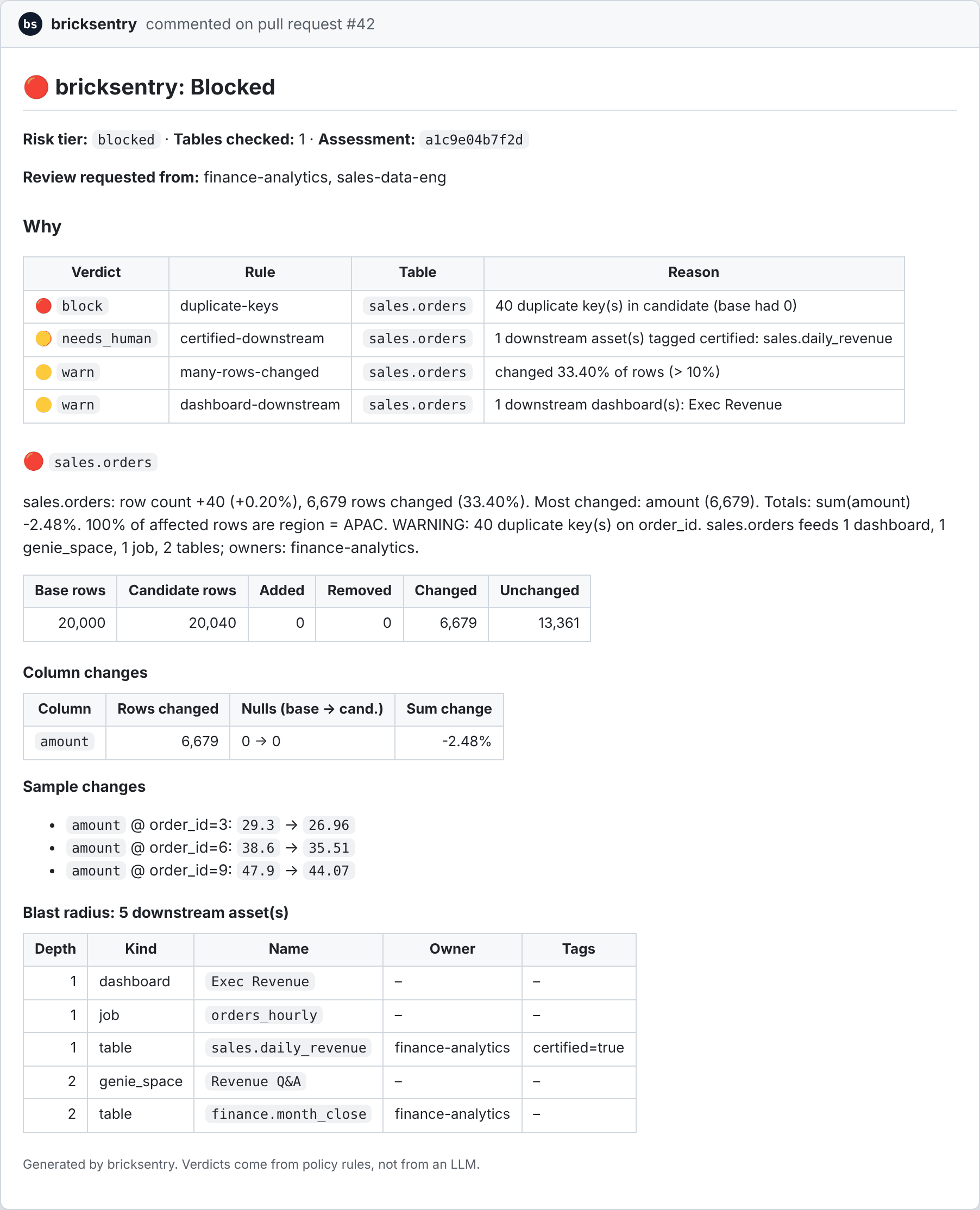
It detects changed tables from the files in the PR and posts or updates one PR comment, like this one for the demo's fan-out bug:
Check out with fetch-depth: 0 and give the job pull-requests: write permission.
Or use the bundled GitHub Action, which also writes the report to the job summary:
- uses: bricksentry/[email protected]
  with:
    config: bricksentry.yml
    fail-on: needs_human
A complete workflow you can copy to .github/workflows/bricksentry.yml:
name: bricksentry
on: pull_request

permissions:
  contents: read
  pull-requests: write

jobs:
  check-data:
    runs-on: ubuntu-latest
    steps:
      - uses: actions/checkout@v4
        with:
          fetch-depth: 0
      # Build this PR's version of your pipeline into a per-PR schema first,
      # for example: databricks bundle deploy -t ci && databricks bundle run -t ci
      - uses: bricksentry/[email protected]
        with:
          config: bricksentry.yml
          fail-on: needs_human
          slack-webhook: ${{ secrets.SLACK_WEBHOOK_URL }}    # optional
          teams-webhook: ${{ secrets.TEAMS_WEBHOOK_URL }}    # optional
        env:
          DATABRICKS_HOST: ${{ secrets.DATABRICKS_HOST }}
          DATABRICKS_CLIENT_ID: ${{ secrets.DATABRICKS_CLIENT_ID }}
          DATABRICKS_CLIENT_SECRET: ${{ secrets.DATABRICKS_CLIENT_SECRET }}
          DATABRICKS_WAREHOUSE_ID: ${{ secrets.DATABRICKS_WAREHOUSE_ID }}
To make the check binding, mark this job as a required status check in your branch protection rules. Then a needs_human or block verdict stops the merge, whatever the author or an agent decides.
Alerts in Slack and Teams
When the verdict is needs_human or worse, bricksentry can post a short alert: the verdict, the rules that fired, who should review, and a link back to where the check ran.
# bricksentry.yml
notify:
  on: needs_human                         # alert at this verdict or worse
  slack_webhook: env:SLACK_WEBHOOK_URL    # Slack incoming webhook
  teams_webhook: env:TEAMS_WEBHOOK_URL    # Teams Workflows "webhook request" URL
  mentions:                               # optional: @-mention reviewers in Slack
    finance-analytics: S0123ABCD          # a user group id (starts with S)
    [email protected]: U0456EFGH              # a member id (starts with U)
Then check the setup with one command. It sends a clearly labelled sample alert and reads no tables:
bricksentry test-alert
- Keep webhook URLs secret. Put them in CI secrets or environment variables (
BRICKSENTRY_SLACK_WEBHOOKandBRICKSENTRY_TEAMS_WEBHOOKwork too), never in the file; bricksentry warns if it finds one there. - Links back to the run. In GitHub Actions the alert links to the PR or run. In a Databricks job it links to the job run. Anywhere else, set
BRICKSENTRY_RUN_URL(ornotify.run_url). - Mentions. Owners come from Unity Catalog. Map them to Slack ids under
mentionsand the alert @-mentions them; unmapped owners are shown as text. Find an id in Slack under a person's profile or a user group's menu, "Copy member ID" / "Copy group ID". - Never breaks a run.
assessandpreviewsend alerts automatically when a webhook is set (--no-notifyturns them off); in Python callsentry.notify(assessment). If Slack or Teams is busy the alert is retried once, a failure is reported without the webhook URL, and the verdict always stands.
Python API
from bricksentry import Sentry

s = Sentry()                                   # reads ./bricksentry.yml
a = s.assess(["main.sales.orders"], pr="42")
print(a.verdict, a.notify)
print(a.tables[0].summary)

s.preview_write("DELETE FROM main.sales.orders WHERE status = 'test'", "main.sales.orders")
Configuration
backend: {type: databricks, warehouse_id: abc123}      # auth: standard Databricks SDK chain
sandbox_schema: main.bricksentry_sandbox
candidate_pattern: "{catalog}.{schema}_pr_{pr}.{table}"
sample_pct: 10                                         # sample_guard re-checks the whole table (on by default)
assessment_store: ~/.bricksentry/assessments           # or false to keep assessments in memory
lineage: {type: databricks, depth: 3, lookback_days: 90, column_depth: 2}   # also: exclude, exclude_dropped
tables:
  main.sales.orders:
    keys: [order_id]
    segment_by: [region]
    measures: [amount, quantity]   # totals worth checking (see below)
    paths: ["src/pipelines/orders/**", "resources/orders_job.yml"]
policy: policy.yml            # or builtin:<template>, see "Policy templates" below
Without Unity Catalog (local DuckDB work, tests, or other platforms), give the lineage in the config instead. Edges map a table to what reads from it; column edges and tags are optional:
lineage:
  type: static
  edges:
    main.sales.orders: [main.sales.daily_revenue, "dashboard:Revenue Overview", "job:finance_close"]
  owners:
    main.sales.daily_revenue: finance-team
  tags:
    main.sales.daily_revenue: {certified: "true"}
  column_edges:                       # "table.column" -> downstream "table.column"s
    main.sales.orders.amount: [main.sales.daily_revenue.revenue]
  column_tags:                        # table -> column -> tags
    main.sales.orders: {customer_email: {pii: ""}}
Typos are caught: an unknown key such as sample_pc prints a warning that names the right one (did you mean 'sample_pct'?) instead of being silently ignored.
Which totals are checked. sum_change_pct_gt rules and summaries look at measures: by default every numeric column except keys and columns whose names look like IDs, codes, years and other date parts, coordinates, ratings, scores or rates (a 10% drop in sum(established_year) only says rows were removed). List measures for a table to choose exactly, or set measures: all to check every numeric column. A rule that names a column (when: {column: rating, sum_change_pct_gt: 1}) always checks it.
Policy example
A small policy.yml with one rule per severity. pass is the default: a change gets it when no rule matches.
default: pass                       # no rule matched -> pass
notify_owners_on: needs_human       # tag downstream owners from this level up

rules:
  - name: type-change               # a column changed type -> warn
    when: {column_type_changed: true}
    then: warn

  - name: revenue-moved             # total revenue moved more than 2% -> a human signs off
    when: {column: amount, sum_change_pct_gt: 2}
    then: needs_human

  - name: duplicate-keys            # a join fanned out and duplicated keys -> block the PR
    when: {duplicate_keys: true}
    then: block
| The change | Verdict |
|---|---|
| A filter fix that changes 40 rows, nothing else | pass |
order_date goes from STRING to DATE | warn |
A pricing fix moves SUM(amount) by 3.1% | needs_human |
A new join duplicates 40 order_ids | block |
If several rules match, the most severe one wins. The full starter policy is in examples/databricks/policy.yml, and bricksentry init writes one for you.
Policy templates
Start from a ready-made policy instead of writing one:
| Template | For |
|---|---|
agent-safe | Changes written by AI agents: anything beyond a small, clean change goes to a human |
default | Balanced: block duplicate keys, a human for row loss, dropped columns, PII and certified downstream |
strict | Production-critical pipelines: small changes need a human, failed checks block |
pii | Tables with personal data: any change to a pii-tagged table, or one feeding it, needs a human |
certified | Certified or gold tables that dashboards and AI rely on |
finance | Revenue and money tables: totals can't move quietly, double counting is blocked |
Use one directly with policy: builtin:finance, or write an editable copy with bricksentry init --policy finance. bricksentry policies finance prints it. Tags come from Unity Catalog, so tag your tables pii or certified for those templates to apply.
Policy conditions
table (glob) · tag · downstream_tag · downstream_kind · downstream_count_gt · removed_pct_gt · added_pct_gt · changed_pct_gt · row_count_change_pct_gt · row_count_drop_pct_gt · column_removed · column_added · column_type_changed · duplicate_keys · null_keys · sum_change_pct_gt / null_increase_gt (optionally with column) · changed_column (glob) · changed_column_tag · downstream_column_tag · any_change · diff_error · lineage_error
Column conditions look only at the columns the change touched (changed values, new NULLs, dropped or retyped): changed_column_tag: pii matches when one of them is tagged pii in Unity Catalog, and downstream_column_tag: certified when one of them feeds a column tagged certified, following system.access.column_lineage up to lineage.column_depth hops (default 2; 0 turns it off). The default policy asks a human when a pii column changes; strict, agent-safe and certified also flag changes that feed certified columns.
All conditions in a when must hold. The most severe matching rule sets the verdict. Unknown conditions are rejected at load time, so a typo can't silently disable a rule.
Permissions needed on Databricks
CAN USEon a SQL warehouse.SELECTon the tables you assess and their candidates.SELECTonsystem.access.table_lineage(andsystem.access.column_lineagefor column-level impact), plussystem.information_schemafor owners, table tags and column tags. Without lineage access bricksentry still diffs, and adds alineage-unavailablewarning (blast radius unknown) instead of guessing.CREATE TABLEonsandbox_schema, forpreview_write.
Known limits (v0.1.x)
- Lineage is recorded at runtime. Brand-new tables have no downstream history yet. Unity Catalog doesn't capture RDD operations, and UDFs hide column-level mapping; column lineage records source-to-target derivations, so a column used only in a filter or join may not appear.
- Keys are required. Tables without a stable key can't be diffed row by row yet (an aggregate-profile mode is planned).
- Changed-table detection uses path globs from config. It doesn't parse Asset Bundles yet.
- Validated on one Databricks workspace so far (serverless, November 2026, on a 2-million-row table with 0.1.4): lineage, Delta rollback plans, previews on shallow clones, every verdict level, and the sampling guard catching a single changed row. The automated tests use DuckDB and a mocked SDK, so please open an issue if something behaves differently on yours.
Roadmap
Top priority: validation across more workspaces. Classic and serverless compute, AWS, Azure and GCP, and workspaces with restricted system-table access. If you run the quickstart notebook, please share what you see, whether it works or not.
Next: dbt support, so dbt models on Databricks get the same diff, blast radius and verdict (planned for 0.2) · Asset Bundle parsing for automatic table detection · an aggregate diff for keyless tables · Lakeflow expectations in the verdict · bricksentry watch for scheduled drift checks · a Databricks App UI.
Contributing
Bug reports from real pipelines help the most. See CONTRIBUTING.md, and SECURITY.md for reporting vulnerabilities privately.
License
Apache-2.0. Created and maintained by Brahma - Databricks Champion.
Trademarks
bricksentry is an independent open-source project. It is not affiliated with, endorsed by, or sponsored by Databricks, Inc. or Functional Software, Inc. (Sentry). Databricks, Unity Catalog and Lakeflow are trademarks of Databricks, Inc. Delta Lake is a trademark of the Linux Foundation, and Apache Spark and PySpark are trademarks of the Apache Software Foundation. All other names are the trademarks of their respective owners and are used here only to describe compatibility. Thank you.
Comments
New to MCP?
From what the protocol is to installing your first server, these answers cover most first questions.
An open protocol that defines how AI applications connect to external tools and data in a uniform way. Clients talk to the model; MCP servers provide tools, resources and prompt templates. They exchange standard messages, so one server can be reused by many clients.