About browser-gateway
browser-gateway routes browser sessions across cloud, Docker, and local Chrome providers, with failover and session-state tools for developers and AI agents. It also offers REST endpoints and a dashboard.
Key features
- 01Provider routing with automatic failover
- 02Persistent browser profiles
- 03Session replay and dashboard
- 04REST screenshot, extraction, and scraping
- 05MCP browser navigation and interaction
Use cases
- 01Keep browser automation running when a provider fails
- 02Reuse cookies and localStorage across sessions
- 03Review recorded browser sessions
- 04Let an agent navigate pages and submit forms
MCP support
Exposes browser tools to MCP clients, including navigation, snapshots, screenshots, actions, extraction, and evaluation. Requests are routed through the gateway’s provider selection and failover layer.
Configuration
Local server config is the same for every client. Copy it into your client’s MCP config file.
npx -y browser-gatewayBG_TOKENSecretAuthentication token for gateway access (optional, only needed with remote providers)Local servers need a runtime on your machine (e.g. Node.js 18+). Config file locations differ by client; see your client’s docs.
Tools
Local servers expose tools only once running on your machine, and the maintainer has not provided a tool list.
Details
From the project README
browser-gateway
The open router for cloud browsers.
One endpoint that routes across every browser provider you use: automatic failover, persistent profiles, session replay, REST API, MCP server, dashboard.
Works unchanged with Puppeteer, Playwright, Stagehand, browser-use, and any MCP client.










Website · Quick start · MCP · Profiles · Replays · REST API · Dashboard · Discord
Overview
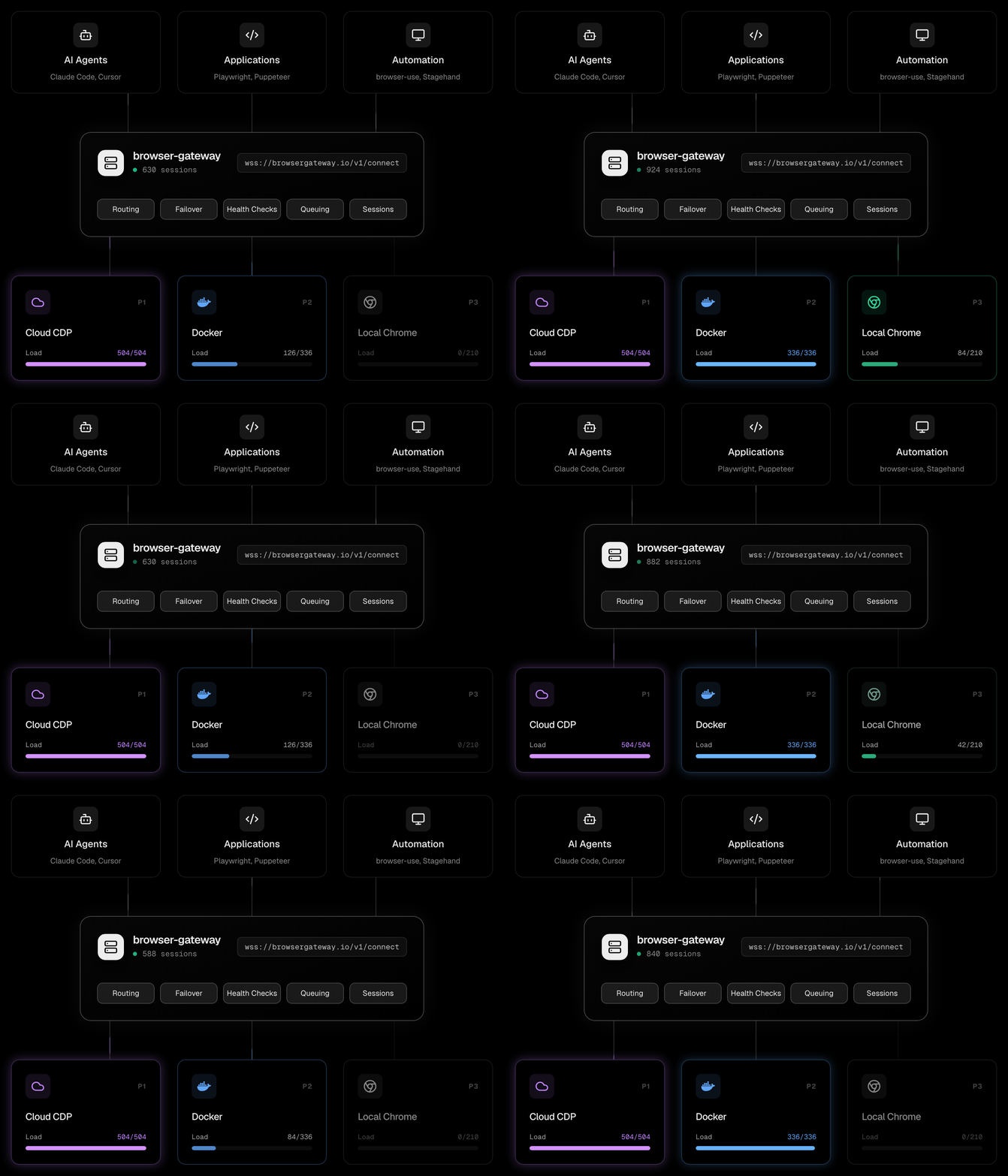
One endpoint. Multiple providers. Automatic failover when one is saturated or goes down.
Your app connects to ws://gateway:9500/v1/connect. The gateway picks the best available provider based on health, capacity, and your routing strategy. Providers can be cloud CDP services, Docker containers, or local Chrome instances.
Dashboard
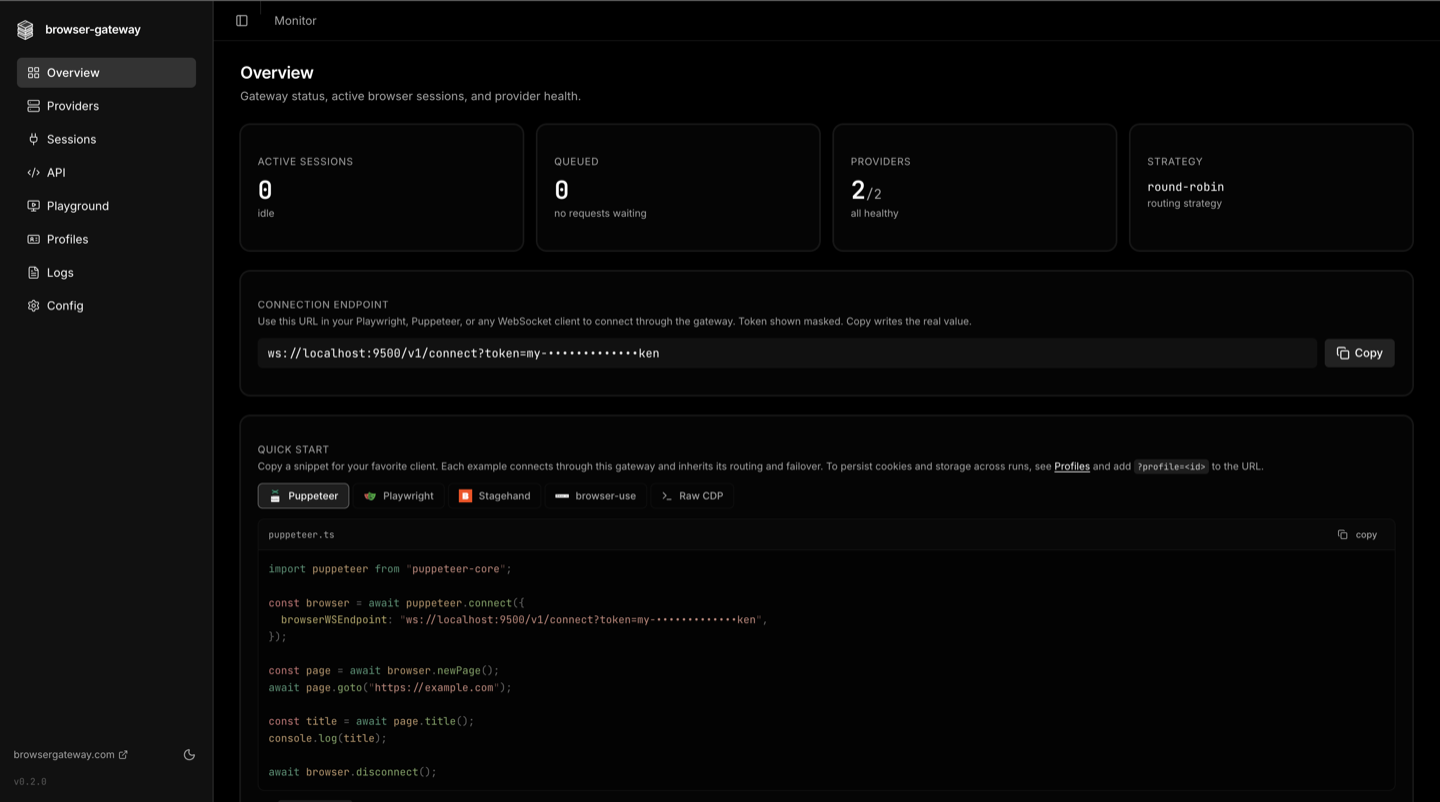
A web dashboard ships with every install. Open http://localhost:9500/web after starting the gateway.
Overview. Active sessions, queue depth, provider health, connection endpoint, and a copy-paste quickstart for Puppeteer, Playwright, Stagehand, browser-use, and raw CDP.
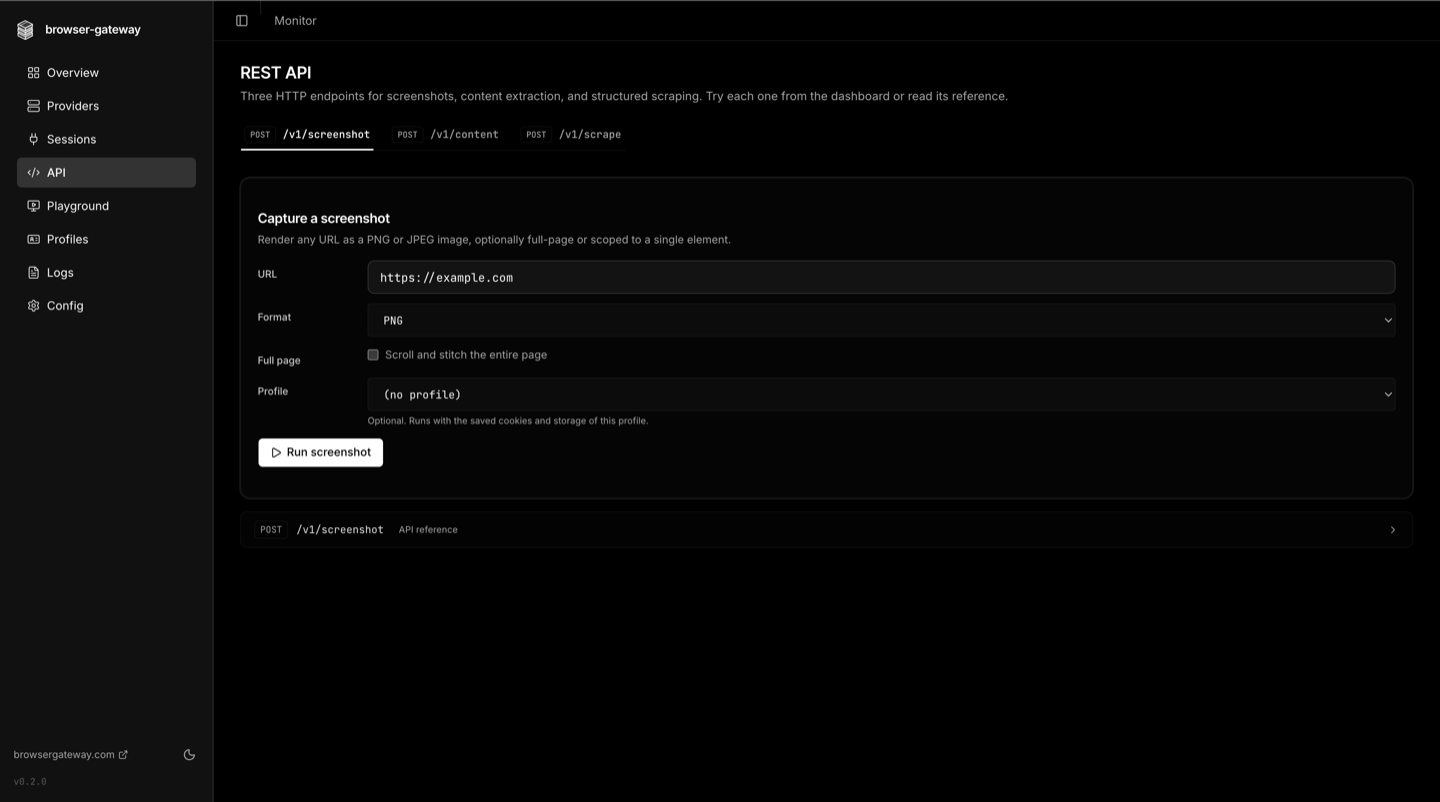
REST API. Run screenshot, content extraction, and structured scraping endpoints from a form-driven UI, with profile selection and parameter reference inline.
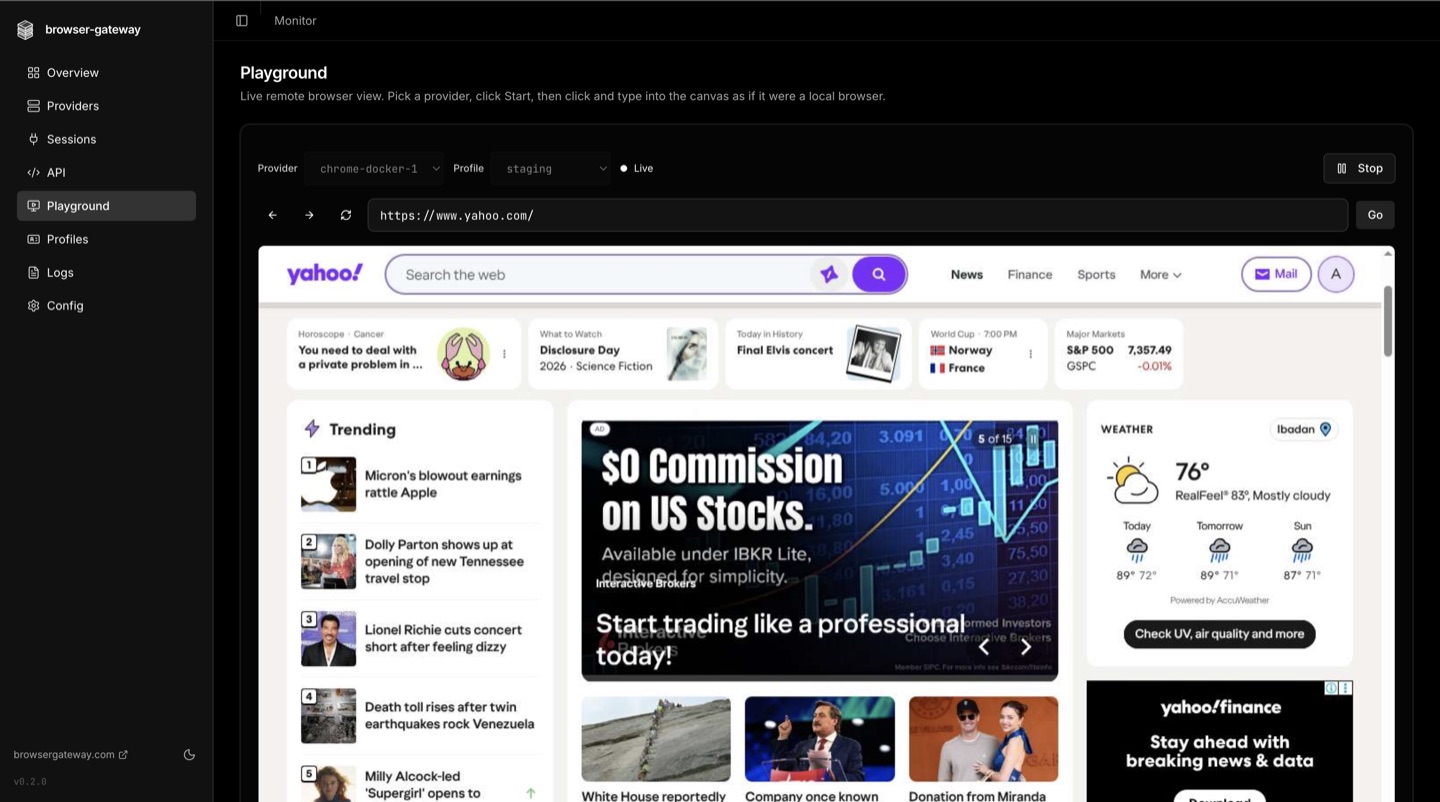
Playground. Drive any provider live from the browser. Pick a provider and profile, type into the canvas as if it were a local browser, and watch the remote session in real time.
Features
Routing & reliability
- Automatic failover - the next provider takes over the instant one fails, no client changes
- Five load-balancing strategies - priority chain, round-robin, least-connections, latency-optimized, weighted
- Per-provider concurrency limits - the gateway enforces
maxConcurrenton every backend - Request queue - connections wait when every provider is saturated instead of failing immediately
- Cooldown - failing providers are skipped and recover automatically after a TTL
- Health checks - periodic connectivity probes mark providers unhealthy before clients hit them
- Graceful shutdown - active sessions drain cleanly on SIGTERM and SIGINT
- Session reconnect - a dropped client reconnects with
?sessionId=<X-Session-Id>; on a provider that issues a resume token (browserserve with its resume window on) it gets the same browser back with its pages, cookies and storage, otherwise a new browser on the same provider - Webhooks - fire on provider down, recover, and queue-overflow events
REST API
- Screenshot -
POST /v1/screenshotreturns any URL as PNG or JPEG, full-page or scoped to a selector - Content extraction -
POST /v1/contentreturns markdown, plain text, HTML, or a cleaned article - Scrape -
POST /v1/scrapeextracts structured data via CSS selectors or full-page formats - Pooled sessions - browser connections are reused across requests, like a database pool
- Automatic retry - failed requests retry against a fresh page
Profiles — persistent browser state
- Survive across sessions - cookies and
localStorageare captured as you leave each page and on disconnect, and replayed on the next connect with the same id (IndexedDBtoo on browserserve) - Saved on any provider - every provider can load and save any profile; pin a provider to one profile only to route that profile's sessions there
- Profiles never mix - a browser that still holds a different profile is refused. Anything else already in a reused browser (from sessions without a profile) is saved with the profile
- One-line opt-in - add
?profile=acmeto the WebSocket URL, the rest is automatic - Encrypted at rest - AES-256-GCM with envelope encryption, anti-swap binding, and a scrypt-derived KEK
- Provider-agnostic - state is captured at the CDP level, so it replays against any provider
- Per-profile locking - concurrent connects to the same id return HTTP 409 to prevent corruption
- Export and import - encrypted
.bgpblobs are portable between gateway installs - One-click enable - the dashboard wizard generates a strong key in your browser and writes it to config
See the Profiles docs for the full guide, security model, REST endpoints, and limitations.
Session replay — see what the agent saw
- Frame-accurate visual record of every routed session, captured via CDP
Page.startScreencast - Zero injection - no script runs inside the customer page, capture is fully out-of-band
- Provider-agnostic - works with any backend that supports page screencast
- Dashboard player - scrub through the recorded frames, switch between captured browser targets
- Retention controls - configurable horizon, per-session byte cap, daily cleanup
See the Replays docs for the storage layout, REST endpoints, and tuning knobs.
MCP server for AI agents
- One-call tools -
fetch_pagereads any url as markdown andscreenshot_pagecaptures it, each in a single call that opens and closes its own browser - Session tools -
browser_session,browser_navigate,browser_snapshot,browser_act,browser_extract,browser_screenshot,browser_wait,browser_tabs,browser_evaluate,browser_observefor logins, forms and multi-step work - Fallback for coding agents - a Claude Code plugin sends Claude to
fetch_pagewhen its built-in web fetch is blocked, empty or needs JavaScript (/plugin marketplace add browser-gateway/browser-gateway); setup for Codex, Cursor and Gemini CLI in plugins/browser-gateway - Zero config - auto-detects Chrome and launches it on first tool use
- Concurrent sessions - every agent gets its own browser, no shared state
- Raw CDP - no Playwright or Puppeteer dependency
- Compatible - Claude Code, Cursor, and any MCP-compatible client
Computer use for Claude and Gemini
- Any browser for the model's own browser tool - runs Claude's browser and computer use tools and Gemini computer use on any provider behind the gateway
- About ten lines -
runClaudeLoop/runGeminiLooptake your own model call and handle actions, screenshots and results - Safe defaults - http and https only, private networks blocked, optional site allowlist, Gemini's confirm step for risky actions
- No extra dependencies -
browser-gateway/agent-tools/computer-use, tested on Node.js, Bun, Deno and the Cloudflare Workers runtime
Management
- Dashboard - manage providers, watch sessions, and edit config from the browser
- Provider CRUD - add, edit, delete, and test providers from the dashboard or API
- Config editor - edit
gateway.ymlin-browser with syntax highlighting and validation - Auth - token-based, with a secure HttpOnly cookie for the dashboard
- Protocol-agnostic - works with Playwright, Puppeteer, and any WebSocket protocol
Quick Start
As a WebSocket Proxy (for applications)
npm install -g browser-gateway
Create gateway.yml:
version: 1

providers:
  primary:
    url: wss://provider.example.com?token=${PROVIDER_TOKEN}
    limits:
      maxConcurrent: 5
    priority: 1

  fallback:
    url: ws://my-playwright-server:4000
    limits:
      maxConcurrent: 10
    priority: 2
browser-gateway serve
Connect from your app:
// For CDP providers
const browser = await chromium.connectOverCDP('ws://localhost:9500/v1/connect');

// For Playwright run-server providers
const browser = await chromium.connect('ws://localhost:9500/v1/connect');
Or use the REST API — no WebSocket management needed:
# Screenshot
curl -X POST http://localhost:9500/v1/screenshot \
  -H "Content-Type: application/json" \
  -d '{"url": "https://example.com"}' --output screenshot.png

# Extract content as markdown
curl -X POST http://localhost:9500/v1/content \
  -H "Content-Type: application/json" \
  -d '{"url": "https://example.com", "formats": ["markdown"]}'
These endpoints accept http and https URLs on public hosts only. Loopback,
link-local and private-range addresses are refused, and hostnames are resolved and
re-checked. To reach an internal host, list it under rest.allowedPrivateHosts in
gateway.yml.
Dashboard at http://localhost:9500/web.
As an MCP Server (for AI agents)
Add to your Claude Code or Cursor config:
{
  "mcpServers": {
    "browser-gateway": {
      "command": "npx",
      "args": ["browser-gateway", "mcp"]
    }
  }
}
No config files needed. The agent gets navigate, snapshot, screenshot, click, type, and evaluate tools through the gateway's routing layer.
See the MCP docs for all options.
Authentication
Set BG_TOKEN to require a token (or put it in a .env file):
BG_TOKEN=my-secret-token browser-gateway serve
- WebSocket clients pass the token as
?token=query param - API clients use
Authorization: Bearer <token>header - Dashboard shows a login form, sets a secure HttpOnly cookie
- Health endpoint (
/health) is always public
Without BG_TOKEN every /v1/* route is unauthenticated, so the gateway binds to
127.0.0.1 instead of all interfaces. Set a token (or set HOST explicitly) to
serve other machines. BG_ALLOWED_HOSTS allows extra Host values on /mcp
when no token is set.
CLI
# Proxy server
browser-gateway serve                    # Start the gateway + dashboard
browser-gateway serve --port 8080        # Custom port
browser-gateway serve --config path.yml  # Custom config

# MCP server for AI agents
browser-gateway mcp                      # Auto-detect Chrome, zero config
browser-gateway mcp --headless           # Headless mode (for CI/Docker)
browser-gateway mcp --cdp-endpoint ws:// # Connect to existing browser
browser-gateway mcp --config gateway.yml # Multi-provider with failover

# Utilities
browser-gateway check                    # Test provider connectivity
browser-gateway version                  # Print version
browser-gateway help                     # Show help
API
| Endpoint | Method | Description |
|---|---|---|
/v1/connect | WebSocket | Connect to a browser (the core feature) |
/v1/screenshot | POST | Take a screenshot of any URL (docs) |
/v1/content | POST | Extract page content as markdown, text, or HTML (docs) |
/v1/scrape | POST | Extract data via CSS selectors or full-page formats (docs) |
/v1/status | GET | Gateway health + provider status + pool status |
/v1/sessions | GET | Active sessions |
/v1/providers | GET/POST | List or add providers |
/v1/providers/:id | PUT/DELETE | Update or remove a provider |
/v1/providers/:id/test | POST | Test provider connectivity |
/v1/config | GET/PUT | Read or save config |
/v1/config/validate | POST | Validate YAML without saving |
/mcp | POST | MCP Streamable HTTP endpoint |
/json/version | GET | CDP discovery (for browser-use, Playwright, Stagehand) |
/health | GET | Health check |
Docker
Recommended: Docker Compose. The bundled docker-compose.yml mounts a named volume for state and a read-only gateway.yml from the host.
# Drop your gateway.yml next to docker-compose.yml, then:
docker compose up -d
Plain docker run:
docker run -d \
  -p 9500:9500 \
  -v bg_data:/data \
  -v ./gateway.yml:/app/gateway.yml:ro \
  -e PROVIDER_TOKEN=xxx \
  ghcr.io/browser-gateway/server:latest
Persistence
Everything the gateway writes to disk lives under a single directory, BG_DATA_DIR (defaults to /data inside the image). Mount that as a named volume or a bind mount and all state survives container restarts and image upgrades. Today it contains:
profiles/— encrypted profile blobs (when profiles are enabled)
Future versions may add more subdirectories under the same root (cooldown state, session snapshots, captures). Mounting BG_DATA_DIR as one volume keeps every subsystem persistent without follow-up config changes.
Upgrades
State lives in the volume, code lives in the image. Pull the new image, recreate the container — no data lost:
docker compose pull
docker compose up -d
The container reads the same BG_DATA_DIR and the same gateway.yml. Profile blobs are versioned and the gateway reads older formats transparently.
Image tags
| Tag | Updated on |
|---|---|
:0.3.0 (and every subsequent version) | published manually after a release |
:latest | always points at the newest version |
Images are multi-arch (linux/amd64, linux/arm64), signed with Sigstore build provenance, and ship an SBOM. Verify with the GitHub CLI:
gh attestation verify oci://ghcr.io/browser-gateway/server:0.3.0 \
  --repo browser-gateway/browser-gateway
How It Works
Sessions without profile / recording / observability (the default) take the byte-pipe fast lane:
- Client connects to
ws://gateway:9500/v1/connect - Gateway selects a provider using your routing strategy
- Gateway opens a raw TCP connection to the provider
- HTTP upgrade forwarded, provider responds with
101 Switching Protocols - Bidirectional TCP pipe:
client <-> gateway <-> provider - All WebSocket messages forwarded transparently (never parsed or modified)
- On disconnect: session cleaned up, slot released, metrics updated
- If all providers full: connection waits in a queue until a slot opens
Sessions with profile inject, session recording, live view, or observability (e.g. ?profile=X, ?session_record=true, /v1/live) run through a CDP-aware pipeline instead — one WebSocket per session, N plugins observing the wire. Same routing + failover, byte-perfect passthrough at rest, plugins only fire when their feature is requested. Architecture + plugin-authoring guide: docs/PIPELINE.md.
Self-hosted provider: browserserve
browserserve is the stack's own self-hosted browser server: one container that hands out isolated Chrome sessions over CDP. Add it like any other provider:
providers:
  browserserve:
    url: ws://your-host:9222
  cloud-provider:
    url: <websocket-url-with-auth>
    priority: 2
Because the gateway controls that runtime, a browserserve provider is auto-detected and unlocks two things no external provider gets:
- Auto capacity. You do not set
maxConcurrent. browserserve measures its host (memory, thread, and CPU limits) and advertises a safe ceiling, which the gateway adopts. The dashboard shows it as(auto). - Complete profiles. Every session is a fresh browser, and a saved profile carries the whole browser state, including IndexedDB and service workers. Other providers save cookies and site storage.
A common shape: browserserve as the primary provider on your own hardware, with a cloud provider at a lower priority for failover.
Works With
browser-gateway is compatible with existing browser tools. Just pass the gateway URL — it auto-resolves via /json/version.
AI Agent Frameworks:
# browser-use (Python) — HTTP URL auto-resolves
BrowserSession(cdp_url="http://localhost:9500")
// Stagehand (TypeScript)
new Stagehand({ env: "LOCAL", localBrowserLaunchOptions: { cdpUrl: "http://localhost:9500" } })
Playwright MCP (all 70 Playwright tools through gateway routing):
{
  "mcpServers": {
    "playwright": {
      "command": "npx",
      "args": ["@playwright/mcp@latest", "--cdp-endpoint", "http://localhost:9500"]
    }
  }
}
Puppeteer / Playwright:
// Playwright — HTTP or WebSocket
const browser = await chromium.connectOverCDP("http://localhost:9500");

// Puppeteer — WebSocket
const browser = await puppeteer.connect({ browserWSEndpoint: "ws://localhost:9500/v1/connect" });
Documentation
Full docs live at docs.browsergateway.com.
- Getting Started
- Configuration Reference
- Supported Providers
- Profiles — Persistent Browser State
- Session Replays
- Session Lifecycle
- REST API
- MCP Server for AI Agents
- Computer Use (Claude and Gemini)
- CLI Reference
- Web Dashboard
- How Failover Works
- Load Balancing Strategies
- Request Queue
- Webhooks
- Docker Deployment
- Integrations — Playwright, Puppeteer, browser-use, Stagehand, Playwright MCP
Contributing
Contributions welcome. See CONTRIBUTING.md for guidelines.
License
MIT - see LICENSE.
Links
Contact
Questions, security reports, or partnership inquiries: [email protected].
Comments
New to MCP?
From what the protocol is to installing your first server, these answers cover most first questions.
An open protocol that defines how AI applications connect to external tools and data in a uniform way. Clients talk to the model; MCP servers provide tools, resources and prompt templates. They exchange standard messages, so one server can be reused by many clients.