About Unwritten
Unwritten detects likely missing companion files or C# members by learning co-change patterns from a repository’s git history. It serves AI coding agents through MCP and can also run as a CLI or commit hook, with confidence scores and example commits for warnings.
Key features
- 01Learn co-change patterns from git history
- 02Flag missing companion files and members
- 03Show confidence scores and example commits
- 04Analyze any language at file level
- 05Add C# member-level checks and JSON noise filtering
- 06Run through MCP, CLI, or hooks
Use cases
- 01Check agent edits before committing
- 02Catch omitted tests after changing implementation files
- 03Run repository checks in pre-commit hooks
MCP support
Runs as an MCP server that lets AI coding agents call `check_holes` to inspect edits. It also offers a CLI and hook-based checks.
Configuration
Local server config is the same for every client. Copy it into your client’s MCP config file.
We haven’t collected a package or remote endpoint for this server. Follow the instructions in the project README.
Tools
Local servers expose tools only once running on your machine, and the maintainer has not provided a tool list.
Details
From the project READMEUnwritten



Catch the files you — or your AI agent — forgot to change. Unwritten learns
from your git history which files usually change together and warns when one is
missing from your edit: "you changed OrderService.cs but not
OrderServiceTests.cs, and they change together 94% of the time." It calls
these missing companions holes, and every warning comes with its confidence
score and real example commits as proof.
1 possible hole(s):

  src/Orders/OrderServiceTests.cs
    expected because you changed src/Orders/OrderService.cs
    confidence 0.826 (90 co-changes in 100 changes)
    e.g. 3f2a1c9 Add surcharge handling to freight calculation

FAIL: at least one hole at confidence >= 0.70.
It runs as an MCP server so AI coding agents (Claude Code, Copilot) can check
their own edits mid-session, and as a CLI for pre-commit hooks.
One dotnet tool execute, an index in .unwritten/, no server, no subscription,
no tokens.
Works on any language. File-level rules only need git history, so hole detection works the same on Python, TypeScript, Go, or mixed repos. C# repos additionally get method-level rules and cosmetic-edit filtering; JSON files get key-level noise filtering. Running the tool requires the .NET SDK (10+), but the repos it analyzes can be anything.
Quick start
From your repo's root:
- Warm up the index (optional — every command builds it on first use and keeps it current by itself; this just makes the first query fast).
dotnet tool execute Unwritten --yes -- reindex
- Register as an MCP server (Claude Code):
claude mcp add unwritten -- dotnet tool execute Unwritten --yes -- mcp
- (Recommended if using Claude Code) Make the check deterministic — a git pre-commit hook and a Claude Code Stop hook that feeds failing holes back to the agent before a commit is made:
dotnet tool execute Unwritten --yes -- install-hook --git --claude-code
That's it — your agent can now call check_holes after editing, and the hooks
catch the cases where it forgets to.
Explanatory video
https://github.com/user-attachments/assets/4ae7a22d-c611-458f-8c48-08f87eca1d29
See it in action
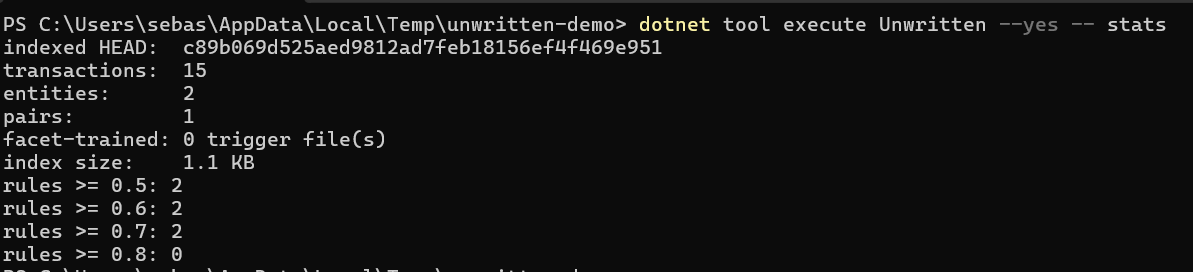
stats shows what the tool has learned — here, one file pair coupled strongly
enough (confidence ≥ 0.7) to block a commit if one side is missing:
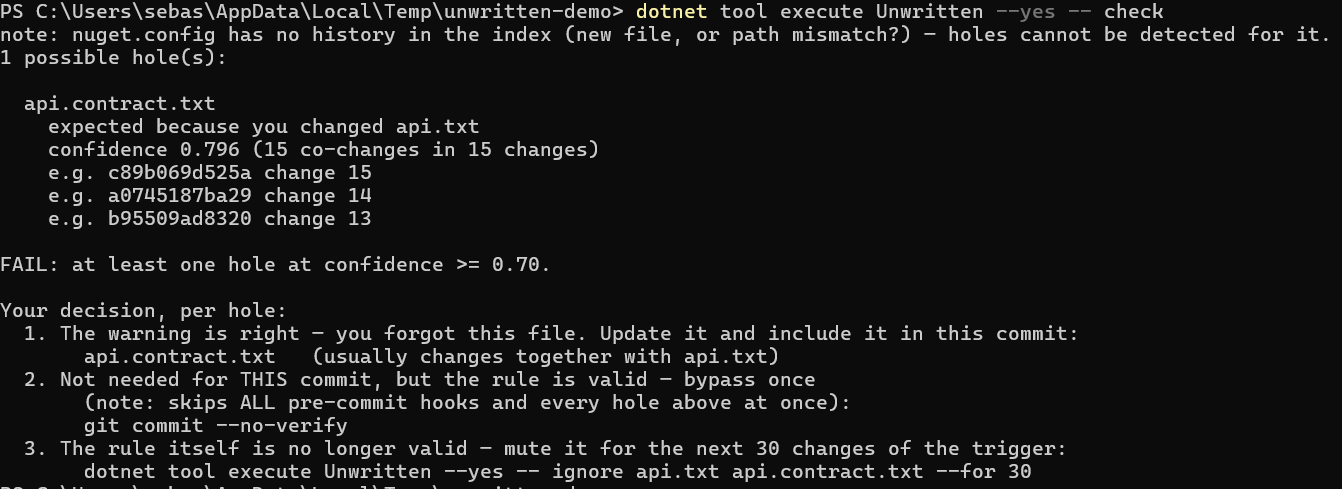
After editing one file of that pair, check warns that its companion is
missing and spells out the three ways to resolve it — update the companion,
commit anyway, or mute the rule:
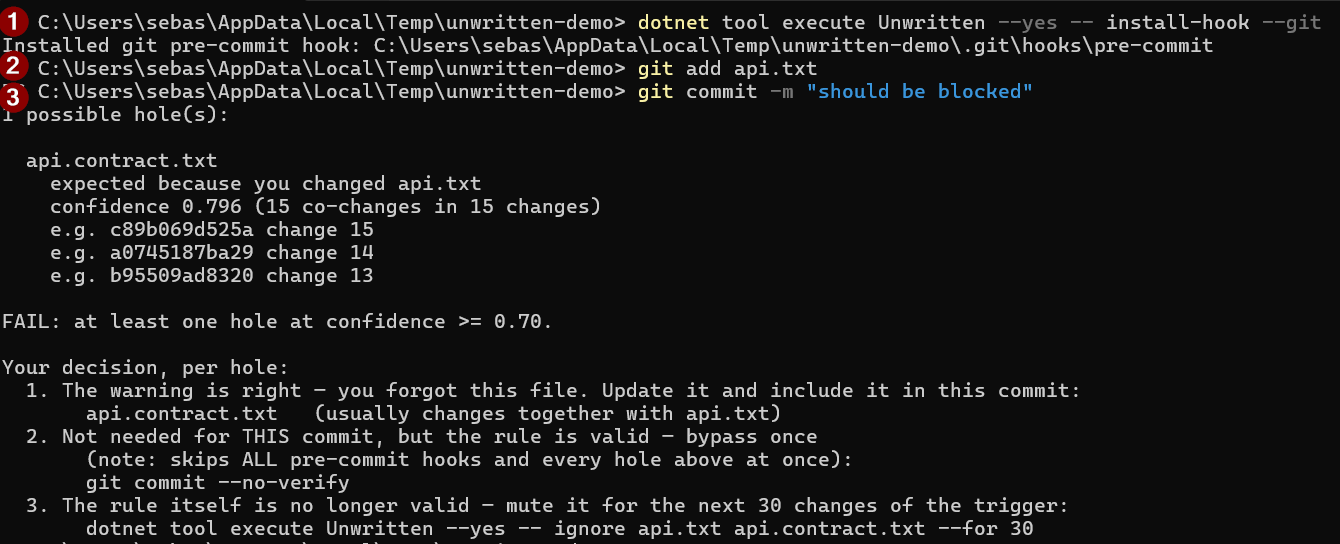
With the pre-commit hook installed, the same check runs automatically on every commit and blocks it while the companion is still missing:
Documentation
Everything else lives in docs/README.md:
- Background & the research behind it
- Why these thresholds (tested on real data)
- Use: MCP server, CLI, hooks, muting false rules
- Configuration reference
- How it works
- What it does NOT do (yet)
License
Comments
New to MCP?
From what the protocol is to installing your first server, these answers cover most first questions.
An open protocol that defines how AI applications connect to external tools and data in a uniform way. Clients talk to the model; MCP servers provide tools, resources and prompt templates. They exchange standard messages, so one server can be reused by many clients.