Chromium Style QR Code Generator
LocalAbout Chromium Style QR Code Generator
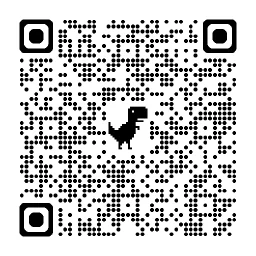
Chromium Style QR Code Generator is an MCP server for creating Chromium-style QR codes in MCP workflows. It supports circular modules, rounded locators, and a Dino or custom center image.
Key features
- 01Generate Chromium-style QR codes
- 02Use circular modules and rounded locators
- 03Add the Dino logo by default
- 04Use a Base64 custom center image
- 05Disable the center image
Use cases
- 01Turn a URL or text into a QR code
- 02Create a QR code with the Dino logo
- 03Place a custom image at the QR center
- 04Generate a QR code without a center image
MCP support
It exposes the generate_qr_code tool to MCP clients over stdio, returning generated codes as PNG images.
Configuration
Local server config is the same for every client. Copy it into your client’s MCP config file.
Tools
1Saved tool list · updated 2w ago
| Parameter | Type | Required | Description |
|---|---|---|---|
| text | string | Yes | The text to encode in the QR code |
| showLogo | boolean | No | Whether to show a center logo (default: true). When true and no customLogo is provided, shows the Chromium Dino logo. |
| customLogo | string | No | Base64-encoded image to use as center logo instead of the default Dino. When provided and showLogo is true, this replaces the Dino logo. |
Details
From the project README@chromium-style-qrcode/mcp
An MCP (Model Context Protocol) server for generating Chromium-style QR codes with circular modules, rounded locators, and an optional center image (Dino logo or custom).
Features
- Chromium-style rendering — circular dot modules, rounded locator corners, matching the QR codes generated by Google Chrome
- Dino logo — the iconic Chrome Dino is drawn in the center by default
- Custom center image — supply a Base64-encoded image to replace the Dino
- Toggle center image — set
showLogo: falseto generate a plain QR code - MCP-native — communicates over stdio, works with any MCP-compatible client
Installation
Note: The
type: "stdio"field is not required — it's the default transport for MCP servers configured withcommandandargs.
Using npx (recommended)
No installation required:
{
  "mcpServers": {
    "io.github.chromium-style-qrcode/mcp": {
      "command": "npx",
      "args": ["-y", "@chromium-style-qrcode/mcp"]
    }
  }
}
Using bunx
{
  "mcpServers": {
    "io.github.chromium-style-qrcode/mcp": {
      "command": "bunx",
      "args": ["@chromium-style-qrcode/mcp"]
    }
  }
}
Global install
npm install -g @chromium-style-qrcode/mcp
Then configure the MCP client:
{
  "mcpServers": {
    "io.github.chromium-style-qrcode/mcp": {
      "command": "chromium-style-qrcode-mcp"
    }
  }
}
Tool
generate_qr_code
Generate a Chromium-style QR code and return it as a PNG image.
Parameters
| Parameter | Type | Required | Default | Description |
|---|---|---|---|---|
text | string | Yes | — | The text or URL to encode |
showLogo | boolean | No | true | Whether to show a center logo |
customLogo | string | No | — | Base64-encoded image to use as the center logo instead of the Dino |
Examples
Basic QR code with Dino logo:
{
  "text": "https://example.com"
}
Plain QR code (no center image):
{
  "text": "https://example.com",
  "showLogo": false
}
QR code with custom center image:
{
  "text": "https://example.com",
  "customLogo": "<base64-encoded image data>"
}
Development
# Install dependencies
bun install

# Run in development
bun run start

# Build
bun run build

# Lint & format
bun run lint
bun run format
Requirements
- Node.js >= 22.14.0
License
Comments
New to MCP?
From what the protocol is to installing your first server, these answers cover most first questions.
An open protocol that defines how AI applications connect to external tools and data in a uniform way. Clients talk to the model; MCP servers provide tools, resources and prompt templates. They exchange standard messages, so one server can be reused by many clients.