
Claudinho — live 2026 World Cup scores for your AI agent (stdio, npm)
LocalAbout Claudinho — live 2026 World Cup scores for your AI agent (stdio, npm)
Claudinho is an MCP server for coding agents and other MCP clients to check football scores, fixtures and standings across the World Cup and club competitions. It also provides match cards, team and bracket data, with a bundled World Cup schedule and read-only tools.
Key features
- 01Live scores and dated fixtures
- 02Competition standings and World Cup bracket
- 03Team next-match lookup
- 04Shareable match and table cards
- 05World Cup market signals and team data
Use cases
- 01Check live scores during a match
- 02Find a team's upcoming fixture
- 03Review competition tables or the World Cup bracket
- 04Create a text card to share a match
MCP support
Runs as a local stdio MCP server, exposing read-only football tools, resources and prompts to MCP clients. The bundled World Cup schedule also supports offline data lookups.
Configuration
Local server config is the same for every client. Copy it into your client’s MCP config file.
npx -y @claudinho/mcpCLAUDINHO_LANGLocale for dates, attribution, and commentary: en, es, pt, or fr (optional; default en)CLAUDINHO_TZIANA timezone for kickoff times, e.g. America/Mexico_City (optional; default system)CLAUDINHO_FLAVORCommentary flair: off, subtle, or full (optional; default full)CLAUDINHO_MARKETSSet to 'off' to hide read-only prediction-market signals (optional; informational only)CLAUDINHO_COMPETITIONThe competition the server answers for, by alias or ESPN slug, e.g. premier-league or eng.1 (optional; a tool call's competition argument wins, else the choice saved with claudinho follow)CLAUDINHO_TEAMThe team get_next_fixture answers for when a call names none, by name or code, e.g. Arsenal or ARS (optional; else the team pinned with claudinho follow --team, under its own competition)Local servers need a runtime on your machine (e.g. Node.js 18+). Config file locations differ by client; see your client’s docs.
Tools
9Saved tool list · updated 3w ago
| Parameter | Type | Required | Description |
|---|---|---|---|
| date | string | No | Date as YYYY-MM-DD (default: today) |
| tz | string | No | IANA timezone for kickoff times, e.g. America/Mexico_City |
| lang | string | No | Locale for dates, provider attribution, and commentary: en, es, pt, fr (the summary scaffold stays English; other locales fall back to en) |
| flavor | enum | No | Commentary flair: off, subtle, full (default: full)off | subtle | full |
Details
From the project README

@claudinho/mcp ⚽
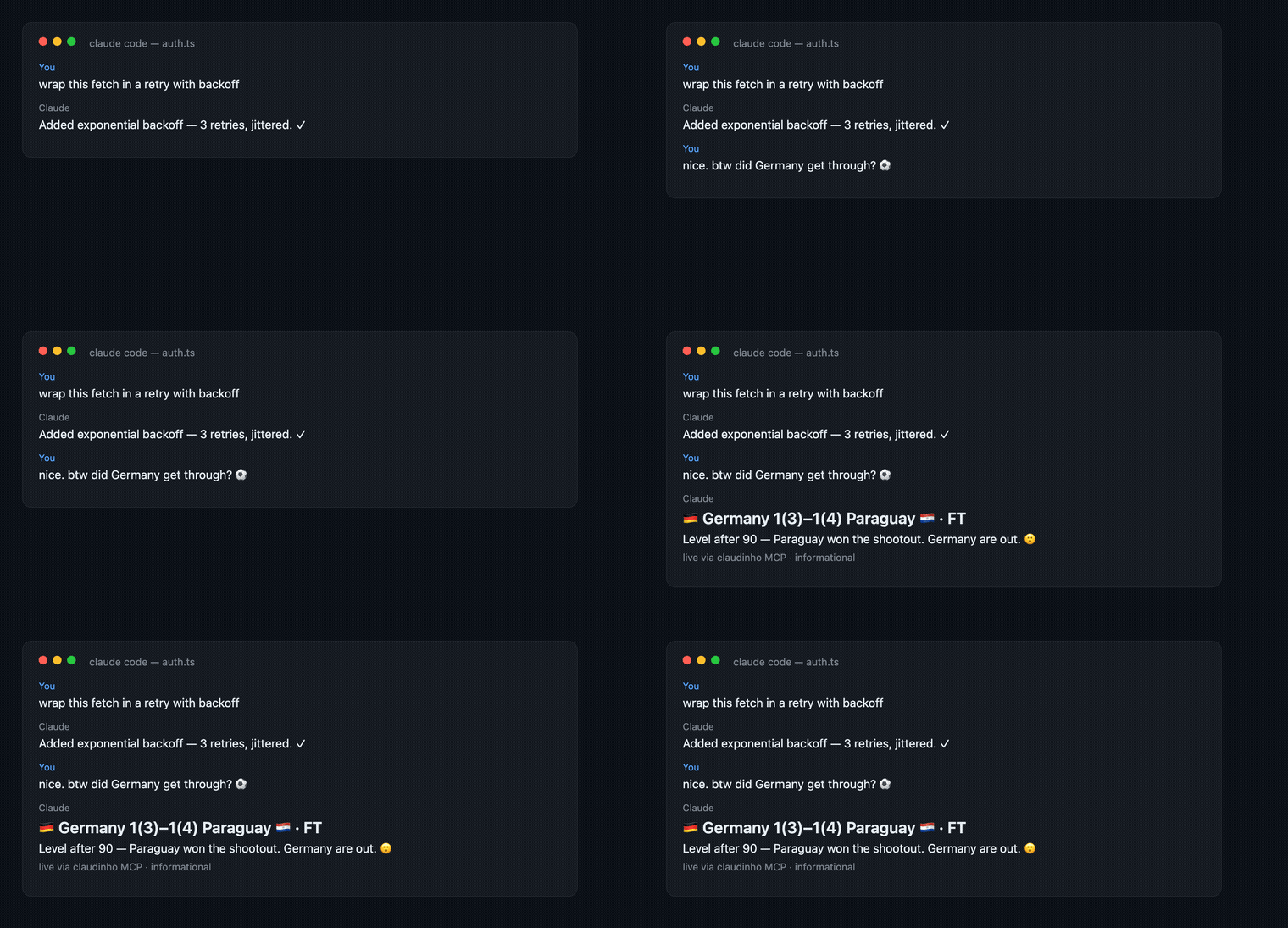
An MCP server that lets your coding agent answer football questions: live scores, fixtures, standings and paste-ready match cards for the competition you follow: the World Cup, the Premier League, LALIGA, the Champions League and 12 more. It works in Claude Code, Cursor, Codex, Claude Desktop, Windsurf, Zed, VS Code and any MCP client that runs a local (stdio) server. No API key, no signup, no account.
Install
The server runs with npx, so it needs Node.js 22 or later. That is the oldest line it runs on, not a security
level: run a patched release of the Node 22 or 24 line.
Claude Code
claude mcp add claudinho -- npx -y @claudinho/mcp
Codex CLI
codex mcp add claudinho -- npx -y @claudinho/mcp
Cursor, Claude Desktop, Windsurf, Zed, VS Code: add this to the client's MCP config (for
Cursor, ~/.cursor/mcp.json or a project's .cursor/mcp.json; for Claude Desktop, Settings →
Developer → Edit Config, then restart). Some clients (VS Code, Zed) put the same command and
args under a key of their own: see your client's MCP docs.
{ "mcpServers": { "claudinho": { "command": "npx", "args": ["-y", "@claudinho/mcp"] } } }
Using Cursor CLI too? claudinho init cursor (from @claudinho/cli) puts the live score in its
statusline and prints this config for you to paste.
Ask your first question
The server answers for one competition at a time. Either name it in your question:
"What Champions League matches are on today?" · "Show me the Premier League table" · "When does Arsenal play next in the Champions League?"
or choose it once with the CLI, and then just ask:
npx @claudinho/cli follow champions-league --team Arsenal
"What matches are on today?" · "Show me the live scores" · "When's our next game?" · "Make me a shareable card for today"
Without a competition, the tools that answer for one say how to choose it.
Tools
Every tool is read-only, and two of them never touch the network.
| Tool | What it does |
|---|---|
get_today | the fixtures for a date (default: today) in the caller's timezone, with live scores |
get_live | the matches in play right now |
get_match | one match by id, with the goals and cards the provider sent for a match in play or finished |
get_next_fixture | a team's next match, by name or code (Arsenal, ARS, Mexico, MEX); with no team, the server's CLAUDINHO_TEAM, else the team the user pinned (claudinho follow <alias> --team <name>) when the request is for its competition |
get_standings | the standings: every table, or one by its key (a group letter, or A1, A-B, LEAGUE) |
get_bracket | the knockout bracket, World Cup only, from the Round of 32 to the final; an optional stage (R32, R16, QF, SF, 3P, F) keeps one round |
get_share_snippet | a plain-text card for a match, a team's next match, a table, the bracket (bracket: true, with an optional knockoutStage), a date or live; hand it to the user as it is |
get_market_signal | World Cup prediction-market odds for a match (matchId), a team's current or next match (team, a 3-letter code such as MEX), or a date; informational only |
get_team | a World Cup nation's name or code to its FIFA code, flag and group (offline) |
list_competitions | the supported competitions, the alias each takes and what each offers, and the one in effect (offline) |
Every tool but get_team takes an optional competition (an alias such as champions-league), and
most take tz, lang (en, es, pt, fr) and flavor (off, subtle, full).
Resources: standings://{group}, and fixtures://{date} (the bundled World Cup schedule).
Prompts: my_team (your team's next match and its standing, in the competition you follow) and
tournament_today.
Prediction-market odds (World Cup)
For World Cup matches, get_today, get_match and a get_share_snippet card for a match, a
team's next match or a date add a short "who's favored" line when a reliable Polymarket market
exists, and get_market_signal reads one on its own. Informational only, not betting advice:
market-implied percentages with Polymarket's attribution, never links or trade calls. Finished
matches never show one. CLAUDINHO_MARKETS=off in the server's env turns the short line off;
get_market_signal still answers.
Commentary
A match line in a tool's text ends with a short line of commentary in the reader's language
(— ¡GOOOOL!), or a team's own rally cry when it has one (Mexico's ¿Y si sí?, Pumas' ¡Goya!,
Arsenal's COYG!). A postponed or cancelled match gets neither. The commentary never appears in
the structured data. Turn it down with CLAUDINHO_FLAVOR=subtle or off in the server's env, or
per call with flavor.
Details for agent builders
Choosing the competition. A request's competition is its competition argument, else the
server's CLAUDINHO_COMPETITION, else the choice claudinho follow <alias> saved. An unknown value
is a tool error that lists the aliases. With none of the three, every competition-answering tool
answers noCompetition: true and competition: null beside its empty shape, with a sentence saying
what to do; list_competitions answers current: null.
What every answer carries. Human-readable text and structured content, validated against each
tool's declared outputSchema. The text starts with the competition it is for (a share card says it
in its title), and the structured content carries it as competition. Two tools differ:
get_team reads the World Cup's nations whatever the competition and carries no competition, and
list_competitions names the one in effect last in its text and as current in its data.
Answers that are not whole. When the provider sent records that could not be read,
get_today, get_live, get_match, get_next_fixture, get_bracket, get_market_signal and
get_share_snippet say so before what they show and carry partial (with omitted, the count of
records left out, when it is known). An empty answer then means nothing was read, not that nothing
exists. In particular, a missing next match does not mean a team is out.
Club competitions. get_next_fixture and get_match search from yesterday to 14 days ahead:
an empty answer carrying horizon or window is about that span. Several teams matching one name
come back as candidates. Between two seasons, get_today, get_live, get_next_fixture and
get_match carry betweenEditions. get_bracket answers inapplicable for a league season with no
knockout tie (the Premier League, LALIGA), and unsupported for every other competition but the
World Cup. A club has no flag. A match's stage is REGULAR for a league's season, LEAGUE for
a cup's league phase, PO for play-offs, or OTHER with the provider's own words in stageLabel.
Markets. get_today, get_match and a get_share_snippet card for a match, a team's next
match, a date or live matches carry marketComplete (a table or bracket card does not), and
get_market_signal carries complete. false means the
optional market read did not finish, which is not the same as "no signal"; the text, and a share
card, say so too. CLAUDINHO_MARKETS_SOURCE=fake gives a clearly labelled, network-free preview.
The process. Stdout carries only the MCP protocol; diagnostics go to stderr.
CLAUDINHO_DEBUG=1 in the server's env prints the data provider's failures there.
How it works
The World Cup's 104 fixtures ship with the package. Every other competition's schedule, and every live score, comes from ESPN's public scoreboard (an answer from it names ESPN). World Cup market odds come from Polymarket's public data. The server keeps its cache in memory only.
Privacy
No accounts, no telemetry, no analytics, no tracking, and no Claudinho server. The server asks ESPN (and Polymarket, for World Cup odds) for public data with nothing about you attached; those services still see standard request metadata, such as your IP address, like any web request. It writes nothing to disk. Full policy: PRIVACY.md.
License
MIT © 2026 Arturo Garrido · source and issues
Independent fan project. Not affiliated with FIFA, any confederation, league or club, or Anthropic.
Built while watching the games. #VibingLaVidaLoca ⚽
Comments
New to MCP?
From what the protocol is to installing your first server, these answers cover most first questions.
An open protocol that defines how AI applications connect to external tools and data in a uniform way. Clients talk to the model; MCP servers provide tools, resources and prompt templates. They exchange standard messages, so one server can be reused by many clients.