
About garmin-mcp
garmin-mcp is a read-only MCP server that lets AI assistants query personal Garmin Connect training, sleep, and recovery data through Garmin's official Personal API. It can run locally or in a user's Cloudflare account, with the cloud setup supporting access from web and mobile clients.
Key features
- 01Read-only access to Garmin data
- 02Training, sleep, and recovery queries
- 03Local and Cloudflare deployment options
- 0426 tools and 5 prompts
- 05Fetches current data when asked
Use cases
- 01Review recent training and recovery before a workout
- 02Compare running totals, pace, or long runs
- 03Examine sleep patterns and heart-rate trends
MCP support
The server exposes Garmin Connect data through MCP tools and prompts. It supports local stdio use and a remote HTTP endpoint for cloud deployment.
Configuration
Local server config is the same for every client. Copy it into your client’s MCP config file.
npx -y garmin-mcpGARMIN_API_KEYSecretYour Garmin Personal API key (Garmin Connect > Settings > Personal API Token)Local servers need a runtime on your machine (e.g. Node.js 18+). Config file locations differ by client; see your client’s docs.
Tools
26Saved tool list · updated 3d ago
| Parameter | Type | Required | Description |
|---|---|---|---|
| date | any | No | YYYY-MM-DD, or 'today' / 'yesterday' (resolved in the user's Garmin time zone). |
Details
From the project READMEgarmin-mcp


Ask your AI assistant about your training, sleep and recovery, using your own Garmin data. It's an MCP server that gives Claude, ChatGPT and other assistants read-only access to your Garmin Connect data through Garmin's official Personal API.
Run it whichever way suits you. The tools are identical:
- Local. Runs on your computer, started by your AI app. About a minute to set up, and all you need is your Garmin key. In Claude Desktop it's a one-click install.
- Cloud. Runs on your own Cloudflare account (the free plan is plenty), behind GitHub sign-in. About 20 minutes to set up, and it then works on all your devices: web, desktop and phone.
It works with Claude, ChatGPT, Claude Code, Codex, Gemini CLI, Cursor, VS Code and other MCP clients. See Local or cloud? for which apps each option covers.
Either way, you get:
- Insight, not another chart. Ask a question and get an answer based on your own data.
- No password. It uses Garmin's official API key, which you can revoke at any time, not your Garmin login.
- No middleman. Data goes straight from Garmin to your computer or your own Cloudflare account. No third-party service stores it.
- Always current. It fetches from Garmin when you ask, so there's no sync to remember.
- No extra cost. It uses the AI subscription you already have, and the cloud option fits Cloudflare's free plan.
Ask things like:
- "Am I ready to train hard today?"
- "How has my resting heart rate and HRV changed since May?"
- "What were my running totals and average pace each month this year?"
- "How much of my running is easy vs hard?"
- "Which day of the week do I sleep worst?"
- "Compare my last two long runs."
- "Give me my km splits for Sunday's race. Did I negative split?"
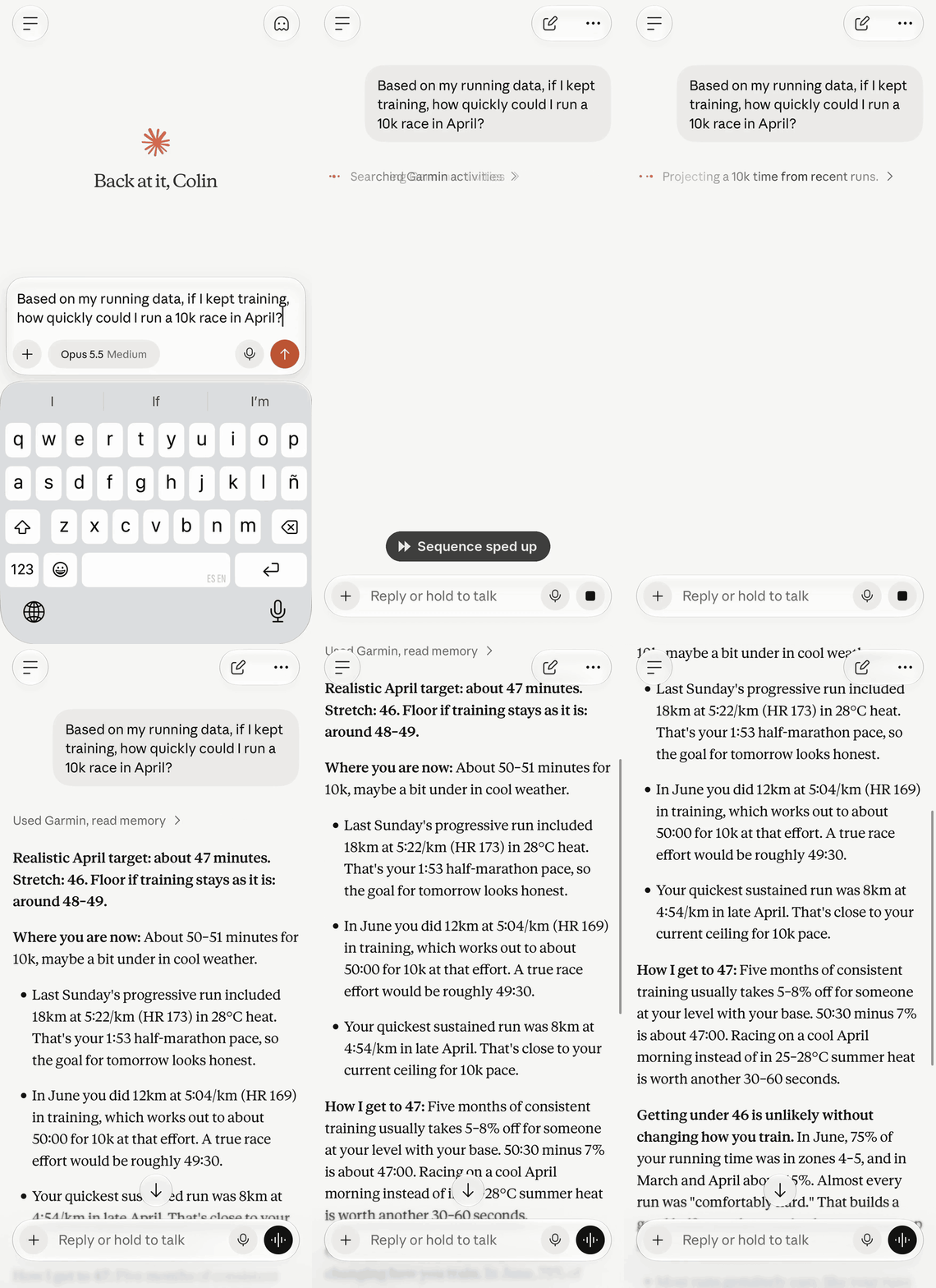
Here it is in Claude on a phone (cloud version), projecting a 10k time from recent runs:
Not affiliated with or endorsed by Garmin. "Garmin" and "Garmin Connect" are trademarks of Garmin Ltd. or its subsidiaries.
Local or cloud?
| Local | Cloud | |
|---|---|---|
| Claude Desktop (one-click install), Claude Code | ✅ | ✅ |
| Codex (CLI, and in the ChatGPT desktop app) | ✅ | ✅ |
| Gemini CLI, Cursor, VS Code | ✅ | ✅ |
| The ChatGPT app: web, desktop chat and phone | ✅ | |
| Claude on the web | ✅ | |
| AI apps on your phone or tablet | ✅ | |
| Works when your computer is off | ✅ | |
| Set up in about 1 minute | ✅ | |
| No Cloudflare or GitHub account needed | ✅ | |
| Garmin key stored only on your computer | ✅ | |
| Nothing listening on the network | ✅ | |
| Cache kept between sessions | ✅ | |
| Free to run | ✅ | ✅ |
| All 26 tools and 5 prompts | ✅ | ✅ |
Still deciding?
I use Claude Desktop or Claude Code on one computer
Go local. You get everything, in about a minute. In Claude Desktop it's a single download: no Node, no config file.
I want to ask from my phone, say right after a run
Go cloud. Phone apps can't start a local process, so they need a server they can reach over the internet.
I use ChatGPT
Go cloud. The ChatGPT app itself (web, desktop chat and phone) connects to remote MCP servers only. Codex is the exception: the Codex CLI, and Codex in the ChatGPT desktop app, can run it locally.
I use more than one computer
Go cloud. Local means installing it on each computer; cloud means setting it up once and adding the URL to each app.
I'm not sure yet
Start local. If you later want it on your phone, set up cloud. There's nothing to migrate, because your data stays in Garmin.
Can I run both?
Yes. They can share a Garmin key.
Which is more secure?
Both are locked down, in different ways. Local has no sign-in because there's nothing to sign in to: only the app that started it can talk to it, and your key sits in that app's config on your computer. Cloud is reachable from the internet, so it's locked to your GitHub account, and your key sits in Cloudflare secrets. See Security model.
How comfortable with a terminal do I need to be?
Local: you paste one command or one config snippet. Cloud: about a dozen commands, plus a few settings in the Cloudflare and GitHub dashboards.
Running locally
Your AI app starts the server as a local process and talks to it directly. There's no Cloudflare or GitHub setup.
All you need is a Garmin Personal API key (see Create a Garmin Personal API key).
Claude Desktop: one click
- Download garmin-mcp.mcpb.
- Double-click it, paste your Garmin key when asked, done.
Claude Desktop runs the extension itself, so you don't need Node or a config file, and your key is stored in your system keychain.
Claude Code, Cursor, VS Code and other apps
These need Node 22 or newer. There's nothing to install separately: your app
runs the garmin-mcp package with
npx.
Claude Code:
claude mcp add garmin --env GARMIN_API_KEY=<your key> -- npx -y garmin-mcp
Cursor, VS Code and other apps (or Claude Desktop, if you'd rather not use the extension): add this to the app's MCP config:
{
	"mcpServers": {
		"garmin": {
			"command": "npx",
			"args": ["-y", "garmin-mcp"],
			"env": {
				"GARMIN_API_KEY": "<your key>"
			}
		}
	}
}
VS Code's mcp.json uses "servers" instead of "mcpServers".
Codex
For the Codex CLI and Codex in the ChatGPT desktop app, which share one
config. Add this to ~/.codex/config.toml (needs Node 22 or newer):
[mcp_servers.garmin]
command = "npx"
args = ["-y", "garmin-mcp"]
env = { GARMIN_API_KEY = "<your key>" }
Gemini CLI
Add this under "mcpServers" in ~/.gemini/settings.json (needs Node 22 or
newer):
"garmin": {
	"command": "npx",
	"args": ["-y", "garmin-mcp"],
	"env": { "GARMIN_API_KEY": "<your key>" }
}
Restart the app, then try "Am I ready to train today?".
Running in the cloud
MCP client ──OAuth──▶ Worker (/mcp) ──Bearer JWT──▶ Garmin Personal API
                         │
                         └─ /authorize ──▶ GitHub sign-in ──▶ allowed user ID? ──▶ token
Each person deploys their own copy to their own Cloudflare account. It's locked to a single GitHub account, so your Garmin data is only ever reachable by you.
What you need
- A Garmin Connect account and a Garmin device
- A Cloudflare account (free plan)
- A GitHub account
- Node 22 or newer
- About 20 minutes
Run all commands from the repo folder.
1. Install and log in to Cloudflare
git clone https://github.com/colincooperio/garmin-mcp.git
cd garmin-mcp
npm install
npx wrangler login
cp wrangler.example.jsonc wrangler.jsonc
wrangler.jsonc is git-ignored, so your settings never get committed.
2. Create the KV namespace
npx wrangler kv namespace create OAUTH_KV
Paste the id it prints into wrangler.jsonc, replacing YOUR_KV_NAMESPACE_ID.
3. Lock it to your GitHub account
Open https://api.github.com/users/<your-github-username> and copy the numeric
id. Put it in wrangler.jsonc as ALLOWED_GITHUB_USER_ID.
It uses the numeric ID rather than your username because usernames can be changed and then claimed by someone else.
4. Work out your Worker's URL
It will be https://garmin-cloud-mcp.<your-subdomain>.workers.dev. Your
workers.dev subdomain is on the Workers & Pages overview in the Cloudflare
dashboard.
Set MCP_RESOURCE in wrangler.jsonc to that URL with /mcp on the end.
5. Create a GitHub OAuth app
Go to GitHub → Settings → Developer settings → OAuth Apps → New OAuth App and fill in:
- Homepage URL:
https://garmin-cloud-mcp.<your-subdomain>.workers.dev - Authorization callback URL:
https://garmin-cloud-mcp.<your-subdomain>.workers.dev/callback
Then generate a client secret.
6. Create a Garmin Personal API key
Go to Garmin Connect → Personal API Token → Create Key. Pick 1 year and copy the key; Garmin shows it only once.
7. Store the secrets
Each command prompts you to paste the value.
npx wrangler secret put GITHUB_CLIENT_ID
npx wrangler secret put GITHUB_CLIENT_SECRET
npx wrangler secret put COOKIE_ENCRYPTION_KEY   # paste output of: openssl rand -hex 32
npx wrangler secret put GARMIN_API_KEY
If wrangler asks to create the Worker first, say yes.
8. Deploy
npm run deploy
This type-checks and runs the full test suite before it deploys. If anything
fails, nothing ships. The test output includes a few labelled expected error
lines: those come from tests that check the Worker refuses bad requests.
9. Connect your AI apps
Your server URL is https://garmin-cloud-mcp.<your-subdomain>.workers.dev/mcp.
Every app opens a GitHub sign-in the first time; sign in and approve.
- Claude: Settings → Connectors → Add custom connector, and paste the URL. The connector follows your Claude account onto every device.
- ChatGPT: add it as a custom connector (MCP server) with OAuth authentication. Custom connectors need developer mode and depend on your plan; see OpenAI's help pages for the current steps.
- Claude Code:
claude mcp add --transport http garmin <url>, then run/mcpto sign in. - Cursor, VS Code and other MCP apps: add a remote (HTTP) MCP server with the URL. Apps that support MCP OAuth handle the sign-in themselves.
Try "Am I ready to train today?". In apps that show MCP prompts, such as Claude's connector menu, you can also pick a ready-made prompt.
Why this one
Compared with password-based Garmin MCP servers
Most Garmin MCP servers predate the Personal API. They log in with your Garmin email and password and call Garmin Connect's private web endpoints, running on your own machine.
| Password-based | This, local | This, cloud | |
|---|---|---|---|
| Garmin access | Your email + password, session tokens on disk | Official Personal API key: revocable, expires (30 days to 1 year) | Same as local |
| Breaks when Garmin changes its login or MFA | Yes, regularly | No, it uses the documented API | No |
| Works in web and phone apps | No | No | Yes |
| If the credential leaks | Your whole Garmin account | Read-only health data, until you delete the key | Same as local, and the key sits in Cloudflare secrets, not on a laptop |
The trade-off: the Personal API covers less. It has no golf scorecards, training plans, Garmin Training Status, race predictions, gear, courses or write access. The server tells the model this up front, so it says it isn't available instead of hunting for it.
Compared with a basic wrapper of the API
A one-tool-per-endpoint wrapper works, but it's slow and expensive in tokens: Garmin returns 100+ fields per activity and a reading every two minutes for heart rate. This server does the heavy lifting itself:
- Questions answered in one call.
get_readiness,summarize_wellnessandsummarize_activitiesfetch, join and aggregate in the server. Five months of runs comes back as about 1,000 characters instead of about 190,000. - Compact by default. Readable units, flattened rows, hourly heart rate
instead of every reading. Every tool has
detail: "full"for the raw data. - Garmin's per-call limits handled. Some endpoints only allow 28 or 31 days per request. Longer ranges are split and fetched in parallel, so the model makes one call, not four plus a failure.
- Named periods in your time zone.
last_30_days,this_week,last_month,today,yesterdayresolve using the time zone in your Garmin profile. - Times in your local time, even on DST nights. Garmin sends times as raw
epochs, GMT strings and "local" values, and its local values are an hour out
on the nights the clocks change. Every time comes back as your local
YYYY-MM-DD HH:MM, worked out from the exact moment and your profile's time zone, or from your watch's time zone when you're travelling. - Partial results. If one source fails (say HRV for a night), the rest still comes back with a short note, so the model doesn't retry everything.
- Caching. Data at least 3 days old has settled, so it's cached for 7 days, and activity details for a day. Activity analyses never change, so they're cached indefinitely (only the derived tables, never the file). Follow-up questions skip Garmin. (Locally, the cache lasts until the app restarts the server.)
- Things Garmin's API doesn't give you directly: per-km/mile splits and best efforts (computed from the activity's FIT file in the server, so a two-hour run comes back as a few KB of tables, not 7,000 samples), training load (acute:chronic ratio), time in heart-rate zones (for one activity, the watch's own figures with the zones you had then, so they match Garmin Connect), weekday patterns, distance-weighted pace, side-by-side activity comparison.
- Prompt templates for apps that support MCP prompts (such as Claude's connector menu): Am I ready to train today?, Sleep report, Training review, Weekly check-in, Compare recent sessions.
Tools
All tools are read-only. Ranges can be up to 92 days (366 for the
summarize_* tools). Every range tool also takes period, and single-day
tools take today or yesterday. For the summarize_* tools, a start_date
on its own means "since then": the range ends today.
Start here. These answer common questions in one call with a small response:
| Tool | Answers |
|---|---|
get_readiness | "How recovered am I?", "How did I sleep?": that night's sleep, HRV vs baseline, resting HR, Body Battery, each against your previous 7 days; training load; the last 3 days of training |
summarize_wellness | Sleep, resting HR, HRV, stress, steps and Body Battery trends: by week, month, weekday or overall |
summarize_activities | Training totals: distance, time, pace, HR, training load and time in HR zones, by week, month, weekday or overall |
compare_activities | 2–5 activities side by side |
get_activity_analysis | One activity from its original FIT file: per-km or per-mile splits, the watch's laps and workout reps, best efforts (1 km to marathon), time in HR zones as the watch recorded it, first- vs second-half drift |
Detail. Compact by default; pass detail: "full" for Garmin's raw data.
| Tool | Data |
|---|---|
get_daily_summaries | One row per day: steps, calories, HR, intensity minutes, stress, Body Battery |
get_sleep_summaries / get_sleep | Sleep hours by stage, score, HR, respiration, SpO2, sleep need and what drove it, over a range or for one night |
get_hrv_summaries / get_hrv | HRV over a range, or one night's readings |
get_body_battery, get_stress, get_steps | Daily series over a range (Body Battery includes the day's key readings) |
get_heart_rate | One day, as hourly min/avg/max, plus every reading in a from/to window if given |
get_spo2, get_fitness_age | Single-day detail |
get_weight, get_weight_goals, get_hydration, get_wellness_activity_summaries | Ranges |
search_activities | Individual activities, filterable by type, subtype, race, distance, duration, elevation gain, name and area, sortable by distance or speed |
get_activity, get_activity_workouts | One activity in detail |
get_nutrition, get_menstrual_cycle | Single-day detail |
get_profile | Units, time zone and heart-rate zones |
Together these cover every endpoint in
Garmin's Personal API spec,
including the activity file download that get_activity_analysis reads.
There's deliberately no "GET any path" tool: with one, the model guessed at
endpoints that don't exist and wasted calls.
Training load
The acute:chronic ratio compares the last 7 days with the average week of the last 28. Garmin's own Training Status isn't in the Personal API, so the server computes it from the best measure every activity in the window has, and says which it used:
- Garmin's per-activity training load, on watches that record it
- Heart-rate zone load (minutes in each zone × zone number), on any watch or strap with heart rate
- Moving minutes, when there's no heart-rate data
It uses one measure for the whole window, because mixing them would make the ratio meaningless. Treat it as a guide, not Garmin's figure.
Looking after it
Rotating the Garmin key. Garmin emails you before the key expires. Create a new key, then:
- Local: replace
GARMIN_API_KEYin your AI app's MCP config and restart the app. For Claude Code, runclaude mcp remove garminand add it again. For the Claude Desktop extension, paste the new key into the extension's settings in Claude Desktop. - Cloud: run
npx wrangler secret put GARMIN_API_KEY. It takes effect immediately, and cached data is tied to the key that fetched it.
Then delete the old key in Garmin Connect.
Updating.
- Claude Desktop extension: download the new garmin-mcp.mcpb from the latest release and double-click it.
- Local with
npx:npxfetches the latest version each time your AI app starts the server, so just restart the app. To stay on a fixed version, use[email protected]in place ofgarmin-mcpin your config. - Cloud:
git pull, thennpm installandnpm run deploy. Yourwrangler.jsoncisn't touched by updates. Ifwrangler.example.jsoncgains a new setting, copy it across.
Logs. Locally, the server logs to your AI app's MCP log. In the cloud, run
npm run tail, or use Workers → garmin-cloud-mcp → Logs in the Cloudflare
dashboard. Logs record errors and rejected logins, never your Garmin data.
Cutting off all access at once. Delete the Garmin key in Garmin Connect;
that stops both local and cloud. For cloud, you can also set
ALLOWED_GITHUB_USER_ID to "0" and run npx wrangler deploy: every
connected app is refused on its next request.
Rolling back a bad cloud deploy. npx wrangler rollback.
A value is empty? Some fields depend on your device. Ask again with
detail: "full" to see everything Garmin sent. If the field is there, the
compact answer is missing it: please open an issue.
Security model
Both
- Read-only, fixed paths. Every tool calls a fixed Garmin path with GET. There's no tool that writes to Garmin or fetches an arbitrary URL.
- Your data's path. Garmin → your computer or your Worker → your AI app. It ends up in whichever chats you use the tools in, under that provider's data policies.
Local
- No network listener. The server talks over stdin and stdout to the app that started it, and nothing else can connect. That's why there's no sign-in. Never wrap it in an HTTP proxy or expose it on a network; use the cloud version for remote access.
- Garmin credentials. The key lives in your AI app's MCP config on your computer. The bearer token and cached responses are held in memory and gone when the process exits.
Cloud
- Only you can get a token. After GitHub sign-in, the callback compares
GitHub's numeric user ID with
ALLOWED_GITHUB_USER_ID. Anyone else gets a 403 before an MCP token exists. Every/mcprequest re-checks the ID, so changing it revokes existing sessions. - Fails closed. An unset,
"0"or non-numeric allowed ID lets nobody in. - Minimal GitHub access. The GitHub token is requested with no scopes, used once to read your user ID, and discarded.
- Standard OAuth. OAuth 2.1 with PKCE (S256), CSRF-protected consent, and
tokens bound to the
/mcpresource, via@cloudflare/workers-oauth-provider. - Garmin credentials. The key lives only in Cloudflare secrets. The 24-hour bearer token is cached in KV under a hash of the key, never the key itself. Cached past-date responses live in the same KV namespace, in your Cloudflare account only, and expire after 7 days. Activity analyses (split and lap tables, never the FIT file or GPS positions) are kept there indefinitely, since an activity's file never changes.
- No private addresses.
global_fetch_strictly_publicblocks the Worker from fetching private addresses.
Found a security problem? Please report it privately through GitHub's Security → Report a vulnerability on this repo rather than opening an issue.
Contributing
Bug reports and pull requests are welcome; see CONTRIBUTING.md for how to report issues, run the tests and cut a release.
Known limits
- One Garmin account per cloud deployment or local install. To share with family, each person sets up their own copy with their own Garmin key.
- Personal API coverage only. No golf, training plans, Garmin Training Status, race predictions, VO2 max history, personal records, gear, courses, badges or social.
- Read-only. It can't log activities, weight, hydration or food, or change goals, settings or workouts. The Personal API has no write access, so your AI app can read your Garmin data but never change it.
- No raw activity files or GPS tracks.
get_activity_analysisreads the FIT file in the server and returns only derived tables; the file, samples and positions never reach the model. Manual entries and GPX/TCX imports have no FIT data, so the tool says so instead. - Rate limits unpublished. Garmin hasn't published Personal API rate limits. A 429 comes back as a clear tool error.
Credits
The OAuth flow is adapted from Cloudflare's
remote-mcp-github-oauth
demo. src/workers-oauth-utils.ts is vendored from it under its MIT licence.
Author
Built by Colin Cooper.
License
Comments
New to MCP?
From what the protocol is to installing your first server, these answers cover most first questions.
An open protocol that defines how AI applications connect to external tools and data in a uniform way. Clients talk to the model; MCP servers provide tools, resources and prompt templates. They exchange standard messages, so one server can be reused by many clients.