
About PDF Redaction MCP
PDF Redaction MCP detects and redacts personally identifiable information in PDFs. It is for users processing digital or scanned documents, with custom prompts and entity-type filtering.
Key features
- 01Redaction with custom prompts
- 02Filter detections by entity type
- 03Process multiple languages
- 04Support digital and scanned PDFs
Use cases
- 01Redact personal data in PDFs
- 02Redact selected entity types in documents
MCP support
The MCP server lets MCP clients use the PDF Redaction API to detect and redact PDF content.
Configuration
Remote servers need no local install. Pick your client, then copy the config or install in one click.
https://api.pdf-redaction.com/mcp/claude mcp add --transport http com-pdf-redaction-pdf-redaction https://api.pdf-redaction.com/mcp/{"mcpServers":{"com-pdf-redaction-pdf-redaction":{"type":"http","url":"https://api.pdf-redaction.com/mcp/"}}}Open in Cursor{"servers":{"com-pdf-redaction-pdf-redaction":{"type":"http","url":"https://api.pdf-redaction.com/mcp/"}}}Open in VS Code{"mcpServers":{"com-pdf-redaction-pdf-redaction":{"type":"http","url":"https://api.pdf-redaction.com/mcp/"}}}{"mcpServers":{"com-pdf-redaction-pdf-redaction":{"serverUrl":"https://api.pdf-redaction.com/mcp/"}}}Run commands in a terminal; paste JSON into the client’s MCP config and restart. Servers that need sign-in will prompt on first connect.
Tools
Details
From the project README

Secure Your PDFs with AI-powered Redaction



PDF Redaction API
It is example of using API for https://pdf-redaction.com
Free API for redacting PDFs available at https://api.pdf-redaction.com/api/docs
Key Features
- Redact PDF using custom prompt
- Filter detected entities by type
- Support for multiple languages
- Support Digital and Scanned(image based) PDFs
API Key
For generate API Key please go to the: https://pdf-redaction.com/apikeys/
For check usage: https://pdf-redaction.com/apikeys/usage/

Put API Key to the env variable PDF_REDACTION_API_KEY or to .env file.
Limitations
Limitations for free version:
- 10 page per request
- 100 Free requests per month
- 5 requests per minute
🚀 Instant Install self-hosted PDF Redaction API
-
Option A (curl):
/bin/bash -c "$(curl -fsSL https://raw.githubusercontent.com/StabRise/pdf-redaction-api/main/install.sh)" -
Option B (wget):
/bin/bash -c "$(wget -qO- https://raw.githubusercontent.com/StabRise/pdf-redaction-api/main/install.sh)"
Jupyter Notebooks with examples
| Chapter | Notebook |
|---|---|
| 1: PDF Redaction API | |
| 2: PDF Redaction API base64 | |
| 3: PDF Redaction API using prompt | |
| 4: Redact QR Codes from PDF | |
| 5: Redact Rotated/Vertical text in PDF | |
| 6: Redact Signatures from PDF | |
| 7: Redact Faces from PDF | |
| 8: Redact custom PII data | |
| 9: Detect PII in PDF (no redaction) | |
Redaction PDF using custom prompt
This provides the flexibility to redact PDF using custom prompt.
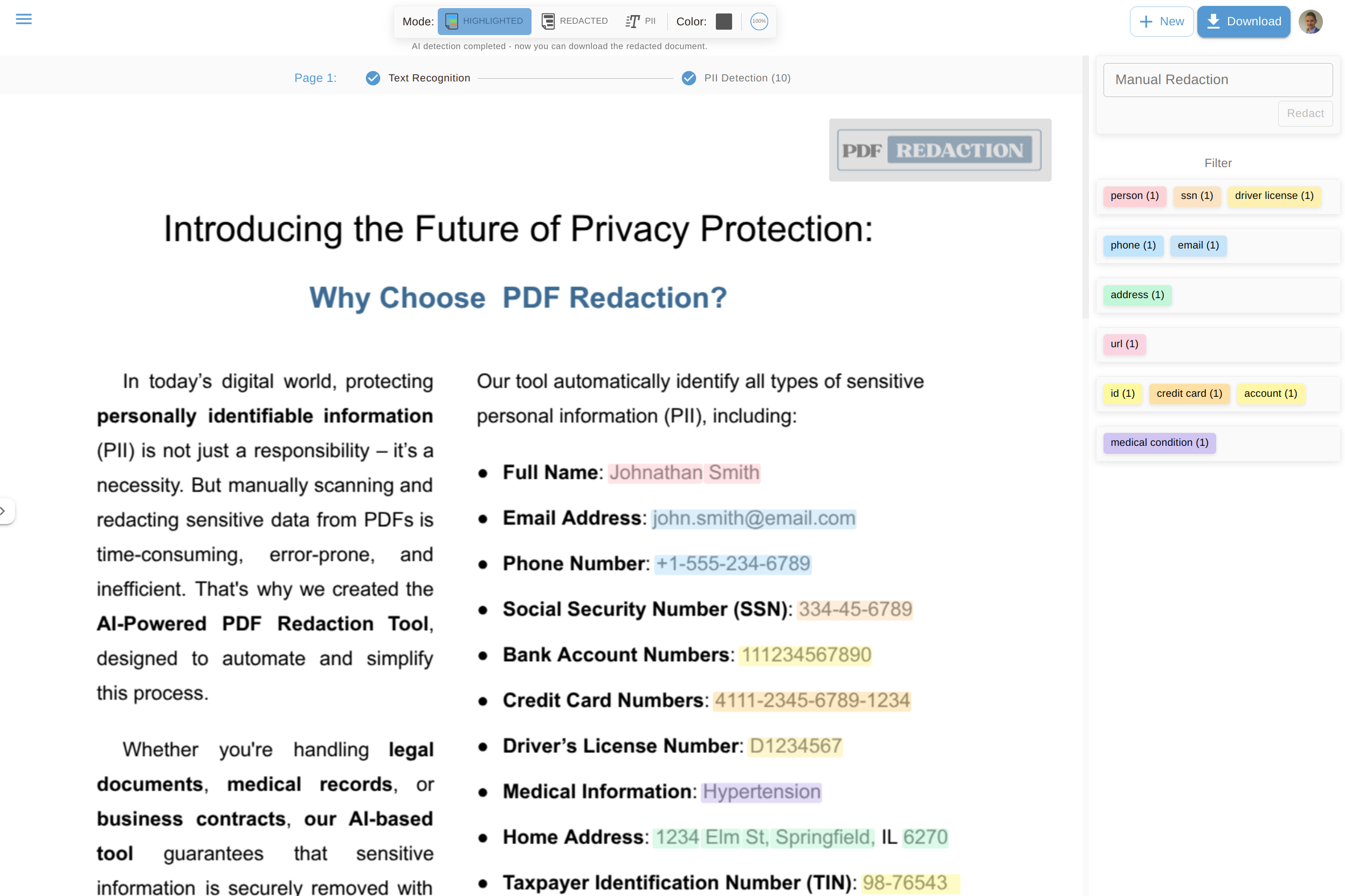
Demo with web UI
You can try it out for free at https://pdf-redaction.com
Comments
New to MCP?
From what the protocol is to installing your first server, these answers cover most first questions.
An open protocol that defines how AI applications connect to external tools and data in a uniform way. Clients talk to the model; MCP servers provide tools, resources and prompt templates. They exchange standard messages, so one server can be reused by many clients.