
About OpenSumi
OpenSumi is a framework for quickly building AI Native IDE products, with a built-in MCP client. It is aimed at teams that want to create customized IDEs in desktop or web form.
Key features
- 01Framework for building AI native IDEs
- 02Built-in MCP client
- 03Tool calls through connected MCP servers
- 04Electron-based desktop IDE support
- 05CodeBlitz pure web IDE framework
Use cases
- 01Developing a customized AI IDE product
- 02Building cloud or browser-based IDEs
- 03Creating a desktop IDE application on the framework
MCP support
OpenSumi acts as an MCP client, connecting to MCP servers and invoking the tools they provide.
Configuration
Local server config is the same for every client. Copy it into your client’s MCP config file.
We haven’t collected a package or remote endpoint for this server. Follow the instructions in the project README.
Tools
Local servers expose tools only once running on your machine, and the maintainer has not provided a tool list.
Details
From the project README

OpenSumi
A framework helps you quickly build AI Native IDE products.









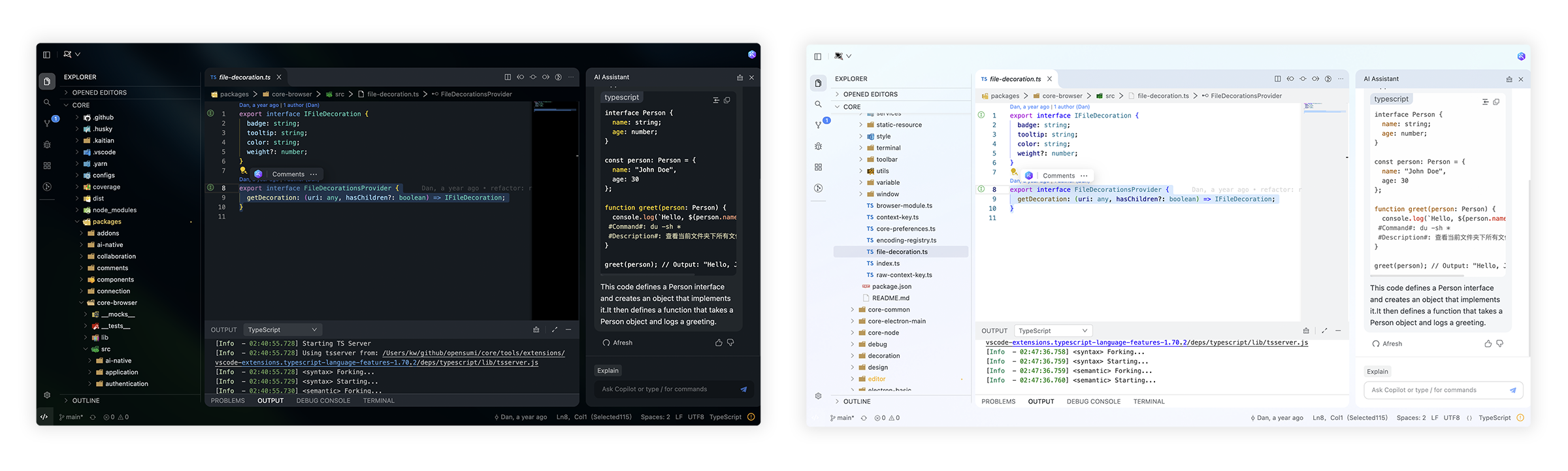
🌟 Getting Started
Here you can find some of our example projects and templates:
- Cloud IDE
- Desktop IDE - based on the Electron
- CodeFuse IDE - AI IDE based on OpenSumi
- CodeBlitz - A pure web IDE Framework
- Lite Web IDE - A pure web IDE on the Browser
- The Mini-App liked IDE
⚡️ Development
$ yarn install
$ yarn run init
$ yarn run download-extension  # Optional
$ yarn run start
By default, the tools/workspace folder in the project would be opened, or you can run the project by specifying the directory in the following way:
$ MY_WORKSPACE={local_path} yarn run start
Usually, you may still encounter some system-level environment dependencies. You can visit Development Environment Preparation to see how to install the corresponding environment dependencies.
📕 Documentation
For complete documentation: opensumi.com
📍 ReleaseNotes & BreakingChanges
You can see all the releasenotes and breaking changes here: CHANGELOG.md.
🔥 Contributing
Read through our Contributing Guide to learn about our submission process, coding rules and more.
🙋♀️ Want to Help?
Want to report a bug, contribute some code, or improve documentation? Excellent! Read up on our Contributing Guidelines for contributing and then check out one of our issues labeled as help wanted or good first issue.
🧑💻 Needs some help?
Go to our issues or discussions to create a topic, it will be resolved as soon as we can.
✨ Contributors
Let's build a better OpenSumi together.
|

|

|
We warmly invite contributions from everyone. Before you get started, please take a moment to review our Contributing Guide. Feel free to share your ideas through Pull Requests or GitHub Issues.
📃 License
Copyright (c) 2019-present Alibaba Group Holding Limited, Ant Group Co. Ltd.
Licensed under the MIT license.
This project contains various third-party code under other open source licenses.
See the NOTICE.md file for more information.
Comments
New to MCP?
From what the protocol is to installing your first server, these answers cover most first questions.
An open protocol that defines how AI applications connect to external tools and data in a uniform way. Clients talk to the model; MCP servers provide tools, resources and prompt templates. They exchange standard messages, so one server can be reused by many clients.