
About Dbhub
DBHub is a minimal database MCP server for PostgreSQL, MySQL, SQL Server, MariaDB, Oracle, and SQLite, with zero dependencies and two default tools to conserve context. It suits developers who want MCP clients to query databases with read-only or limited access.
Key features
- 01Zero-dependency lightweight MCP server
- 02Two default tools to save tokens
- 03Single interface across multiple databases
- 04Read-only mode, row limits, and query timeouts
- 05SSH tunneling and SSL/TLS encryption
- 06Built-in Workbench web interface
Use cases
- 01Exploring schemas from Claude Code or Cursor during local development
- 02Exposing read-only views to non-technical staff
- 03Replacing several per-database MCP servers with one process
- 04Running read-only diagnostics on production databases
MCP support
DBHub is an MCP server that exposes tools such as execute_sql and search_objects to clients like Claude Desktop, Claude Code, and Cursor, and supports custom tools defined in dbhub.toml.
Configuration
Local server config is the same for every client. Copy it into your client’s MCP config file.
npx -y @bytebase/dbhubDSNSecretDatabase connection string (e.g., postgres://user:pass@host:5432/db)DB_TYPEDatabase type: postgres, mysql, mariadb, sqlserver, oracle, sqliteDB_HOSTDatabase hostnameDB_PORTDatabase portDB_USERDatabase usernameDB_PASSWORDSecretDatabase passwordDB_NAMEDatabase name or SQLite file pathTRANSPORTTransport mode: stdio or httpPORTHTTP server port (default: 8080)IDInstance identifier for tool namesSSH_HOSTSSH server hostnameSSH_PORTSSH server port (default: 22)SSH_USERSSH usernameSSH_PASSWORDSecretSSH passwordSSH_KEYSecretPath to SSH private keySSH_PASSPHRASESecretSSH key passphraseSSH_AUTH_SOCKSecretPath to SSH agent socketLocal servers need a runtime on your machine (e.g. Node.js 18+). Config file locations differ by client; see your client’s docs.
Tools
Local servers expose tools only once running on your machine, and the maintainer has not provided a tool list.
Details
From the project READMENote
If you need an enterprise-level database MCP server with built-in guardrails like approval flow, access control, data masking, and audit logging beyond what DBHub offers, check out Bytebase.

            +------------------+    +--------------+    +------------------+
            |                  |    |              |    |                  |
            |  Claude Desktop  +--->+              +--->+    PostgreSQL    |
            |                  |    |              |    |                  |
            |  Claude Code     +--->+              +--->+    SQL Server    |
            |                  |    |              |    |                  |
            |  Cursor          +--->+    DBHub     +--->+    Oracle        |
            |                  |    |              |    |                  |
            |  VS Code         +--->+              +--->+    SQLite        |
            |                  |    |              |    |                  |
            |  Copilot CLI     +--->+              +--->+    MySQL         |
            |                  |    |              |    |                  |
            |                  |    |              +--->+    MariaDB       |
            |                  |    |              |    |                  |
            +------------------+    +--------------+    +------------------+
                 MCP Clients           MCP Server             Databases
DBHub is a minimal MCP server: token-efficient, zero-dependency, and just two tools by default with opt-in extras. This lightweight gateway allows MCP-compatible clients to connect to and explore different databases:
- Minimal: Zero dependency, token efficient with a minimal set of MCP tools to maximize context window
- Multi-Database: PostgreSQL, MySQL, MariaDB, SQL Server, Oracle, and SQLite through a single interface
- Multi-Connection: Connect to multiple databases simultaneously with TOML configuration
- Guardrails: Read-only mode, row limiting, and query timeout to prevent runaway operations
- Secure Access: SSH tunneling and SSL/TLS encryption
DBHub is the official example in the Claude Code docs for connecting to PostgreSQL via MCP.
Token Efficiency
DBHub loads just 2 tools by default at 1.4k tokens — 13-14x fewer than alternatives — keeping the context window open for your actual work.
| MCP Server | Default Config | Default Tools |
|---|---|---|
| DBHub | 1.4k | 2 (execute_sql, search_objects) |
| MCP Toolbox | 19.0k | 28 |
| Supabase MCP | 19.3k | all |
Use Cases
- Local Development: Schema exploration, query validation, and data debugging with Claude Code, VS Code, Cursor, etc.
- Non-Technical Access: Expose curated, read-only views to non-technical staff via Claude Desktop, VS Code, Cursor, etc.
- Multi-Database Consolidation: Replace separate MCP servers for each database with a single DBHub process
- Production Troubleshooting: Read-only diagnostics with guardrails against runaway queries
Supported Databases
PostgreSQL, MySQL, SQL Server, MariaDB, Oracle, and SQLite.
MCP Tools
DBHub implements MCP tools for database operations:
- execute_sql: Execute SQL queries with transaction support and safety controls
- search_objects: Search and explore database schemas, tables, columns, indexes, and procedures with progressive disclosure
- explain_sql (opt-in): Show a query's execution plan without running it
- health_check (opt-in): Report connection pool state and buffer cache hit ratio
- Custom Tools: Define reusable, parameterized SQL operations in your
dbhub.tomlconfiguration file
Workbench
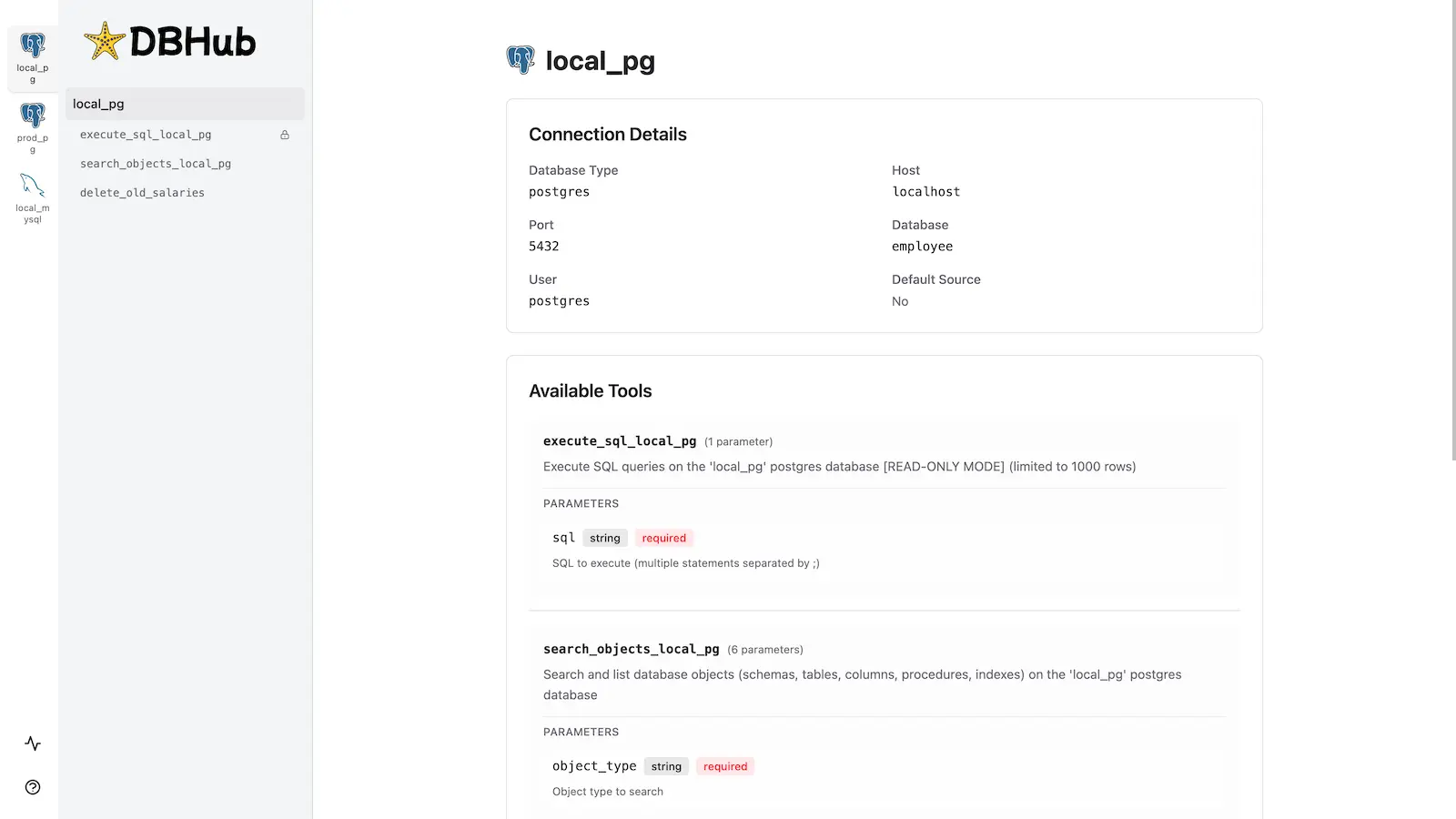
DBHub includes a built-in web interface for interacting with your database tools. It provides a visual way to execute queries, run custom tools, and view request traces without requiring an MCP client.
Installation
npx @bytebase/dbhub@latest --transport http --port 8080 --dsn "postgres://user:password@localhost:5432/dbname?sslmode=disable"
Also available as:
- Docker image
- MCP Bundle (one-click install, read-only)
- Claude Code plugin
See the Installation Guide for all options, Command-Line Options for parameters, and Multi-Database Configuration for connecting several databases at once.
Development
Requires Node.js >= 22.5.0 (DBHub uses the built-in node:sqlite module).
# Install dependencies
pnpm install

# Run in development mode
pnpm dev

# Build and run for production
pnpm build && pnpm start --transport stdio --dsn "postgres://user:password@localhost:5432/dbname"
Contributors
Star History
Comments
New to MCP?
From what the protocol is to installing your first server, these answers cover most first questions.
An open protocol that defines how AI applications connect to external tools and data in a uniform way. Clients talk to the model; MCP servers provide tools, resources and prompt templates. They exchange standard messages, so one server can be reused by many clients.