
Distri: A Composable Agent Framework
LocalAbout Distri: A Composable Agent Framework
Distri is an open-source AI agent framework written in Rust for developers running and composing agents through a CLI, API, or React application. Agents are defined in Markdown with TOML frontmatter, with support for sub-agents, skills, tracing, and A2A invocation.
Key features
- 01Define agents in Markdown
- 02Run via CLI, API, or React
- 03Built-in, HTTP, external, and MCP tools
- 04Load skills and delegate to sub-agents
- 05Remote execution in sandboxed containers
- 06A2A protocol and invocation traces
Use cases
- 01Run a single agent task from the CLI
- 02Embed an agent in a React app
- 03Delegate work to specialized sub-agents
- 04Trace agent, LLM, and tool calls
MCP support
The framework supports MCP tools in agent execution flows and also supports external client-side tools.
Configuration
Local server config is the same for every client. Copy it into your client’s MCP config file.
We haven’t collected a package or remote endpoint for this server. Follow the instructions in the project README.
Tools
Local servers expose tools only once running on your machine, and the maintainer has not provided a tool list.
Details
From the project READMEDistri



Distri is an open-source AI agent framework built in Rust. Define agents in markdown, connect your product functions as tools, and run them from the CLI, as an API server, or embedded in your React UI.
Documentation · Website · Distri Cloud
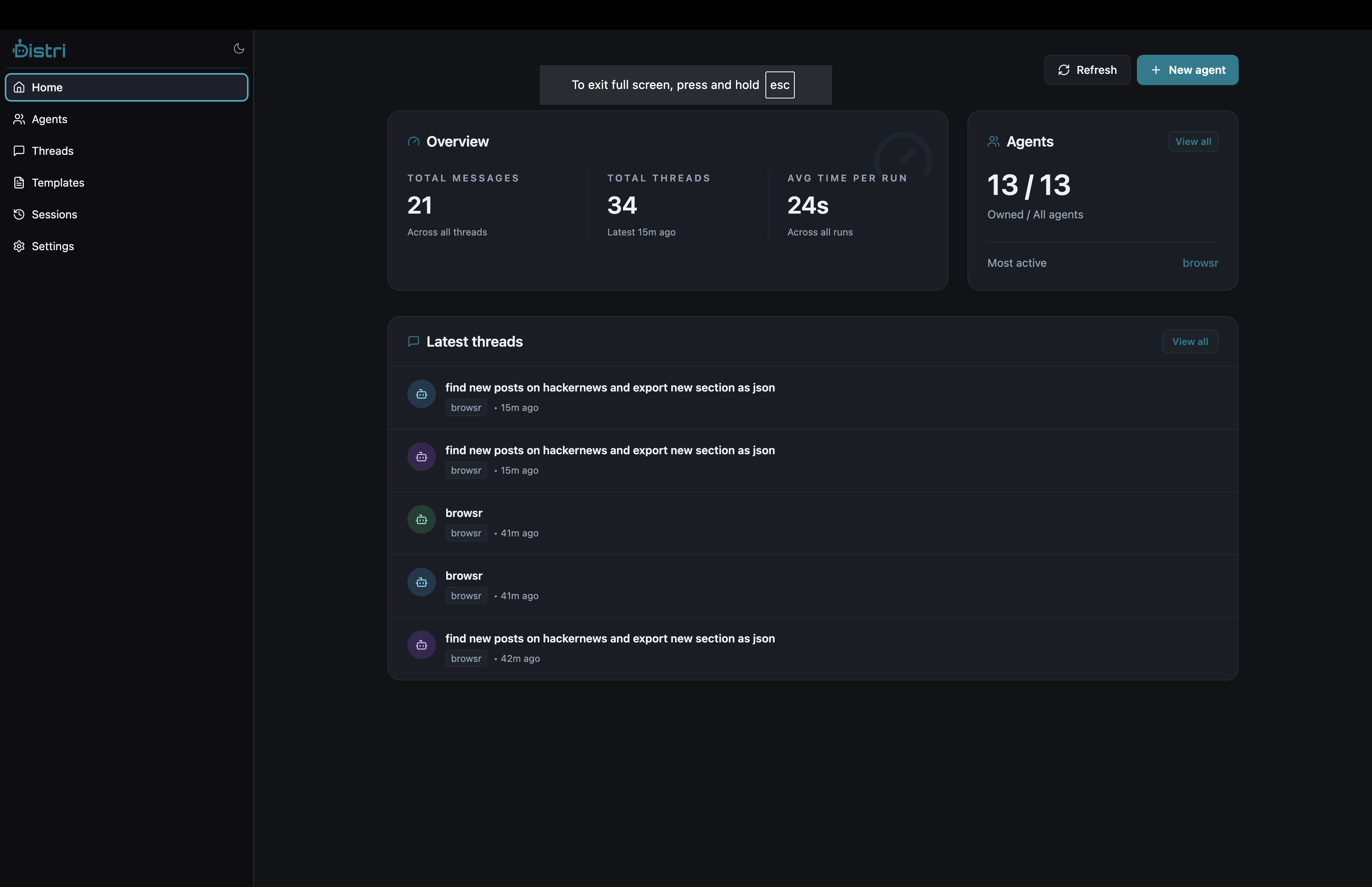
Why Distri
- Agents as markdown — Define behavior, tools, and model settings in a single
.mdfile with TOML frontmatter - Built-in tool system — Builtins (search, shell, browser), dynamic HTTP tools, external client-side tools, and MCP support
- Skills — On-demand knowledge documents agents load at runtime via
load_skill, with automatic re-injection after context compaction - Sub-agents — Agents delegate to specialized child agents with isolated context and token budgets
- Remote execution — Run agents in sandboxed containers for untrusted code or resource isolation
- React SDK — Drop-in
<Chat />component with streaming, tool renderers, voice, and developer mode - A2A compatible — Implements the A2A protocol for agent discovery and invocation
- Self-hosted — Run on your own infrastructure with SQLite. No external dependencies required.
Installation
# Install script (macOS / Linux)
curl -fsSL https://distri.dev/install.sh | sh

# Homebrew
brew tap distrihub/distri && brew install distri

# Verify
distri --version
Other platforms
Direct download:
# darwin-arm64 | darwin-x86_64 | linux-arm64 | linux-x86_64
TARGET=darwin-arm64
curl -L "https://github.com/distrihub/distri/releases/latest/download/distri-${TARGET}.tar.gz" -o distri.tar.gz
sudo tar -xzf distri.tar.gz -C /usr/local/bin distri
Windows (PowerShell):
Invoke-WebRequest https://github.com/distrihub/distri/releases/latest/download/distri-windows-x86_64.zip -OutFile distri.zip
Expand-Archive distri.zip -DestinationPath $Env:LOCALAPPDATA\distri -Force
$Env:Path += ";$Env:LOCALAPPDATA\distri"
Run
Once installed, start the server and web UI:
distri serve
The first run downloads the matching distri-server binary and UI bundle from
github.com/distrihub/distri/releases
into ~/.distri/. Opens your browser automatically to http://localhost:7777.
Serve options
| Flag | Behavior |
|---|---|
distri serve | Default: resolve+spawn distri-server, serve the UI, open browser |
--port 8080 | Override port (default 7777) |
--no-ui | API-only mode (no web interface) |
--no-browser | Don't auto-open the browser |
--server-version 0.5.3 | Pin a specific server version |
--ui-version 0.5.7 | Pin a specific UI version |
Lifecycle commands
| Command | Behavior |
|---|---|
distri serve | Resolve+spawn distri-server, serve the UI |
distri update | Pull the latest server + UI within the compat range |
distri update --pre | Allow pre-release versions |
distri version | Print installed CLI / server / UI versions |
distri uninstall | Wipe ~/.distri/{bin, ui, cache} |
Quick Start
Run a built-in agent
distri run search --task "What are the top programming languages in 2026?"
Define your own agent
Create agents/my_agent.md:
---
name = "my_agent"
description = "A helpful assistant with web search"
max_iterations = 15

[tools]
builtin = ["final", "search"]
---

# My Agent

You are a helpful assistant. Use the search tool to find current information.

{{task}}
Run it
# Interactive chat
distri tui my_agent

# Single task
distri run --agent my_agent --task "Find the latest SpaceX launch date"

# Start as API server
distri serve --port 8080
Push to Distri Cloud
distri login
distri agents push agents/my_agent.md
Built-in Agents
| Agent | Purpose | Example |
|---|---|---|
| search | Web search + scrape | distri run search --task "latest AI news" |
| fast_search | Quick single-query lookups | distri run fast_search --task "population of Tokyo" |
| web | Browser automation + scraping | distri run web --task "scrape HN top 5 stories" |
| code | Sandboxed code execution | distri run code --task "sum of primes below 1000" |
| deepresearch | Multi-phase research with sub-agent delegation | distri run deepresearch --task "state of quantum computing" |
| distri | Master orchestrator | distri run distri --task "find and calculate..." |
| coder | Full coding agent (shell + web + files) | distri run coder --task "build a REST API" |
| agent_designer | Design new agent definitions | distri run agent_designer --task "design a stock alert agent" |
Requires
BROWSR_BASE_URLandBROWSR_API_KEYfor search, browser, and shell tools. Configured automatically on Distri Cloud.
Agent Definition Format
Agents are markdown files with TOML frontmatter:
---
name = "my_agent"
description = "What this agent does"
max_iterations = 25
context_size = 80000
sub_agents = ["search", "code"]     # delegate to other agents

[tools]
builtin = ["final", "search", "load_skill"]
external = ["Read", "Write", "Edit"]  # client-side tools

[[tools.dynamic]]
name = "my_api"
type = "http"
description = "Call my API"
config = { base_url = "$API_URL", headers = { "Authorization" = "Bearer $TOKEN" } }

[[available_skills]]
id = "*"
name = "*"
---

# System Prompt

Your instructions here. Supports Handlebars templates:
- {{task}} — the user's message
- {{> skills}} — available skills listing
- {{> connections}} — available connections
See Agent Definition docs for the full schema.
Skills
Skills are reusable instruction documents agents load on demand:
---
name = "data_pipeline"
description = "How to run the data transformation pipeline"
tags = ["data", "etl"]
context = "inline"
---

# Data Pipeline

## Steps
1. Fetch data with `my_api` tool...
2. Transform using Python...
# Push skills
distri skills push skills/data_pipeline.md
distri skills list
Agents call load_skill("data_pipeline") at runtime. Two modes:
- Inline (default) — content injected into conversation, survives context compaction
- Fork — spawns isolated child agent with skill as instructions
React SDK (DistriJS)
Embed agents in your React app:
npm install @distri/react
import { useAgent, Chat } from '@distri/react';

function App() {
  const { agent } = useAgent({ agentIdOrDef: 'my_agent' });
  return <Chat agent={agent} threadId="conversation-1" />;
}
Features: SSE streaming, tool execution with custom renderers, voice I/O, developer mode, browser-side file tools (IndexedDB-backed Read/Write/Edit/Glob/Grep).
See the DistriJS docs for full integration guide.
CLI Reference
Server & UI
distri serve                        # Start server + UI on port 7777
distri serve --port 8080            # Custom port
distri serve --no-ui                # API-only
distri update                       # Pull latest server + UI
distri version                      # Show versions
distri uninstall                    # Clean ~/.distri/
Agent & skill management
distri                              # Interactive TUI
distri run --task "..." [--agent A] # Run a task
distri run --task "..." --remote    # Run in sandboxed container

distri agents list / push / delete  # Manage agents
distri skills list [-a] / push      # Manage skills
Debugging & tools
distri traces list / show ID [-v]   # Debug with trace viewer
distri tools list / invoke          # Inspect and test tools
Connections & config
distri connections list / token     # OAuth connections
distri secrets list / set / delete  # Manage secrets
distri workflows run / push         # DAG workflows

distri login                        # Auth with Distri Cloud
distri profile list / use / config  # Multi-profile management
Invocation & Traces
Distri has two invocation APIs, both fully traced (agent → steps → LLM → tools,
with tokens/cost/latency and provenance) in the Traces view / distri traces list:
| API | Endpoint | What it does |
|---|---|---|
execute | POST /v1/agents/{id} (A2A message/send | message/stream) | Run a full agent |
llm_execute | POST /v1/llm/execute | A single LLM call (great for high-volume grading/extraction) |
// JS (@distri/core)
const agent = await Agent.create('scoring_agent', client)
await agent.invoke({ /* messages */, contextId, tags: { team: 'growth' } })   // execute
await client.llm(messages, tools, { agent_id: 'scoring_agent', thread_id, title })  // llm_execute
// Rust (distri client)
run_agent(&client, RunOptions { agent: Some("scoring_agent".into()), task, thread_id,
                                tags: Some(tags), trace_context: None, ..Default::default() }, cb).await?;   // execute
client.llm_execute(LlmExecuteOptions::new(LLmContext { thread_id, label, messages, ..Default::default() })
                       .with_agent_id("scoring_agent".into())).await?;          // llm_execute
distri run --agent scoring_agent --task "grade: 2+2=4" --tag team=growth # CLI
Grouping calls into one trace: give related calls the same thread / context id
(contextId on execute, thread_id on llm_execute) — Distri derives the trace id
from it, so they collapse into a single trace (e.g. all grading calls of one eval run).
For cross-process propagation, pass an explicit trace_context { trace_id, parent_span_id }
on execute to nest the agent's spans under a caller's existing trace.
See the full guide: Traces & Tracing Context.
Architecture
distri/
├── distri-types/          # Shared type definitions
├── distri-cli/            # CLI binary
├── distri/                # Client library
├── distri-formatter/      # Output formatting
│
├── server/
│   ├── distri-core/       # Agent engine (orchestrator, loop, tools, LLM)
│   ├── distri-server/     # HTTP server (actix-web, A2A endpoints)
│   ├── distri-stores/     # Storage backends (SQLite, Postgres)
│   ├── distri-auth/       # Auth providers
│   ├── distri-parsers/    # Parsing utilities
│   └── agents/            # Built-in agent definitions (.md)
│
└── samples/               # Example applications
    └── scraper/           # Web scraping agent
Execution Flow
User message → AgentOrchestrator
  → Load agent definition
  → Create ExecutorContext (thread, task, run)
  → AgentLoop
    → PlanningStrategy.plan() → LLM produces plan
    → ExecutionStrategy.execute_step() per step
      → Tool calls (builtin, dynamic, external, MCP)
      → Event streaming (SSE)
    → Loop until final tool or max iterations
  → Return result
Development
# Build
cargo build

# Run tests
cargo test

# Test a specific crate
cargo test -p distri-core
This repo is the Rust backend only. The TypeScript SDK (@distri/core,
@distri/react, @distri/components) lives in
distrihub/distrijs.
Samples
| Sample | Type | Description |
|---|---|---|
| scraper | CLI/Rust | Web scraping and data extraction agent |
Licensing
- Root and common components: MIT License
- Server components (
server/): Elastic License 2.0 — follows fair-code principles
Links
Comments
New to MCP?
From what the protocol is to installing your first server, these answers cover most first questions.
An open protocol that defines how AI applications connect to external tools and data in a uniform way. Clients talk to the model; MCP servers provide tools, resources and prompt templates. They exchange standard messages, so one server can be reused by many clients.