
About Rowbase
Rowbase is a database client for people and AI agents, with a built-in MCP server and read-only defaults across MySQL, MariaDB, PostgreSQL, and SQLite. It combines visual query tools with compact TOON results.
Key features
- 01Read-only-by-default connections
- 02MySQL, MariaDB, PostgreSQL, SQLite support
- 03Visual query builder and filtering
- 04Schema navigation and autocomplete
- 05CSV, JSON, Markdown, SQL export
- 06Compact TOON results
Use cases
- 01Let an AI agent inspect schemas and query data
- 02Build queries without writing SQL
- 03Review and save row edits with SQL preview
MCP support
Its built-in MCP server exposes tools for schema discovery, sampling, querying, explaining SQL, and finding references. Writes require explicit permission; results use the compact TOON format.
Configuration
Local server config is the same for every client. Copy it into your client’s MCP config file.
Tools
11Saved tool list · updated 2w ago
This tool takes no parameters.
Details
From the project README
Rowbase
A fast, good-looking, read-only-by-default database client — for humans and for AI agents.
MySQL / MariaDB · PostgreSQL · SQLite · native macOS app · one-file app for macOS, Linux & Windows · built-in MCP server






Why Rowbase?
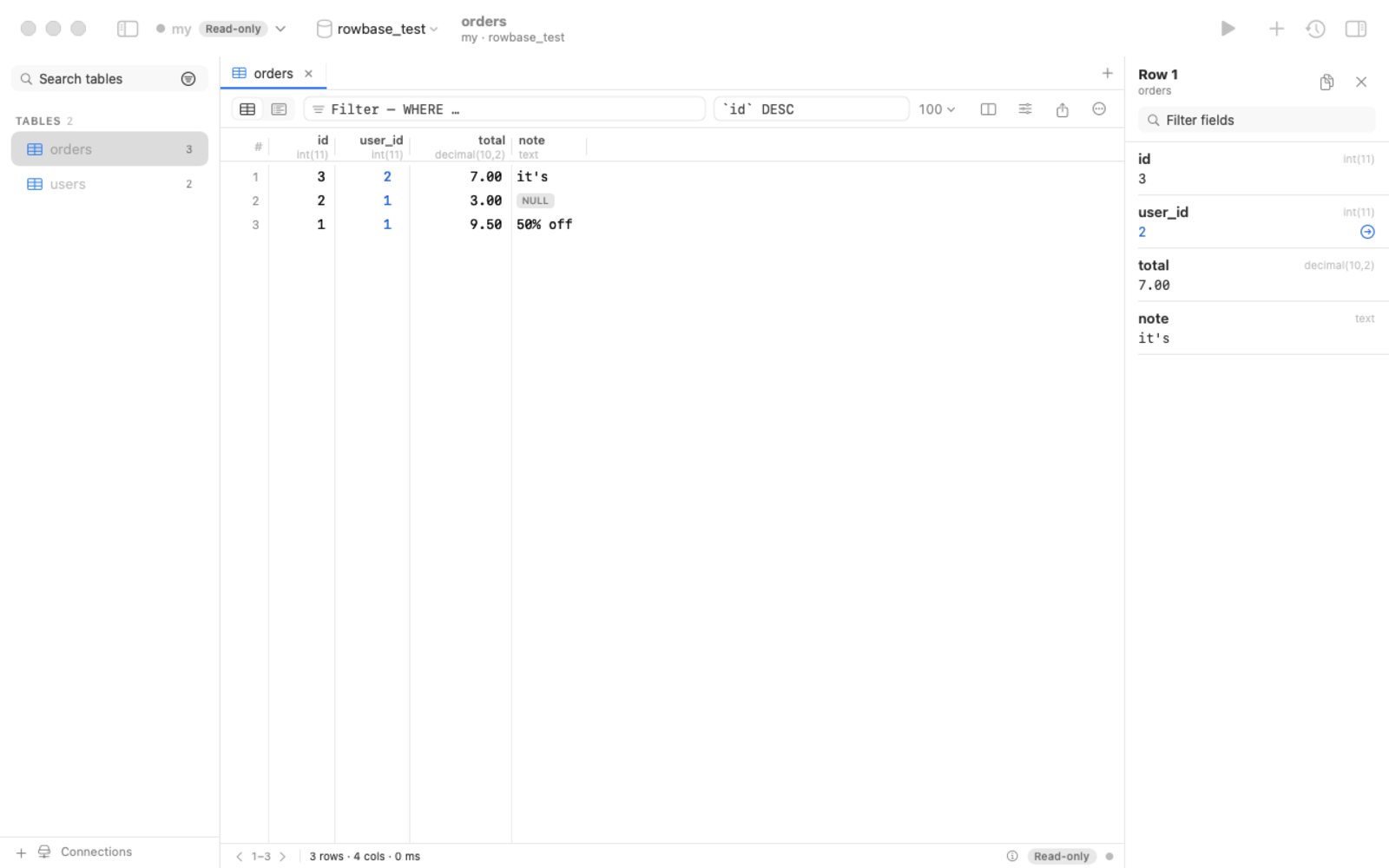
- Safe by default. Every connection is read-only until you say otherwise — enforced at four independent layers
(driver-level single statement, SQL guard,
READ ONLYtransaction, timeouts). Production connections get a red accent. - Made for AI assistants too. A built-in MCP server lets Claude, Cursor, Codex & co. explore your schema and query data — read-only unless you allow writes, with a token-efficient output format (TOON) and a built-in guide so the assistant knows how to use it. One copy-paste prompt sets everything up.
- One file, no installer. Download a single binary for macOS, Linux or Windows and run it — no admin rights, no Python, no drivers to install. Or use the native macOS app.
- No SQL required. Filter any column from its header like in DataGrip — pick values from a list with counts, or use contains / starts with / between / LIKE / regex / NULL — and build whole queries visually (joins, counts and sums, conditions, sorting) in the query builder, with the generated SQL shown live.
- Nice to use. Foreign-key navigation (also for UUID references without FKs, e.g. 1C-style schemas), "referenced by", transpose, column picker, schema-aware autocomplete, EXPLAIN highlighting, query cancel, inline editing with SQL preview, export to CSV/JSON/Markdown/SQL, SSH tunnels.
- Open source under Apache-2.0. Passwords live in your OS keychain, never in config files.
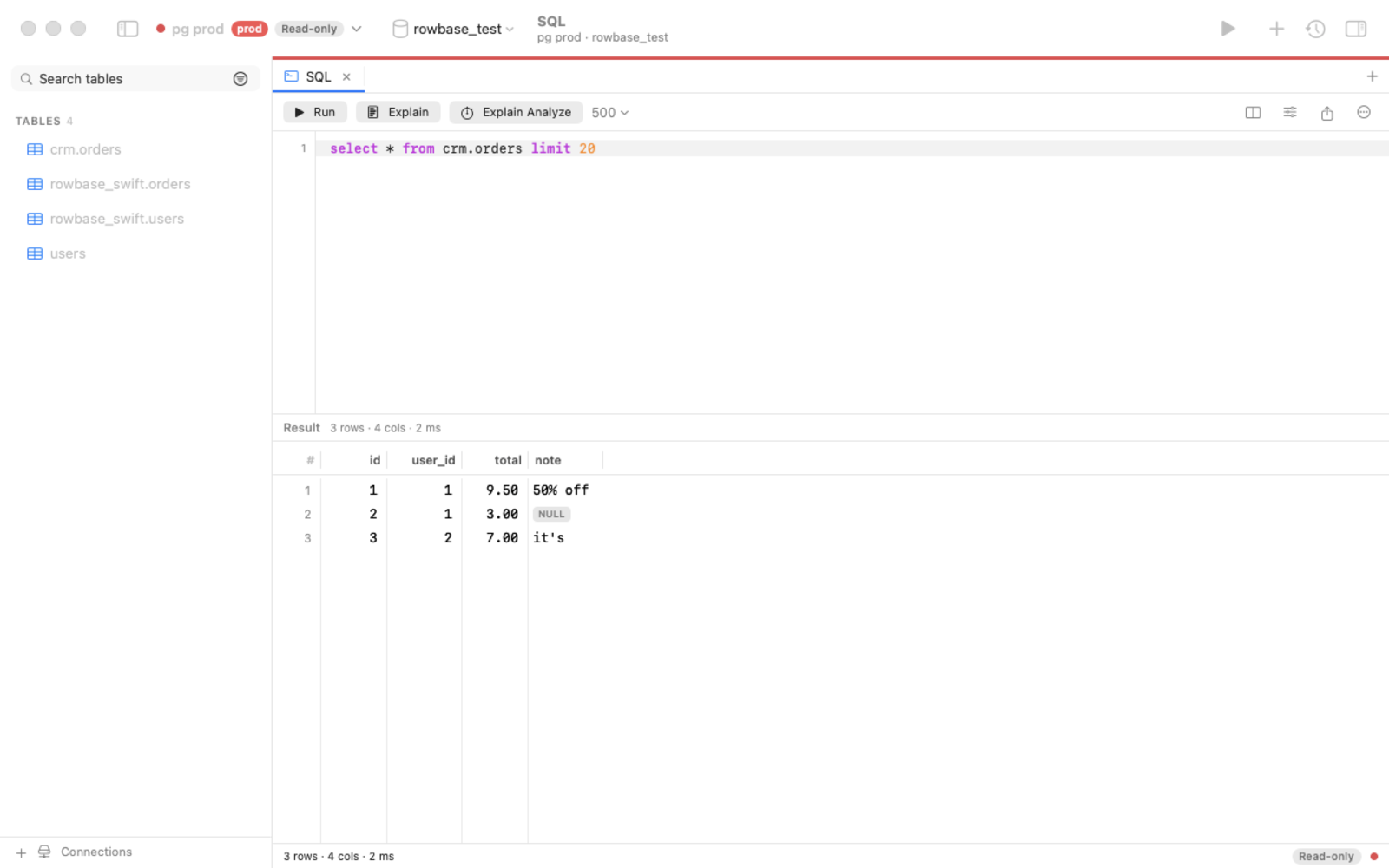 | 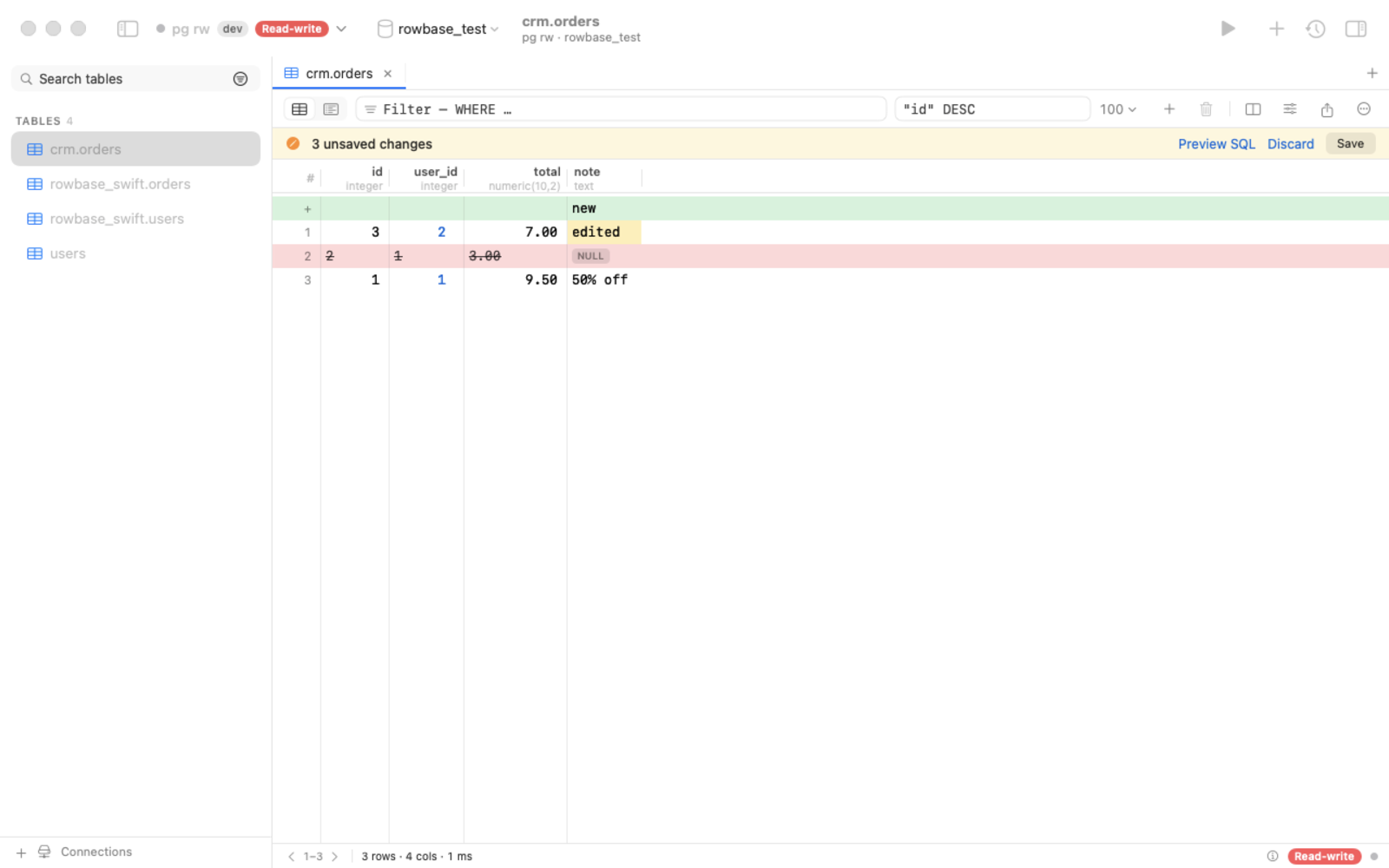 |
| SQL editor: autocomplete, ⌘↩ runs the statement under the caret, EXPLAIN, cancel | Edit rows safely: pending changes, SQL preview, one atomic save |
Download
Grab the latest from Releases:
| Platform | File | How to run |
|---|---|---|
| macOS (native app) | Rowbase-x.y.z.dmg | open, drag to Applications |
| macOS (one file) | rowbase-macos-arm64 | chmod +x rowbase-macos-arm64 && ./rowbase-macos-arm64 |
| Ubuntu / Debian | rowbase_x.y.z_amd64.deb / _arm64.deb | double-click → Install (or sudo apt install ./rowbase_*.deb), then start Rowbase from the apps menu |
| Linux, no root | one command | curl -fsSL https://raw.githubusercontent.com/djstreet11/Rowbase/main/packaging/install.sh | sh — installs to ~/.local/bin + apps menu |
| Linux x64 / arm64 (one file) | rowbase-linux-x64 / -arm64 | chmod +x rowbase-linux-* && ./rowbase-linux-x64 (Ubuntu 20.04+, Debian 10+, RHEL 8+) |
| Windows 10 / 11 | rowbase-windows-x64.exe | double-click |
Started without arguments (or from the apps menu), Rowbase opens the web UI in your browser; starting it again just
reopens the page. A downloaded Linux one-file binary has no "executable" flag, so a double-click does nothing — use the
.deb or the install command above, or chmod +x it. Builds are not code-signed yet:
macOS → System Settings → Privacy & Security → Open Anyway; Windows → More info → Run anyway.
Updates. The Mac app: Rowbase → Check for Updates… (from 0.3.0). One-file binaries: rowbase update, or the
Update button in the web UI. PyPI installs: pipx upgrade rowbase-db. The only request is an anonymous check of
GitHub Releases, at most once a day — no telemetry; turn it off with ROWBASE_NO_UPDATE_CHECK=1.
Connect your AI assistant (MCP)
Open AI / MCP in the app, click Copy prompt, paste it into your assistant — it registers the server, reads the built-in guide and creates a reusable skill. Or register manually:
claude mcp add rowbase -- /path/to/rowbase mcp          # one-file binary or app
claude mcp add rowbase -- uvx --from rowbase-db rowbase mcp   # straight from PyPI, nothing to download
Listed in the official MCP Registry as io.github.djstreet11/rowbase.
Results come back as compact TOON tables (~40% fewer tokens than JSON):
rows[2]{id,customer,total}:
  1,"Smith, Bob",9.50
  2,ann,null
truncated: false
Tools: guide, connections, databases, tables, describe, search_schema, sample, count, query, explain, find_ref
(+ apply_changes only when you allow writes). Details: docs/MCP.md.
CLI
Install from PyPI (pipx install rowbase-db / uv tool install rowbase-db) or use a one-file download.
rowbase add shop 'postgres://[email protected]/shop?ssh=deploy@bastion'   # read-only unless --rw
rowbase tables -c shop
rowbase q "SELECT * FROM orders WHERE status = 'new'" -c shop --format json
rowbase ui        # web UI on http://127.0.0.1:8765
rowbase mcp       # MCP server (stdio)
rowbase doctor    # environment report
rowbase update    # update a one-file binary in place (--check: only check)
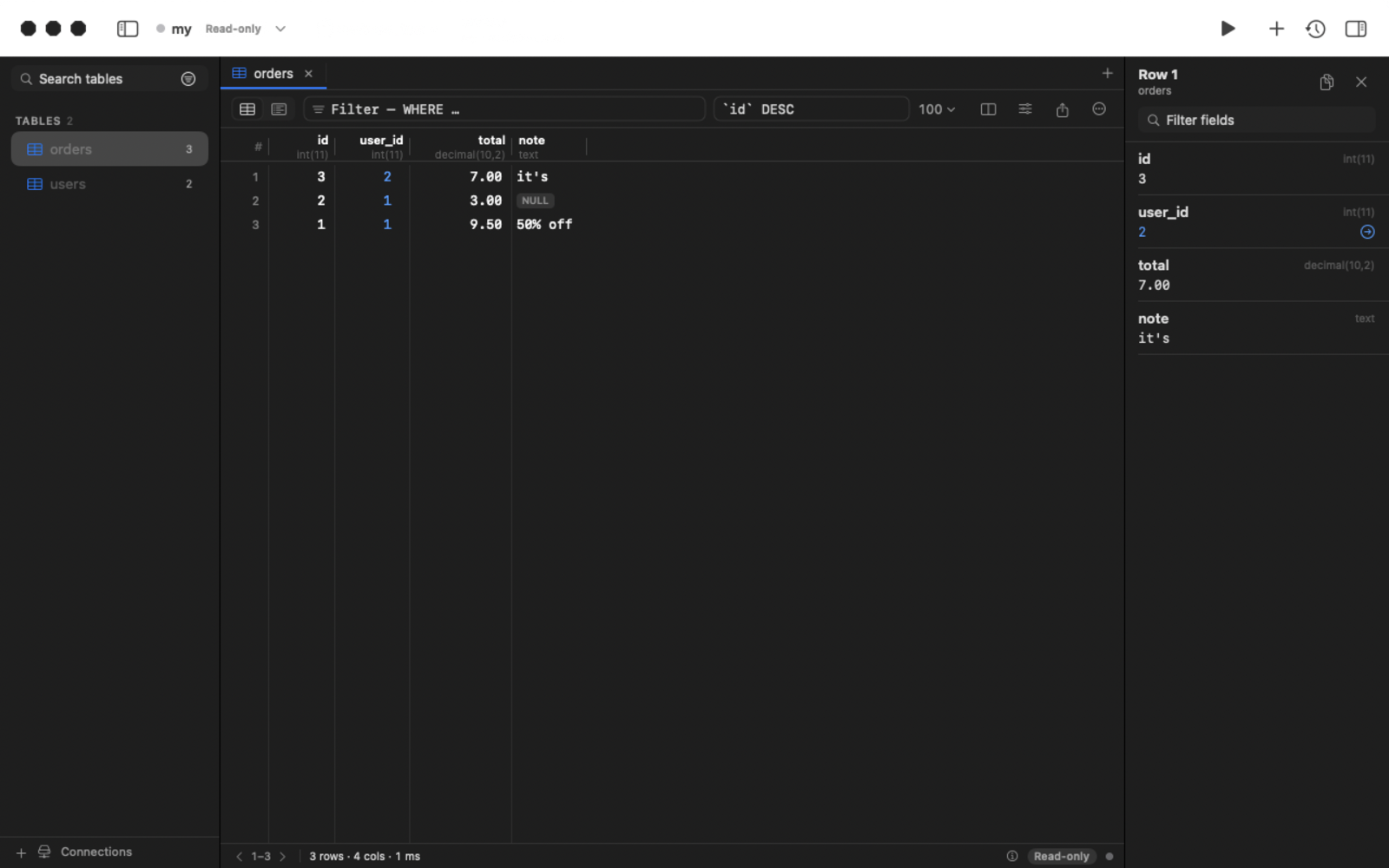
Dark mode
Build from source
- Python track:
python3 -m venv .venv && .venv/bin/pip install -e . && .venv/bin/rowbase ui - One-file binaries: docs/BUILDING.md · Native macOS app:
cd native && swift build· releases: docs/RELEASING.md - Architecture & roadmap: SPEC.md
Contributing
Issues, ideas and pull requests are welcome — see CONTRIBUTING.md and the Code of Conduct. If Rowbase is useful to you, a ⭐ helps others find it.
License
Apache-2.0 — see NOTICE and THIRD_PARTY_LICENSES.md.
Comments
New to MCP?
From what the protocol is to installing your first server, these answers cover most first questions.
An open protocol that defines how AI applications connect to external tools and data in a uniform way. Clients talk to the model; MCP servers provide tools, resources and prompt templates. They exchange standard messages, so one server can be reused by many clients.