
About AlbumentationsX MCP
AlbumentationsX MCP is a server for inspecting image datasets, previewing and comparing augmentations, and exporting reproducible pipelines. It is intended for dataset and model workflow reviews, with visual feedback and bounded local file access.
Key features
- 01Discover transforms and validate pipelines
- 02Preview batches and create contact sheets
- 03Compare, rank, and report preview runs
- 04Review annotations and segmentation masks
- 05Export pipelines as Python, JSON, or YAML
- 06Provide interactive MCP Apps review
Use cases
- 01Inspect image augmentation results before accepting a pipeline
- 02Review segmentation masks and annotation overlays
- 03Compare robustness variants and export the chosen pipeline
MCP support
Exposes AlbumentationsX dataset, preview, review, validation, and export workflows to MCP hosts. MCP Apps review is available with a text-only fallback for other hosts.
Configuration
Local server config is the same for every client. Copy it into your client’s MCP config file.
uvx albumentationsx-mcpALBU_MCP_ALLOWED_ROOTSOptional os.pathsep-separated allowlist of local roots that preview inputs and masks may be read from.ALBU_MCP_ARTIFACT_ROOTOptional local directory where generated preview artifacts and manifests are written.ALBU_MCP_MAX_PREVIEW_RUNSOptional retention limit for indexed preview runs. Defaults to 100.Local servers need a runtime on your machine (e.g. Node.js 18+). Config file locations differ by client; see your client’s docs.
Tools
47Saved tool list · updated 2w ago
| Parameter | Type | Required | Description |
|---|---|---|---|
| request | object | Yes |
Details
From the project READMEAlbumentationsX MCP
Model Context Protocol server for AlbumentationsX: inspect datasets, preview augmentations, refine them with visual feedback, and export reproducible pipelines.




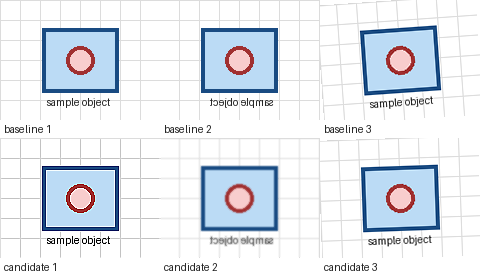
Ask an MCP host for several robustness variants, reject an excessive result such as too_noisy:high, compare the adjusted batch previews, and export the accepted pipeline.
Install
Claude Desktop
Download the latest albumentationsx-mcp.mcpb, install it from Settings -> Extensions -> Advanced settings, and select separate image and artifact directories.
Other MCP Hosts
Run the published server with bounded local access:
uvx --from albumentationsx-mcp albumentationsx-mcp \
  --allowed-root /absolute/path/to/images \
  --artifact-root /absolute/path/to/albu-artifacts
run_first_preview requires the default full or dataset capability profile. The smaller review profile uses the
explicit validate/render fallback in the usage guide, or you can restart with dataset or full; see
configuration. Copyable host configurations are in the install guide.
The repository also contains a native Codex plugin bundle. npx skills add dKosarevsky/albu-mcp installs agent guidance, not the MCP server.
First Preview
After connecting the server, ask your host:
Run the host smoke check. If preview_ready is true, call run_first_preview for /absolute/path/to/images with low
intensity and at most 8 images. Show me the contact sheet. When I mention a specific result, call
trace_preview_variant before adjusting it.
run_host_smoke_check returns preview_ready and a preview_request_template. If resource reads are unavailable, call
get_workflow_example with example_id="client-smoke".
Try the classification robustness use case, or follow the
First 10 Minutes guide. The validate_preview_request fallback, batch previews, and how to
compare preview runs are in Usage. Use too_noisy:high or exposure_too_weak:medium, then optionally
share one redacted loop through first-preview feedback.
If setup fails, read albumentationsx://diagnostics/guide and call diagnose_environment for bounded remediation actions.
Capabilities
- Transform discovery, schemas, recipes, and pipeline validation.
- Classification, detection, segmentation, OCR, bbox, mask, keypoint, and dataset-quality workflows.
- Deterministic previews, contact sheets, annotation overlays, comparison, ranking, and reports.
- Interactive MCP Apps review with a text-only fallback for other hosts.
- Structured feedback, tuning sessions, and Python, JSON, or YAML export.
- Runtime-aware CPU
torch.Tensorpipeline validation and guarded Python handoff. - MCP
2026-07-28plus legacy negotiation; stable agent workflow resources, diagnostics, and contract snapshots.
The server does not execute arbitrary Python, fetch remote images, overwrite datasets, or train models. Reads are restricted by --allowed-root; generated files stay under --artifact-root.
Integrations
- Official Albumentations MCP guide
- Official MCP Registry entry
- skills.sh agent skill
- Upstream documentation PR
Documentation
- Install and host configuration
- Runtime settings and capability profiles
- First 10 minutes
- First-preview feedback
- Usage and recipes
- CPU Tensor Compose validation and export
- MCP Apps review and compatibility policy
- Documentation index
- CHANGELOG.md
- server.json: public MCP Registry metadata.
Development
uv sync --all-extras --dev
uv run pytest
uv run ruff check .
uv run ruff format --check .
uv run ty check
Licensed under AGPL-3.0-or-later.
Comments
New to MCP?
From what the protocol is to installing your first server, these answers cover most first questions.
An open protocol that defines how AI applications connect to external tools and data in a uniform way. Clients talk to the model; MCP servers provide tools, resources and prompt templates. They exchange standard messages, so one server can be reused by many clients.