
About testlink-mcp
testlink-mcp is a safety-focused MCP server for TestLink 1.9.20, for discovering and analyzing test assets and managing test cases or execution results. It combines bounded, structured reads with preview-before-apply writes and disables writes by default.
Key features
- 01Discover projects, plans, builds, and suites
- 02Search and retrieve normalized test cases
- 03Inspect traceability and execution history
- 04Validate test cases and preview changes
- 05Apply confirmed case and result updates
Use cases
- 01Find test cases within a project or suite
- 02Review requirement links and execution evidence
- 03Check test case content before synchronization
- 04Report execution results after reviewing a preview
MCP support
Exposes TestLink discovery, analysis, validation, and preview/apply tools over MCP stdio using TestLink's XML-RPC interface. Clients can discover tools without credentials; writes require explicit enablement and confirmed, unexpired previews.
Configuration
Local server config is the same for every client. Copy it into your client’s MCP config file.
npx -y testlink-mcpTESTLINK_URLTestLink base URLTESTLINK_DEV_KEYSecretTestLink API developer keyTESTLINK_DEMO_MODEUse deterministic demo dataTESTLINK_WRITE_ENABLEDAllow confirmed writesLocal servers need a runtime on your machine (e.g. Node.js 18+). Config file locations differ by client; see your client’s docs.
Tools
15Saved tool list · updated 3w ago
This tool takes no parameters.
Details
From the project READMEtestlink-mcp
An AI-friendly, safety-first Model Context Protocol server for TestLink 1.9.20. It exposes normalized discovery and analysis tools, bounded cursor pagination, structured output, and preview-before-apply writes over stdio.
This repository is a clean implementation based on TestLink's public XML-RPC interface and the public MCP SDK. It has no dependency on a private TestLink package or private source tree.
Highlights
- Starts without credentials so MCP clients can discover all tools, resources, and prompts.
- Explicit deterministic demo mode for evaluation and onboarding.
structuredContent,outputSchema, tool annotations, cursor pagination, and stable error codes.- Attachment metadata only; attachment content and base64 payloads are removed.
- Writes disabled by default. There is no delete tool.
- Every apply requires
confirm: true, an unexpired single-use 10-minute preview, and an unchanged server snapshot. - Side-effect calls are never automatically retried; apply attempts are written to a redacted operation ledger.
- Runtime guard blocks unsupported/EOL odd Node releases and security patch levels below the declared floor.
Safe write demo
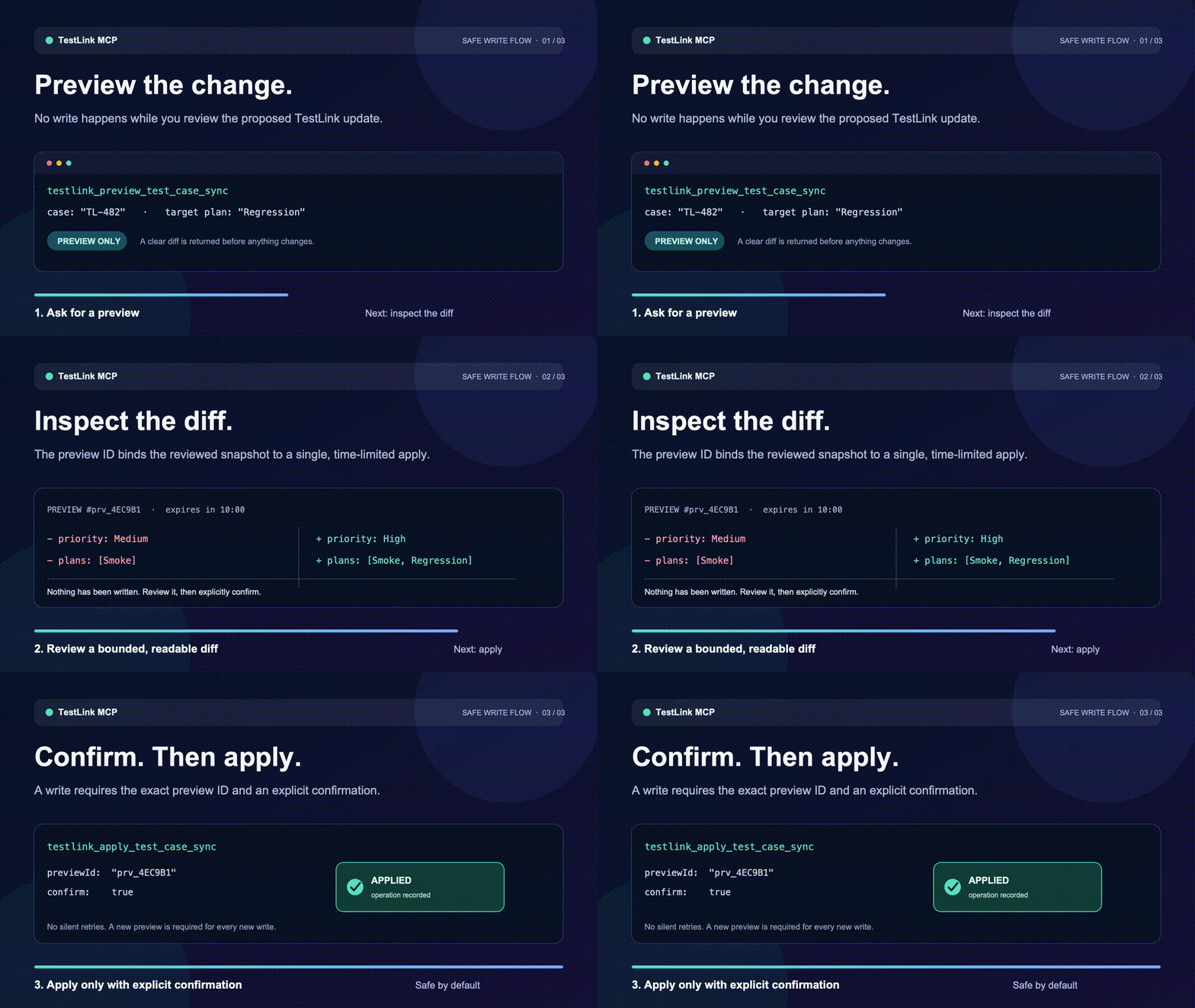
The demo uses synthetic data only. It shows the required safety boundary:
Preview a proposed change, inspect the bounded diff, then call apply
with the exact preview ID and confirm: true. No write happens during preview.
The editable source frames are in
docs/assets/testlink-safety.
Requirements
- Node.js
^22.23.2 || ^24.18.1 || ^26.5.1 - TestLink 1.9.20 with its XML-RPC API enabled
The development and container baseline is Node 24.19.0 LTS. CI also runs Node 22.23.2 and 26.7.0.
Quick start
nvm use
npm ci
npm run build
TESTLINK_DEMO_MODE=true node dist/cli.js
Future npm invocation after publication:
npx -y [email protected]
MCP client configuration:
{
  "mcpServers": {
    "testlink": {
      "command": "npx",
      "args": ["-y", "[email protected]"],
      "env": {
        "TESTLINK_URL": "https://testlink.example.com/testlink",
        "TESTLINK_DEV_KEY": "your-testlink-dev-key"
      }
    }
  }
}
Do not put real credentials in tracked files. Copy .env.example to an ignored .env, or inject environment variables from your MCP client/secret manager.
Tools
| Workflow | Tool | Purpose |
|---|---|---|
| Start | testlink_get_server_capabilities | Check configuration, compatibility, demo mode, and write policy |
| Explore | testlink_list_projects | List projects |
| Explore | testlink_list_test_plans | List plans in a project |
| Explore | testlink_list_builds | List builds in a plan |
| Explore | testlink_list_test_suites | Walk one suite level |
| Analyze | testlink_search_test_cases | Search cases in a bounded project/suite scope |
| Analyze | testlink_get_test_case | Retrieve one normalized case |
| Analyze | testlink_list_test_case_attachments | Retrieve safe attachment metadata |
| Analyze | testlink_get_traceability | Inspect requirement links and membership in one required test plan |
| Analyze | testlink_get_execution_history | Inspect recent execution evidence |
| Validate | testlink_validate_test_case | Find incomplete or ambiguous case content |
| Preview | testlink_preview_test_case_sync | Preview create/update and plan memberships |
| Apply | testlink_apply_test_case_sync | Apply an unchanged confirmed sync preview |
| Preview | testlink_preview_execution_result | Preview passed/failed/blocked reporting |
| Apply | testlink_apply_execution_result | Apply an unchanged confirmed result preview |
All tools return:
{
  "ok": true,
  "data": {},
  "meta": {
    "source": "testlink",
    "requestId": "..."
  }
}
Failures use ok: false with { code, message, retryable, details? }. Consumers should branch on error.code, not message text.
Safe write workflow
- Search for an existing case and retrieve its current version.
- Validate the desired test case.
- Call the relevant preview tool.
- For a create, provide the TestLink
authorLogin;desiredCase.suiteId,summary, andstepsare also required by TestLink 1.9.20. - Show
proposedChangesto the user and obtain explicit confirmation. - Call apply with the preview ID and
confirm: truewithin 10 minutes. - A confirmed apply consumes its preview before any side effect. After any success, conflict, or failure, create and review a new preview before trying again.
- If apply returns
OUTCOME_UNKNOWN, do not retry. The remote write may have succeeded; reconcile the TestLink case, plan membership, or execution result first.
Enable writes only in the server process that should perform them:
TESTLINK_WRITE_ENABLED=true npx -y [email protected]
The default ledger path is ~/.local/state/testlink-mcp/operations.jsonl. Override it with TESTLINK_LEDGER_PATH. Before a remote write, the server persists an attempted row; it then records applied or outcome_unknown. The ledger contains hashes and redacted outcomes, not developer keys.
Configuration
| Variable | Default | Meaning |
|---|---|---|
TESTLINK_URL | unset | TestLink base URL or complete XML-RPC endpoint |
TESTLINK_DEV_KEY | unset | Personal TestLink API key |
TESTLINK_DEMO_MODE | false | Use deterministic local demo data |
TESTLINK_WRITE_ENABLED | false | Permit confirmed apply tools |
TESTLINK_REQUEST_TIMEOUT_MS | 30000 | Request timeout, 100–300000 ms |
TESTLINK_MAX_RESPONSE_BYTES | 5242880 | Maximum XML response size |
TESTLINK_LEDGER_PATH | user state directory | Redacted JSONL operation ledger |
NODE_EXTRA_CA_CERTS | unset | Optional additional CA bundle; TLS verification remains enabled |
Demo mode is explicit and wins over remote configuration:
TESTLINK_DEMO_MODE=true TESTLINK_WRITE_ENABLED=true node dist/cli.js
Development
npm ci
npm run check
npm test
npm run eval
npm run build
npm audit --omit=dev --audit-level=high
npm pack --dry-run
The offline tool-selection eval checks that common user intents select search, validation, preview, and apply tools distinctly. It is deterministic and does not send data to an external model.
Docker
The image runs as a non-root user and uses Node 24.19.0. Build without pushing:
docker buildx build --platform linux/amd64,linux/arm64 --tag testlink-mcp:local --output type=oci,dest=testlink-mcp.oci.tar .
Future image name after approval and publication: ghcr.io/eason0in/testlink-mcp:1.0.8.
Release policy
Version 1.0.8 is release-ready but publication remains an explicit action. The protected release workflow requires a signed version tag, reruns the complete test/eval/audit/SBOM/package gates, publishes npm with provenance, publishes a multi-architecture GHCR image with SBOM and provenance, creates a GitHub Release, and finally publishes the validated MCP Registry entry.
A separate protected live-smoke workflow verifies the installed package against a real TestLink 1.9.20 instance using read-only calls. Its URL and developer key must be stored as environment secrets and are never written to logs.
The package manifest and server.json share the MCP name io.github.Eason0in/testlink-mcp. Registry validation can be run without publishing:
mcp-publisher validate server.json
The account-side setup and submission data for npm, the MCP Registry, Glama, and MCP.so are tracked in Marketplace submission checklist.
Public references
- TestLink 1.9.20 source and release branch
- Model Context Protocol TypeScript SDK
- Official MCP Registry publisher commands
License
MIT
Comments
New to MCP?
From what the protocol is to installing your first server, these answers cover most first questions.
An open protocol that defines how AI applications connect to external tools and data in a uniform way. Clients talk to the model; MCP servers provide tools, resources and prompt templates. They exchange standard messages, so one server can be reused by many clients.