
About figjam-mcp
figjam-mcp is a local MCP server that turns FigJam boards into searchable, source-cited context for assistants working with workshop material. It preserves structures such as table rows and directed arrows, and can compare saved snapshots.
Key features
- 01Read and cluster board nodes
- 02Search topics and page through context
- 03Answer questions with node citations
- 04Compare changes between snapshots
- 05Optional vision-model image interpretation
Use cases
- 01Find decisions and open questions on a board
- 02Check table rows and arrow relationships
- 03Compare two snapshots of a board
MCP support
As a local MCP server, it provides clients with tools for board ingestion, context retrieval, cited answers, snapshot comparison, and configuration diagnostics.
Configuration
Local server config is the same for every client. Copy it into your client’s MCP config file.
npx -y figjam-context-mcpFIGMA_ACCESS_TOKENSecretFigma token with file_content:read; file_metadata:read also enables cheap freshness checks.LLM_API_KEYSecretKey for the configured OpenAI-compatible provider; required for vision and answers.LLM_BASE_URLExplicit OpenAI-compatible provider base URL; .env.example uses OpenRouter.FIGJAM_MCP_CACHE_DIRPrivate local cache root; v4 snapshots are stored in a subdirectory.Local servers need a runtime on your machine (e.g. Node.js 18+). Config file locations differ by client; see your client’s docs.
Tools
5Saved tool list · updated 3d ago
| Parameter | Type | Required | Description |
|---|---|---|---|
| ingestMode | enum | No | How aggressively to use vision LLM calls during ingestbalanced | max_quality | max_speed |
| customPhases | array | No | Free-form phase names to map clusters onto (e.g. ["Ideen", "Feedback", "Offene Fragen"]); overrides docStructureHint |
| figmaFileUrl | string | Yes | URL of the FigJam/Figma file to ingest |
| focusNodeIds | array | No | IDs of pages, sections, frames, groups or single nodes whose image clusters are interpreted first, in list order; the rest of the board follows in the usual order. Section IDs come from the ingest_board summary or the first page of get_board_context. Only the order of image interpretation changes: the whole board is still read and cached, and later ingests without focusNodeIds reuse the interpretations. No effect in max_speed |
| forceFullIngest | boolean | No | Download and extract the board again, skipping the unchanged-board check and cache, and redo the image interpretation of the chosen ingestMode. Interpretations this mode does not redo (all in max_speed; in balanced those of clusters without image or drawing) are kept while a cluster's content is unchanged. The vision time budget still applies, so balanced and max_quality may need several ingests until every image is interpreted again. An unchanged board gives no new snapshot for diff_board, even with forceFullIngest. Model/configuration changes are detected automatically. Default: false |
| docStructureHint | enum | No | Built-in framework used to map clusters to phasesfreeform | double_diamond | lean_canvas | retro | user_journey |
| figmaAccessToken | string | No | Figma personal access token; falls back to FIGMA_ACCESS_TOKEN env var if omitted |
Details
From the project READMEfigjam-context-mcp
A local MCP server that turns FigJam boards into source-cited context for LLMs. It reads a board through the Figma REST API, groups stickies, tables, images and arrows into clusters, and answers questions with links back to the original nodes.
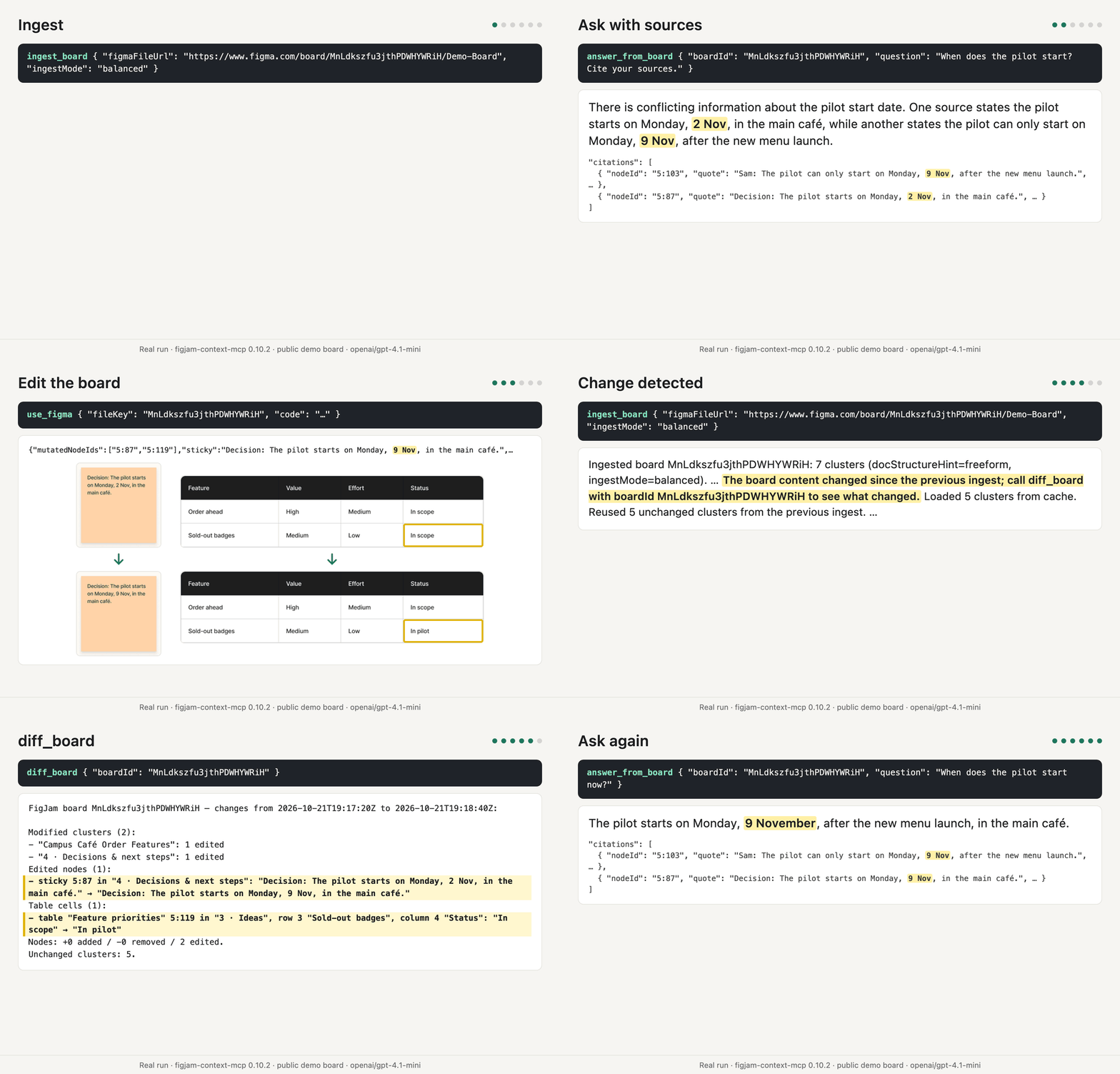
Rendered from the tool calls and outputs of a real run against the public
demo board with
figjam-context-mcp 0.10.2 and openai/gpt-4.1-mini. Figma's MCP server
(use_figma) made the edit.
Why
Workshop boards hold research notes, decisions and open questions, but an LLM cannot read a canvas. Screenshots and PDF exports lose tables, arrow direction and the link to the source. This server keeps the board's structure and cites every answer to the nodes it came from.
Compared with Figma's MCP server
Figma's official MCP server reads a FigJam board or node with its images
(get_figjam) and edits boards (use_figma). This server turns a workshop
board into context an assistant can cite and track:
- large boards read section by section, with an overview, size-limited pages and search
- source IDs in compact overviews, with Figma links in full excerpts and answer citations
- tables read row by row
- local snapshots, and
diff_boardto see what changed - explicit credentials redacted before they reach the cache, the output or a model
- image descriptions from a vision model you configure
The two work together: in the demo above, Figma's server edits the board and this one reports the change.
Tools
| Tool | What it does | LLM call |
|---|---|---|
ingest_board | Reads a board, clusters it and saves a local snapshot. Re-ingests reuse unchanged clusters; focusNodeIds chooses which sections' images are interpreted first. | In balanced (default) and max_quality mode |
get_board_context | Reads saved context, automatically using compact source-ID lines for large section reads; detail: "full" returns complete excerpts and Figma links. Also supports topic search and pagination. | No |
answer_from_board | Answers one specific question (a number, status or decision) from the most relevant excerpts, with node-level citations or an insufficient-evidence result. Not meant for whole-board summaries. | Yes |
diff_board | Compares two snapshots: new, removed and changed clusters, nodes, table cells and arrows. | No |
diagnose_llm_config | Tests the configured models with small text and image JSON checks. | Yes |
Quick start
Requires Node.js 22.12 or later.
- Create a Figma personal access token under Settings → Security → Personal
access tokens with the scope
file_content:read. The token's account needs access to the board. - Optional: create an OpenRouter key at
openrouter.ai/keys. It enables image
interpretation,
answer_from_boardanddiagnose_llm_config. Without it, useingestMode: "max_speed"withget_board_contextanddiff_board. - Add the server using the example for your client below.
@latestwith--prefer-onlinemakes npx check the registry for the latest release on every start, even when package metadata is cached (npm configuration).
Claude Code
claude mcp add figjam-context -e FIGMA_ACCESS_TOKEN=your-figma-token -e LLM_BASE_URL=https://openrouter.ai/api/v1 -e LLM_API_KEY=your-openrouter-key -- npx -y --prefer-online figjam-context-mcp@latest
For longer ingests, set MCP_TOOL_TIMEOUT=300000 in the environment that launches
Claude Code and INGEST_BOARD_VISION_BUDGET_MS=270000 in the server environment,
leaving about 30 seconds for the rest of the ingest (Claude Code environment
variables).
Codex CLI and ChatGPT desktop app
Add this to ~/.codex/config.toml; the app, CLI and IDE extension share this
configuration (OpenAI MCP setup):
[mcp_servers.figjam-context-mcp]
enabled = true
command = "npx"
args = ["-y", "--prefer-online", "figjam-context-mcp@latest"]
startup_timeout_sec = 30
default_tools_approval_mode = "approve"

[mcp_servers.figjam-context-mcp.env]
FIGMA_ACCESS_TOKEN = "your-figma-token"
LLM_BASE_URL = "https://openrouter.ai/api/v1"
LLM_API_KEY = "your-openrouter-key"
Without default_tools_approval_mode = "approve", ChatGPT may ask for approval
or abort tools with external effects; with it, the client never asks before board
content goes to the model provider, so use max_speed and avoid answer_from_board
for confidential boards.
For longer ingests, set tool_timeout_sec = 300 under
[mcp_servers.figjam-context-mcp] and INGEST_BOARD_VISION_BUDGET_MS = "270000" in its
env table, leaving about 30 seconds for the rest of the ingest (OpenAI timeout
options).
GitHub Copilot CLI
Add this to ~/.copilot/mcp-config.json
(Copilot CLI MCP setup):
{
  "mcpServers": {
    "figjam-context": {
      "type": "local",
      "command": "npx",
      "args": ["-y", "--prefer-online", "figjam-context-mcp@latest"],
      "env": {
        "FIGMA_ACCESS_TOKEN": "your-figma-token",
        "LLM_BASE_URL": "https://openrouter.ai/api/v1",
        "LLM_API_KEY": "your-openrouter-key"
      },
      "tools": ["*"]
    }
  }
}
For longer ingests, set "timeout": 300000 on the server in
~/.copilot/mcp-config.json and "INGEST_BOARD_VISION_BUDGET_MS": "270000" in its
env, leaving about 30 seconds for the rest of the ingest (tested with a 600000 ms
timeout).
VS Code
Add this to .vscode/mcp.json in your workspace, or open MCP: Open User
Configuration for your profile. VS Code uses servers and type: "stdio"
(VS Code MCP configuration):
{
  "servers": {
    "figjam-context": {
      "type": "stdio",
      "command": "npx",
      "args": ["-y", "--prefer-online", "figjam-context-mcp@latest"],
      "env": {
        "FIGMA_ACCESS_TOKEN": "your-figma-token",
        "LLM_BASE_URL": "https://openrouter.ai/api/v1",
        "LLM_API_KEY": "your-openrouter-key"
      }
    }
  }
}
For longer ingests, use the Local harness with a per-server "timeout": 300000 in
mcp.json and "INGEST_BOARD_VISION_BUDGET_MS": "270000" in its env (about 30
seconds below the timeout); #343135
reports that remote HTTP tool calls in the Copilot harness, the default in 1.142, ignore
that timeout and stop after about 180 seconds, while the Local harness honors it.
Other MCP clients
For clients that accept mcpServers, add this to their MCP configuration:
{
  "mcpServers": {
    "figjam-context": {
      "command": "npx",
      "args": ["-y", "--prefer-online", "figjam-context-mcp@latest"],
      "env": {
        "FIGMA_ACCESS_TOKEN": "your-figma-token",
        "LLM_BASE_URL": "https://openrouter.ai/api/v1",
        "LLM_API_KEY": "your-openrouter-key"
      }
    }
  }
}
Where the client supports a configurable tool timeout, raise it to about 300 seconds
using its documented setting and set INGEST_BOARD_VISION_BUDGET_MS=270000 in the
server environment, about 30 seconds below it.
Cursor has no configurable timeout: its IDE allows about 60 minutes, while ACP/CLI calls
stop at 60 seconds even with progress, so keep the default image budget on that path
(Cursor
support).
Then ask your assistant to ingest a board URL, for example "Ingest
https://www.figma.com/board/FILE_KEY/Name and list the open questions."
The boardId of every later call is the file key from that URL. To summarize
a board, the assistant calls ingest_board, then get_board_context without
parameters, whose first page names the largest sections and includes a section
overview with IDs within the page's size limit, and then reads the largest sections
by passing their IDs as nodeIds.
Large nodeIds reads automatically use short source-ID lines, grouped by section,
when the first full page would leave unread excerpts. limit applies only with
the full view; an overview ignores it even when supplied. Read complete text and
its Figma link with the same boardId and snapshotId, the line's ID in
nodeIds, and detail: "full". For a table row, use its table ID.
Everything that lies in no section, such as loose notes and tables, comes with
outsideSections: true.
All settings: configuration. Problems: troubleshooting.
How it works
- Read.
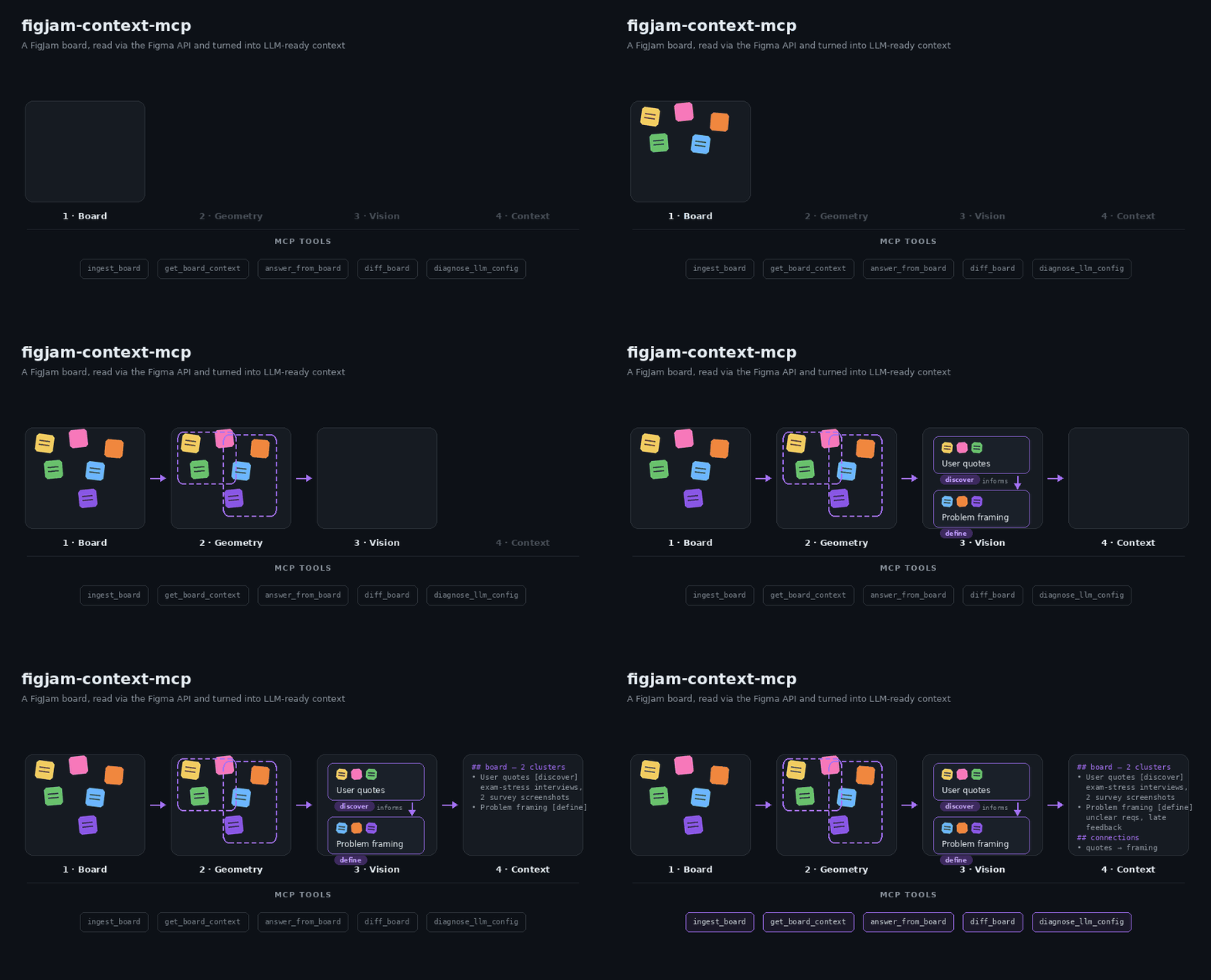
ingest_boarddownloads the board through the Figma REST API on every call.get_board_contextandanswer_from_boardread the saved snapshot without a new request. - Normalize. Nodes become text, table cells, images and connectors, with their pages and sections. Tables are read row by row: row and column come from the cell IDs, and each row becomes one excerpt.
- Cluster. Nearby nodes are grouped by rotation-aware distance. Arrows between groups become directed relations. Clusters without a model label are named after their section, and an arrow appears in the context once one of its ends, or a section, frame or group around one, is on the page.
- Interpret. In
balancedmode, clusters with an image, or drawings without any text, get a vision-model summary within a 40-second budget; text clusters, however short, keep their extracted text. A cluster starts only when the time left fits it; unfinished clusters continue on the next ingest. WithfocusNodeIds, the images of the given sections, frames or nodes come first. Inmax_quality, one ingest interprets only a few dozen clusters within the 40-second image budget (20–35 on a board with about 300 clusters, measured with 3 parallel requests); the next ingest continues, each costs a Tier 1 file download, andfocusNodeIdssets the order. - Serve. The snapshot is saved to a private local cache. Search favors
excerpts containing more of the question’s words.
get_board_contextsearches it (BM25 over original text, table rows and names),answer_from_boardanswers with citations anddiff_boardcompares snapshots. The firstget_board_contextpage includes a size-limited section overview with IDs; pass a page, section, frame or group ID asnodeIdsto read everything inside it; several IDs in one call take turns in request order. With defaultdetail: "auto", reads of multiple distinct IDs or one container use a compact overview when the first full page would leave unread excerpts. Text is shortened to a shared 50–120-character prefix with…; the host writes the summary. Topic searches,outsideSections, single leaf/table/cell IDs and small containers stay full. Textcontentis the readable page;structuredContentholds each excerpt once, inoverview.text(with emptyevidenceandclusters) or inevidencefor the full view. In full excerpts, onlysnapshotIdis inherited from the response: absentchunkIndexmeans 0 and absenttruncatedormodelDerivedmeans false, with no inheritance of these flags from a cluster.
Models and cost
The default preset student-free uses free OpenRouter models: text and images go
to openrouter/free, which picks a free model that supports structured outputs
(and images, for images). The free default is best effort: free models change, hit rate limits
and time out. A request to openrouter/free or openrouter/auto that fails with
a provider error is sent once more, since the router may pick another model. Images go to the model with at most 1,024 px on the longest side;
larger ones are scaled down locally.
- OpenRouter allows free models 20 requests per minute and 50 requests per day, or 1,000 per day once you have bought at least 10 credits (limits).
- Figma limits requests by seat and plan
(rate limits). File
downloads and image renders are Tier 1: Dev and Full seats on paid plans get
10–20 requests per minute, View and Collab seats and files in Starter plans at
most 20 per month. Every
ingest_boardcall is one file download, so a View or Collab seat allows about 20 ingests a month. Images come from the image fills instead, Tier 2 with at least 5 requests per minute, in one request per ingest. Renders are left for drawings without an image and as a fallback for single images; one render request covers up to 18 nodes.max_speedneeds neither. LLM_BASE_URLtakes any OpenAI-compatible endpoint; for paid models, setLLM_TEXT_MODELS,LLM_FAST_TEXT_MODELSandLLM_VISION_MODELS, for example all three toopenai/gpt-4.1-mini(provider charges apply).- Run
diagnose_llm_configafter every model change. It checks JSON replies and image understanding with synthetic inputs.
Privacy
- The server reads from Figma and never changes a board.
balancedandmax_qualityingests send board text and images (originals or renders) to the configured LLM provider.answer_from_boardsends the question and selected excerpts.max_speedwithget_board_contextanddiff_boardsends nothing to an LLM provider.- Snapshots stay in a private per-user cache on your machine. Delete the cache directory to remove them.
- Explicit credentials such as
Passwort: …or API keys are redacted before they reach the cache, tool output or an LLM provider (FIGJAM_MCP_REDACT_CREDENTIALS). This is a safety net, not a guarantee: images are not redacted, so keep credentials off the board. - Keep tokens in the client's environment. A token passed as a tool argument can appear in client logs.
Limitations
- Image interpretation gets 40 seconds per ingest by default; large boards need several ingests to interpret every image cluster.
- A client that cancels an ingest, for example after a 60-second timeout, gets no partial result.
- Free models are best effort. Citations show where an answer comes from, not that its conclusion is right.
- Search is lexical; synonyms without shared words do not match.
- Local stdio only; no hosted or multi-user mode.
Measured results: evaluation.
Development
git clone https://github.com/ecestnrkl/figjam-mcp.git
cd figjam-mcp
npm ci
cp .env.example .env    # add your tokens
npm run check           # typecheck, tests, build, package validation
npm run package:smoke   # install the packed package and exercise all tools
npm run eval:retrieval  # offline retrieval and diff evaluation
npx --prefer-online @modelcontextprotocol/inspector --config inspector.config.json
See CONTRIBUTING.md and the changelog.
License
MIT © 2026 ecestnrkl
Comments
New to MCP?
From what the protocol is to installing your first server, these answers cover most first questions.
An open protocol that defines how AI applications connect to external tools and data in a uniform way. Clients talk to the model; MCP servers provide tools, resources and prompt templates. They exchange standard messages, so one server can be reused by many clients.