
About rekey
rekey is a CLI and MCP server for rotating API keys and tokens across supported providers, then delivering and verifying replacements before retiring old credentials. It stores credentials in the OS keychain and keeps secret values out of MCP responses.
Key features
- 01Rotate keys across supported providers
- 02Deliver replacements to configured destinations
- 03Verify new credentials before retirement
- 04Store logins in the OS keychain
- 05Configure repeatable rotations in TOML
- 06Require opt-in for MCP write actions
Use cases
- 01Rotate a GitLab token into a .env file
- 02Deliver new keys to GitHub Actions or AWS SSM
- 03Run configured rotations in scripts or CI
- 04Let an MCP client list keys without exposing secrets
MCP support
The stdio MCP server offers read-only provider, connection, and key-listing tools by default. Rotation and retirement require explicit flags, and secret values are never returned to the client.
Configuration
Local server config is the same for every client. Copy it into your client’s MCP config file.
We haven’t collected a package or remote endpoint for this server. Follow the instructions in the project README.
Tools
Local servers expose tools only once running on your machine, and the maintainer has not provided a tool list.
Details
From the project READMErekey
Rotate API keys and tokens across providers from one CLI: mint the new key, push it to everything that uses it, verify it, retire the old one. Includes an MCP server.
Only touches accounts you administer — every provider acts with your own credential.
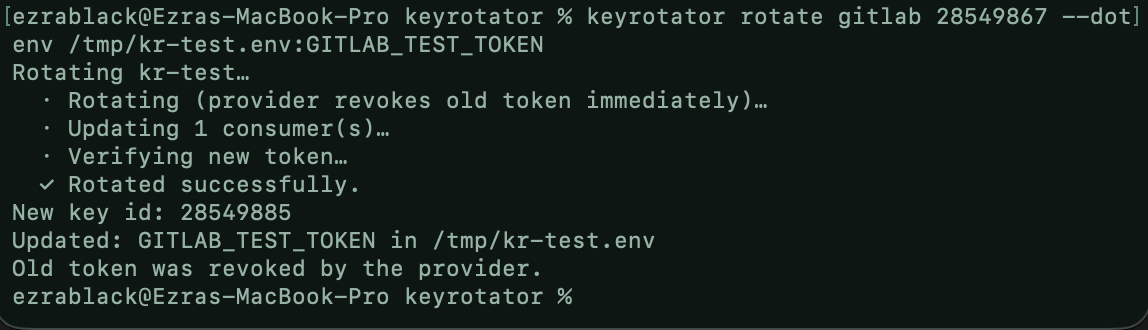
CLI — rotate a GitLab token straight into a .env file:
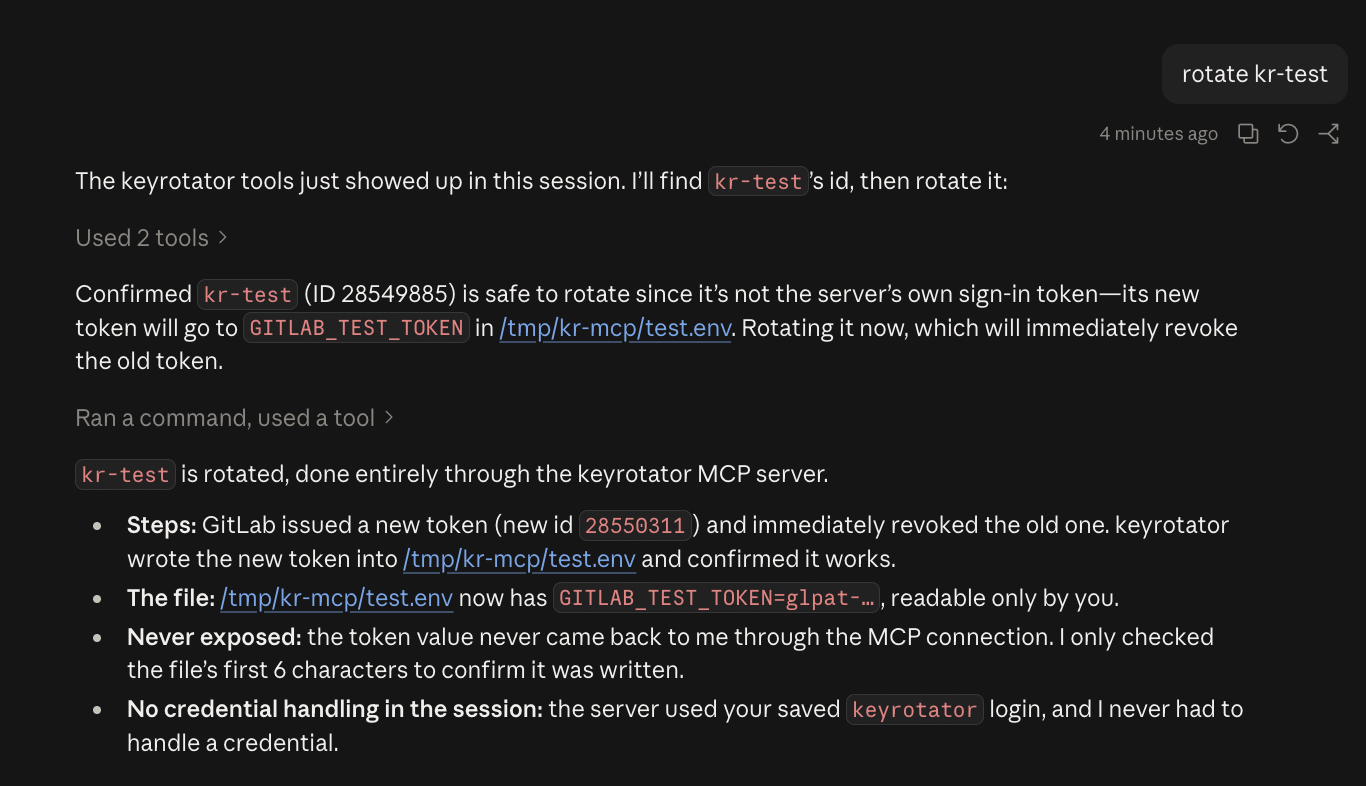
MCP — Claude rotating the same token through rekey mcp; the secret
never reaches the model:
Install
Prebuilt binaries for macOS, Linux and Windows: Releases.
Or with Rust (stable):
cargo install rekey
OS keychain support (macOS Keychain, Windows Credential Manager, Linux Secret Service) is built in.
Quick start
Practice on a throwaway GitLab token first. Every command below is safe to
copy; replace 28550311 with your own ids from step 3.
1. Make a throwaway token to rotate. In GitLab → Access tokens, create a
token named kr-test (any scope).
2. Log in. Opens GitLab's token page with the name and api scope
pre-filled. Click Create token, paste it back (input is hidden).
rekey login gitlab
Checking with GitLab…
✓ Logged in to GitLab as @you. Saved to your macOS Keychain.
  rekey now works from any terminal — nothing to export.
3. Find the key id.
rekey list gitlab
ID        NAME
28550267  rekey   (signed in with this key)
28550311  kr-test
4. Rotate it into a .env file. rekey shows the plan and waits for you.
rekey rotate gitlab 28550311 --dotenv /tmp/kr-test.env:KR_TEST_TOKEN
Here's what will happen:
  1. GitLab replaces "kr-test" with a new token and immediately revokes the old one. This can't be undone.
  2. The new token is saved to KR_TEST_TOKEN in /tmp/kr-test.env.
  3. rekey checks that the new token works.

Go ahead? [Y/n] y

Rotating kr-test…
  · Rotating (provider revokes old token immediately)…
  · Updating 1 consumer(s)…
  · Verifying new token…
  ✓ Rotated successfully.

New key id: 28550312
Updated: KR_TEST_TOKEN in /tmp/kr-test.env
Old token was revoked by the provider.
5. Check and clean up.
cat /tmp/kr-test.env      # KR_TEST_TOKEN=glpat-…
rm /tmp/kr-test.env
Then delete kr-test in GitLab.
For real keys: run rekey rotate gitlab with no arguments — it lets
you pick the key and destination and can save that to rekey.toml, so
the next rotation is one command. In scripts/CI:
rekey rotate gitlab 28550311 --dotenv .env --yes --no-input
Commands
| Command | |
|---|---|
login [provider] | Opens the provider's token page (GitLab: pre-filled), takes the pasted token, verifies it, saves it to the OS keychain. --url for self-hosted GitLab / Datadog site. No provider: show status. |
logout <provider> | Remove saved credentials (doesn't revoke them). |
connect <provider> | Check credentials and key-management access. |
list <provider> | List keys. Column 1 is the id other commands take. |
rotate <provider> [id] | Rotate one key. |
rotate-all <provider> | Rotate every key that has a destination. Skips the key you're signed in with. |
retire <provider> [id] | Deactivate (where supported) or delete an old key. --delete to delete a deactivated key. |
mcp | MCP server on stdio. |
Global: --config <path>, --no-input (fail instead of prompting).
--yes skips confirmation. Omitted args are prompted for in a TTY. Flags go in
any order. stdout carries only list output and --print-secret values;
everything else is stderr.
Destinations
rotate refuses to start unless the new secret has at least one destination.
| Flag | Destination |
|---|---|
--dotenv <path>[:VAR] | Set VAR in a .env file. Default VAR per provider; AWS also writes AWS_ACCESS_KEY_ID. |
--gh-secret <owner/repo>:<NAME> | GitHub Actions secret via gh (stdin). |
--ssm <name>:<region> | AWS SSM SecureString via aws (stdin). |
--secret-file <path> | File, mode 0600. |
--secret-dir <dir> | rotate-all: one 0600 file per key. |
--keychain | OS keychain, service rekey. |
--print-secret | stdout. |
Repeatable flags: --dotenv, --gh-secret, --ssm.
--delete-old-now deletes the old key right after the new one is delivered.
Config
./rekey.toml, then ~/.config/rekey/config.toml. Contains no
secrets. Interactive rotate can write entries for you.
[[keys]]
provider = "gitlab"
name = "ci-deploy"            # match on id, name and/or principal
consumers = [
  { type = "dot_env_file", path = ".env", variable = "GITLAB_TOKEN" },
  { type = "github_actions_secret", repo = "me/app", secret_name = "GITLAB_TOKEN" },
]

[[keys]]
provider = "aws"
principal = "ci-user"         # IAM user; survives the new key id
consumers = [
  { type = "dot_env_file", path = ".env", variable = "AWS_SECRET_ACCESS_KEY", id_variable = "AWS_ACCESS_KEY_ID" },
  { type = "aws_ssm_parameter", name = "/ci/aws", region = "us-east-1" },
]
Consumer types: dot_env_file, github_actions_secret, aws_ssm_parameter,
file, keychain. Match on name/principal for providers that issue a new
id per rotation. Relative paths resolve against the config file. Full example:
rekey.toml.example.
Credentials
Lookup order: environment variable → saved login (rekey login) → prompt
(TTY only, offers to save). Never taken as flags. Rotating the token rekey
signs in with (GitLab, Cloudflare) updates the saved login.
REKEY_DISABLE_KEYCHAIN=1 disables keychain reads/writes.
Providers
| Provider | Style | Rotates | Credentials | Notes |
|---|---|---|---|---|
aws | overlap | IAM access keys | aws CLI session, AWS_PROFILE | Max 2 keys per user; refuses if both exist. Old key → Inactive. |
gitlab | atomic | Personal access tokens | GITLAB_TOKEN (api scope), GITLAB_URL, GITLAB_TOKEN_EXPIRY_DAYS | |
cloudflare | atomic | User API tokens | CLOUDFLARE_API_TOKEN (API Tokens: Edit) | Token id is stable. |
datadog | overlap | API keys | DD_API_KEY, DD_APP_KEY, DD_SITE | No disabled state. |
npm | overlap | Classic tokens | npm CLI session, NPM_REGISTRY | Parses CLI output; granular tokens unsupported. |
dockerhub | overlap | Personal access tokens | DOCKERHUB_USERNAME, DOCKERHUB_PASSWORD | New token gets repo:read+repo:write. |
openai | overlap | Org admin keys | OPENAI_ADMIN_KEY | |
anthropic | manual | — | ANTHROPIC_ADMIN_KEY | No create API; rotate prints Console steps, retire deactivates. |
twilio | overlap | Standard API keys | TWILIO_ACCOUNT_SID, TWILIO_AUTH_TOKEN, TWILIO_API_USER | |
sendgrid | overlap | API keys | SENDGRID_API_KEY | Copies scopes from the old key. |
github-app | ephemeral | Installation tokens | GITHUB_APP_ID, GITHUB_APP_PRIVATE_KEY_PATH or GITHUB_APP_PRIVATE_KEY | ~1h tokens; nothing to revoke. |
AWS needs the aws CLI, npm needs npm, --gh-secret needs gh.
Want another provider? Request it.
Rotation semantics
| Style | Sequence | Failure handling |
|---|---|---|
| overlap | create → verify → deliver → deactivate old → (delete old) | Verify fails or all deliveries fail: new key deleted, nothing changed. Some deliveries fail: both keys stay live, exit 1. |
| atomic | rotate (old revoked by provider) → deliver → verify | Irreversible. All deliveries fail: secret written to rekey-rescue-*.secret (0600). |
| ephemeral | mint → verify → deliver | Old token expires on its own. |
| manual | — | Prints manual steps. |
Without --delete-old-now, an old key with no disabled state stays active;
the output gives the retire command. Exit code is non-zero whenever
something needs attention.
MCP
rekey login gitlab
claude mcp add rekey -- rekey mcp --config ~/.config/rekey/config.toml
| Tool | Enabled by | |
|---|---|---|
list_providers, check_connection, list_keys | default | Read-only. |
rotate_key | --allow-rotate | Delivers only to consumers in your config. No destination args. |
retire_key | --allow-retire | Refuses the server's own login key. |
Secret values are never returned to the client. Credentials come from the environment or saved logins. On macOS, allow Keychain access once after installing a new build.
Security
- Secrets go to subprocesses via stdin, never argv.
- Files rekey creates are 0600; existing
.envpermissions are kept; writes are atomic. - Secret values are printed only with
--print-secret. - Report vulnerabilities privately via the repo's Security tab.
Contributing
- New provider or feature: open an issue.
- Code: see CONTRIBUTING.md. A provider is one file
implementing the
Connectortrait.
Links
- crates.io: rekey
- MCP Registry name — mcp-name: io.github.Ezra-Black/rekey
Credits
Built by Ezra Black — ezrablack.dev.
License
Comments
New to MCP?
From what the protocol is to installing your first server, these answers cover most first questions.
An open protocol that defines how AI applications connect to external tools and data in a uniform way. Clients talk to the model; MCP servers provide tools, resources and prompt templates. They exchange standard messages, so one server can be reused by many clients.