
About F2C MCP Server
F2C MCP Server is a Model Context Protocol server that converts Figma designs to code using F2C. It is aimed at developers who want AI coding tools to work directly with Figma design data and produce HTML/CSS output.
Key features
- 01Pixel-level HTML/CSS generation
- 02React, CSS Modules and Tailwind CSS output
- 03Design node conversion from Figma URLs
- 04Figma design context for AI tools
- 05Remote image download to local assets
Use cases
- 01Converting Figma nodes to front-end code in Cursor or Trae
- 02Downloading design images to local assets
- 03Providing Figma design context to AI coding tools
MCP support
This project is an MCP server that exposes Figma node data, image downloading and design-to-code conversion to MCP clients.
Configuration
Local server config is the same for every client. Copy it into your client’s MCP config file.
Tools
2Saved tool list · updated 3w ago
| Parameter | Type | Required | Description |
|---|---|---|---|
| fileKey | string | Yes | The Figma file identifier found in the file URL (e.g., https://www.figma.com/file/XXXXXXXXXXXX/). Extract the XXXXXXXXXXXX portion as the fileKey. |
| ids | string | Yes | Comma-separated list of Figma node IDs for conversion. To obtain node IDs, select elements in Figma, right-click and select "Copy/Paste as" → "Copy ID". |
| personalToken | string | No | Figma personal access token for API authentication.The parameters are not required when the tool is called. |
| localPath | string | No | Absolute path for asset(e.g., images) and code storage. Directory will be created if non-existent. Path must follow OS-specific format without special character escaping. When this path is set, all code-related static resources are stored in this directory, while other assets (e.g., images) will be saved into the subdirectory named assets under this path. |
| imgFormat | enum | No | Export format for image assets: "png" for lossless quality, "jpg" for compressed files, or "svg" for vector graphics.png | jpg | svg |
| scaleSize | number | No | Image export scale factor (1-4). Higher values yield better quality at the cost of larger file sizes. |
Details
From the project READMEF2C MCP Server




Due to Figma REST API rate limits, if you are affected, please switch to @f2c/mcp-plugin for normal operation.
English | 简体中文
A Model Context Protocol server for Figma Design to Code using F2C.
Features
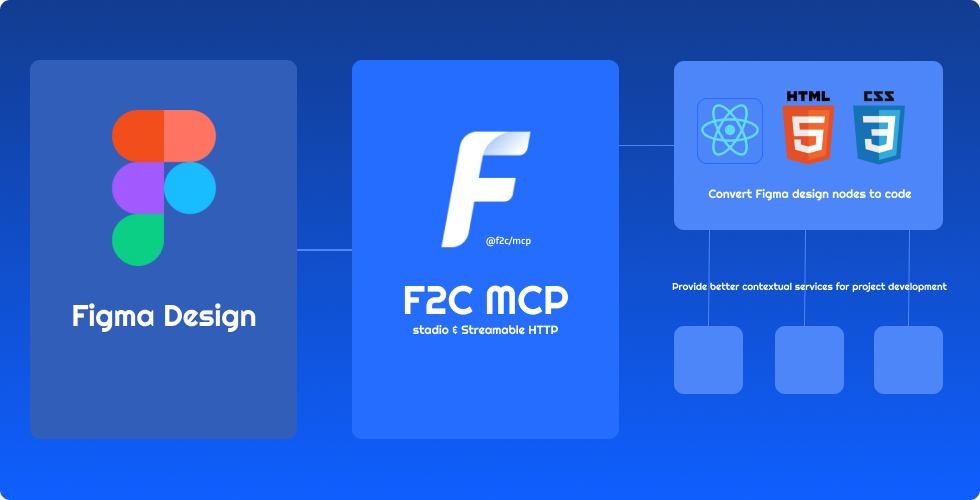
- 🎨 Pixel-Perfect HTML/CSS:F2C converts Figma designs to pixel-perfect HTML/CSS with precision.
- ⚛️ Multi-Framework Support:F2C generates React, CSS Modules, and Tailwind CSS code for fast development.
- 🧠 Figma Design Context:F2C integrates design context, ensuring compatibility with AI tools like Cursor.
- 🔗 Figma File URL Parsing:F2C converts design nodes via Figma URLs, streamlining workflows.
- 🖼️ Remote Image Localization:F2C automates downloading Figma images to local assets for efficiency.
How it works
- Configure the Server in an MCP-supported IDE (e.g., Cursor, Trae).
recommended to use Comate AI IDE
- Open your chat in IDE (e.g. agent mode in Cursor).
- Paste a link to a Figma Node (Right-click any node in the Figma Layer panel to copy it).
- Enter your requirements in the chat, such as fetching node data, downloading images, converting to code, etc.
Configuration and Development
See Configuration and Development
Data Privacy Notice
The logging tools integrated in this project are used solely for basic usage statistics and error log reporting. No sensitive information or user data is collected. All reported data is used exclusively to improve product quality and user experience.
FAQ
See FAQ
Credits
Thanks to:
- Framelink Figma MCP Server Give Cursor and other AI-powered coding tools access to your Figma files with this Model Context Protocol server.
- Cursor Talk to Figma MCP Allowing Cursor to communicate with Figma for reading designs and modifying them programmatically.
- Figma MCP Server This server provides tools for viewing, commenting, and analyzing Figma designs directly through the ModelContextProtocol.
Comments
New to MCP?
From what the protocol is to installing your first server, these answers cover most first questions.
An open protocol that defines how AI applications connect to external tools and data in a uniform way. Clients talk to the model; MCP servers provide tools, resources and prompt templates. They exchange standard messages, so one server can be reused by many clients.