
About Finmcp Finance Mcp
FinMCP is a TypeScript MCP server that provides Yahoo Finance data for AI assistants, covering markets, companies, and cross-asset quotes. It supports local use and Docker-based HTTP deployment, with caching, data validation, and optional API-key protection.
Key features
- 0115 financial data tools
- 02Stock, options, crypto, and forex data
- 03Company financials and earnings
- 04Caching and data quality checks
- 05Local stdio and streaming HTTP transports
- 06Optional API-key authentication
Use cases
- 01Retrieve stock quotes and historical prices
- 02Review company statements and earnings
- 03Check news, options, and market sentiment
- 04Deploy a protected remote finance endpoint
MCP support
FinMCP exposes Yahoo Finance data tools to MCP clients. It can run locally over stdio or as an HTTP service, with optional API-key protection for public deployments.
Configuration
Local server config is the same for every client. Copy it into your client’s MCP config file.
We haven’t collected a package or remote endpoint for this server. Follow the instructions in the project README.
Tools
Local servers expose tools only once running on your machine, and the maintainer has not provided a tool list.
Details
From the project READMEYahoo Finance MCP Server (Cloud)
Production-grade (Cloud) financial data infrastructure for AI assistants with enterprise-grade resilience, comprehensive data quality validation, and production-ready monitoring.
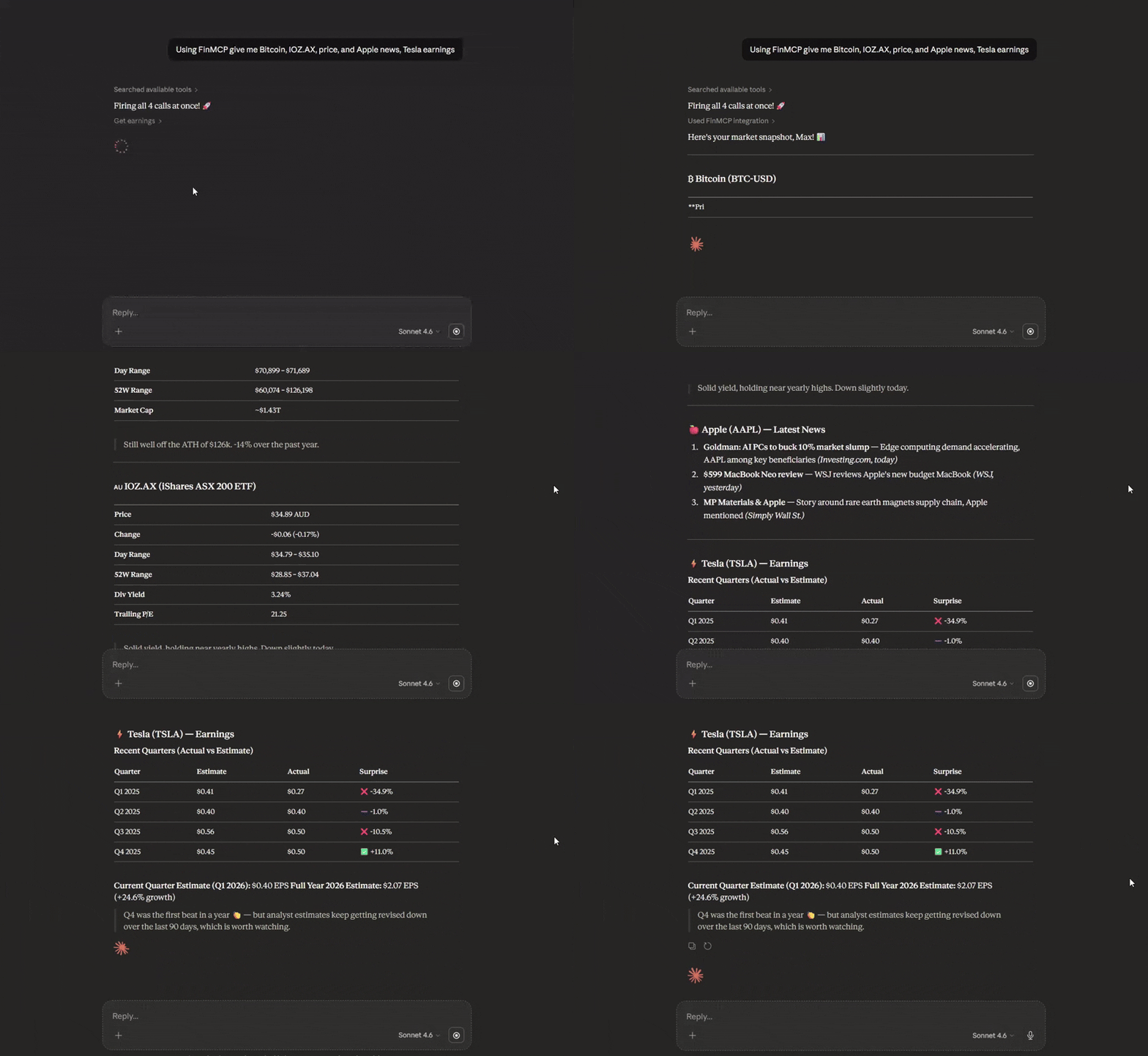
Deploy to the Cloud (Docker-based)
FinMCP ships with a Dockerfile and is fully Docker-based, so it runs on any platform that supports containers — Railway, Render, Fly.io, DigitalOcean App Platform, a VPS, or anything else.
Easiest option — Railway (recommended for beginners):
- Sign up at railway.com (referral link — gives you free credits)
- New Project → Deploy from GitHub repo → paste
https://github.com/Steve-sy/finmcp - Railway auto-detects the
Dockerfileand builds + deploys automatically - (Optional) Add
YF_MCP_API_KEYin Railway's Variables tab to protect your endpoint - Go to Settings → Networking → Generate Domain to get your public URL
- Your MCP endpoint is live at:
https://<your-app>.up.railway.app/mcp
Other platforms (Render, Fly.io, VPS, etc.):
Any platform that can run a Docker container works. Point it at this repo, and set the start command to node dist/http.js. The server listens on the PORT environment variable (automatically injected by most platforms) and defaults to 3333.
Optional: protect public deployments with YF_MCP_API_KEY and connect using ...?key=YOUR_SECRET.
Claude Desktop Integration (Cloud)
Customize -> Connectors -> Add custom connector: Name: FinMCP Remote MCP Server URL: your cloud https url: https:///mcp
Local Installation
npm install -g @mustafa.ramx/finmcp
Quick Start
Start Server
finmcp
Claude Desktop Integration (Local — npm)
Add to your claude_desktop_config.json:
{
  "mcpServers": {
    "finmcp": {
      "command": "finmcp"
    }
  }
}
Claude Desktop Integration (Local — Docker)
If you prefer Docker over installing Node.js, first build the image:
docker build -t finmcp .
Then add to your claude_desktop_config.json:
{
  "mcpServers": {
    "finmcp": {
      "command": "docker",
      "args": ["run", "-i", "--rm", "finmcp", "node", "dist/index.js"]
    }
  }
}
Note: ChatGPT Desktop MCP support may vary — check its documentation for custom connector configuration.
Other AI Tools
Cursor AI / Cline AI:
{
  "mcpServers": {
    "finmcp": {
      "command": "finmcp"
    }
  }
}
Features
- 15 Financial Data Tools: Stocks, options, crypto, forex, company intelligence, market sentiment
- Circuit Breaker Pattern: Automatic recovery from API failures
- Multi-Strategy Rate Limiting: Token bucket + adaptive + per-endpoint limiting
- Data Quality Scoring: Completeness and integrity validation
- Comprehensive Caching: Graceful fallback with high cache hit ratio (70-90%)
- Streaming HTTP Transport: Run locally or deploy to the cloud (Docker/Railway) for HTTPS access
- Optional API Key Auth: Protect public deployments with
YF_MCP_API_KEY - Enterprise Testing: Unit, integration, e2e, and chaos tests
Available Tools
Market Data
get_quote- Real-time quotes with quality reportingget_historical_prices- OHLCV data with date rangesget_historical_prices_multi- Batch historical data
Company Intelligence
get_quote_summary- Comprehensive company overviewget_balance_sheet- Assets, liabilities, equityget_income_statement- Revenue, expenses, net incomeget_cash_flow_statement- Operating, investing, financing cash flowsget_earnings- Quarterly earnings with estimatesget_analysis- Analyst recommendations and price targetsget_major_holders- Institutional and insider ownership
Market Sentiment
get_news- Latest articles with relevance scoringget_options- Options chains with Greeksget_trending_symbols- Top movers with volume metricsscreener- Filter stocks by 12+ criteria
Cross-Asset
get_crypto_quote- Cryptocurrency pricesget_forex_quote- Currency pair exchange rates
Documentation
For complete documentation including configuration, usage examples, architecture details, and best practices:
View Full Documentation on GitHub
Documentation includes:
- Complete Tool Reference
- Usage Guide with Examples
- Configuration Guide
- Architecture Details
- Data Verification Status
Configuration
Create a config.json file:
{
  "rateLimit": {
    "requestsPerMinute": 60,
    "requestsPerHour": 1500
  },
  "cache": {
    "ttlQuotes": 60000,
    "maxCacheSize": 1000
  },
  "circuitBreaker": {
    "failureThreshold": 5,
    "monitoringWindow": 60000,
    "successThreshold": 3
  }
}
For detailed configuration options, see Configuration Guide.
Performance
| Metric | Value |
|---|---|
| Quote queries | 60 requests/minute (configurable) |
| Batch operations | Up to 100 symbols per request |
| Cache hit ratio | 70-90% for frequently accessed symbols |
| Cold start time | <500ms |
| Test coverage | 95%+ for core middleware |
License
MIT
Links
Comments
New to MCP?
From what the protocol is to installing your first server, these answers cover most first questions.
An open protocol that defines how AI applications connect to external tools and data in a uniform way. Clients talk to the model; MCP servers provide tools, resources and prompt templates. They exchange standard messages, so one server can be reused by many clients.