
🤖 GDAI MCP – MCP Server for Godot Game Engine
LocalAbout 🤖 GDAI MCP – MCP Server for Godot Game Engine
GDAI MCP is a Godot 4.1+ plugin that lets MCP clients such as Claude, Cursor and VS Code control the Godot Editor. It is aimed at game developers who want an assistant to create scenes and nodes, edit scripts, and read errors and debugger logs.
Key features
- 01Create scenes, nodes, resources and scripts in the editor
- 02Add, remove and update nodes and their properties
- 03Read script errors, debugger output and logs
- 04Search files and resources under res:// paths
- 05Take screenshots of the editor and running game
Use cases
- 01Having an AI assistant inspect and fix GDScript errors
- 02Generating scene structures and basic nodes from prompts
- 03Adjusting node properties across a Godot project
MCP support
The plugin runs as an MCP server that exposes tools for editing scenes, reading script errors and searching files in the Godot Editor to MCP clients.
Configuration
Local server config is the same for every client. Copy it into your client’s MCP config file.
We haven’t collected a package or remote endpoint for this server. Follow the instructions in the project README.
Tools
Local servers expose tools only once running on your machine, and the maintainer has not provided a tool list.
Details
From the project READMEgdai-mcp-plugin-godot
🤖 GDAI MCP – MCP Server for Godot Game Engine
GDAI MCP Godot Plugin allows AI to control the Godot Editor to create scenes, nodes, scripts. It can debug script errors, debugger and output logs.
🚀 Feature Highlights
Take your Godot workflow to the next level by automating your game development.
-
[NEW!] ✨ 📷 Automatically takes screenshots to visually understand the editor and running game.
-
🧱 Create Scenes Programmatically
Generates scenes, nodes, resources, scripts and more -
🛠️ Add & Manipulate Nodes
Modifies the scene tree adding/removing/updating nodes and their properties -
🐞 Debugger Integration
View debugger output, logs and scripts errors. -
📁 File & Asset Search
Searches for files and resources directly from the filesystem (res://) -
📐 Property Updates
Set and get node properties dynamically. -
🧩 Project Understanding
Has a deep understanding of your project, scenes and scripts. -
📝 GDScript context
Helps you write and debug GDScript
🛠️ How It Works
Use the GDAI MCP Plugin to control Godot from any MCP Client like Cursor, Windsurf, Claude, VSCode etc.
-
Install in Godot Project
Add the GDAI MCP Plugin to your Godot project.
Installation Guide -
Add command in MCP Client
Add the MCP server command to your MCP Client's config.
MCP Client Config -
Start Chatting
Start chatting and see the MCP action!
Examples
💻 Example
User: Please fix my gdscript errors.
Assistant: I'd be happy to help fix your GDScript errors. Let me start by examining your current scene and looking for any errors in your script.
Running tool: get_open_script
Running tool: get_open_script_errors
...conversation continues
See more examples at the end
🤝 Compatible MCP Clients
Use GDAI MCP with your favorite MCP client or IDE:
- Cursor
- Claude Desktop
- VS Code (via GitHub Copilot, Cline, Roo Code, etc)
- WindSurf
- And more
🤝 Compatible Godot version
The plugin is compatible with Godot 4.1+
❓ Frequently Asked Questions
What is GDAI MCP Godot Plugin?
A plugin that allows any MCP Client to control Godot Engine Editor remotely, allowing it to create scenes, nodes, resources, scripts and more.
Can this make an entire game with one shot prompt?
Yes and no. It depends on the quality of your prompt and the LLM used. Claude Desktop most of the times is able to one-shot simple games.
Is Godot scripting experience required?
No, but it's helpful.
Which clients are supported?
Any MCP client either a program or even a script can connect to the MCP server.
Can I use this in commercial projects?
Yes! You can use this plugin to make commercial games!
Can I use this in a public project?
Yes! But make sure to not commit the plugin to the public repository of your game.
Is there documentation?
Yes, detailed docs are available.
🚀 Take Your Godot Workflow to the Next Level
Unlock the full potential of AI through automated game development via the GDAI MCP Plugin.
🗣️ Suggestions
Have any question or feature requests?
Join the Discord Server or DM @3ddelano
💡 More examples
-
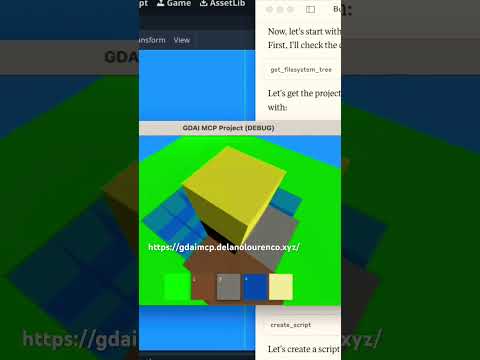
3D Minecraft clone
-
3D car racing game

-
Create scene with nodes
-
Edit GDScript files
Installation Guide
Check out the detailed Installation Guide
🔄 Update Guide
Check out the detailed Update Guide
📄 License
© 2025 Delano Lourenco. All rights reserved.
Comments
New to MCP?
From what the protocol is to installing your first server, these answers cover most first questions.
An open protocol that defines how AI applications connect to external tools and data in a uniform way. Clients talk to the model; MCP servers provide tools, resources and prompt templates. They exchange standard messages, so one server can be reused by many clients.