
About GA4 SEO MCP
GA4 SEO MCP is an open-source server for preparing and auditing site measurement across GA4, Search Console, and PageSpeed. It serves analytics and SEO workflows, and keeps write tools unavailable unless explicitly enabled.
Key features
- 01Query GA4 reports and realtime data
- 02Inspect Search Console queries, pages, and sitemaps
- 03Audit PageSpeed and CrUX measurements
- 04Plan site measurement setup in one call
- 05Optionally create properties and configure measurement
- 06Enable only selected toolsets and scopes
Use cases
- 01Review traffic and engagement for a website
- 02Audit Search Console visibility and submitted sitemaps
- 03Check PageSpeed and field performance data
- 04Plan and apply a new site's measurement setup
MCP support
This project is an MCP server exposing tools and prompts for GA4, Search Console, PageSpeed, and optional keyword research. It registers write-capable tools only when writes are enabled.
Configuration
Local server config is the same for every client. Copy it into your client’s MCP config file.
uvx ga4-seo-mcpGOOGLE_APPLICATION_CREDENTIALSSecretPath to a service account key file. Leave unset to use Application Default Credentials from gcloud.GA4SEO_TOOLSETSComma-separated toolsets: admin,data,gsc,psi,dataforseo,ads.GA4SEO_ENABLE_WRITESSet to 1 to register tools that create, update, delete, submit or verify. Off by default.PAGESPEED_API_KEYSecretPageSpeed Insights API key. Recommended: the anonymous quota is shared and often exhausted.DATAFORSEO_LOGINDataForSEO login, for the dataforseo toolset.DATAFORSEO_PASSWORDSecretDataForSEO password, for the dataforseo toolset.GOOGLE_ADS_DEVELOPER_TOKENSecretGoogle Ads developer token, for the ads toolset.GOOGLE_ADS_LOGIN_CUSTOMER_IDManager (MCC) customer ID, only when operating through a manager account.Local servers need a runtime on your machine (e.g. Node.js 18+). Config file locations differ by client; see your client’s docs.
Tools
24Saved tool list · updated 5d ago
This tool takes no parameters.
Details
From the project READMEEnglish · Español
ga4-seo-mcp — site measurement for AI agents, end to end
Get a site's measurement ready end to end: GA4 + Search Console + PageSpeed, with optional, guarded writes. An open source Model Context Protocol server for Google Analytics 4 & Search Console. Most MCP servers for Google read your data; this one can also set it up: property, web stream, key events, custom dimensions, Search Console DNS verification, sitemap and a PageSpeed baseline — read-only until you say otherwise.





Tags: mcp-server · ga4 · google-analytics · search-console · seo · pagespeed · core-web-vitals · keyword-research · claude-code · cursor
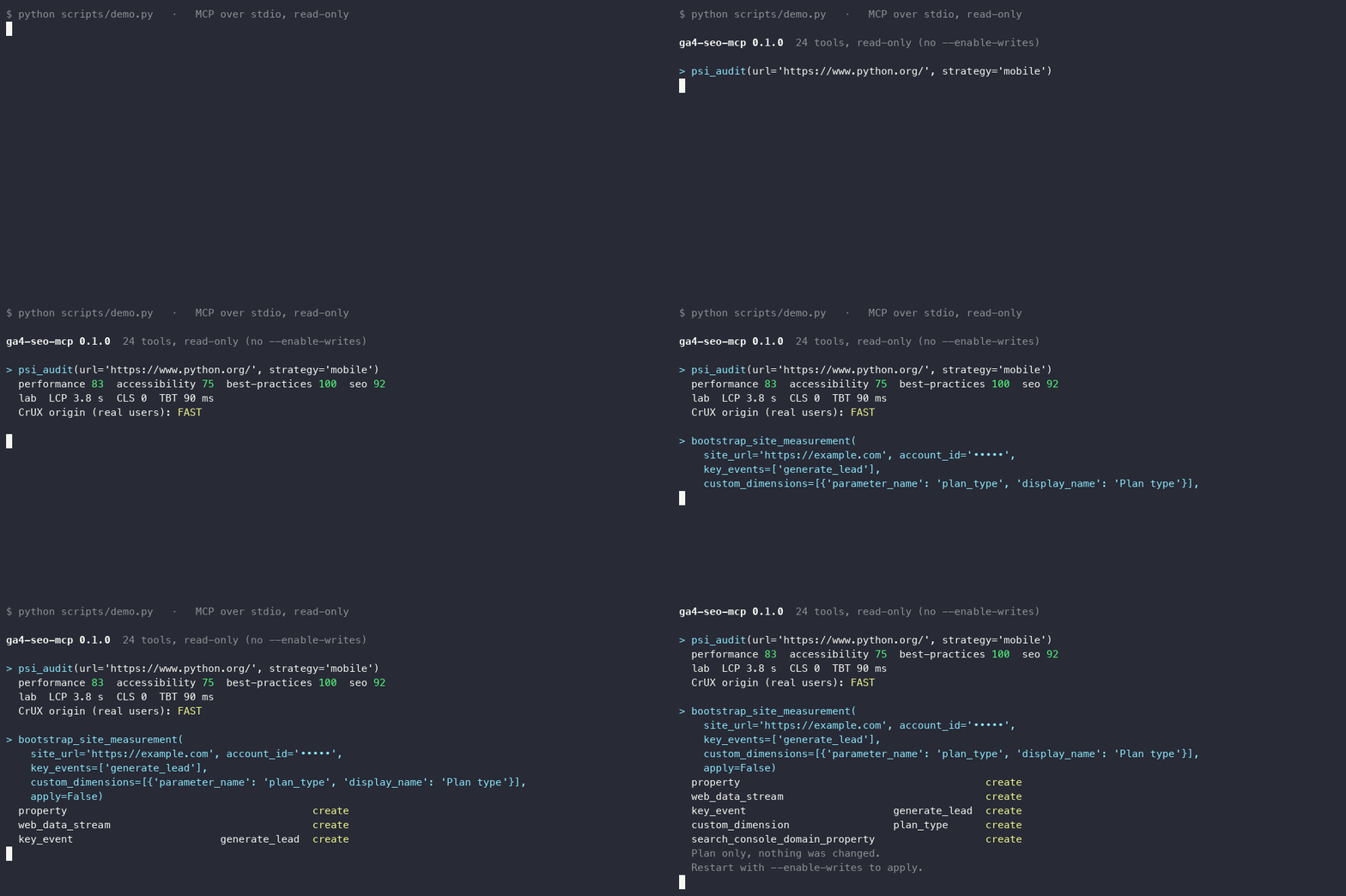
Real run: psi_audit on a public site and bootstrap_site_measurement(apply=False) planning a new site. The demo script redacts the account ID.
💡 Why this one?
Launching a site means the same chores every time: create the GA4 property and its web stream, mark the key events, register custom dimensions, add the domain to Search Console, publish a DNS TXT record, verify it, submit the sitemap, and record a PageSpeed baseline. ga4-seo-mcp turns that into one plan your agent shows you, and one confirmation.
| ga4-seo-mcp | Google's official GA4 MCP | search-console-mcp | google-seo-mcp | |
|---|---|---|---|---|
| GA4 reports (Data API) | ✅ | ✅ | ✅ | ✅ |
| Search Console | ✅ | — | ✅ (+ Bing) | ✅ |
| PageSpeed Insights / CrUX | ✅ | — | ✅ | ✅ |
| Create GA4 property + web stream | ✅ | — | — | — |
| Create key events / custom dimensions | ✅ | — | — | ✅ |
| Search Console DNS verification | ✅ | — | — | — |
| One-call site plan → apply (idempotent) | ✅ bootstrap_site_measurement | — | — | — |
| Read-only by default | ✅ write tools are not even registered | read-only only | see its docs | ✅ read-only mode |
| Toolsets | ✅ | — | — | ✅ |
| Language | Python | Python | TypeScript | TypeScript |
Based on each project's README on 2026-10-19; "—" means we did not find it documented. Corrections welcome. Those projects go wider than this one (Bing, AdSense, WordPress, GEO audits…); this one goes deeper on setting up measurement.
🤝 Need this done for you?
This server is built and maintained by Germani Uicab. If you'd rather not run it yourself, ServerStack Solutions can get your GA4 + Search Console measurement ready: a written plan, property and key events configured, the DNS verification and sitemap in place, and a PageSpeed baseline — with a QA pass before handover.
Extras: optional keyword research with DataForSEO (exact long-tail volumes) and Google Ads Keyword Planner (free, bucketed volumes), with es-MX defaults that you can override.
⚡ Quick start
1. Install uv 0.13.4 or newer — the client launches the server with uvx; nothing else to install.
2. Log in with the minimum scopes. The CLI prints the exact gcloud command for the toolsets you enable:
uvx ga4-seo-mcp auth-command --client-id-file=oauth-client.json
# gcloud auth application-default login --client-id-file=oauth-client.json --scopes=https://www.googleapis.com/auth/cloud-platform,https://www.googleapis.com/auth/analytics.readonly,https://www.googleapis.com/auth/webmasters.readonly
Run the printed command. Google blocks Analytics and Search Console scopes on gcloud's built-in OAuth client, so you need your own (a one-time, few-minute setup) or a service account — both are explained in docs/AUTH.md.
3. Check everything before connecting a client (read-only, changes nothing):
uvx ga4-seo-mcp doctor
# [ok] credentials found: Credentials via Application Default Credentials
# [ok] access token refreshed
# [ok] token has the 2 scope(s) these toolsets need
# [ok] admin: <n> account(s) visible on the first page
# [ok] data: responded (<n> metrics in the schema)
# [ok] gsc: <n> site(s) visible
# [ok] psi: no Google login needed; PAGESPEED_API_KEY set
# all checks passed
4. Add it to your client (Claude Code shown; others below):
claude mcp add ga4-seo -- uvx ga4-seo-mcp
Ask: "List my GA4 properties and show last week's sessions for the first one."
🧰 Toolsets, scopes and tools
Enable only what you need with --toolsets (or GA4SEO_TOOLSETS). Default: admin,data,gsc,psi. Only the tools of active toolsets are registered, and the OAuth scopes follow.
| Toolset | What | Scopes (read-only) | Extra scopes with --enable-writes | Tools (read + write) |
|---|---|---|---|---|
admin | GA4 Admin API: accounts, properties, streams, key events, custom dimensions, Ads links, bootstrap_site_measurement | analytics.readonly | analytics.edit | 9 + 10 |
data | GA4 Data API: reports, realtime, top pages, events, traffic sources, portfolio | analytics.readonly | — | 8 + 0 |
gsc | Search Console: queries, pages, sitemaps, domain add + DNS verification | webmasters.readonly | webmasters, siteverification | 5 + 3 |
psi | PageSpeed Insights: Lighthouse lab + CrUX field data | none (PAGESPEED_API_KEY recommended) | — | 2 + 0 |
dataforseo | DataForSEO keyword ideas and exact volumes (paid) | none (DATAFORSEO_LOGIN / DATAFORSEO_PASSWORD) | — | 2 + 0 |
ads | Google Ads Keyword Planner (needs pip install 'ga4-seo-mcp[ads]') | adwords | — | 2 + 0 |
Tool counts from the real registry: 24 with the defaults, 37 with --enable-writes, 8 with --toolsets data, 41 with every toolset and writes. The full list with descriptions is in docs/TOOLS.md (generated from the registry and checked in CI).
Prompts: audit_ga4_setup, seo_360_audit, portfolio_performance_digest and launch_site_measurement (the guided flow: plan → your confirmation → apply → DNS verification → sitemap → PageSpeed baseline).
bootstrap_site_measurement
bootstrap_site_measurement(site_url="https://example.com", account_id="123456789",
                           property_display_name="Example", time_zone="America/Mexico_City",
                           currency_code="USD", key_events=["generate_lead"],
                           custom_dimensions=[{"parameter_name": "plan_type", "display_name": "Plan type"}])
apply=False(default): a plan. Read-only and always registered. It finds the existing property and web stream by the site's domain, the key events and custom dimensions already declared, and the Search Console domain property, and lists what would be created.apply=True: executes the plan. Only works when the server runs with--enable-writes; otherwise it fails before touching anything. Idempotent: it skips what exists, so you can re-run it. Returns a step-by-step report with the measurement ID (G-…) and the DNS TXT token.- DNS verification (
sc_verify_site_dns) and the sitemap (sc_submit_sitemap) stay explicit follow-up steps: you have to publish the TXT record first.
🔒 Security model
Defaults are safe for a single user on a laptop. Details and threat model: SECURITY.md.
- Read-only by default. Without
--enable-writes(orGA4SEO_ENABLE_WRITES=1), tools that create, update, delete, submit or verify are not registered at all — the model cannot call what does not exist. - MCP annotations on every tool:
readOnlyHinton reads,destructiveHinton deletes and updates,idempotentHintwhere repeating is harmless,openWorldHinteverywhere. Clients that honor them can auto-approve reads and ask before writes. - Minimum scopes: each Google client requests only the scope of the call it makes;
auth-commandasks only for the scopes of your toolsets. - HTTP transport (
--transport streamable-http): binds to127.0.0.1, DNS-rebinding protection on, CORS off unlessMCP_CORS_ORIGINS, and an optional bearer tokenMCP_AUTH_TOKEN(401 without it). Listening on0.0.0.0without a token prints a warning, and LAN clients needMCP_ALLOWED_HOSTSor the rebinding protection answers421. - Secrets (DataForSEO, Ads developer token, PageSpeed key) come only from environment variables or a
chmod 600file, and are never logged or returned in errors.
⚙️ Configuration
| Variable | Default | Description |
|---|---|---|
GOOGLE_APPLICATION_CREDENTIALS | — | Service account key file. Unset = Application Default Credentials from gcloud. |
GA4SEO_TOOLSETS | admin,data,gsc,psi | Same as --toolsets. |
GA4SEO_ENABLE_WRITES | 0 | 1 = same as --enable-writes. |
PAGESPEED_API_KEY | — | Recommended: the anonymous PageSpeed quota is shared and often exhausted (429). |
DATAFORSEO_LOGIN, DATAFORSEO_PASSWORD | — | dataforseo toolset. |
GOOGLE_ADS_DEVELOPER_TOKEN | — | ads toolset, or ~/.config/ga4-seo-mcp/dev-token with chmod 600. |
GOOGLE_ADS_LOGIN_CUSTOMER_ID | — | Only when operating through a manager (MCC) account. |
MCP_TRANSPORT | stdio | stdio, streamable-http or sse. |
MCP_HOST / MCP_PORT | 127.0.0.1 / 8000 | HTTP bind address and port. A specific non-loopback address is added to the allowed Host headers; 0.0.0.0 is not, so set MCP_ALLOWED_HOSTS for LAN clients. |
MCP_AUTH_TOKEN | — | Require Authorization: Bearer <token> on every HTTP request. |
MCP_CORS_ORIGINS | — | Comma-separated exact origins for a browser client. Never *. |
MCP_ALLOWED_HOSTS | — | Comma-separated host/IP values clients use (e.g. 192.168.1.10). Required when binding 0.0.0.0 and connecting over the LAN; DNS-rebinding protection rejects everything else with 421. |
Copy .env.example as a starting point.
🔌 Connect your client
Every client launches the server over stdio. Add --enable-writes to args only for the session where you actually want to set up a site.
Claude Code
claude mcp add ga4-seo -- uvx ga4-seo-mcp
# with options:
claude mcp add ga4-seo -e PAGESPEED_API_KEY=your-key -- uvx ga4-seo-mcp --toolsets admin,data,gsc,psi
Claude Desktop (claude_desktop_config.json) and Cursor (~/.cursor/mcp.json)
{
  "mcpServers": {
    "ga4-seo": {
      "command": "uvx",
      "args": ["ga4-seo-mcp"],
      "env": { "PAGESPEED_API_KEY": "your-key" }
    }
  }
}
VS Code (.vscode/mcp.json)
{
  "servers": {
    "ga4-seo": {
      "type": "stdio",
      "command": "uvx",
      "args": ["ga4-seo-mcp"]
    }
  }
}
Docker (stdio). Mount your credentials file read-only — the ADC file from gcloud or a service account key — and run as your own user so the container can read a 0600 file:
docker run -i --rm --user "$(id -u):$(id -g)" \
  -v ~/.config/gcloud/application_default_credentials.json:/creds/credentials.json:ro \
  -e GOOGLE_APPLICATION_CREDENTIALS=/creds/credentials.json \
  ghcr.io/germaniu/ga4-seo-mcp
HTTP (several clients sharing one server):
MCP_AUTH_TOKEN=$(openssl rand -hex 32) uvx ga4-seo-mcp --transport streamable-http
# endpoint: http://127.0.0.1:8000/mcp  (send Authorization: Bearer <token>)
🩹 Troubleshooting
| Symptom | Cause and fix |
|---|---|
This app is blocked / access_denied during gcloud ... login | gcloud's built-in client cannot request Analytics or Search Console scopes. Use your own OAuth client (--client-id-file) and add yourself as a Test User of its consent screen — docs/AUTH.md. |
cloud-platform scope is required but not requested | Use the command printed by ga4-seo-mcp auth-command: gcloud needs cloud-platform in the list. The server itself never requests it. |
403 ... API has not been used in project | Enable the Google Analytics Admin API, Google Analytics Data API and Search Console API in your quota project, then gcloud auth application-default set-quota-project my-gcp-project. |
403 ... does not have sufficient permissions for this property | Add your user (or the service account email) to the GA4 property or Search Console site. |
ga4-seo-mcp doctor says the token is missing scopes | You logged in before enabling a toolset or writes. Re-run the auth-command output. |
| Write tools do not show up | Start the server with --enable-writes. It is off by default on purpose. |
PageSpeed Insights error 429 | The anonymous quota is shared by everyone. Create an API key and set PAGESPEED_API_KEY. |
| Keyword Planner volumes look rounded (10, 30, 170, 210…) | Google Ads reports bucketed volume for accounts without active spend. Use the dataforseo toolset for exact numbers. |
| A deleted GA4 property still appears | delete_property is a soft delete: Google keeps it in the trash for 35 days (list_properties(include_deleted=True)). |
HTTP answers 421 Invalid Host header | DNS-rebinding protection. Connect with the host you bound (127.0.0.1/localhost, or the MCP_HOST address). |
HTTP answers 401 | Send Authorization: Bearer $MCP_AUTH_TOKEN. |
📚 Documentation
- docs/AUTH.md — own OAuth client vs service account, scopes per toolset, Test Users.
- docs/TOOLS.md — every tool and prompt, generated from the registry.
- docs/ARCHITECTURE.md — modules, registration and security layers.
- SECURITY.md · CONTRIBUTING.md · CHANGELOG.md
🧪 Development
uv sync --all-extras
uv run ruff check . && uv run ruff format --check . && uv run pytest
uv run python scripts/smoke_stdio.py --expect 24   # real stdio initialize + tools/list
📄 License
MIT. Not affiliated with or endorsed by Google. Google Analytics, Search Console and PageSpeed Insights are trademarks of Google LLC.
Comments
New to MCP?
From what the protocol is to installing your first server, these answers cover most first questions.
An open protocol that defines how AI applications connect to external tools and data in a uniform way. Clients talk to the model; MCP servers provide tools, resources and prompt templates. They exchange standard messages, so one server can be reused by many clients.