
About CRM Lifecycle Ops
CRM Lifecycle Ops is a read-only Claude Code plugin and CLI for lifecycle and marketing-ops teams using Braze, Klaviyo, or Iterable. It checks campaign messages with code across channels and offers early-alpha live-account planning and impact analysis.
Key features
- 01Validate email, SMS, push, and in-app content
- 02Render personalization for varied customer data
- 03Apply built-in and team-defined rules
- 04Run email checks in CI
- 05Preview account changes and dependencies
Use cases
- 01Catch broken links before an email launch
- 02Check SMS length and opt-out wording
- 03Review campaign changes before editing an account
- 04Block failing email checks in a CI pipeline
MCP support
The engine runs as a local MCP server for MCP clients, including Cursor and Claude Desktop. It can use demo data or read-only platform access; it never sends messages or edits accounts.
Configuration
Local server config is the same for every client. Copy it into your client’s MCP config file.
npx -y crm-lifecycle-opsCLO_BRAZE_API_KEYSecretBraze REST API key (read-only permissions). Leave unset to skip Braze.CLO_BRAZE_REST_ENDPOINTBraze REST endpoint for your instance, e.g. https://rest.iad-01.braze.comCLO_BRAZE_WORKSPACEA label for the Braze workspace this key belongs to.CLO_KLAVIYO_API_KEYSecretKlaviyo private API key (read-only scopes). Leave unset to skip Klaviyo.CLO_KLAVIYO_ACCOUNTA label for the Klaviyo account this key belongs to.CLO_ITERABLE_API_KEYSecretIterable server-side API key (read-only). Leave unset to skip Iterable.CLO_ITERABLE_REGIONIterable data center: us or eu.CLO_ITERABLE_PROJECTA label for the Iterable project this key belongs to.CLO_RULESOptional path to a shared house-rules file so a whole team is checked the same way.CLO_TEAM_DIROptional shared folder for the team usage report (check counts only, no message content).Local servers need a runtime on your machine (e.g. Node.js 18+). Config file locations differ by client; see your client’s docs.
Tools
20Saved tool list · updated 3d ago
| Parameter | Type | Required | Description |
|---|---|---|---|
| file | string | No | Absolute path to a local .html file, used when html is not given. |
| from | string | No | Sender email address. |
| html | string | No | The email HTML, including template tags. |
| name | string | No | |
| subject | string | No | |
| personas | array | No | Synthetic test profiles. Leave empty to use the team's personas or auto-generated ones. |
| platform | enum | Yes | Which platform's template language the email uses.braze | klaviyo | iterable |
| preheader | string | No | |
| transactional | boolean | No | Receipts, password resets and other transactional mail: skips the unsubscribe requirement. |
| check_links_live | boolean | No | Also check each link over the network (HEAD requests only; unsubscribe and click-tracking links are never requested). |
Details
From the project READMEcrm-lifecycle-ops
Pre-send QA for Braze, Klaviyo and Iterable. Every email, text, push and in-app message is checked by code, as every kind of customer, before it goes out. Then, in your live account: what a change will break, and how to build it.




The 80-second demo (sound on):
https://github.com/user-attachments/assets/dc4e632c-f71e-43d5-8451-6e2a67b6471e
A Claude Code plugin (and a CLI for CI) for lifecycle, CRM and marketing-ops teams who build campaigns by hand. The message checks work fully today; the live-account features are early alpha (see the status column below). It is read-only: it never sends or edits anything.
Try it in 30 seconds
No account and no Claude Code needed, just Node.js 20+. This checks four sample emails that ship with the package:
npx crm-lifecycle-ops check --demo
Then point it at your own templates: npx crm-lifecycle-ops check path/to/emails. That covers emails. The plugin below
adds the rest: every channel, your live account, what a change will break, and build steps.
What it does
| Try | ||
|---|---|---|
| Plan and build faster | Click-by-click build steps in your platform's terms, with your naming and UTMs | /build-plan |
| Change safely | See what a change to a segment, field or shared block will break, before you make it | /what-breaks |
| Send with confidence | Every message on every channel, checked as every kind of customer | /check-campaign |
| Prove the impact | Delivery health after launch, plus problems caught and hours saved | /ops-report |
Quick start
Needs Claude Code and Node.js 20+.
/plugin marketplace add har5h98/crm-lifecycle-ops
/plugin install crm-lifecycle-ops@crm-lifecycle-ops
Then try it on the built-in demo account. No platform access needed:
/refresh demoloads a fictional brand's Braze workspace./check-campaign Price Drop Alertchecks a whole campaign./what-breaks loyalty_tiershows what a change would affect.
When you're ready for your own account:
/setupteaches it your team's rules (about five minutes, or paste an email you like and it learns from that)./connectadds a read-only key. Keys go in the plugin's settings and your system's secure storage, never in chat.
Using Cursor, Claude Desktop or another MCP client?
The engine is also on npm, so any MCP client can run it. The slash commands are Claude Code skills, so elsewhere you ask in plain words ("check this email", "what breaks if I rename loyalty_tier?").
{
  "mcpServers": {
    "crm-lifecycle-ops": {
      "command": "npx",
      "args": ["-y", "crm-lifecycle-ops"],
      "env": { "CLO_BRAZE_API_KEY": "…", "CLO_BRAZE_REST_ENDPOINT": "https://rest.iad-01.braze.com" }
    }
  }
}
Leave env out to use the demo account. Every setting is listed in server.json.
Check email templates in CI
The same checks run from a terminal, so a pipeline can stop a broken email before anyone launches it. It
exits 1 on a blocking problem (or on warnings too, with --fail-on warn). It uses the built-in rules unless you
pass a rules file, so it gives the same verdict on every machine; commit your team's file (the one /setup
saves to ~/.crm-lifecycle-ops/rules.json) and point at it:
npx crm-lifecycle-ops check emails/ --rules team-rules.json
# .github/workflows/email-qa.yml
on: pull_request
jobs:
  email-qa:
    runs-on: ubuntu-latest
    steps:
      - uses: actions/checkout@v4
      - run: npx -y [email protected] check emails/ # pin a version so new checks don't change your build
--help lists the options (--platform, --subject, --transactional, --json). The template language is
detected per file; the output says "guessed" when nothing in a file gives it away, so pass --platform then.
Early alpha. Everything works on the demo account and against mocked API responses. It hasn't been field-tested on real accounts yet. If a result looks wrong,
/report-problemturns it into a test and a fix.
Example
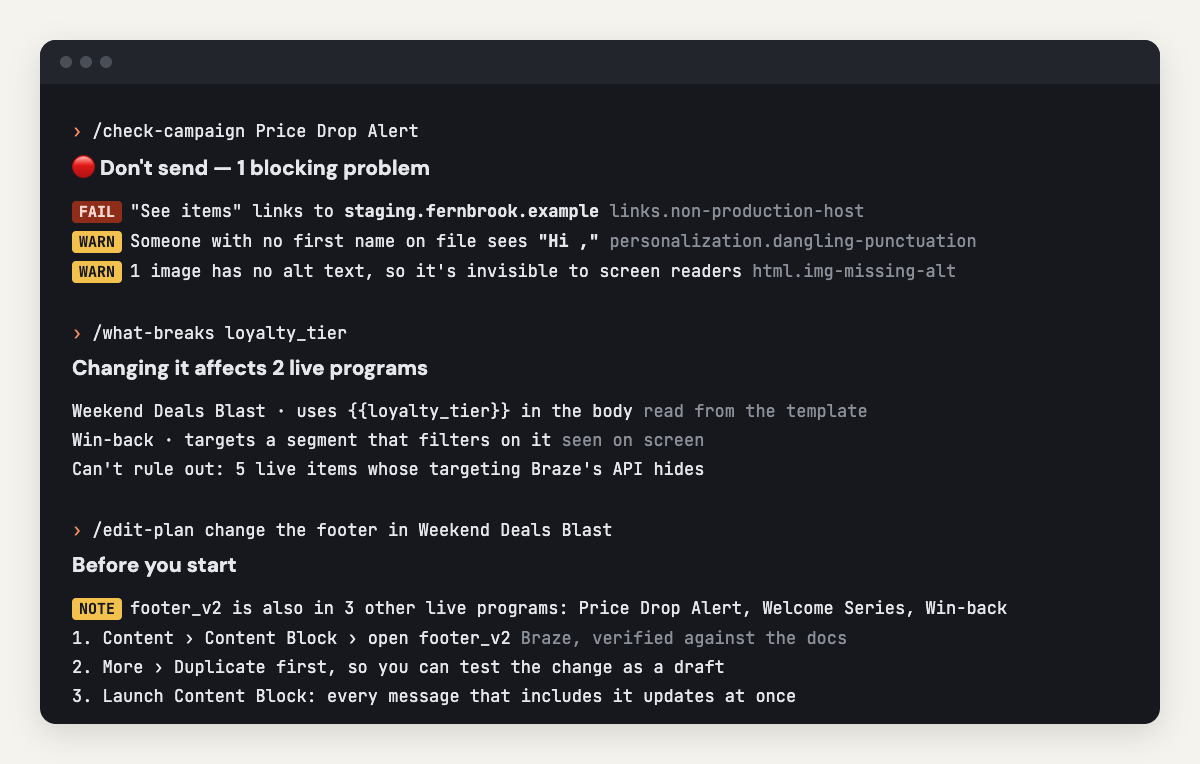
Real output from the demo account:
/check-campaign Price Drop Alert          🔴 Don't send. 1 blocking problem

fail  links.non-production-host        "See items" points at staging.fernbrook.example
warn  personalization.dangling-punct.  Someone with no first name on file sees "Hi ,"
warn  html.img-missing-alt             1 image has no alt text
warn  a11y.no-lang                     No lang attribute, so screen readers guess the language

/check-sms Flash Sale Text                🟡 Fix before sending

warn  sms.unicode            "’" and "—" switch the text to Unicode: 70 characters per segment, not 160.
                             Swap ’ → ' and — → -
warn  sms.too-many-segments  Up to 3 billed segments; house limit is 2
warn  sms.no-opt-out         No "Reply STOP to opt out"
Code makes every pass/fail call, never AI. Claude adds a labelled, advisory review (subject line, CTA, tone)
on top. Need a record for the launch ticket? Ask /check-campaign for a QA sign-off report: a Markdown file
with every finding, what couldn't be verified and a reviewer sign-off, ready to paste into Jira, Slack or Notion.
All commands
✅ works fully today · 🧪 works on the demo account and mocked APIs, not yet field-tested on real accounts
| Command | What it does | Status | |
|---|---|---|---|
| Get started | /start-here | Overview and the best first step | ✅ |
/setup | Teach it your team's rules: language, brand, links, footer, senders, test customers, strictness | ✅ | |
/house-rules | View or change those rules; mark a finding "fine for us" | ✅ | |
/connect | Connect Braze, Klaviyo or Iterable with a read-only key | 🧪 | |
/refresh | Pull the latest campaigns, journeys, segments, templates and content blocks (or load the demo) | 🧪 | |
| Plan and build | /plan-journey | Design a journey and check it for overlap with what's already live | 🧪 |
/build-plan | Step-by-step build instructions in your platform's own terms | 🧪 | |
/bulk-edit | Preview a find-and-replace across every subject, body and content block | 🧪 | |
| Change safely | /what-breaks | What's affected if you change or delete an attribute, segment, block, event or link | 🧪 |
/what-changed | What changed in the account since last time, live items first | 🧪 | |
/edit-plan | The safe way to change something live (copy, running journeys, shared blocks, audiences) | 🧪 | |
/show-journey | Draw a live journey as a diagram, with structural problems flagged | 🧪 | |
| Send with confidence | /check-campaign | A whole campaign or journey: every message, settings and structure | 🧪 |
/check-email | One email: HTML, links, unsubscribe, UTMs, personalization, house rules | ✅ | |
/check-push | One push: lock-screen length for your longest names, deep links, blanks | ✅ | |
/check-sms | One text: billed segments, Unicode traps, opt-out wording, sender name | ✅ | |
/check-in-app | One in-app message or content card: length, buttons, links | ✅ | |
| Prove the impact | /watch-launch | Bounce, unsubscribe, spam and delivery rates against thresholds | 🧪 |
/ops-report | Messages checked, problems caught, hours saved, for you or the whole team | ✅ | |
/report-problem | Report a wrong result; it becomes a test case and gets fixed | ✅ |
Details
What "check" covers, by channel
| Channel | Catches |
|---|---|
Broken Outlook blocks, unclosed tables, missing alt text, Gmail clipping; a preheader that's missing, repeats the subject or reads "View in browser"; staging or malformed links, http://, inconsistent UTMs, broken pages (live check); missing unsubscribe (skipped for transactional mail) | |
| Accessibility (email) | Missing lang, "click here" links, image-only links with no alt text, layout tables screen readers read as data, text under 12px |
| Push | Title and body length for your longest customer names, line breaks that hide titles on iOS, deep links, Android's required title (Braze) |
| SMS | Billed segments the way carriers count them, the exact character that switches a text to Unicode, opt-out wording, sender name, each platform's limits |
| In-app | Body length, buttons and their links, click-through destination, HTML structure |
| Content cards | Title and message length, card link and image destinations |
| Webhooks | Missing or staging URLs, keys written into the URL, JSON bodies that break when a name contains a quote |
| Personalization (all) | Renders every message for a complete, empty, long-values and accented-name customer (or your own): Hi , blanks, literal null, leftover {{ }}, template errors, Iterable comparisons that silently skip the send |
| Campaigns & journeys | Audience and conversion event, naming convention, dead-end branches, unreachable steps, empty message steps |
Braze Liquid, Klaviyo's template language and Iterable Handlebars are supported. Platform tags that can't run
locally (coupon codes, catalog lookups, Connected Content) are reported as not verified, never as passing or
failing. Full list with ids: src/checks/catalog.ts.
Your rules, not just ours
What's "wrong" depends on the team, so checks come in three layers:
| Layer | Examples | Can a team change it? |
|---|---|---|
| Locked: wrong for everyone | No unsubscribe, template syntax that doesn't render, broken links | No |
| Defaults: sensible everywhere | Missing alt text, http:// links, Gmail clipping, mixed UTM tagging | Re-grade or turn off |
| House rules: your conventions | Spelling, date format, brand terms, banned phrases, approved domains and senders, UTM naming, footer, subject length, name fallback, naming convention, test customers | Set in /setup |
"That's fine for us" becomes a recorded exception with a reason (/house-rules), which is different from
"the tool is wrong" (/report-problem). Teams share one rulebook by setting the same Shared rules file in the plugin's settings.
What it can't see (yet)
Every result says what it couldn't verify, and every dependency says how it's known (confirmed by the API, read from the template, read from the segment description, seen on screen).
- Local rendering is an approximation. Braze Connected Content and catalog lookups aren't executed, and Klaviyo's template language is approximated. These are reported as not verified.
- Braze's API doesn't say which segment a campaign or Canvas targets.
/what-breakslists those as "can't rule out" and can read them from your Braze dashboard via Claude in Chrome, with your OK. - Iterable's API doesn't return journey step order, so Iterable journeys show their emails but not the path.
- Braze content cards come back from the API with few fields; card checks are fullest when the copy is pasted.
- It never builds or edits in your account.
/build-planand/edit-plantell you how;/bulk-editpreviews only.
What it runs, sends and fetches
It never sends messages, never edits your account, never reads customer profiles (it tests with made-up customers), and sends nothing to the author or any third party.
| What | When | Where it goes |
|---|---|---|
A local MCP server (node dist/mcp-server.js, readable source in src/) | When Claude Code loads the plugin | Your machine only |
| Read-only API calls | /refresh, /watch-launch | Only the platform you connected: your Braze REST endpoint, a.klaviyo.com, or api.iterable.com / api.eu.iterable.com |
| Link checks (unsubscribe and tracking links are never requested) | Only when you ask for a live link check | The links in the email being checked |
| Local files: snapshots, house rules, QA sign-off reports, a usage log of check ids and counts | Normal use | ~/.crm-lifecycle-ops/ |
| A copy of the usage log (counts only, never message content) | Only if you set a team report folder | The folder you chose |
| A GitHub issue | Only via /report-problem, after you approve the exact text | github.com/har5h98/crm-lifecycle-ops |
API keys are read only from the plugin's settings (secure storage). See SECURITY.md and the privacy policy.
Learn more
- Operator guide: a one-page routine for setup, each step of a build, and the weekly review.
- How it works: the architecture, data flow and design decisions in plain language.
How it gets better
- You report:
/report-problemturns a wrong result into a redacted GitHub issue (it asks before posting). - It becomes a test: each confirmed report joins
tests/corpus/and must pass from then on. - Fixes are drafted automatically: Claude writes the test and the fix as a pull request for human review.
- Vendor changes are watched: a weekly job checks the Braze, Klaviyo and Iterable APIs for changes, and a monthly one opens a checklist to re-verify the build and edit guides against the vendors' docs. Every plan says when its steps were last verified, and warns once that's more than 90 days ago.
Wrong results are the most valuable contribution. See CONTRIBUTING.md.
License
MIT. Not affiliated with or endorsed by Braze, Klaviyo or Iterable; product names are trademarks of their owners.
Comments
New to MCP?
From what the protocol is to installing your first server, these answers cover most first questions.
An open protocol that defines how AI applications connect to external tools and data in a uniform way. Clients talk to the model; MCP servers provide tools, resources and prompt templates. They exchange standard messages, so one server can be reused by many clients.