
About reashield
REAShield hardens owned JavaScript, Electron and Python apps against automated reverse engineering. It protects shipped builds through approaches such as moving logic server-side, encrypted sealing and runtime indirection, and includes a measurement workflow.
Key features
- 01Harden JavaScript, Electron and Python apps
- 02Relocate sensitive logic to a server
- 03Use encrypted sealing and runtime indirection
- 04Integrate through bundler plugins
- 05Measure recovery before and after hardening
Use cases
- 01Protect sensitive logic shipped with an app
- 02Rewrite dynamic IPC channels in Electron apps
- 03Test hardening against reverse-engineering tools
MCP support
REAShield provides an MCP server with tools to inspect, harden and measure a project: reashield_doctor, reashield_harden and reashield_measure. It can be connected using a stdio command in an MCP client configuration.
Configuration
Local server config is the same for every client. Copy it into your client’s MCP config file.
Tools
Local servers expose tools only once running on your machine, and the maintainer has not provided a tool list.
Details
From the project READMEREAShield


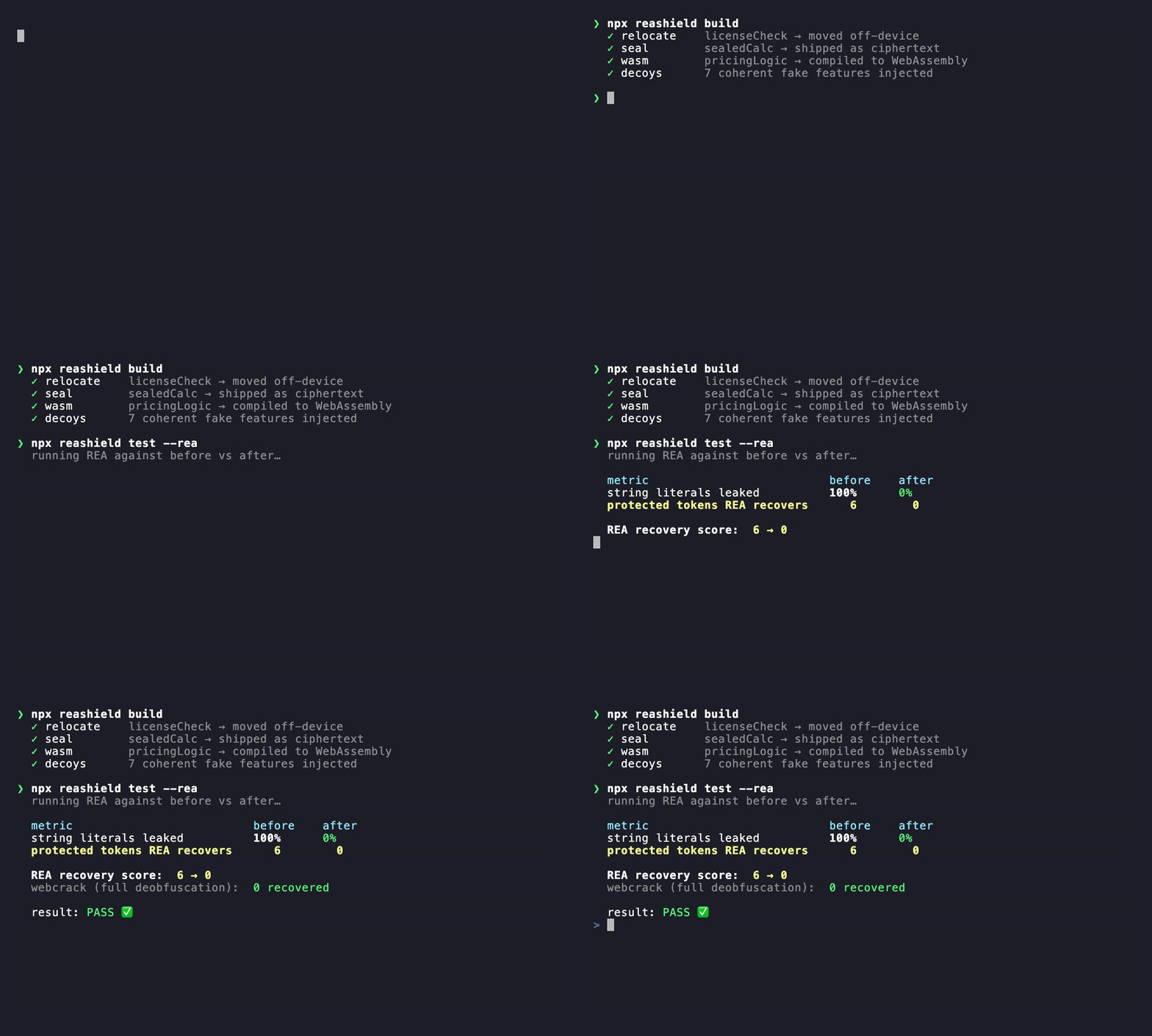
REA reverse-engineers any app. REAShield makes it come back empty.
REA — the #1 trending repo on GitHub — lets an AI agent reverse-engineer your shipped app in one command, no source code needed. REAShield is the defensive counter: drop it into your build and it hardens what you ship (JavaScript / Electron / Python) so automated reverse engineering comes back empty.
Measured against the real attacker — not claimed
- REA (
rea-agents) recovered 6 protected tokens → 0 after hardening. - webcrack fully deobfuscated the hardened client (1103 changes, string array decoded) and still recovered 0 — because the secrets were relocated/sealed, not just obfuscated.
npm i -D reashield
npx reashield build        # hardened client + generated server skeleton
npx reashield test --rea   # run the REAL REA on before/after; score what it recovers
Python front-end: pip install reashield (see python/).
Honest promise & limits — read this
Offline code can never be made unbreakable. If a machine must run it, the machine has it, so it can always be extracted given effort — obfuscation, WASM and bytecode only raise the cost. REAShield's job is to defeat the automated attack (the one REA just handed everyone) and raise a human analyst's cost from minutes to days. The only truly unrecoverable code is code you don't ship — run it server-side (
mode: "relocate"). Defensive-only, behavior-preserving, transparent (no phone-home). It hardens code you own and ship; it won't help bypass anyone else's DRM, license checks, or anti-cheat.
Use it from an AI agent (MCP server)
REA is an MCP server that hands an agent reverse-engineering tools. REAShield ships the defensive mirror — an MCP server that hands an agent hardening tools, so Claude Code / Cursor can inspect, harden, and measure a project from chat.
Tools: reashield_doctor (what's exposed), reashield_harden (harden it),
reashield_measure (run the real REA and report the recovery score).
# Claude Code
claude mcp add reashield -- npx -y reashield-mcp

# Cursor / other MCP clients — add to your MCP config:
# { "mcpServers": { "reashield": { "command": "npx", "args": ["-y", "reashield-mcp"] } } }
Two front-ends, one architecture
REAShield is a monorepo. The same durable idea — move secrets off-device, turn static facts into runtime facts, and measure the result — is implemented for two ecosystems:
| Front-end | Install | Protects | Status |
|---|---|---|---|
| JavaScript / npm / Electron (this package) | npm i -D reashield | shipped JS bundles, app.asar | published |
Python (python/) | pip install -e python | shipped .py apps | in this repo |
Both share the pillar ordering below. The Python package mirrors relocation,
sealing (AES-GCM), string indirection, name mangling, polymorphism, decoys, and
a measurement harness — with a safety analyzer that refuses rather than
miscompiles. See python/README.md.
Interpreted / source-shipped languages are the natural fit; compiled-to-native (Go, Rust, C/C++) ship no source and are a different reverse-engineering game.
Why this works (the threat model)
REA's JavaScript/Electron path is static — it never runs your app. It reads your bundle, rebuilds a graph of modules, imports, routes, IPC channels and strings, then hands a coding agent a compact summary to reason over. It honestly leaves anything computed at runtime unresolved and drops relationships when a graph gets too big.
So the durable defenses either move secrets off-device or turn static facts into runtime facts REA can't resolve. Plain obfuscation — the thing LLM-assisted deobfuscation erodes fastest — is the replaceable outer skin, not the foundation.
Defense pillars (ordered by durability)
| Pillar | mode / layer | What it does | Honest limit |
|---|---|---|---|
| Server-side relocation | relocate | Moves the real body to a generated server skeleton; ships only an opaque remote-call stub through one endpoint. The secret never ships. | Needs a secured backend; the request/response boundary is observable. |
Encrypted sealing (max) | seal | Ships the module as ciphertext, decrypted at runtime with a key fetched from your server. | Needs connectivity; does not stop a human dumping decrypted memory. |
| WASM | wasm | Compiles numeric-subset logic to a real WebAssembly module, off REA's JS graph path. | Numeric subset only; falls back to obfuscate (reported) outside it; wasm can still be decompiled. |
Dynamic graph (max) | dynamicGraph | Computed imports + runtime dispatch table — deletes the call/import edges REA recovers. | CPU cost; scoped to protected regions. |
| Graph starvation | flattenBundle, stripSourceMaps, stringIndirection, dynamicChannels | One module, no maps, no semantic plaintext strings, computed channel names. | Obfuscation erodes over time. |
| Polymorphism | polymorphic | Per-build re-randomization of names, strings and structure — defeats version diffing. | Cosmetic alone; pairs with the above. |
| Decoys | decoys | Inert fake "feature" clusters (hub + ring-linked members + a fake entry) with plausible route/IPC/key strings, shaped to look central in REA's summary. | Experimental; measured, can add size. |
| Integrity | integrity (off) | Fail-safe anti-tamper. | Does not defend REA's static path (REA never runs your app). |
Install
npm install --save-dev reashield
Quick start
npx reashield init          # scaffold shield.config.cjs
npx reashield build         # emit hardened client + server skeleton
npx reashield doctor        # show config, layers, costs, deps
npx reashield test          # measure before vs after (static; add --rea for real REA)
Config (shield.config.cjs)
module.exports = {
  input: "src/index.js",
  output: "dist-shielded",
  preset: "balanced",            // low | balanced | max
  protect: [
    { name: "licenseCheck", mode: "relocate" },  // strongest: off-device
    { name: "sealedCalc",   mode: "seal" },        // ciphertext + remote key (max)
    { name: "pricingLogic", mode: "wasm" },        // off the JS graph (fast-follow)
    { name: "featureGate",  mode: "obfuscate" },   // harden in place
  ],
  server: {
    enabled: true, out: "server-shielded", adapter: "express",
    endpoint: "/__s", keyEndpoint: "/__s/k", decoyCalls: false,
  },
  polymorphic: { enabled: true, seed: "auto" },     // "auto" rotates every build
  layers: {
    stripSourceMaps: true, flattenBundle: true, obfuscate: true,
    stringIndirection: true, dynamicChannels: true, dynamicGraph: false,
    decoys: { enabled: true, count: 5 }, integrity: false,
  },
};
protect: ["a", "b"] (a plain string array) is also accepted; each defaults to
mode: "obfuscate". You can also put the config under a reashield key in
package.json.
Presets
- low — strip maps, flatten, mangle. Fast, minimal size.
- balanced (default) — + string indirection, name homogenization, computed channels, opaque relocation boundary, structural polymorphism, 5 decoys. Low cost.
- max — + dynamic dispatch, encrypted sealing, decoy calls, control-flow
flattening, dead-code injection, self-defending, ~15 decoys. Adds latency /
CPU / size —
doctorflags it.
Bundler plugins (run hardening inside your existing build)
Instead of the CLI, harden as part of an esbuild / Rollup / Vite build. The
plugin runs the source-level pillars per module, then finalizes each output
chunk (decoys + obfuscation + source-map stripping + client-runtime injection)
and writes the server skeleton. flattenBundle is a no-op here — your bundler
already bundles; the plugin hardens its output. Configure the relocated/sealed
transport once via the global the plugin installs:
globalThis.__configureShield({ transport, keyTransport }) (or let the default
fetch transport call your endpoints).
// rollup.config.mjs
import { reashieldRollup } from "reashield/plugins";
export default {
  input: "src/index.js",
  output: { dir: "dist", format: "esm" },
  plugins: [reashieldRollup({ configPath: "shield.config.cjs" })],
};
// vite.config.mjs  (Vite consumes the Rollup plugin interface)
import { reashieldVite } from "reashield/plugins";
export default { plugins: [reashieldVite({ configPath: "shield.config.cjs" })] };
// esbuild build script
import { build } from "esbuild";
import { reashieldEsbuild } from "reashield/plugins";
await build({
  entryPoints: ["src/index.js"],
  bundle: true,
  outdir: "dist",
  plugins: [reashieldEsbuild({ configPath: "shield.config.cjs" })],
});
Each plugin accepts { config | configPath, cwd, seed }. Note: the plugin
hardens every emitted JS chunk, so obfuscation cost applies to the whole output
— scope your build accordingly.
The generated server skeleton
relocate and seal emit a server-shielded/ directory holding the real
logic and keys. Never ship it to users. You run it behind your own auth +
TLS. REAShield scaffolds the Express/Fastify wiring and an in-process handler
for tests; securing the endpoint is your responsibility (it does not add
auth for you).
Auth seam (you supply it). Until you call setAuthVerifier, the endpoint is
open — secure it before shipping. The client attaches a token from a source
you configure; the server verifies it:
// server
import { setAuthVerifier } from "./server-shielded/handlers.js";
setAuthVerifier(async (token, ctx) => (await myAuth.verify(token)) === true);

// client (wire once at startup)
__configureShield({ authToken: () => myAuth.currentToken() }); // (or globalThis.__configureShield in plugin builds)
Adapters. adapter: "express" | "fastify" | "web" | "generic". The skeleton
always exports a cross-runtime webHandler(request: Request): Promise<Response>
that drops into Hono, Cloudflare Workers, Deno, Bun, or a Next.js route handler:
import { webHandler } from "./server-shielded/handlers.js";
export const POST = (req) => webHandler(req); // Next.js app route, Workers fetch, ...
Relocated/sealed functions become async (they do a round-trip). Make sure your
call sites await them. They must be self-contained (no closure over
client-only module state).
Behavior preservation
Hardening must never change what your program does. The bundled example
(examples/sample-package) proves identical outputs before and after hardening
— including relocated and sealed code, exercised through an in-process server —
and asserts decoys never execute. Run it with npm run example:test.
Electron hardening
For Electron apps, REAShield adds an Electron-specific path (pair it with the JS pillars above):
- Dynamic IPC channel rewriting — turns literal
ipcMain/ipcRenderer/webContentschannel strings into runtime-computed ones. REA leaves dynamically-computed IPC names unresolved by design, so this directly starves its graph. Value-preserving: both sides compute the identical string. Enable withlayers.ipcChannels: true, or run standalone:npx reashield electron ipc src/main.js --out dist/main.js - V8 bytecode (
bytenode) — ship.jscso the asar holds no readable JS:
Caveat: V8 bytecode is tied to the exact V8 version — compile with your target Electron's Node/V8, or thenpx reashield electron bytecode dist/main.js --out dist/main.jsc.jscwill not load. Raises cost against automated static JS analysis; it is not unbreakable. - Defensive fuses (
@electron/fuses) — flip the packaged binary to the hardened defaults (disableRunAsNode, Node CLI inspect args andNODE_OPTIONS; enable embedded ASAR integrity validation andOnlyLoadAppFromAsar). Run after packaging, in yourafterPack:npx reashield electron fuses path/to/YourApp # --dry to preview
bytenode and @electron/fuses are optional dependencies, loaded only when
you use these commands. Programmatic API: import { rewriteIpcChannels, compileToBytecode, recommendedFuses, applyFuses } from "reashield/electron".
WASM backend (numeric crown jewels)
Mark a function mode: "wasm" and REAShield compiles it to a real WebAssembly
module (emitted as binary — no external toolchain) that is instantiated
synchronously, so behavior is unchanged. The arithmetic then lives in wasm
bytes, off REA's JS module-graph path. Supported today: numeric params, const
locals, a return, + - * /, unary -, ternaries with comparison/&&/||/!
conditions, and Math.(max|min|abs|floor|ceil|round|sqrt|trunc). Anything
outside that subset falls back to in-place obfuscation, reported (never silent).
Honest limit: wasm is a harder, different analysis league — not unbreakable.
Durability: measure, don't trust
REA ships often. reashield test compares your own before/after artifact and
writes a baseline; the committed GitHub Action
(.github/workflows/reashield-regression.yml) re-measures across a matrix of
rea-agents versions and fails when a newer REA recovers more than the
baseline allows. That regression gate — not any single obfuscation trick — is
what keeps the shield strong over time.
rea-agents is an optional dev dependency. Without it, reashield test
falls back to static proxy metrics (source maps, import edges, string leakage,
protected-name leakage, secret-string removal).
Roadmap
✅ Bundler plugins (esbuild/Rollup/Vite) · ✅ Electron path (bytenode, defensive fuses, dynamic IPC rewriting) · ✅ WASM backend (numeric-subset → real wasm).
Next: broader WASM subset (control flow, strings) · broader server adapters + auth helpers · summary-view-tuned decoys · ASAR packaging integration helpers.
License
MIT. Use it to protect code you own and ship. Nothing here is a weapon against anyone else's software.
Comments
New to MCP?
From what the protocol is to installing your first server, these answers cover most first questions.
An open protocol that defines how AI applications connect to external tools and data in a uniform way. Clients talk to the model; MCP servers provide tools, resources and prompt templates. They exchange standard messages, so one server can be reused by many clients.