
About MCP Image Generation Server
MCP Image Generation Server provides image generation through Tencent Hunyuan, OpenAI GPT Image, and Doubao. It supports configurable styles and resolutions, and offers local stdio or remote HTTP access with image URLs for frontend use.
Key features
- 01Hunyuan, OpenAI, and Doubao providers
- 02Prompt-based image generation
- 03Styles, resolutions, and negative prompts
- 04stdio and Streamable HTTP transports
- 05Image URLs and base64 retrieval
Use cases
- 01Generating images from prompts in an MCP client
- 02Serving generated images to a web frontend
- 03Using a remote server with multiple clients
MCP support
Exposes image generation and retrieval tools, style and resolution resources, and an image-generation prompt. MCP clients can connect via stdio or HTTP; HTTP mode supports bearer-token authentication and concurrent clients.
Configuration
Local server config is the same for every client. Copy it into your client’s MCP config file.
We haven’t collected a package or remote endpoint for this server. Follow the instructions in the project README.
Tools
Local servers expose tools only once running on your machine, and the maintainer has not provided a tool list.
Details
From the project READMEMCP Image Generation Server
A Model Context Protocol (MCP) server for image generation using multiple AI providers including Tencent Hunyuan, OpenAI GPT Image, and Doubao APIs.
Version: 0.2.0
Features
🎯 Multi-API Provider Support
- Tencent Hunyuan: 18 artistic styles with Chinese optimization
- OpenAI GPT Image: High-quality image generation with English optimization
- Doubao (ByteDance): Balanced quality and speed with 12 styles
🚀 Core Features
- Generate images from text descriptions
- Support for multiple image styles across different providers
- Support for different image resolutions
- Negative prompts for excluding unwanted elements
- Intelligent provider selection and management
- Unified parameter format with provider-specific options
🌐 Transport Modes (New in v0.2.0)
- stdio Transport: Local IDE integration (Cursor, Windsurf)
- HTTP Transport: Remote access and enterprise deployment
- Multi-client concurrent connections
- Bearer Token authentication
- Session management
- RESTful API endpoints
- Suitable for cloud deployment and remote access
Why HTTP Transport? Version 0.2.0 adds Streamable HTTP support (MCP's official standard as of 2024-11-05) to enable:
- Remote Access: Claude remote MCP requires public HTTP endpoints (stdio only works locally)
- Enterprise Deployment: Centralized service deployment with multiple concurrent clients
- Cloud Native: Compatible with containers, Kubernetes, and load balancers
Note: This uses Streamable HTTP (POST/GET/DELETE), not the deprecated SSE-only approach. SSE is retained for compatibility but Streamable HTTP is the recommended standard.
🔧 Smart Provider Management
- Automatic detection of available API providers
- Support for specifying particular providers or automatic selection
- Unified error handling and retry mechanisms
- Flexible parameter formats:
provider:styleandprovider:resolution
Installation
Using UV (Recommended)
UV is a fast, modern Python package manager. Recommended usage:
# Install UV (Windows)
curl -sSf https://astral.sh/uv/install.ps1 | powershell

# Install UV (macOS/Linux)
curl -sSf https://astral.sh/uv/install.sh | bash

# Clone the project and enter the directory
cd path/to/image-gen-mcp-server

# Create a UV virtual environment
uv venv
# Or specify an environment name
# uv venv my-env-name

# Activate the virtual environment (Windows)
.venv\Scripts\activate
# Activate the virtual environment (macOS/Linux)
source .venv/bin/activate

# Install dependencies (recommended)
uv pip install -e .

# Or use the lock file for exact versions
uv pip install -r requirements.lock.txt
Using Traditional pip
If you prefer traditional pip:
# Create a virtual environment
python -m venv venv
# Activate the virtual environment (Windows)
venv\Scripts\activate
# Activate the virtual environment (macOS/Linux)
source venv/bin/activate

# Install dependencies
pip install -e .
# Or use the lock file
pip install -r requirements.lock.txt
Environment Setup
Create a .env file in the project root. See .env.example for all available options.
Basic Configuration
# Image save directory
MCP_IMAGE_SAVE_DIR=./generated_images
# Public base URL for generated image links (HTTP mode, optional but recommended)
# MCP_PUBLIC_BASE_URL=https://mcp.your-domain.com
# Metadata TTL for get_image_data cache (seconds)
# MCP_IMAGE_RECORD_TTL=86400
# Max bytes allowed in get_image_data base64 response
# MCP_GET_IMAGE_DATA_MAX_BYTES=10485760

# API Provider Credentials (configure at least one)
TENCENT_SECRET_ID=your_tencent_secret_id
TENCENT_SECRET_KEY=your_tencent_secret_key
OPENAI_API_KEY=your_openai_api_key
DOUBAO_API_KEY=your_doubao_api_key
# Optional but recommended when multiple providers are configured
# MCP_DEFAULT_PROVIDER=openai
Transport Configuration (Optional)
# Transport mode: stdio (default, for local IDE) or http (for remote access)
MCP_TRANSPORT=stdio

# HTTP transport settings (only needed for HTTP mode)
MCP_HOST=127.0.0.1
MCP_PORT=8000

# Authentication (recommended for HTTP mode)
MCP_AUTH_TOKEN=your-secure-random-token
Usage
🔄 Transport Modes
This server supports two transport modes:
| Feature | stdio Transport | HTTP Transport |
|---|---|---|
| Use Case | Local IDE integration | Remote access, enterprise deployment |
| Connection | Subprocess communication | HTTP/HTTPS network |
| Multi-client | ❌ Single client | ✅ Multiple concurrent clients |
| Remote Access | ❌ Not supported | ✅ Supported |
| Authentication | Not needed | Bearer Token |
| Deployment | Simple | Cloud-ready |
🚀 Quick Start
Unified Entry Point (Recommended)
# Method 1: Run as module (recommended)
python -m mcp_image_server

# Method 2: Use entry script
./mcp-server

# Method 3: After pip install
mcp-image-server
The unified server will automatically use the transport mode specified in your .env file:
MCP_TRANSPORT=stdio→ Local stdio mode for IDE integrationMCP_TRANSPORT=http→ HTTP server mode for remote access
📡 HTTP Transport Mode
For remote access and enterprise deployment, use HTTP transport:
1. Configure HTTP Mode
# Set in .env file
MCP_TRANSPORT=http
MCP_HOST=127.0.0.1
MCP_PORT=8000
MCP_AUTH_TOKEN=your-secure-token  # Optional but recommended
2. Start HTTP Server
python -m mcp_image_server
Server will start on http://127.0.0.1:8000 with endpoints:
GET /health- Health checkPOST /mcp/v1/messages- Send JSON-RPC messagesGET /mcp/v1/messages- Subscribe to SSE eventsDELETE /mcp/v1/messages- Close sessionGET /images/{filename}- Serve generated image files
generate_image tool returns images[].url for HTTP clients.
If server is exposed through reverse proxy/public domain, set MCP_PUBLIC_BASE_URL to ensure URL is externally reachable.
/images/* is intentionally public so browser/front-end image rendering works even when MCP API auth is enabled.
Best-practice agent flow:
- Call
generate_imageto get renderable image + stableimage_id/url. - Call
get_image_data(image_id=...)only when programmable base64 text is required.
3. Test HTTP Server
# Check server health
curl http://127.0.0.1:8000/health

# Run comprehensive tests
python test_mcp_server.py

# Test with API key for actual image generation
python test_mcp_server.py --with-api
4. Use HTTP Client
# Run example client
python example_http_client.py basic       # Explore server capabilities
python example_http_client.py generate    # Generate images (requires API key)
For detailed HTTP transport documentation, see HTTP_TRANSPORT_GUIDE.md
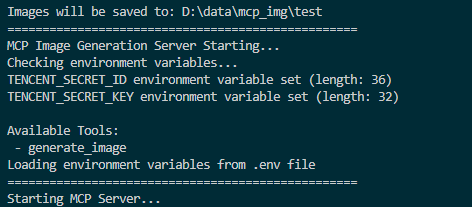
Screenshot of MCP server running successfully:
Connecting to the Server
You can connect from MCP-compatible client(recommand cursor now). The server provides the following features:
Resources
styles://list- List all available image stylesresolutions://list- List all available image resolutions
Tools
generate_image- Generate images based on prompt, style, and resolution (OpenAI also supportsbackground/output_format/output_compression/moderation)get_image_data- Fetch base64 text for a previously generated image byimage_id
Prompts
image_generation_prompt- Create image generation prompt templates
🎨 Multi-API Usage Examples
Basic Usage
# Auto-select best available provider
generate_image(prompt="A cute cat in a garden")

# Specify a particular provider
generate_image(prompt="A cute cat", provider="openai")
generate_image(prompt="一只可爱的小猫", provider="hunyuan")
generate_image(prompt="Cute kitten", provider="doubao")
Advanced Parameter Usage
# Use provider-specific styles and resolutions
generate_image(
    prompt="Cyberpunk city skyline",
    style="hunyuan:saibopengke",
    resolution="hunyuan:1024:768"
)

# Mix provider selection with standard parameters
generate_image(
    prompt="Fantasy magical forest",
    provider="doubao",
    style="fantasy",
    resolution="1024x768",
    negative_prompt="low quality, blurry"
)

# OpenAI with high-resolution output
generate_image(
    prompt="Artistic portrait of a musician",
    provider="openai",
    style="artistic",
    resolution="1536x1024"
)
📊 Supported Providers and Parameters
Tencent Hunyuan
- Styles: 18 options including
riman,xieshi,shuimo,saibopengke,youhua - Resolutions: 8 options from
768:768to1280:720 - Specialty: Chinese-optimized, rich artistic styles
OpenAI GPT Image
- Styles: 12 options including
natural,vivid,realistic,artistic,anime - Resolutions: 4 options:
1024x1024,1536x1024,1024x1536,auto - Advanced options:
background,output_format,output_compression,moderation(via MCP client) - Specialty: High-quality output, English optimization
Doubao (ByteDance)
- Styles: 12 options including
general,anime,chinese_painting,cyberpunk - Resolutions: Model-dependent (auto-validated by configured model/fallback model)
- Specialty: Balanced quality and speed
Cursor Integration
For integration setup details and sample config JSON, see:
Recommended minimum environment variables:
MCP_IMAGE_SAVE_DIR- Provider credentials you actually use:
TENCENT_SECRET_ID+TENCENT_SECRET_KEY,OPENAI_API_KEY,DOUBAO_API_KEY
Optional provider/model controls:
OPENAI_BASE_URL,OPENAI_MODELDOUBAO_ENDPOINT,DOUBAO_MODEL,DOUBAO_FALLBACK_MODELMCP_DEFAULT_PROVIDER(recommended when multiple providers are enabled)
After changing .env model/default-provider values at runtime, call reload_config.
🧪 Testing
The project includes comprehensive testing tools:
Protocol Tests (No API Key Required)
# Test MCP protocol functionality without API keys
python test_mcp_server.py
This tests:
- ✅ Health check endpoint
- ✅ MCP initialization handshake
- ✅ Tools listing
- ✅ Resources listing and reading
- ✅ Prompts listing
- ✅ Session management
Functional Tests (API Key Required)
# Test actual image generation with configured providers
python test_mcp_server.py --with-api
This additionally tests:
- ✅ Real image generation with OpenAI
- ✅ Real image generation with Hunyuan
- ✅ Real image generation with Doubao
Note: At least one API key must be configured in .env to run functional tests.
Troubleshooting
General Issues
- Ensure environment variables are set correctly
- Check for spaces in paths; use quotes if needed
- Ensure the virtual environment is activated (if using one)
- Try running the server script directly to check for errors
- Check UV environment with
uv --version
HTTP Transport Issues
- Connection refused: Ensure server is running on correct host/port
- 401 Unauthorized: Check
MCP_AUTH_TOKENconfiguration - 404 Session not found: Re-initialize connection to get new session ID
- No provider available: Configure at least one API provider in
.env
For detailed troubleshooting, see HTTP_TRANSPORT_GUIDE.md
Front-end Demo
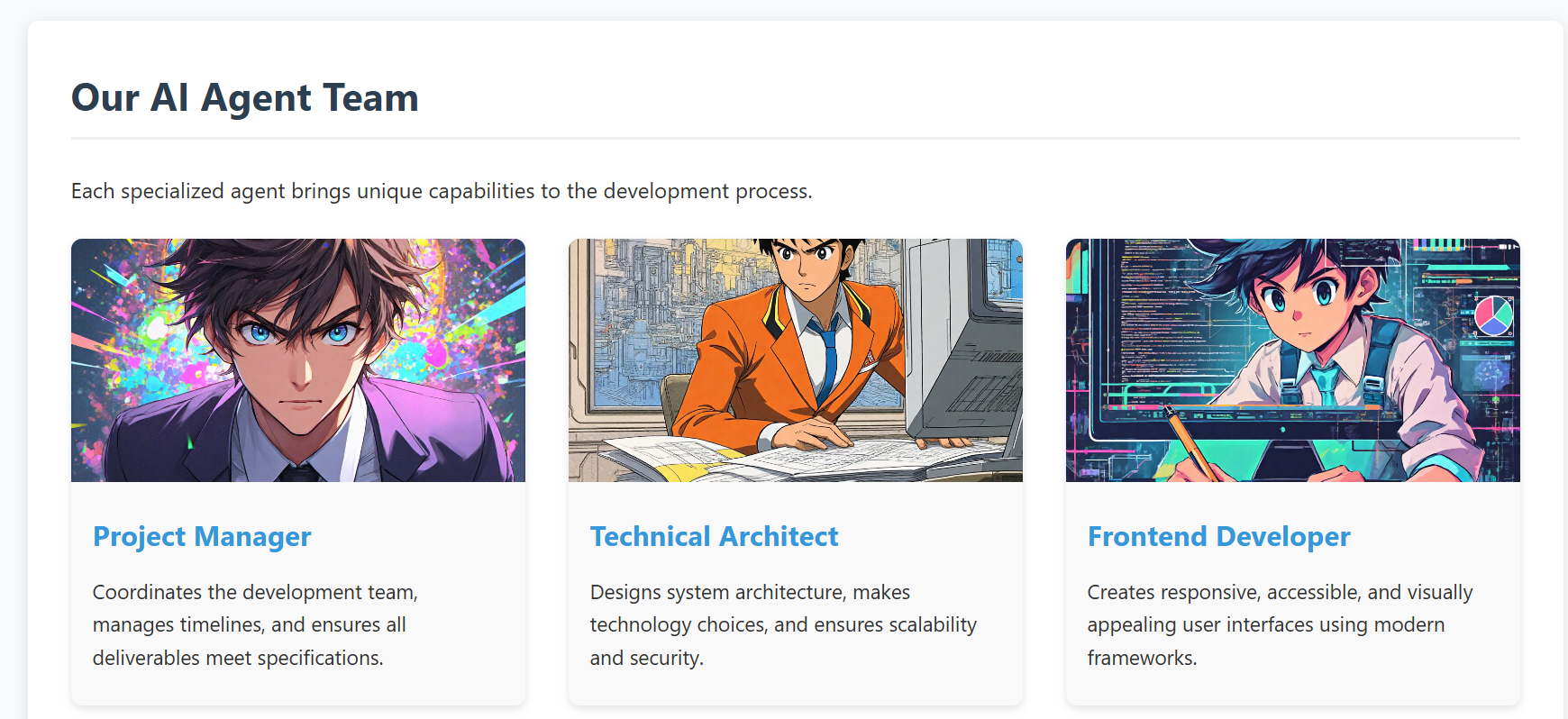
For a front-end integration example, see web-design-demo/.
This example demonstrates how to develop a real project using Cursor IDE, where you can generate and manage images directly within your development environment using our MCP tool 🛠️. No need to switch between different image generation tools or leave your IDE - everything can be done right in your development workflow ✨.
- screenshot of the demo web
API Reference
Multi-API Architecture
The project now supports multiple image generation APIs through a unified interface:
Supported APIs
- Tencent Hunyuan Image Generation API (Original)
- OpenAI GPT Image API (New)
- Doubao Image Generation API (New)
Unified MCP Resources
providers://list- List all available providersstyles://list- List all styles from all providersresolutions://list- List all resolutions from all providersstyles://provider/{provider_name}- Get styles for specific providerresolutions://provider/{provider_name}- Get resolutions for specific provider
Enhanced MCP Tools
generate_image- Multi-provider image generation with intelligent routingget_image_data- Retrieve base64 text data for a generated image by idreload_config- Reload runtime config/models from env/.env without process restart (safe subset only)
Tencent Hunyuan Image Generation API
The project originally used and continues to support Tencent Hunyuan Image Generation API. Here are the key details:
API Endpoints
- Domain:
hunyuan.tencentcloudapi.com - Region:
ap-guangzhou(Currently only supports Guangzhou region) - Default API Rate Limit: 20 requests/second
- Concurrent Tasks: Default 1 task at a time
Task Flow
- Submit Task: Submit an asynchronous image generation task with text description
- Query Task: Get task status and results using task ID
- Result URL: Generated image URLs are valid for 1 hour
For detailed API documentation and pricing, please refer to:
OpenAI GPT Image API
API Features
- High-quality image generation
- Automatic prompt optimization
- Multiple style options
- High-resolution output support
Doubao API (ByteDance)
API Features
- ByteDance's proprietary image generation model
- Balanced quality and speed
- Chinese and English prompt support
- Multiple artistic styles
RoadMap
-
Version 0.2.0 (Current)
- ✅ Tencent Hunyuan image generation API
- ✅ OpenAI GPT Image API integration
- ✅ Doubao API integration
- ✅ Multi-provider management system
- ✅ Intelligent provider selection
- ✅ Unified parameter interface
- ✅ HTTP transport with Streamable HTTP protocol
- ✅ Remote access support
- ✅ Multi-client concurrent connections
- ✅ Bearer Token authentication
- ✅ Session management
- ✅ Comprehensive testing suite
-
Future Plans
- Support more mainstream text-to-image model APIs, including:
- Qwen-Image (Qwen/Wan family)
- Open-source model API services (for example: FLUX, SDXL/SD3.5)
- Advanced features:
- Image editing and modification
- Batch image generation
- Style transfer capabilities
- Custom model fine-tuning support
- Enhanced MCP integration:
- Real-time generation progress
- Image history and management
- Advanced prompt templates
- Support more mainstream text-to-image model APIs, including:
Community contributions for more model integrations and new features are welcome!
Compatibility
- stdio: Verified with Cursor and Windsurf.
- HTTP (Streamable HTTP): Works with MCP clients that support HTTP transport.
- For other clients/environments, compatibility depends on the client-side MCP implementation.
Contributing
We welcome contributions of all kinds! Here are some ways you can help:
- 🐛 Report bugs and issues
- 💡 Suggest new features or improvements
- 🔧 Submit pull requests
- 🎨 Add support for more image generation models
Getting Started with Contributing
- Fork the repository
- Create your feature branch (
git checkout -b feature/AmazingFeature) - Commit your changes (
git commit -m 'feat: add some AmazingFeature') - Push to the branch (
git push origin feature/AmazingFeature) - Open a Pull Request
Please make sure to update tests as appropriate and follow the existing coding style.
We appreciate your interest in making this project better!
Comments
New to MCP?
From what the protocol is to installing your first server, these answers cover most first questions.
An open protocol that defines how AI applications connect to external tools and data in a uniform way. Clients talk to the model; MCP servers provide tools, resources and prompt templates. They exchange standard messages, so one server can be reused by many clients.