
About Actvt
Actvt is a Mac monitoring app for system metrics, ports, and sessions from Claude Code, Codex, and other agents. Its embedded MCP server lets agents query machine and session data.
Key features
- 01Live CPU, GPU, memory, and network metrics
- 02Browse and search agent sessions
- 03Analyze costs, tokens, and quota usage
- 04View remote sessions over SSH
- 05Detect and mask sensitive data
- 06Inspect and reclaim listening ports
Use cases
- 01Diagnose Mac performance or thermal issues
- 02Find and resume an earlier agent session
- 03Review token costs by project
- 04Identify processes using a port
MCP support
Actvt embeds a local MCP server that connects to Claude Code and Codex CLIs. It exposes system metrics, ports, and agent session data; raw transcripts require explicit opt-in, and sensitive data is masked.
Configuration
Local server config is the same for every client. Copy it into your client’s MCP config file.
We haven’t collected a package or remote endpoint for this server. Follow the instructions in the project README.
Tools
Local servers expose tools only once running on your machine, and the maintainer has not provided a tool list.
Details
From the project README
Actvt
A macOS app that monitors your Mac and your AI coding agents in one place.
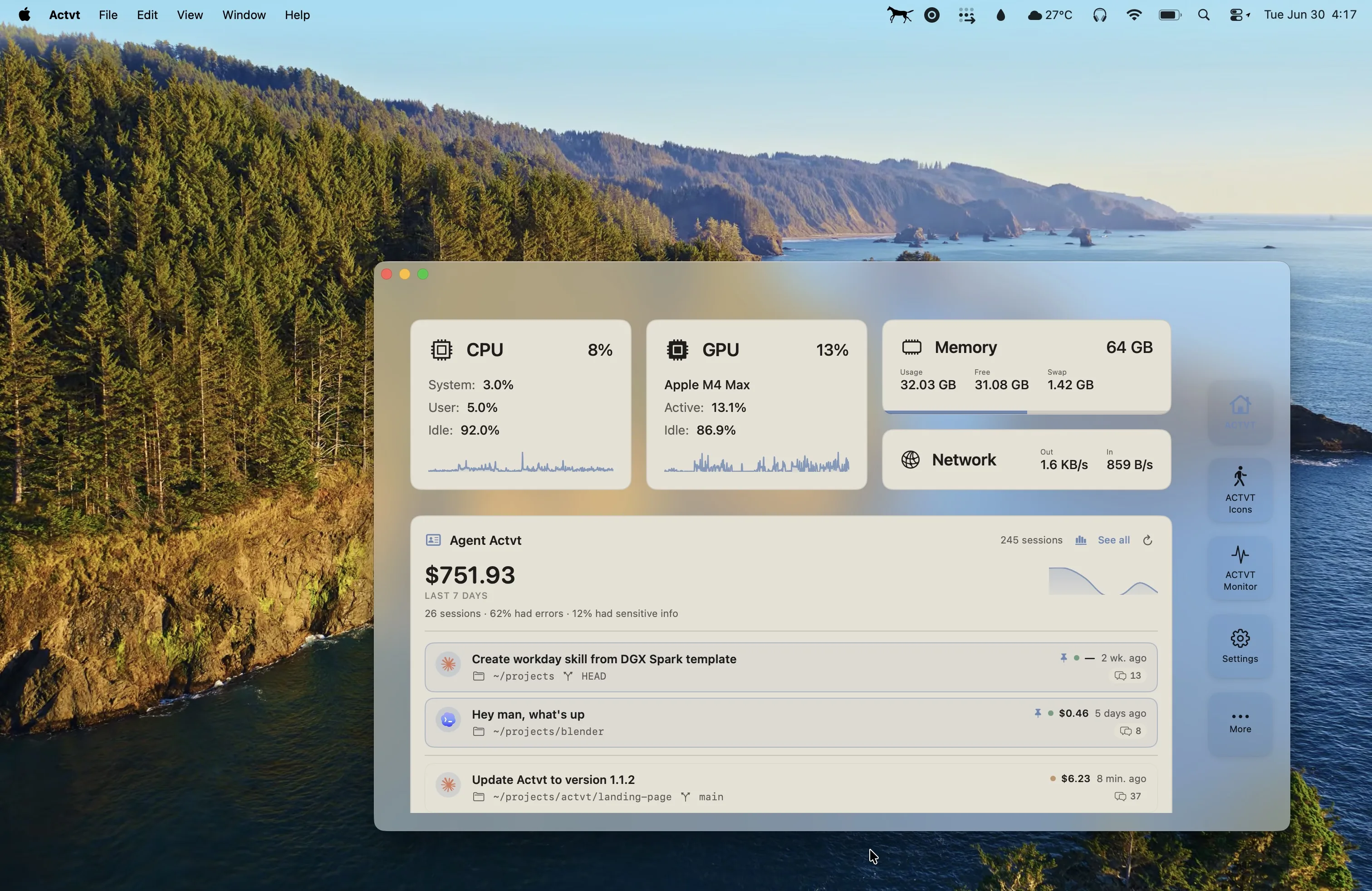
Actvt shows live CPU, GPU, memory and network for your Mac. It also reads the Claude Code and Codex session transcripts already sitting on your disk, so you can search them, see what they actually cost, and pick one back up where you left it.
It ships an embedded MCP server, so your agents can query the machine they are running on.
Download
Download for Apple Silicon. Requires macOS 15.5 or later.
Updates are delivered in-app through the Sparkle appcast in this repository, and every version is listed on the releases page.
What it does
System monitoring. CPU, GPU, memory and network with live graphs, usage breakdowns and temperatures. History is persisted across restarts.
Agent sessions. One browser for every Claude Code, Codex and Claude Desktop session. Full transcripts with thinking blocks and tool calls, outline navigation, search across everything, and one-click resume back into your terminal. Sessions are tagged by where they started, so a run in Ghostty is distinguishable from one in Cursor.
Cost and usage analytics. Total spend, token counts, cache hit ratio, spend by project, tool usage, and a daily activity heatmap. Plan usage bars show how much of your Claude and Codex quota is left and when it resets.
Spend is calculated at API token pricing. On a flat-rate plan that figure is not your bill. It is what those tokens would have cost at API rates, which is a useful read on what you are getting out of the plan.
Remote sessions. Reach over SSH to other Macs and headless Linux boxes and fold their sessions into the same timeline. Tailscale peers are discovered automatically. Install the helper on each host with one command, no sudo required.
curl -fsSL https://actvt.io/install-cli.sh | sh
Notifications. Get told when a session is waiting on your input, finishes, errors, runs long, or crosses a cost threshold. Clicking a notification raises the exact terminal or editor window that session lives in.
Sensitive data detection. Transcripts are scanned for emails, credentials, payment cards, IDs and other sensitive spans. Every scan runs on-device and offline. Values are masked by default.
Port manager. List every listening TCP port with the process behind it, and reclaim one without leaving the app.
MCP server
Actvt embeds a Model Context Protocol server. One click connects it to your installed Claude Code and Codex CLIs, after which your agents can ask Actvt about the machine they are running on. The server is local and protected by an auth token.
| Group | What agents can query |
|---|---|
| System | CPU, GPU, memory, network, thermal pressure, uptime, and persisted history |
| Ports | Every listening port and its owning process. port_kill reclaims one. It refuses protected, system and AI-agent processes, and re-verifies the target before acting |
| Agent sessions | Cost and token roll-ups, full-text transcript search, error-pattern triage, and resume cues. Remote-aware, so sessions on your other machines are visible too |
A practical use is diagnosis. An agent can ask whether a slow session was the model thinking or the Mac thermal-throttling, and get an answer grounded in what actually happened.
Raw transcripts stay behind an explicit opt-in, and detected sensitive data is masked.
Privacy
Actvt reads session files that are already on your machine and scans them locally. Sensitive data detection runs entirely on-device with no network access. Remote sessions travel over your own SSH connection, are held in memory while you read them, and are never written to the local index. Plan usage bars read the quota your provider already reports using your CLI's own login, and Actvt never modifies those credentials.
Pricing
Actvt is free to use. A 7-day trial unlocks everything.
| Free | Basic | Premium | |
|---|---|---|---|
| System monitoring, ports, notifications, shortcuts | ✅ | ✅ | ✅ |
| Agent session browser and transcripts | Last 72 hours | 30 days | Full history |
| On-device sensitive data detection | Within window | Within window | ✅ |
| Remote sessions over SSH (up to 3 hosts) | No | ✅ | ✅ |
| Custom Lottie menu bar icons | No | ✅ | ✅ |
| Cost and token Overview, plan usage bars, GPU menu bar | No | No | ✅ |
| MCP server, system and port tools | ✅ | ✅ | ✅ |
| MCP server, agent session tools | No | No | ✅ |
Basic is a $9.99 one-time purchase. Premium is $7.99/month billed annually.
About this repository
This repository is the public release channel for Actvt. It hosts the Sparkle appcast.xml
that drives in-app updates, and pricing.json, the model pricing table Actvt uses to compute
session costs. The application itself is closed source and is not distributed here.
Found a bug or have a request? Open an issue.
Built by Oye Collective. Localized in English, French and German.
Comments
New to MCP?
From what the protocol is to installing your first server, these answers cover most first questions.
An open protocol that defines how AI applications connect to external tools and data in a uniform way. Clients talk to the model; MCP servers provide tools, resources and prompt templates. They exchange standard messages, so one server can be reused by many clients.