
About formio-mcp
formio-mcp is an MCP server for managing Form.io projects from MCP clients, including operations on forms, roles, and actions. It exposes 25 tools over stdio, with project configuration and form revision management.
Key features
- 01Create, retrieve, and update forms
- 02Manage form drafts and revisions
- 03Create and update project roles
- 04Manage form actions
- 05Configure a Form.io project
Use cases
- 01Create or update forms from an agent
- 02Review and publish a form draft
- 03Manage project roles and form actions
MCP support
The server exposes 25 Form.io tools to MCP clients over stdio; it does not provide HTTP or SSE transport. Project credentials can be supplied through environment variables or project configuration.
Configuration
Local server config is the same for every client. Copy it into your client’s MCP config file.
npx -y @formio/mcpFORMIO_PROJECT_URLOptional, and the WEAKEST of the three project sources: a committed formio.json found by walking up from the working directory wins, then the per-directory mapping project_set writes, then this. It pins nothing — project_set can redirect a directory whose environment names a different project. Useful for a launch with nowhere to record a project, such as CI or a container (e.g. https://examples.form.io on the hosted cloud; self-hosted it is either https://your-project.your-domain.com or https://your-host/project-name, depending on how that deployment routes projects). Leave it unset and the agent asks for a project and records it per directory.FORMIO_BASE_URLOptional, and usually unnecessary: the base URL is DERIVED from the project URL — https://api.form.io for a project on a form.io host, the parent path for a project addressed as a sub-directory — and is asked for only when it cannot be derived, which is a path-less project URL on a customer domain. There is no default. Like FORMIO_PROJECT_URL it is the weakest source, behind a committed formio.json and the per-directory mapping.FORMIO_API_KEYSecretForm.io project API key. Optional — applied only to the project FORMIO_PROJECT_URL names, so set FORMIO_PROJECT_URL beside it; any other project, and every project when it is omitted, uses the browser-based portal login flow to obtain a JWT.FORMIO_LOGIN_FORMURL of a custom login form used by the browser-based portal login flow. Defaults to the deployment's portal login form.FORMIO_AUTH_HOSTSecretAddress the browser-login page binds to. Optional; defaults to 127.0.0.1. Set it to 0.0.0.0, together with FORMIO_AUTH_PORT, when the server runs in a container or on a remote machine and the login page must be reachable through a published port. 0.0.0.0 exposes the page on every interface for the duration of a login.FORMIO_AUTH_PORTSecretFixed port for the browser-login page, so a container can publish it (e.g. 43117). Optional; a positive integer, and by default the page takes an ephemeral port.FORMIO_AUTH_TIMEOUTSecretSeconds to wait for a browser login before the call fails with an error naming the remedies. Optional; a positive integer no larger than 2147483, and any other value is ignored. Defaults to 900.FORMIO_FORCE_BROWSERSet to 1 to attempt the browser login even where the server detects it cannot present one (CI, a container, a remote shell with no display). Use it when the login page is reachable from a browser elsewhere.FORMIO_REQUEST_TIMEOUTSeconds a Form.io request may go unanswered before the call fails with a network error naming the URL. Optional; a positive integer no larger than 2147483, and any other value is ignored. Defaults to 60. project_import and project_export wait 300 seconds, or this value when it is longer.FORMIO_INSECURE_TLSSet to 1 to skip TLS certificate verification only for requests to the configured deployment (the hosts of the resolved project URL and base URL); every other host is verified as usual. For local development against self-signed certificates only — never enable in production.Local servers need a runtime on your machine (e.g. Node.js 18+). Config file locations differ by client; see your client’s docs.
Tools
21Saved tool list · updated 2w ago
| Parameter | Type | Required | Description |
|---|---|---|---|
| name | string | No | Name to greet |
Details
From the project READMEFormio MCP server



The MCP server (@formio/mcp) is independently usable from any MCP-aware client. It speaks stdio: the client spawns it and owns stdin/stdout. There is no port to open and nothing to start by hand.
From a clone of this repo, the entry point is src/stdio.ts:
pnpm install
pnpm --filter @formio/mcp exec tsx src/stdio.ts
Run that way it waits for MCP traffic on stdin, which only tells you it starts cleanly — point a client at the command instead. A built package exposes the same entry point as the formio-mcp bin and as dist/stdio.js.
Transport
| Transport | Command | Compatible with |
|---|---|---|
| stdio | npx -y @formio/[email protected] (or node dist/stdio.js) | Claude Code, Claude Desktop, Cursor, VS Code, Codex, Windsurf, Cline — anything that speaks MCP over stdio |
There is no HTTP or SSE transport. The server's only HTTP listener is the temporary browser-login page described under Authentication, which carries no MCP traffic.
Connect a client
The same stdio entry works everywhere, but the file it goes in and the key it goes under both vary by client — .mcp.json under mcpServers for Claude Code, .cursor/mcp.json under mcpServers for Cursor, .vscode/mcp.json under servers for VS Code, and .codex/config.toml as TOML for Codex. There is no universal .mcp.json. The root README carries the full per-client table; the JSON mcpServers shape is:
{
  "mcpServers": {
    "formio-mcp": {
      "command": "npx",
      "args": ["-y", "@formio/[email protected]"],
      "env": {
        "FORMIO_PROJECT_URL": "https://your-project.form.io"
      }
    }
  }
}
Every tool that reaches Form.io needs a project. It can come from a committed formio.json, from a per-directory mapping written by the project_set tool, or from FORMIO_PROJECT_URL in the environment — in that order, narrowest scope first, so a mapping overrides the environment and a committed file overrides both. FORMIO_BASE_URL is optional and usually unnecessary: the base URL is derived from the project URL's shape — https://api.form.io for a project on a form.io host, the parent path for a sub-directory-routed one — and is asked for only when it cannot be derived. No plugin manifest prompts for either value; every client records them per directory with project_set or a committed formio.json, and the .mcpb desktop bundle is the one exception because a desktop host has no working directory to interview in.
The server starts without either one, so a client can connect and list the tools before anything is configured — the project URL is only demanded at the point a tool needs it, and server_status works regardless.
Run in Docker
The server ships a Dockerfile and is published to Docker Hub as formio/mcp for linux/amd64 and linux/arm64. The image speaks stdio, so the MCP client owns stdin/stdout and the container must be run with -i:
docker run -i --rm \
  -e FORMIO_PROJECT_URL=https://your-project.form.io \
  -e FORMIO_API_KEY=your-api-key \
  formio/mcp
Wired into a client — the same entry as Connect a client, with command and args pointed at Docker — that becomes (shown in the JSON mcpServers shape; VS Code uses servers and Codex uses TOML, as noted there):
{
  "mcpServers": {
    "formio-mcp": {
      "command": "docker",
      "args": [
        "run", "-i", "--rm",
        "-e", "FORMIO_PROJECT_URL",
        "-e", "FORMIO_API_KEY",
        "formio/mcp"
      ],
      "env": {
        "FORMIO_PROJECT_URL": "https://your-project.form.io",
        "FORMIO_API_KEY": "your-api-key"
      }
    }
  }
}
Authentication in a container
FORMIO_API_KEY is the recommended path — no browser, nothing interactive. Browser login also works if you publish the auth port; see Headless environments for both.
Two container-specific notes regardless of auth mode. Prefer the FORMIO_PROJECT_URL environment variable over the project_set tool: project_set persists its per-directory mapping to ~/.formio/projects.json, which lives inside the container and is discarded when it exits. And the cwd argument every tool takes refers to a path inside the container, not on your host — while a workspace root the client reports is a host path, so pass cwd explicitly.
To reuse a token across container runs, mount the cache directory — it must be writable, since the server rewrites the file when a token is refreshed or cleared:
-v "$HOME/.formio:/root/.formio"
Self-hosted deployments
Two things commonly bite when the deployment is not public:
Hostname resolution. A private hostname won't resolve inside the container. Map it explicitly:
docker run -i --rm --add-host forms.internal:10.0.0.5 \
  -e FORMIO_BASE_URL=https://forms.internal \
  -e FORMIO_PROJECT_URL=https://forms.internal/my-project \
  -e FORMIO_API_KEY=your-api-key \
  formio/mcp
Private or self-signed certificates. The image trusts only the standard CA bundle. A certificate your host trusts — via the macOS keychain, say — will still fail inside the container, surfacing as a bare fetch failed from the tool. There are two cases, and they behave differently:
Issued by a private CA. Mount the CA certificate and point Node at it:
-v /path/to/rootCA.pem:/certs/rootCA.pem:ro -e NODE_EXTRA_CA_CERTS=/certs/rootCA.pem
A fully self-signed server certificate — one where subject and issuer are identical and there is no CA:TRUE basic constraint. NODE_EXTRA_CA_CERTS cannot fix this, even if you mount the server's own certificate: Node requires a trust anchor to be a CA, and rejects the chain with DEPTH_ZERO_SELF_SIGNED_CERT. Confirm which case you have with:
echo | openssl s_client -connect your-host:443 -servername your-host 2>/dev/null \
  | openssl x509 -noout -subject -issuer
If subject and issuer match, your only option is FORMIO_INSECURE_TLS=1, which skips certificate verification only for requests to the configured deployment; every other host the server reaches is still verified. Use it for local development only — never against a production deployment.
Building the image locally
The build context is the repository root, not this directory: the image installs its dependencies from the repository's pnpm-lock.yaml with a frozen lockfile, so it carries exactly the versions the repository tested. Run this from the repository root:
docker build -f packages/mcp-server/Dockerfile -t formio-mcp .
Inspect it with MCP Inspector
The MCP Inspector connects to the server and lets you browse and call its tools by hand — useful for confirming a config works before wiring it into an agent. Start the web portal:
npx @modelcontextprotocol/inspector
It prints a URL carrying an auth token and opens a browser. The default port is 6274; if something already holds it, move both with CLIENT_PORT=6284 SERVER_PORT=6285.

Copy inspector-config.example.json to inspector-config.json, fill in your project URL and API key, and you have the file the next step asks for. That name is gitignored, so a filled-in copy cannot be committed by accident.
The same run, step by step:
1. Choose Add Servers → Import from client config.
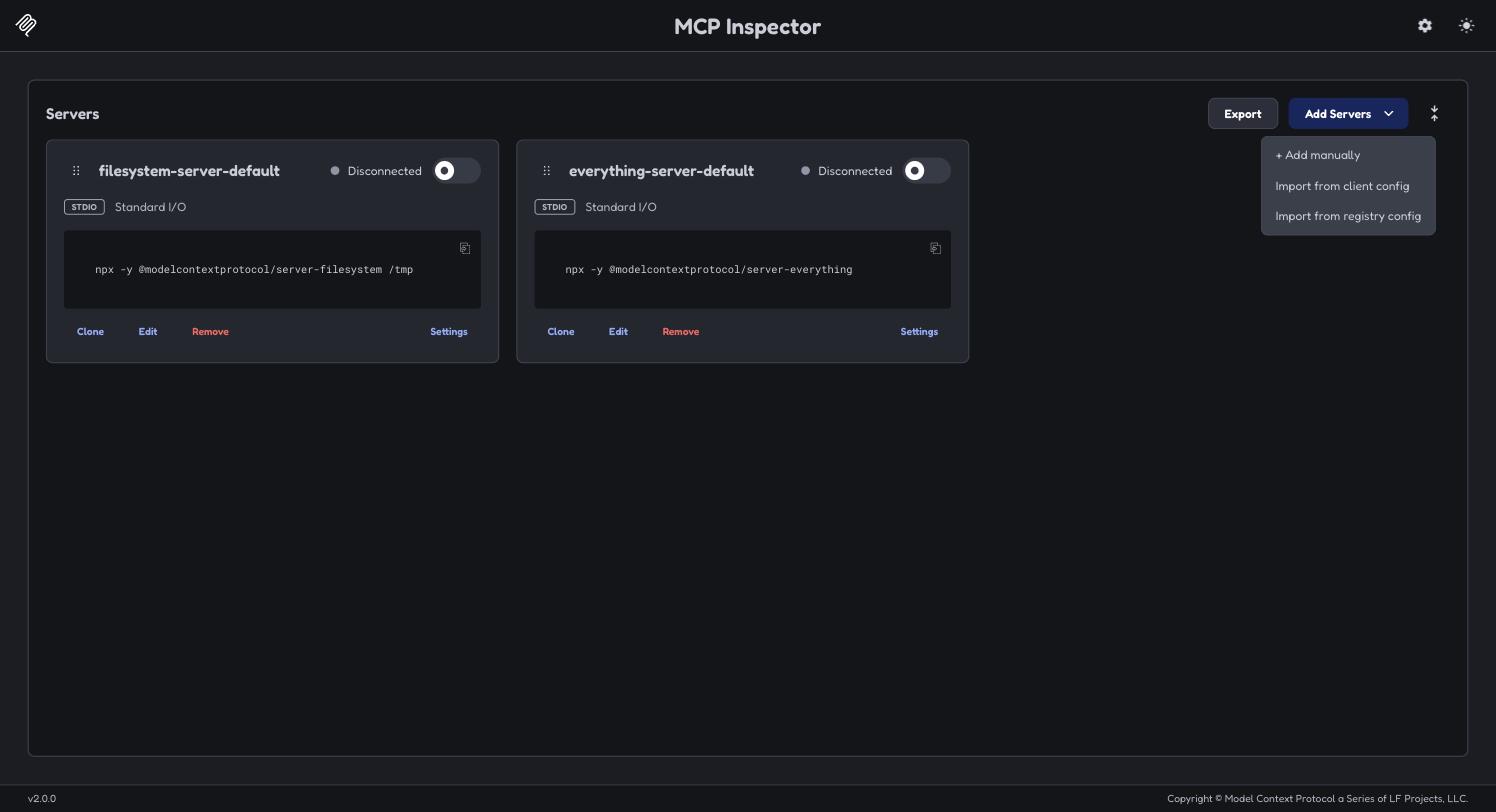
2. Click "From file…". The dialog takes a client config file or a client installed on this machine — there is nowhere to paste JSON.
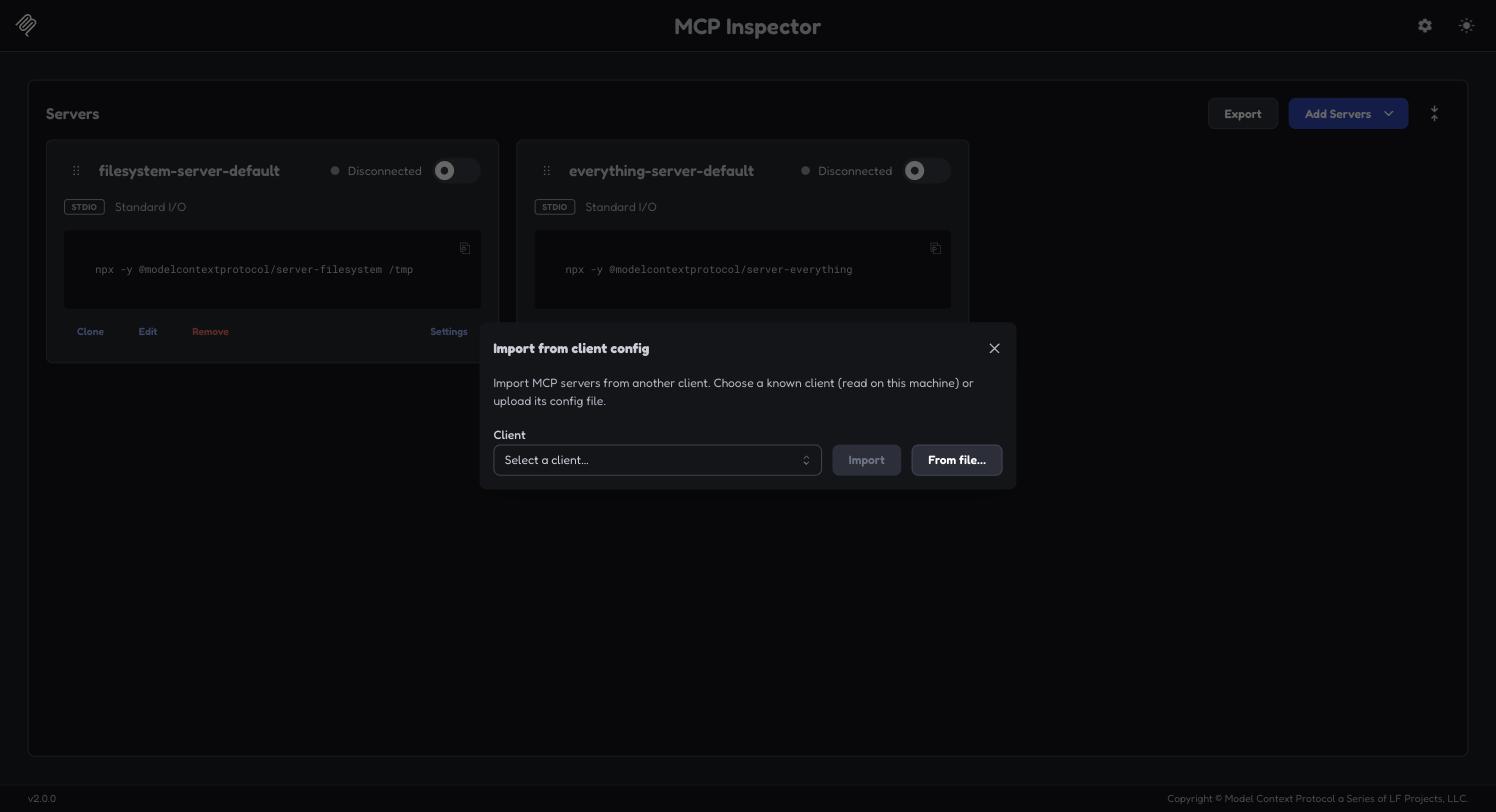
3. Select your inspector-config.json, and the server it defines is listed as new. Confirm with "Import 1 server".
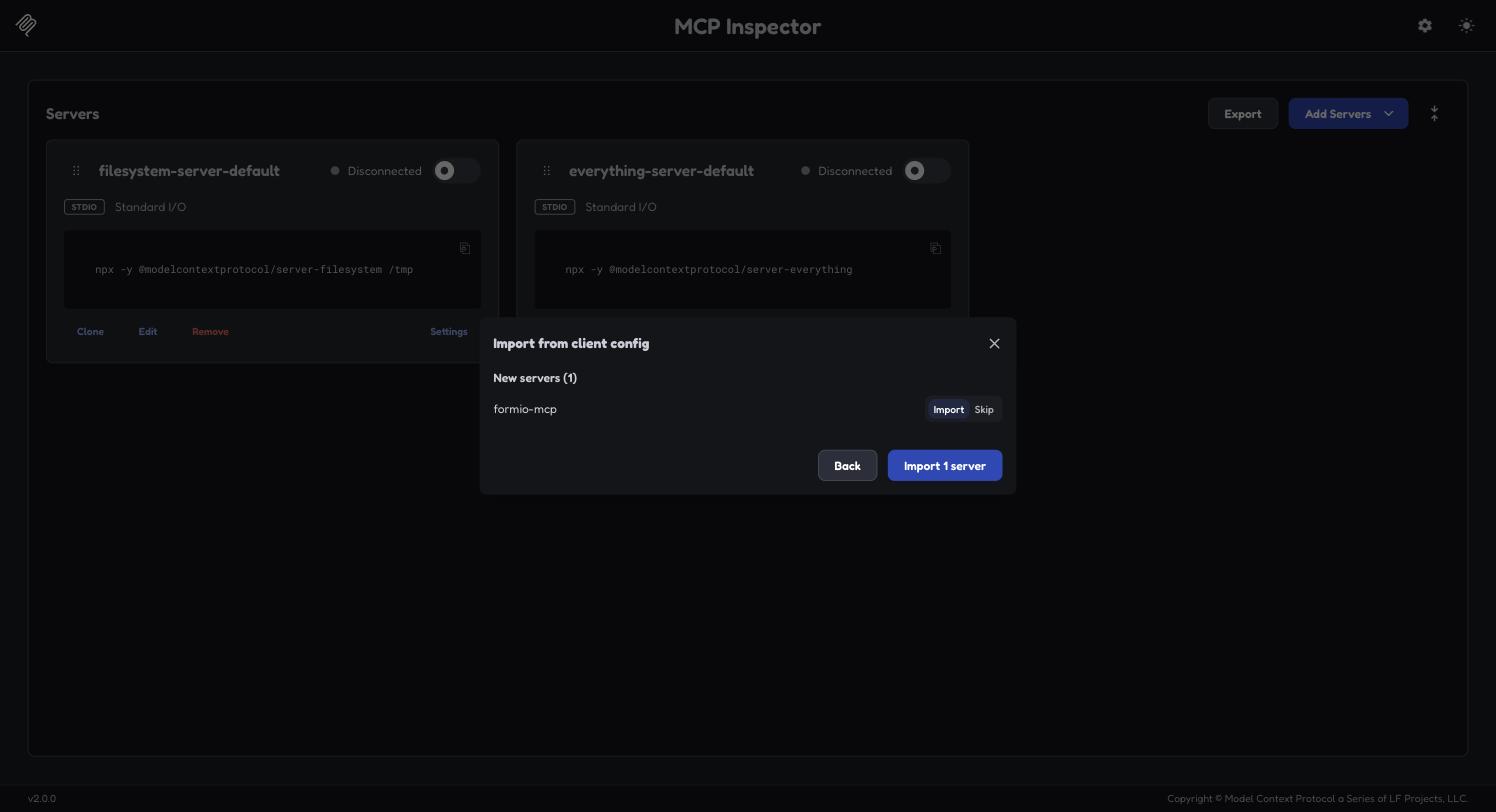
4. Enable the server with the toggle on its card. It turns green and reports the negotiated protocol version once the container is up; the first connection is slower because Docker has to start it.
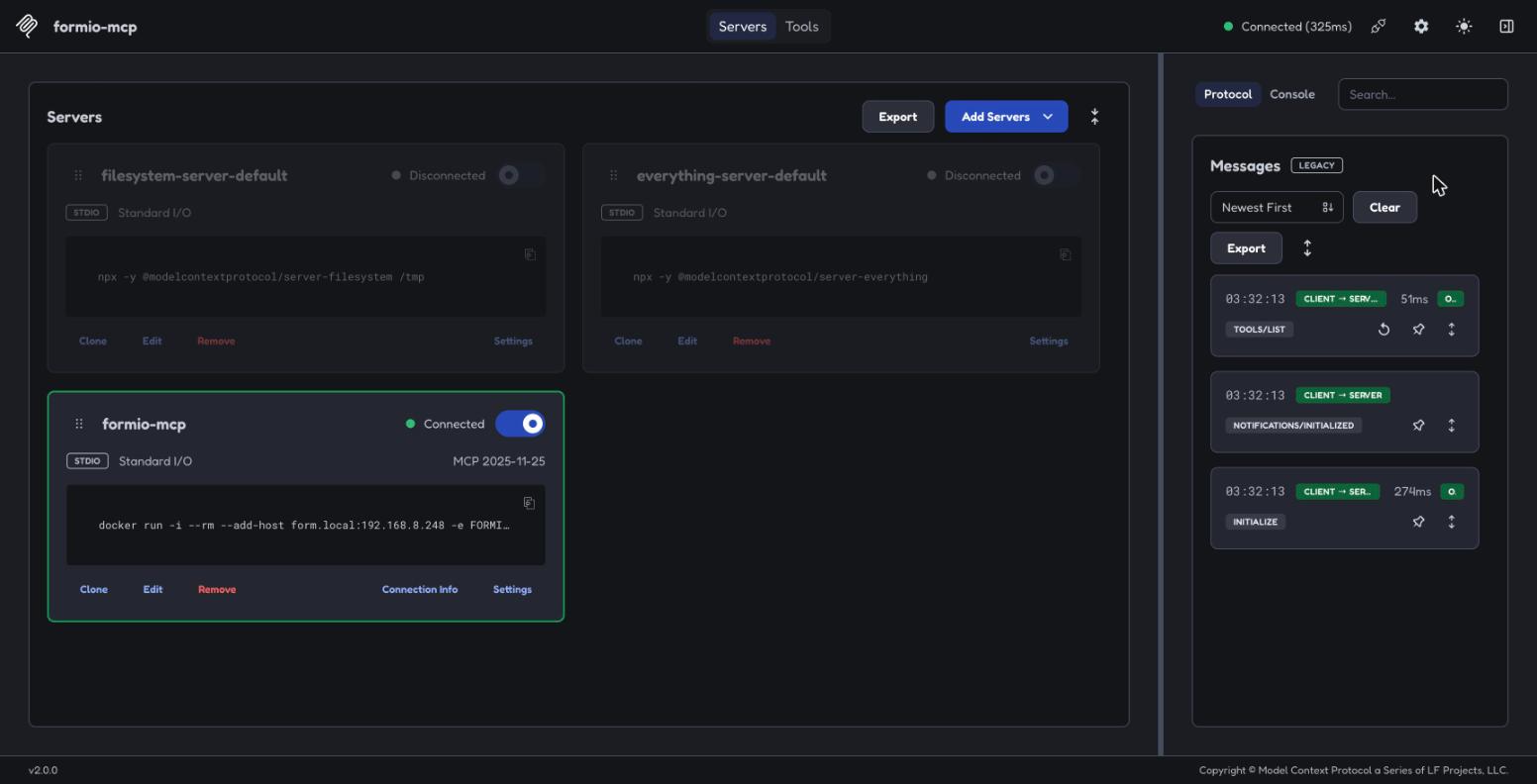
5. Open the Tools tab for the tools this server exposes. Every server lists all 25 — including project_set and project_get, which are registered for every client.
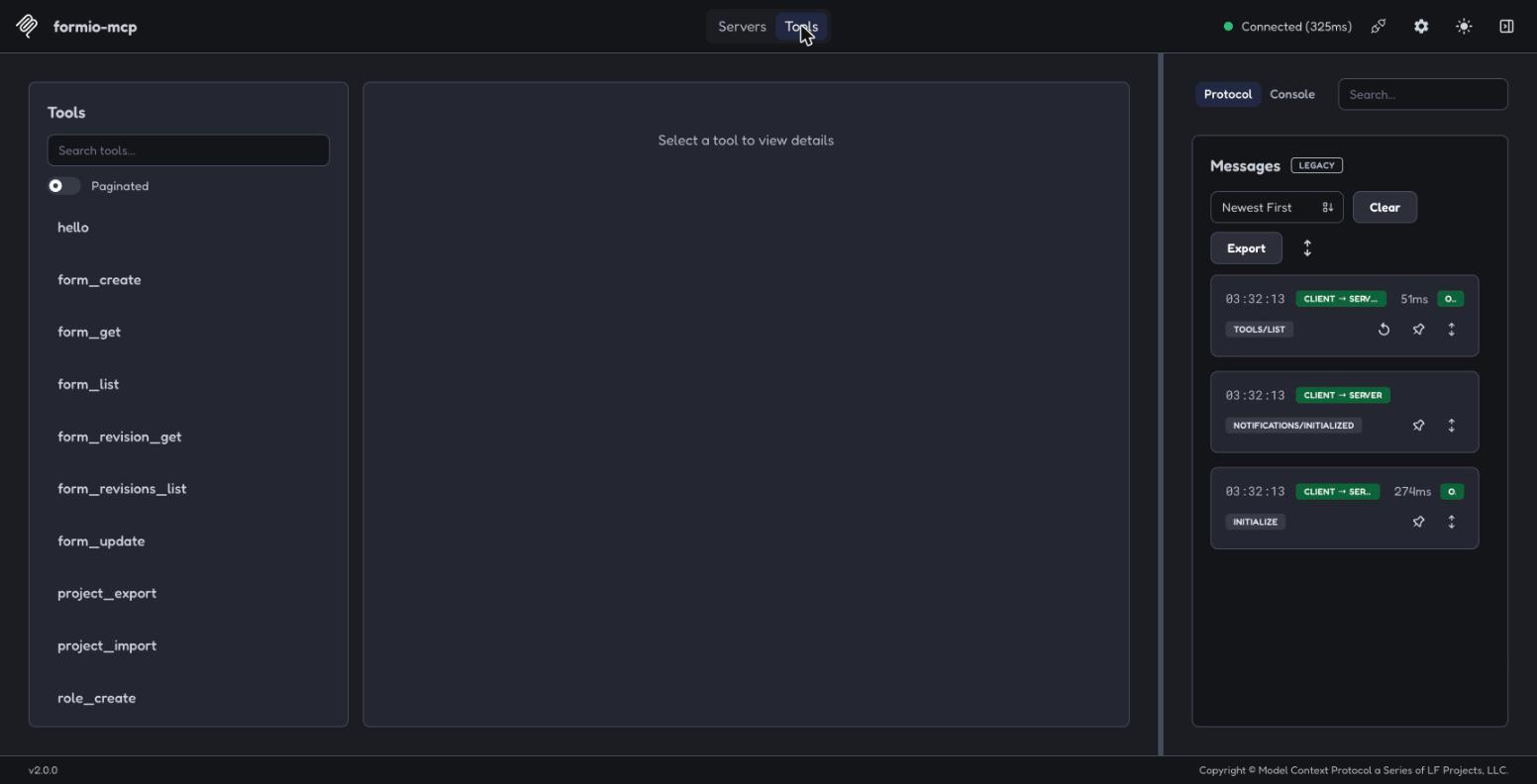
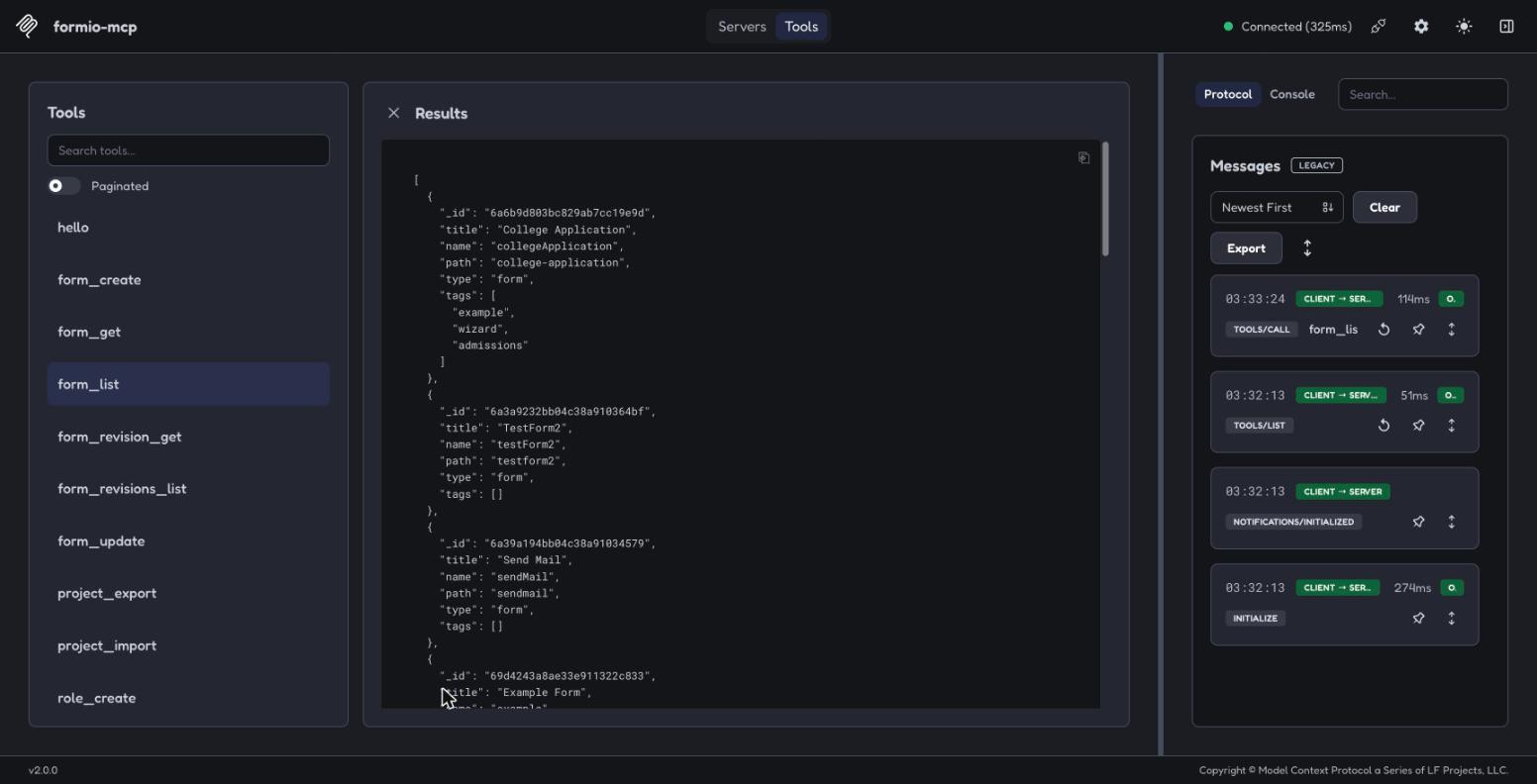
6. Pick a tool, fill in its arguments, and press "Execute Tool". The result appears in the middle pane and the JSON-RPC exchange in the right-hand Protocol panel. server_status touches no credentials and makes no Form.io request, so it isolates transport problems from auth problems; form_list below is a real call against a project.
Importing writes the server into the inspector's own catalog at ~/.mcp-inspector/mcp.json, so it is still there next time — remove it from the card when you are done. A tool that fails with a bare fetch failed is usually the deployment, not the server: see Self-hosted deployments for hostname resolution and certificate trust inside a container.
MCP server tools
The bundled @formio/mcp server exposes these 25 tools. Skills prefer these over raw HTTP whenever an operation is covered.
Forms
| Tool | Purpose |
|---|---|
form_create | Create a new form. Use the formio-schema skill first to build the JSON definition. On a deployment licensed for revisions, revisions defaults to "original". |
form_get | Fetch a single form definition by _id or path (formIdOrPath). draft: true fetches its draft instead. |
form_list | List forms, one page at a time, filtered by type and by tags (forms carrying every tag given). Returns summary fields unless select asks for others. |
form_update | Update a form with its edited JSON. Call form_get first, edit with formio-schema, then update. draft: true saves a draft instead of the live form. |
form_publish | Publish a form's draft as its live version (formId, note). Fails with NO_DRAFT when the form has no draft. Needs the revisions licence (Security Module). |
form_revert | Restore a prior revision's components, tags, properties and display onto the live form (formId, version, note). Needs the revisions licence (Security Module). |
form_revision_list | List a form's revision summaries (_id, _vid, _vnote, _vuser, created, modified), newest first. Requires form revisions to be enabled. |
form_revision_get | Fetch a single immutable form revision by _vid or revision document _id. |
Roles
| Tool | Purpose |
|---|---|
role_create | Create a new project role, passed as role: { title, description?, default?, admin? }. |
role_list | List the project's roles, one page at a time. |
role_update | Update a role (roleId, role). Fields left out keep their stored value. |
Actions
| Tool | Purpose |
|---|---|
action_type_list | List every action type available on the server — the whole catalog, which Form.io does not page. |
action_type_get | Get an action type's settings schema. Fails with UNKNOWN_ACTION_TYPE for a type the catalog does not list. |
action_create | Attach a new action to a form. |
action_list | List the actions on a form, one page at a time. |
action_get | Get a single action by ID. |
action_update | Update an action. Fields left out keep their stored value. |
action_delete | Detach an action from a form. |
Project
| Tool | Purpose |
|---|---|
project_export | Export the project's complete template (roles, resources, forms, actions) as a portable JSON document. With tag, export the template a version tag stored — how a workspace's template.json is refreshed. |
project_import | Import a template JSON for a first build. Each form it names is replaced in place with its actions deleted and recreated, and a template access replaces the project's; forms, roles and actions it does not name are kept. Change an existing project with the form, role and action tools. |
project_tag_list | The project's current version and its version tags, newest first. With compare: true, the roles, resources, forms and actions changed since the current version. |
project_tag_create | Version the project: Form.io snapshots its current state under a semver tag with a description. |
project_get | Report which project a directory resolves to, which deployment hosts it, and which layer supplied each. The preflight to run before the first call that reads or writes — it answers from inside the server, with the same resolver every other tool uses, so no shell command is needed to ask it. Returns a status of ok, not-configured, or base-url-unresolved. |
project_set | Persist a Project URL for a directory, in ~/.formio/projects.json. To record the target with the code instead, write a committed formio.json in the application's own folder — the server reads that file and never writes it. One server can serve several workspaces. Registered in every client. A mapping applies to its directory and every subdirectory beneath it, up to the first folder holding .git — the same boundary as the formio.json search, so a mapping on a parent folder does not reach into a repository cloned beneath it; when several mapped folders contain the working directory, the nearest mapped folder wins. A mapping written here overrides FORMIO_PROJECT_URL in the server environment, which is the weakest source. |
Why project_set works this way
The tool's description carries only the rules a caller acts on. The reasons behind them:
- The call is the persistence. An agent that answers "switch to project X" in text has changed nothing; only the tool call writes the mapping.
- The mapping is keyed by the directory the call resolves to. That is
cwdwhen it is passed, and otherwise the same directory every other tool resolves (seecwdunder the conventions below). Only the last fallback, the server process's own working directory, is fixed when the client spawns the server and often not where the user is working, so a write keyed there says so. - No restart, but not always in effect. Every tool resolves its project on each call, so a new mapping is read by the next call. It governs only where the mapping is the record that wins: under a committed
formio.jsonit is the fallback for when that file goes away. That is why the result reports the pair that actually resolves (projectUrl,ok) rather than the one just recorded. - The Base URL is derived, not asked for. It builds the portal-login URL and keys the cached token, so a wrong one fails at login rather than on a request, and a guessed one sends the login to a deployment the user does not use. It can be derived for a
form.iohost (https://api.form.io, the Base URL every hosted project shares) and for a sub-directory project (the parent path). A path-less project URL on a customer domain is the exception: its deployment is a sibling sub-domain, and nothing in the project URL names it. - A deployment is bound to its project. The Base URL is stored per directory beside the project recorded with it, so each directory can target a different deployment and no deployment answers for another project. A call that re-points a directory to a different project therefore keeps no Base URL: the old value belonged to the project being replaced.
- The mapping is machine-local. It is keyed by absolute path, so it does not survive a clone. A committed
formio.jsonis versioned, visible in a diff and shared with everyone who clones the repository, which is why it is preferred when the target belongs to the application. - Unknown arguments are refused. The input schema is strict: an argument the tool does not take (such as the removed
scope) is rejected rather than dropped, so a call written against older documentation cannot report a write that never happened.
Diagnostic
| Tool | Purpose |
|---|---|
server_status | Report the server's name and version and how cwd resolves to a project, as project_get does. It makes no Form.io request and needs no credentials, so it separates a transport problem from an authentication or configuration one — call it first when other tools fail. |
Conventions every tool follows
cwd. Every tool that resolves a project takes an optionalcwdand resolves for one directory on each call, chosen in this order: thecwdargument; the client's workspace roots, when the client declares the MCProotscapability — one root as is, and with several the roots holding a project record (a committedformio.jsonor a directory mapping, a broken one included) decide — the first of them when they all hold the same record, the next source when none holds one, and a refusal withINVALID_ARGUMENTlisting them when they hold different records; theCLAUDE_PROJECT_DIRenvironment variable, when it is an absolute path; and last the server process's own working directory, which is fixed where the client spawned it. Roots are read once per session and again afternotifications/roots/list_changed; aroots/listthat fails or does not answer within 2 seconds leaves the last good list in use, and counts as no roots only when no read has succeeded.project_getandserver_statusreport the source ascwdSource(argument,client-root,claude-project-dirorserver). Passcwd, as an absolute path, whencwdSourceisserverorclaude-project-dir— both guesses at where the user is — or to target another directory — such as one application in a monorepo that keeps aformio.jsonper app.formIdandformIdOrPath.formIdis always a form's 24-character ObjectId_id.formIdOrPathtakes the_idor the form's path, and only the reads Form.io serves by path take it:form_get,form_revision_listandform_revision_get. A path passed asformIdis refused withINVALID_ARGUMENT; read the form's_idwithform_get.- Lists.
form_list,role_list,action_listandform_revision_listtakelimit(default 100),skip,sortandselect. Each returns its items under its own key (forms,roles,actions,revisions) besidetotal, the number of items the whole query matches, andhasMore, which is true while another page exists: call again with a largerskipuntil it is false. When Form.io does not report a total,totalis absent andhasMoreis true whenever the page came back full.action_type_listreturns itsactionTypesthe same way, always withhasMore: false. - Updates overwrite what they send.
form_update,role_updateandaction_updatesend a PUT, which Form.io applies to the stored document: each field in the body overwrites the stored one, and a top-level field left out keeps its stored value. An array or object in the body is stored as given — it replaces the stored one whole rather than merging into it — so send every component, access entry or setting the field should keep. - Revision history. A
form_createorform_updatethat would save without revision history — the deployment is not licensed for revisions, the body setsrevisions: "", or an update targets a form whose revisions are off — is refused withHISTORY_NOT_ACCEPTEDand writes nothing, unless the call passesacceptNoHistory: true. The server never prompts the user itself: the agent relays the refusal, and retries with the user's answer. Drafts,form_publishandform_revertneed the revisions licence and are refused withLICENSE_REQUIREDwithout it. - Errors. A failed call returns
isError: true, with text that starts with the error's code in brackets —[NOT_FOUND] …— followed by the message, and_meta["io.form/error"]: { code, status?, body? }, wherestatusis Form.io's HTTP status andbodyits response body, truncated to 2,000 characters. An error result carries nostructuredContent. The codes areNOT_CONFIGURED,BASE_URL_UNRESOLVED,CONFIG_UNREADABLE,INVALID_ARGUMENT,AUTH_REQUIRED,FORBIDDEN,NOT_FOUND,VALIDATION_FAILED,LICENSE_REQUIRED,HISTORY_NOT_ACCEPTED,NO_DRAFT,UNKNOWN_ACTION_TYPE,REDIRECTED,UPSTREAM_ERROR,NETWORK_ERRORandINTERNAL. An argument that fails the tool's input schema is reported by the MCP SDK as plain text, without a code.
Authentication
The MCP server supports two authentication modes:
- JWT mode (default). A short-lived local Express server renders the Form.io portal login form; the user signs in once, the JWT comes back via a
/callbackendpoint, andformioFetchattachesx-jwt-tokenon every subsequent request. The flow is implicit — the first authenticated tool call triggers it on a cache miss. No explicitauthenticatetool exists. - API-key mode. Set the
FORMIO_API_KEYenvironment variable besideFORMIO_PROJECT_URL. Requests to the projectFORMIO_PROJECT_URLnames attachx-tokenand skip the browser flow entirely; any other project a committedformio.jsonor a directory mapping resolves authenticates through the portal login instead, andproject_getsays why.
The JWT is cached in ~/.formio/mcp-tokens.json (mode 0600), keyed by the resolved Base URL — one token covers every project on the same deployment. Tokens are valid for roughly seven days; on a cache hit the server checks expiry locally, then revalidates against the server, and falls back to a fresh login if either check fails.
What the agent is granted. JWT mode hands the agent the JWT of whoever logs in, so the agent acts with that person's permissions for the token's lifetime — sign in as an administrator and the agent inherits administrator access to the deployment. An API key is scoped to its project instead. Prefer API-key mode for unattended or shared environments, and sign in as a least-privileged user when using JWT mode.
Headless environments
By default the login page is served on an ephemeral port bound to 127.0.0.1 and the server launches the default browser with open (macOS), xdg-open (Linux), or the url.dll protocol handler (Windows) — directly, not through a shell — which assumes a desktop browser on the same machine.
Where that assumption doesn't hold — a container, an SSH session, CI — you have three options:
-
Set the
FORMIO_API_KEYenvironment variable besideFORMIO_PROJECT_URLand skip the browser entirely. Simplest for unattended use. -
Complete the login manually. The login URL is written to stderr on every login attempt, before any browser launch is tried — not only when something fails. If the launch does fail, that is reported as an additional line rather than swallowed. The URL also appears in the timeout error, which the client surfaces as tool output, so it reaches you even if you never see the server's logs.
stderr is used because with stdio transport stdout carries the MCP protocol itself — writing anything else there corrupts the stream.
-
Bind somewhere reachable. Set
FORMIO_AUTH_HOST=0.0.0.0andFORMIO_AUTH_PORTto a fixed, published port, then open the URL from your own machine:docker run -i --rm -p 43117:43117 \ -e FORMIO_PROJECT_URL=https://your-project.form.io \ -e FORMIO_AUTH_HOST=0.0.0.0 -e FORMIO_AUTH_PORT=43117 \ formio/mcpFORMIO_AUTH_HOST=0.0.0.0exposes the login page on every interface for the duration of the login. Only use it where that is acceptable.
Whichever way you reach it, open the login URL exactly as printed, including its ?s= value: the page is served only for that value, which is generated for each login. Behind a forwarded port (a devcontainer, Codespaces) keep the ?s= value and change only the host and port.
If no login arrives within FORMIO_AUTH_TIMEOUT seconds (default 900) the call fails with an error naming these options, rather than hanging until the client gives up.
Login-form auto-resolution
When FORMIO_LOGIN_FORM is unset, the server probes these candidates on the first login attempt and caches the first one that responds (1.5-second timeout per candidate):
{baseUrl}/formio/user/login(portal-base){projectUrl}/admin/login(project admin){projectUrl}/user/login(project user)
{baseUrl} and {projectUrl} are the RESOLVED values — whatever project get reports for that directory — not the environment variables of similar name.
The probe runs lazily — only when the local auth page is actually served.
Environment variables
| Name | Required | Default | Purpose | Hosted SaaS example | Self-hosted example |
|---|---|---|---|---|---|
FORMIO_PROJECT_URL | yes* | — | Full URL of your Form.io project. The WEAKEST of the three sources: a committed formio.json found by walking up from the working directory wins, then a per-directory mapping written by project_set, then this. Self-hosted, it is a sub-directory of the deployment or a sub-domain of your own domain (https://myproject.example.com), depending on how that deployment routes projects. | https://myproject.form.io | https://forms.example.com/myproject |
FORMIO_BASE_URL | no | derived, see note | Full base URL of your Form.io deployment. Normally DERIVED from the project URL rather than set — https://api.form.io for a project on a form.io host, the parent path for a project addressed as a sub-directory. Supply it only for a project URL with no path on your own domain, whose deployment cannot be derived. The weakest of three sources: a committed formio.json wins, then the per-directory mapping, then this. On the hosted cloud it is always https://api.form.io, never a project's *.form.io sub-domain. | https://api.form.io | https://forms.example.com |
FORMIO_API_KEY | no | undefined | Long-lived project API key, applied only to the project FORMIO_PROJECT_URL names — set FORMIO_PROJECT_URL beside it. Where it applies, the server skips the browser login flow — the only way to authenticate on a host with no browser. | CHANGEME | CHANGEME |
FORMIO_LOGIN_FORM | no | Auto-resolved | Override the portal login form URL used by the JWT login flow. | https://formio.form.io/user/login | https://forms.example.com/formio/user/login |
FORMIO_AUTH_HOST | no | 127.0.0.1 | Bind address for the browser-login page. 0.0.0.0 makes it reachable from outside a container. | ||
FORMIO_AUTH_PORT | no | ephemeral | Fixed port for the browser-login page, so a container can publish it. | 43117 | 43117 |
FORMIO_AUTH_TIMEOUT | no | 900 | Seconds to wait for a browser login before failing the call. A positive integer no larger than 2147483; any other value is ignored. | ||
FORMIO_REQUEST_TIMEOUT | no | 60 | Seconds a Form.io request may go unanswered before the call fails with NETWORK_ERROR naming the URL and the wait. A positive integer no larger than 2147483; any other value is ignored. project_import and project_export wait 300 seconds, or this value when it is longer. | ||
FORMIO_INSECURE_TLS | no | undefined | Set to 1 to skip TLS verification only for requests to the configured deployment (the hosts of the resolved Project URL and Base URL); every other host is verified as usual. Local development only — never against production. | ||
FORMIO_FORCE_BROWSER | no | 0 | Set to 1 to attempt the browser login even where the server detects no browser (CI, a container, SSH with no display). |
* Not at startup — the server starts, lists every tool, and answers server_status without it; only the tools that read or write Form.io data error, naming project_set and this variable. The alternative is the project_set tool, which maps a working directory to a project in ~/.formio/projects.json. Resolution runs by scope, narrowest first: a committed formio.json found by walking up from the caller's cwd, then the mapping for that cwd or its nearest mapped ancestor, then FORMIO_PROJECT_URL in the environment as the weakest source, then the error. Map a directory before any client connects with npx -y @formio/[email protected] project set --project-url <url> --cwd <path> — the deployment is derived from the project URL wherever it can be, so add --base-url <url> only when the server says it cannot be determined. Add --force beside both URLs to record a pair the domain rules refuse — the one shape they cannot tell from a mistake is an internal deployment served from a *.form.io domain; it takes both URLs in the same call, is honoured on every later read, and is a shell-only flag the project_set tool does not have. project set --reset --cwd <path> clears a directory's entry, which is how a forced pair is un-forced: a write that leaves both halves untouched keeps the override, so there is nothing for an unforced re-record to change. project get --cwd <path> prints what resolves and which source won. It exits 0 when it resolved, 1 when nothing is mapped for that directory, 2 when the command could not answer (a usage error, a malformed URL, an unreadable ~/.formio/projects.json), and 3 when a project resolved but its Base URL could not be determined — so a caller can tell "nothing here yet" from "this failed" from "half configured, and here is the one value missing". project set --cwd <path> exits 0 when the directory is ready to serve a call, 1 when a named value is still missing, 2 when the command could not answer, and 3 when the record WAS written and the directory still resolves no Base URL — a committed formio.json governs it and supplies none, so the remedy is an edit to that file rather than another write.
CLI reference: project get, project set and project logout
The formio-mcp binary (npx -y @formio/[email protected] project …) reports what a directory resolves to and records a project for it before any client connects. project logout signs out of one deployment — the one the directory resolves to, exactly as project get resolves it, or the one --base-url names — by removing that deployment's cached token from ~/.formio/mcp-tokens.json and leaving every other entry in place. A running server notices on its next call there and signs in again, so signing out or switching accounts needs no restart. These flags and exit codes are part of the 1.0 surface.
| Flag | Command | Meaning |
|---|---|---|
--cwd <absolute path> | all three | The directory to report on, record for, or sign out for. Defaults to the current directory; a relative path is refused. |
--project-url <url> | project set | The Project URL to record. |
--base-url <url> | project set | The deployment hosting the project. Pass it only when the server says it cannot be derived from the Project URL. |
--force | project set | Record the pair exactly as given, skipping the domain checks. Requires both --project-url and --base-url in the same call. The project_set tool has no equivalent. |
--reset | project set | Clear this directory's entry in ~/.formio/projects.json. Takes no URLs. |
--base-url <url> | project logout | The deployment to sign out of, in place of the one --cwd resolves to. |
| Exit code | project get | project set | project logout |
|---|---|---|---|
0 | The directory resolved a project and its Base URL. | The directory is ready to serve a call. | The token was removed, or none was cached for that deployment; the output says which. |
1 | Nothing is mapped for that directory. | A named value is still missing. | Nothing is mapped for that directory, so no deployment resolves; name one with --base-url. Or the --base-url given is not a valid URL; ask for it again. |
2 | The command could not answer: a usage error, a malformed URL, an unreadable ~/.formio/projects.json. | The command could not answer. | The command could not answer: a usage error, or a ~/.formio/mcp-tokens.json it cannot read or write. |
3 | A project resolved, but its Base URL could not be determined. | The record was written, and the directory still resolves no Base URL: a committed formio.json governs it and supplies none, so the remedy is an edit to that file. | A project resolved, but its deployment could not be determined; name it with --base-url. |
Privacy Policy
Form.io's privacy policy covers the Form.io Services this server talks to: https://form.io/privacy
What the server itself does with data, which is the part the policy above cannot describe:
Where your data goes. Only to the Form.io deployment you configure. Every request targets the Project URL and Base URL that resolve for your working directory — your own SaaS project or your self-hosted server. The server sends nothing to Form.io when you are self-hosted, and there is no telemetry, analytics, or usage reporting of any kind.
What is stored on your machine. Two files under ~/.formio/, both written with mode 0600:
| File | Contents | Written when |
|---|---|---|
mcp-tokens.json | The JWT from the browser login, keyed by the resolved Base URL | You sign in through the browser |
projects.json | A per-directory map of project and base URLs | project_set runs |
Form data and submissions are never written to disk — they pass through in memory to answer a tool call.
Credentials. The FORMIO_API_KEY environment variable, when set, is read from the environment and sent as an authentication header only with requests to the project FORMIO_PROJECT_URL names; it is never written to disk. The cached JWT is valid for roughly seven days, after which the server re-authenticates. Delete ~/.formio/mcp-tokens.json to sign out immediately.
Third parties. The server contacts no third-party service. One exception is worth naming: the browser sign-in page is served locally, and the page it renders loads the Form.io renderer and its stylesheets from cdn.jsdelivr.net, a webfont from fonts.googleapis.com, and the Form.io logo from portal.form.io, so those hosts see your browser's IP address while that page is open. Everything else on the page comes from your own deployment. Set the FORMIO_API_KEY environment variable beside FORMIO_PROJECT_URL to skip the browser flow entirely and avoid it.
Retention. The files above persist until you delete them. Data held in your Form.io project is governed by your own deployment's retention rules, and by the policy linked above for Form.io-hosted projects.
Questions about data handling: [email protected]
Comments
New to MCP?
From what the protocol is to installing your first server, these answers cover most first questions.
An open protocol that defines how AI applications connect to external tools and data in a uniform way. Clients talk to the model; MCP servers provide tools, resources and prompt templates. They exchange standard messages, so one server can be reused by many clients.