
About Approval gate for databases
Approval gate for databases is an MCP proxy that lets reads pass while holding data- or schema-changing calls for a separate supervisor to approve. It is for teams using AI clients with database MCP servers, and also provides approval checks for risky shell commands used by coding agents.
Key features
- 01Passes read calls through
- 02Requires supervisor approval for writes
- 03Shows the exact call and warnings
- 04Runs approved calls once
- 05Checks risky coding-agent commands
Use cases
- 01Review database changes before execution
- 02Require a second person to approve production writes
- 03Gate risky shell commands from coding agents
MCP support
It sits between an MCP client and an upstream MCP server, forwarding calls while applying approval rules. It also supports presets for common servers and exposes a `check_approval` tool for pending requests.
Configuration
Local server config is the same for every client. Copy it into your client’s MCP config file.
npx -y @hibira-io/mcp-approval-gateGATE_COMMANDSecretThe database MCP server to wrap, e.g. npx -y @bytebase/dbhub --transport stdio --dsn postgres://user:pass@host/dbHIBIRA_APP_IDHibira app ID (hibira.io portal)HIBIRA_KEYSecretHibira app keyHIBIRA_SECRETSecretHibira app secretGATE_LABELThe database's name on the approval pageGATE_PUSH_INTERESTSComma-separated push interests that receive approval requestsGATE_MODEwrites (default), all or noneLocal servers need a runtime on your machine (e.g. Node.js 18+). Config file locations differ by client; see your client’s docs.
Tools
Local servers expose tools only once running on your machine, and the maintainer has not provided a tool list.
Details
From the project READMEApproval gate for database MCP servers
@hibira-io/mcp-approval-gate sits in front of the MCP server that connects
your assistant to a database. Reads go straight through. Anything that changes
data or schema waits until another person approves it on a hosted approval
page, sent to their phone as a push notification. Then it runs once, exactly
as approved.
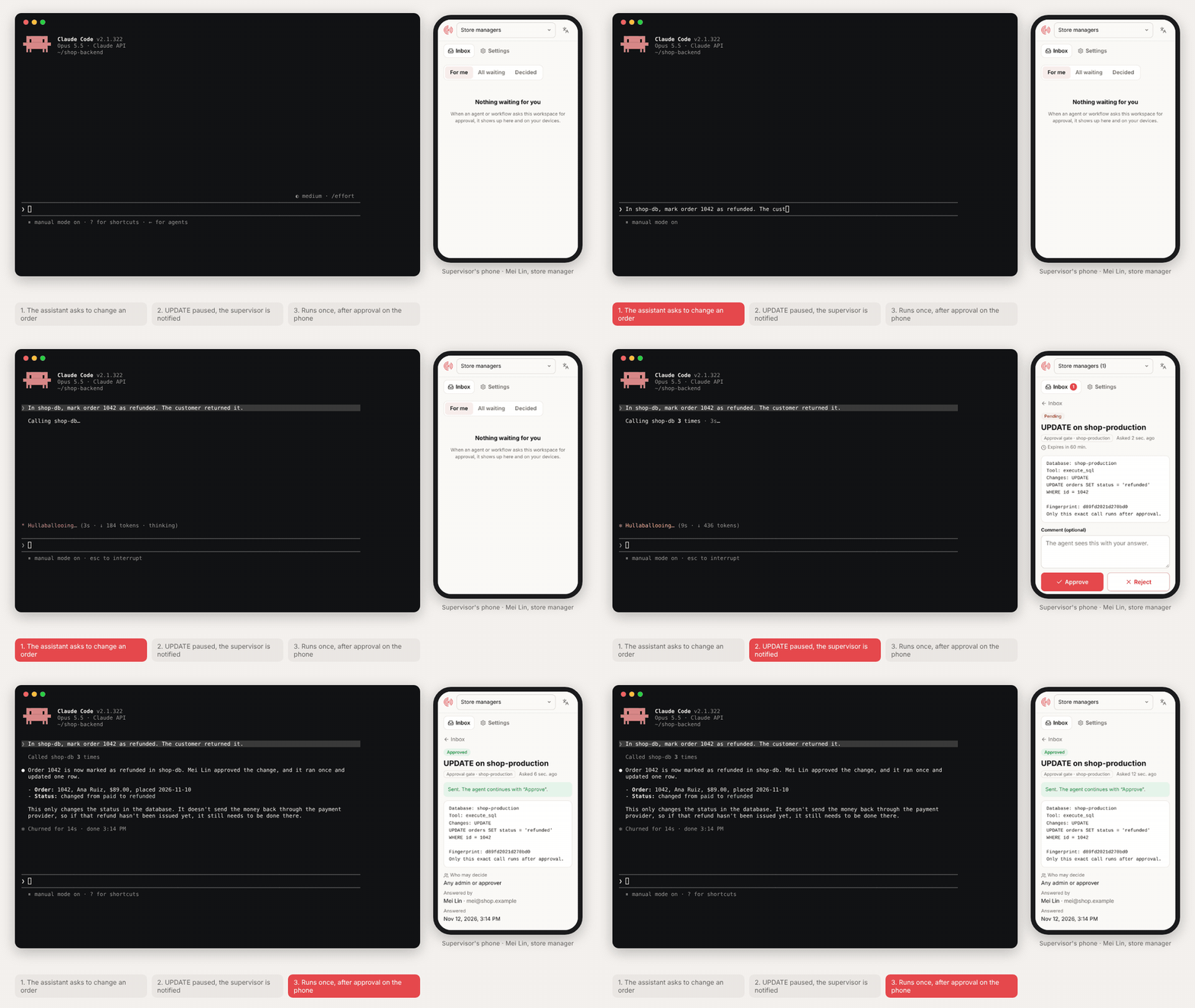
A real session: Claude Code asks to mark order 1042 as refunded through DBHub. The UPDATE waits and the assistant never gets the approval link. The request shows up in the store manager's Hibira Approvals inbox on her phone (it is also sent to her as a push notification); she opens it, checks the statement and approves, and the assistant finishes the change. (MP4 · the same request rejected)
It works with any MCP server, and is tested with:
- DBHub (Postgres, MySQL, MariaDB, SQL Server, SQLite)
- Postgres MCP Pro (
postgres-mcp) - Supabase MCP (local or
mcp.supabase.com)
and with Claude (Desktop, Code and claude.ai), Cursor, ChatGPT and any other MCP client.
assistant ──► approval gate ──► database MCP server ──► database
                  │  writes only
                  ▼
        Hibira approval page + push ──► supervisor taps Approve / Reject
Why
Most database MCP servers offer two choices: read-only, or let the assistant write anything. Client-side "allow this tool?" prompts are answered by the same person who asked. The gate adds the step a team usually wants for production data: a supervisor approval by someone else, with the exact statement in front of them.
- Bound to the exact call. The approval covers one tool call with one set of arguments (shown with its fingerprint). If the statement changes, it needs a new approval. An approved call runs once.
- Fails closed. SQL the gate cannot read, and tools it does not know to be read-only, wait for approval. If the approval service cannot be reached, nothing runs.
- Your database stays yours. The gate runs where your database MCP server runs. Hibira only sees the approval request (title, statement, tool name), never your connection string or query results.
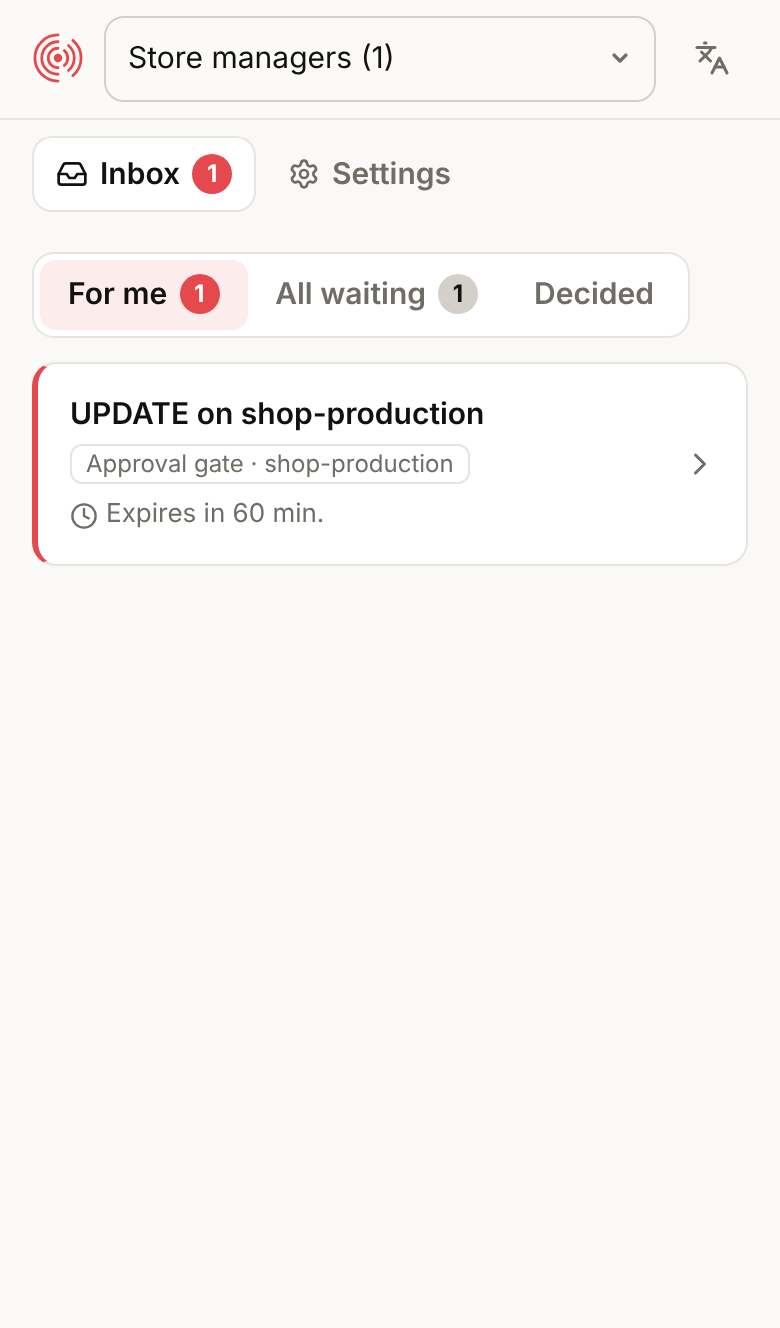
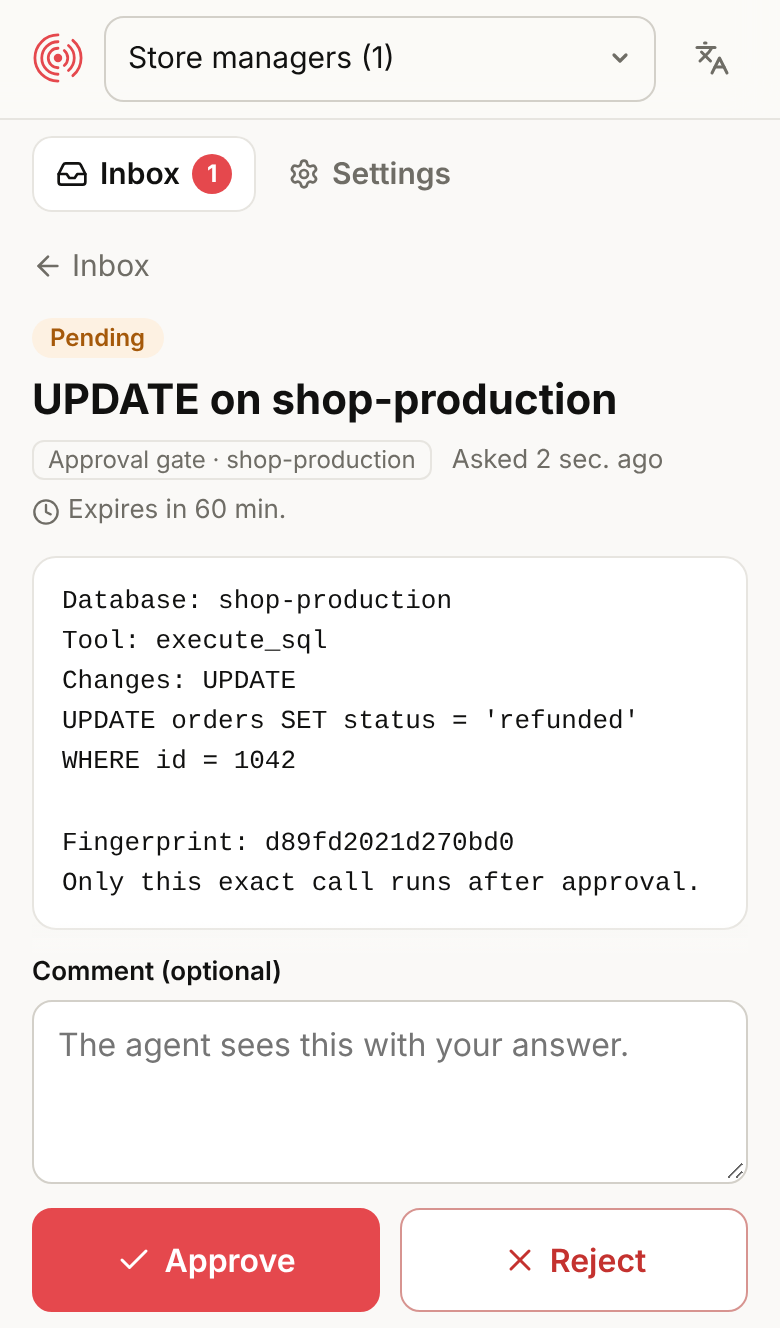
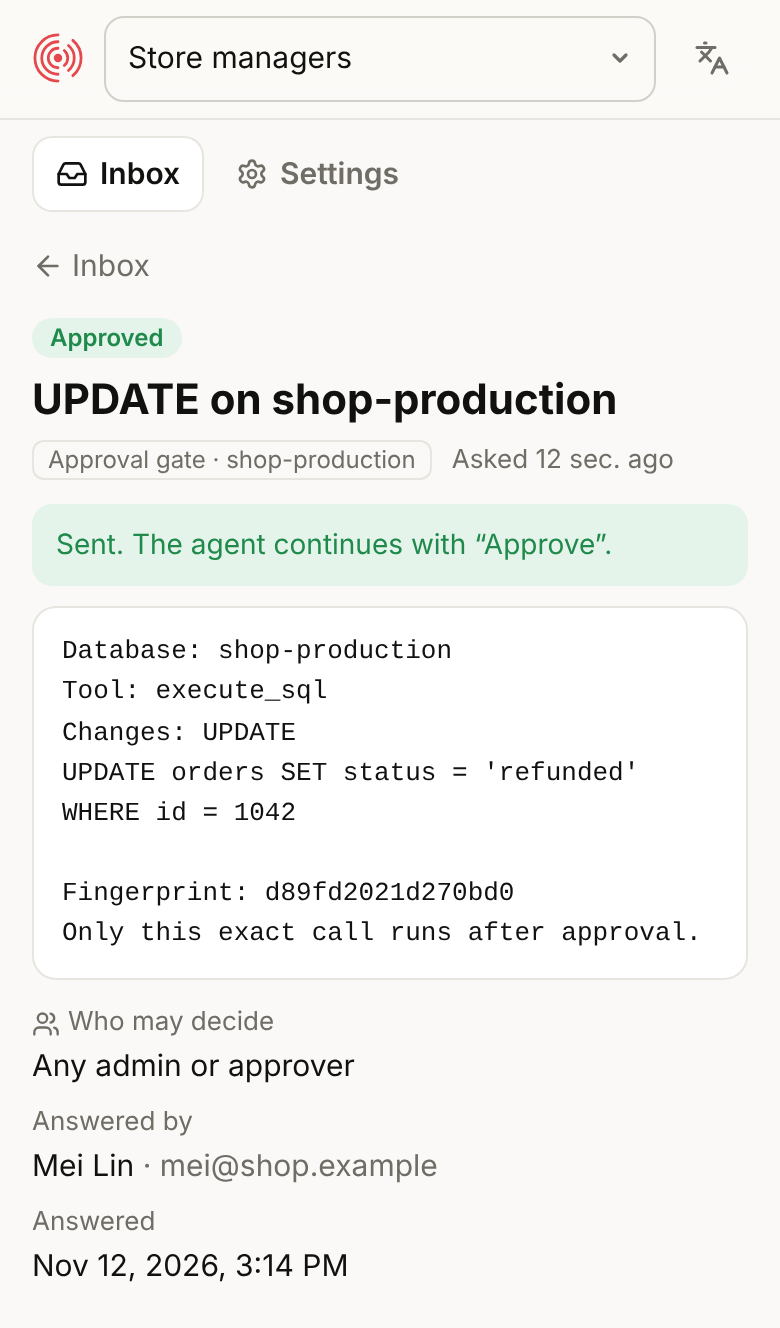
- Clear for the reviewer. The page shows the database label, the kind of
change (
UPDATE,DROP TABLE, ...), warnings such as "DELETE without WHERE changes every row", and the full statement.
Setup
- Create a Hibira Approvals workspace at approvals.hibira.io and invite the people who approve (store managers, DBAs, ...). They get requests on their phones and decide in the approvals inbox.
- Put the gate in front of your database MCP server in your client's config
(below). Everything after
--is the database server's usual command. There are no keys to copy. - The first time the assistant tries to change something, it answers with a link and a short code. A workspace admin opens it, picks the workspace and presses Connect. From then on the gate is connected; reads work all along.
To connect ahead of time from a terminal instead, run
npx -y @hibira-io/mcp-approval-gate login. status and logout work the
same way. The connection is a token, kept in
~/.config/hibira/approval-gate.json, that can only ask for and read that
workspace's approvals. Admins see every connected gate in the workspace
settings and can revoke one at any time.
Claude Code
claude mcp add shop-db -e GATE_LABEL=shop-production \
  -- npx -y @hibira-io/mcp-approval-gate \
  -- npx -y @bytebase/dbhub --transport stdio --dsn "postgres://user:pass@host:5432/shop"
Claude Desktop, Cursor, Windsurf, VS Code
claude_desktop_config.json, .cursor/mcp.json and the others take the same
shape:
{
  "mcpServers": {
    "shop-db": {
      "command": "npx",
      "args": [
        "-y", "@hibira-io/mcp-approval-gate",
        "--label", "shop-production",
        "--",
        "npx", "-y", "@bytebase/dbhub", "--transport", "stdio",
        "--dsn", "postgres://user:pass@host:5432/shop"
      ]
    }
  }
}
postgres-mcp:
"args": ["-y", "@hibira-io/mcp-approval-gate", "--label", "analytics", "--",
         "uvx", "postgres-mcp", "--access-mode=unrestricted"],
"env": { "DATABASE_URI": "postgresql://..." }
--access-mode=unrestricted is fine here: the gate is what holds writes back.
Supabase (local server):
"args": ["-y", "@hibira-io/mcp-approval-gate", "--label", "supabase-prod", "--",
         "npx", "-y", "@supabase/mcp-server-supabase@latest", "--project-ref=<project-ref>"],
"env": { "SUPABASE_ACCESS_TOKEN": "sbp_..." }
execute_sql with a SELECT runs right away; writes, apply_migration,
deploy_edge_function, branch merges and project pauses wait for approval.
Supabase (hosted server):
"args": ["-y", "@hibira-io/mcp-approval-gate", "--label", "supabase-prod",
         "--upstream-url", "https://mcp.supabase.com/mcp?project_ref=<project-ref>",
         "--header", "Authorization: Bearer ${SUPABASE_ACCESS_TOKEN}"],
ChatGPT and claude.ai (remote)
Web clients need an HTTPS URL, so run the gate as a small server next to your database and put HTTPS in front of it (your reverse proxy, a tunnel, or a platform such as Fly.io or Railway):
npx -y @hibira-io/mcp-approval-gate login      # once, on the server
export GATE_TOKEN="$(openssl rand -hex 24)"   # keep it secret
npx -y @hibira-io/mcp-approval-gate --http --host 0.0.0.0 --port 8787 \
  --label shop-production \
  -- npx -y @bytebase/dbhub --transport stdio --dsn "$DATABASE_URL"
The endpoint is https://your-host/mcp/<GATE_TOKEN>; clients that can send
headers may use https://your-host/mcp with Authorization: Bearer <GATE_TOKEN>.
- ChatGPT: Settings → Apps & Connectors → Advanced → Developer mode, then Create: paste the URL with the token, authentication "No authentication".
- claude.ai: Settings → Connectors → Add custom connector, paste the URL with the token.
The gate refuses to listen on a non-local address without GATE_TOKEN.
A Dockerfile is included. In a container, where there is no
terminal to sign in from, pass the workspace token as
HIBIRA_APPROVALS_TOKEN (copy it from ~/.config/hibira/approval-gate.json
after login on any machine), or watch the gate's log for the connect link
on first start.
Beyond databases: presets
The gate works in front of any MCP server. For a few common ones, --preset
knows which tools only read and which change something, and gives the
approval a plain title such as "Stripe: POST /v1/refunds" or "GitHub: merge
pull request acme/shop#42". --allow and --gate still win over a preset.
| Preset | Waits for approval | Runs right away |
|---|---|---|
stripe | stripe_api_write, send_money, transfer_money, convert_currency, ... | stripe_api_read, search, docs, analytics |
github | merges, pushes, file changes, new repos, workflow runs, comments | get_*, list_*, search_*, *_read |
gmail | sending, replying, forwarding, deleting, filters | reading, searching, drafts |
shopify | graphql_mutation, creating, updating, discounts, inventory | queries, analytics, docs |
Stripe (hosted server, with an agent API key):
claude mcp add stripe -- npx -y @hibira-io/mcp-approval-gate --preset stripe \
  --upstream-url https://mcp.stripe.com --header 'Authorization: Bearer ${STRIPE_AGENT_KEY}'
GitHub (official server in Docker):
claude mcp add github -e GITHUB_PERSONAL_ACCESS_TOKEN=... \
  -- npx -y @hibira-io/mcp-approval-gate --preset github \
  -- docker run -i --rm -e GITHUB_PERSONAL_ACCESS_TOKEN ghcr.io/github/github-mcp-server
For Gmail and Shopify, put --preset gmail or --preset shopify in front of
the server you already use. Tools a preset does not know follow the usual
rules below.
What the assistant sees
A write call waits up to 50 seconds (--wait) for the decision, sending
progress updates so the client does not give up early:
- Approved: the call runs and its normal result comes back, with a line saying it was approved.
- Rejected or expired: an error saying it did not run, with the supervisor's comment if they left one.
- Still waiting: a short answer saying a supervisor has to approve it,
with an
approval_id. The gate adds one tool,check_approval: when the person says it is decided, the assistant calls it with thatapproval_id, and the call runs if it was approved. Asking for the same call again reuses the same request.
The assistant does not get the approval link when the gate is connected
to an Approvals workspace (its members are notified and decide signed in), or
when the request reaches the supervisor another way (--push-interests,
--push-users or --channel), so the person chatting with it cannot approve their own change
from the chat. Without any of those, the link is the only way to reach a
supervisor, so the assistant shows it for you to forward. --show-link always
or never overrides this.
What waits for approval
With the default --mode writes:
- Tools listed in
--gatealways wait; tools in--allownever do (a trailing*matches a prefix). - Calls with SQL (an argument named
sql,query,statement,queries, ...) wait if any statement changes something:INSERT,UPDATE,DELETE,MERGE,CREATE,ALTER,DROP,TRUNCATE,GRANT,COPY,CALL,DO,SET,VACUUM, data-changingWITH,SELECT ... INTO,EXPLAIN ANALYZEof a write,SELECTof functions such assetvalorpg_terminate_backend, and anything it cannot parse. Comments, strings and dollar-quoted bodies are skipped, soSELECT 'DROP TABLE x'is a read. - Other tools pass if they are marked
readOnlyHintor named like a read (list_,get_,search_,describe_,explain_,analyze_, ...). Everything else waits.
--mode all sends every call for approval, reads included. --mode none turns
the gate off (useful while testing).
The gate is a second pair of eyes, not a permission system. Give the database user only the rights it needs too.
Coding agents: approval before risky shell commands
The same package is a hook for Claude Code, Codex, Cursor and Hermes Agent. Shell commands that are hard to take back wait until a second person in your Hibira Approvals workspace approves them; everything else runs as usual.
| Waits for approval | Examples |
|---|---|
| Deleting files | rm -rf src, find . -delete, git clean -fdx (not rm -rf node_modules, dist, build, ...) |
| Rewriting git history | git push --force, git reset --hard, git branch -D, deleting remote branches |
| Deploys and releases | vercel --prod, fly deploy, wrangler deploy, firebase deploy, gh pr merge, npm run deploy, make release |
| Infrastructure | terraform apply / destroy, pulumi up, cdk deploy, kubectl delete / apply, helm upgrade, aws ... delete-* |
| Publishing | npm publish, cargo publish, twine upload, docker push, gh release create |
| Databases | psql -c "DELETE ...", SQL heredocs and files, prisma migrate deploy, artisan migrate --force, redis-cli FLUSHALL |
Commands are read the way a shell reads them (&&, pipes, $( ), heredocs),
and wrappers such as sudo, env, bash -c, ssh host '...', npx and
uv run are looked through. SQL is classified like the MCP gate: a
psql -c "select ..." runs, a DELETE waits. Check any command with
npx -y @hibira-io/mcp-approval-gate hook check -- terraform apply.
The request shows the full command, why it waits, the folder, repository and branch, and the computer. Approvers get it on their phones; the agent never gets the link, so it cannot approve itself. An approval lets that exact command run once in that folder. A rejection (with its comment) goes back to the agent with an instruction to stop; if nobody answers within 10 minutes the agent is told to wait and run the same command again later.
Commands are checked on your computer: only the ones that wait create a request (and count toward the workspace's monthly requests). When the month's requests are used up, risky commands stay blocked and the agent says why; nothing is let through unasked.
Install. Connect this computer to your workspace once:
npx -y @hibira-io/mcp-approval-gate login --label "coding agent"
Then add the hook. With the Hibira agent plugin
marketplace: claude plugin install hibira-approval-hooks@hibira (Codex and
Cursor install the same plugin). Or add it by hand:
-
Claude Code,
~/.claude/settings.json(or the project's.claude/settings.json):{ "hooks": { "PreToolUse": [ { "matcher": "Bash", "hooks": [ { "type": "command", "command": "npx -y @hibira-io/mcp-approval-gate hook claude", "timeout": 660 } ] } ] } } -
Codex,
~/.codex/hooks.json(then trust it with/hooks):{ "hooks": { "PreToolUse": [ { "matcher": "Bash", "hooks": [ { "type": "command", "command": "npx -y @hibira-io/mcp-approval-gate hook codex", "timeout": 660 } ] } ] } } -
Cursor,
~/.cursor/hooks.json:{ "version": 1, "hooks": { "beforeShellExecution": [ { "command": "npx -y @hibira-io/mcp-approval-gate hook cursor", "timeout": 660, "failClosed": true } ] } } -
Hermes Agent,
~/.hermes/config.yaml(Hermes waits at most 300 seconds for a hook, so the hook stops waiting after 280 and tells the agent to retry once it is approved). The Hibira Hermes container comes with this set up:hooks: pre_tool_call: - matcher: "terminal" command: "mcp-approval-gate hook hermes" timeout: 300 fail_closed: true
For a faster start on every command, install it once with
npm install -g @hibira-io/mcp-approval-gate and use
mcp-approval-gate hook claude as the command.
Settings go in ~/.config/hibira/approval-hook.json or the environment:
{
  "always": ["^\\./scripts/ship\\.sh"],
  "never": ["^terraform apply .*-target=module\\.sandbox"],
  "approvers": ["platform-team"],
  "wait": 600,
  "expires": 30
}
GATE_HOOK=off turns it off for one shell. A project can add its own
always rules and approvers in .hibira/approval-hook.json (it cannot add
never rules, so an agent cannot switch its own checks off by editing the
repository). This is a safety net against honest mistakes, not a sandbox: a
determined agent can disguise a command, so keep production credentials out
of the agent's reach as well.
Options
| Flag | Env | Default | |
|---|---|---|---|
HIBIRA_APPROVALS_TOKEN | a workspace token, instead of signing in (servers, containers) | ||
--profile | GATE_PROFILE | default | which saved connection to use, to connect gates on one machine to different workspaces |
HIBIRA_APP_ID, HIBIRA_KEY, HIBIRA_SECRET | a Hibira app's keys instead, as in 0.2 (push and channel options apply to these) | ||
HIBIRA_API_URL | https://ws.hibira.io | ||
--label | GATE_LABEL | database | the database's name on the approval page |
--preset | GATE_PRESET | stripe, github, gmail or shopify (see above) | |
--mode | GATE_MODE | writes | writes, all or none |
--allow | GATE_ALLOW_TOOLS | tools that never wait | |
--gate | GATE_TOOLS | tools that always wait | |
--approvers | GATE_APPROVERS | who may decide, in an Approvals workspace: approver group slugs or members' emails (default: any admin or approver) | |
--push-interests | GATE_PUSH_INTERESTS | push the request to these interests | |
--push-users | GATE_PUSH_USERS | ...or to these user ids | |
--channel | GATE_CHANNEL | also announce requests on this channel, e.g. for an approvals inbox | |
--show-link | GATE_SHOW_LINK | auto | give the assistant the approval link: auto (only without push or a channel), always, never |
--options | GATE_OPTIONS | Approve,Reject | answer buttons; the first one approves |
--wait | GATE_WAIT_SECONDS | 50 | how long a call waits before answering "still waiting" |
--expires | GATE_EXPIRES_MINUTES | 60 | how long a request stays open (up to 7 days) |
-- <command> | GATE_COMMAND | the database MCP server to start | |
--upstream-url | GATE_UPSTREAM_URL | ...or a remote one (Streamable HTTP) | |
--header | GATE_UPSTREAM_HEADERS | headers for the remote server; ${VAR} reads the environment | |
--http | off | serve Streamable HTTP instead of stdio | |
--host, --port | GATE_HOST, PORT | 127.0.0.1, 8787 | |
GATE_TOKEN | required for --http on a non-local address |
Pending calls live in the gate's memory. If the gate restarts, a waiting call is forgotten (nothing runs) and the assistant simply asks again.
Development
npm install
npm test
# against real servers and a local Postgres:
DATABASE_URL=postgres://... node --test test/real-servers.e2e.js
License
MIT
中文摘要
@hibira-io/mcp-approval-gate 套在任何数据库 MCP server(DBHub、postgres-mcp、Supabase MCP 等)外面:读取直接通过;写入、改表、删除会先停下,等另一个人(主管)在 Hibira 托管的审批页或手机推播上核准,核准后只按原样执行一次。
- 审批绑定这一次调用的完整参数(附指纹),SQL 改了就要重新审批。
- 设定了推播或频道时,助手拿不到审批链接,只有收到推播的主管能核准。
- 看不懂的 SQL、不确定是否只读的工具一律要审批;审批服务连不上就不执行。
- Gate 跑在你自己的环境,Hibira 只经手审批内容,不碰数据库密码,也看不到查询结果。
- Claude(Desktop / Code / claude.ai)、Cursor、ChatGPT 都能用;网页端用
--http加GATE_TOKEN。 - 设定:在 hibira.io 建立 Approvals 工作区并邀请审批人;设定里只要在
--后面接原本的数据库 MCP 指令,不用复制任何 Key。第一次要写入时,助手会给一个连接链接和代码,由工作区管理员登入后按「连接」即可(也可先执行npx -y @hibira-io/mcp-approval-gate login)。 - 编码代理审批钩子(Claude Code / Codex / Cursor / Hermes Agent):同一个套件也是 agent 的 hook。删档(
rm -rf)、git push --force、部署(vercel --prod、fly deploy、wrangler deploy)、terraform apply、发包(npm publish)、数据库写入等不可逆的 shell 指令,会先送到 Approvals 工作区等另一个人核准,核准后只放行那一次;其他指令照常执行。先执行一次npx -y @hibira-io/mcp-approval-gate login --label "coding agent",再装 agent-plugin 里的hibira-approval-hooks插件(或照上面手动加 hook)。
Comments
New to MCP?
From what the protocol is to installing your first server, these answers cover most first questions.
An open protocol that defines how AI applications connect to external tools and data in a uniform way. Clients talk to the model; MCP servers provide tools, resources and prompt templates. They exchange standard messages, so one server can be reused by many clients.