
About iRacing 🐎
A Node.js MCP server and CLI for accessing iRacing racing data. It provides member, team, career, season recap, and driver lookup operations, with automatic authentication and session management.
Key features
- 01Member profiles and driver lookup
- 02Team information and statistics
- 03Career history and season recaps
- 04Automatic login and session management
- 05MCP server and CLI interfaces
- 06API documentation access
Use cases
- 01Looking up iRacing driver profiles
- 02Retrieving team or career statistics
- 03Reviewing a member's season recap
- 04Querying iRacing data through an MCP client
MCP support
Exposes iRacing data operations as MCP tools, including login, profile, team, career, recap, and driver lookup. MCP clients can use these alongside the standalone CLI.
Configuration
Local server config is the same for every client. Copy it into your client’s MCP config file.
We haven’t collected a package or remote endpoint for this server. Follow the instructions in the project README.
Tools
Local servers expose tools only once running on your machine, and the maintainer has not provided a tool list.
Details
From the project READMEiRacing Data MCP Server 🏎️
A Node.js Model Context Protocol (MCP) server that provides seamless access to iRacing's racing simulation data API. This project serves as both a standalone CLI tool and an MCP server for AI assistant integration.


🌟 Features
🤖 MCP Server Integration
- AI Assistant Ready: Seamlessly integrate with Claude, ChatGPT, and other AI assistants
- Real-time Data Access: Live access to iRacing's comprehensive racing data
- Automatic Authentication: Handles login and session management automatically
- Type-safe Operations: Full TypeScript support with Zod schema validation
📊 Data Access
- Member Profiles: Detailed driver information including licenses and ratings
- Team Information: Comprehensive team data and statistics
- Career Statistics: Complete racing career history and achievements
- Season Recaps: Detailed season performance and progression
- Driver Lookup: Search and find drivers by name
- API Documentation: Built-in access to iRacing's API documentation
🛠️ Dual Interface
- MCP Server: For AI assistant integration
- CLI Tool: For direct command-line access and automation
📖 Usage
As MCP Server
Configuration for LLM Clients
To use this MCP server with AI assistants like Claude Desktop, add the following configuration to your MCP settings file:
For Claude Desktop (~/Library/Application Support/Claude/claude_desktop_config.json on macOS):
{
  "mcpServers": {
    "iracing-data-mcp-server": {
      "command": "npx",
      "args": [
        "iracing-data-mcp-server@latest",
        "@modelcontextprotocol/server-filesystem",
        "/path/to/your/cookie-jar-file"
      ]
      "env": {
        "COOKIE_JAR": "/path/to/your/cookie-jar-file",
        "EMAIL": "[email protected]",
        "API_KEY": "your_api_key_here"
      }
    }
  }
}
Available MCP Tools
The server will run and provide the following tools to AI assistants:
| Tool | Description | Parameters |
|---|---|---|
login | Authenticate with iRacing | None |
get_members_profile | Get member profile data | member_ids: number[] |
get_team | Retrieve team information | team_id: string |
get_member_recap | Get season recap data | member_id: number, year?: number, season?: number |
get_member_career | Get career statistics | member_id: number |
driver_lookup | Search for drivers | driver_name: string |
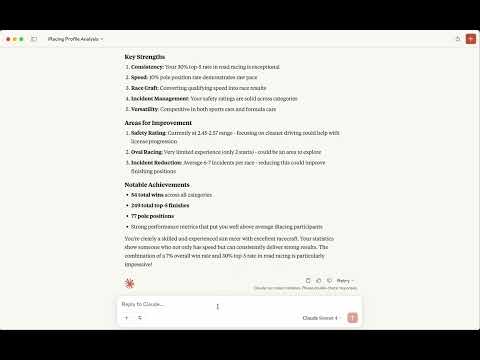
📹 Watch the video
As CLI Tool
Environment Setup
Create a .env file in your project directory:
# Required: Path to store authentication cookies
COOKIE_JAR=./cookies.txt

# Required: Your iRacing account credentials
[email protected]

# Option 1: Use your iRacing password
PASSWORD=your_password

# Option 2: Use pre-generated API key (recommended for security)
# API_KEY=your_api_key_here
Initial Authentication
Before using the cli, authenticate with iRacing:
npm run login
Use the command-line interface for direct data access:
Get Member Profile
# Single member
npm run api member 123456

# Multiple members
npm run api member 123456,789012
Get Team Information
npm run api team 123456
Get Member Career Data
npm run api member-career 123456
Get Season Recap
# Current season recap
npm run api member-recap --member-id 123456

# Specific year and season
npm run api member-recap --member-id 123456 --year 2024 --season 1
Driver Lookup
npm run api driver-lookup "Max Verstappen"
API Documentation
npm run api documentation
🔧 Development Setup
Prerequisites
- Node.js 24+
- npm
- iRacing account with active subscription
Clone and Install
git clone https://github.com/yourusername/iracing-data-mcp-server.git
cd iracing-data-mcp-server
npm install
🔐 Authentication & Security
API Key vs Password
Recommended: Use an API key for enhanced security:
-
Generate API Key:
const crypto = require('crypto'); const apiKey = crypto.createHash('sha256') .update(password + email) .digest('base64'); -
Set in Environment:
API_KEY=your_generated_api_key
# Remove PASSWORD variable when using API_KEY
Cookie Management
The server automatically manages authentication cookies:
- Stores cookies in the path specified by
COOKIE_JAR - Automatically refreshes expired sessions
- Handles authentication errors gracefully
Built with ❤️ for the racing community

Comments
New to MCP?
From what the protocol is to installing your first server, these answers cover most first questions.
An open protocol that defines how AI applications connect to external tools and data in a uniform way. Clients talk to the model; MCP servers provide tools, resources and prompt templates. They exchange standard messages, so one server can be reused by many clients.