
About Memo
Memo is a local-first persistent memory system for coding agents, with offline semantic and keyword retrieval. It keeps Markdown files as the source of truth and combines historical queries, contradiction handling, and scheduled maintenance; the installer can connect supported agents over MCP.
Key features
- 01Offline semantic and BM25 hybrid retrieval
- 02Markdown-backed memories with SQLite indexing
- 03Historical queries and change comparisons
- 04Detect and resolve conflicting memories
- 05Automated multi-phase memory maintenance
- 06MCP profiles with configurable tool sets
Use cases
- 01Carry project decisions across coding-agent sessions
- 02Search saved context by meaning or keywords
- 03Review how a decision changed over time
- 04Find and resolve outdated or conflicting facts
MCP support
Memo connects coding agents to its memory through MCP, and its installer configures clients it finds. MCP profiles control which tools are exposed, with a smaller default surface to limit schema context.
Configuration
Local server config is the same for every client. Copy it into your client’s MCP config file.
Tools
Local servers expose tools only once running on your machine, and the maintainer has not provided a tool list.
Details
From the project README
memo
Your coding agent starts every session with amnesia. memo fixes that — 100% on your own machine.
Persistent, searchable memory for Claude Code, Codex, Cursor, Cline, Devin, and OpenCode. No cloud, no API keys, no Ollama, no vector DB to run. And it spends fewer tokens, not more.







Install
curl -fsSL https://raw.githubusercontent.com/jagoff/memo/v4.16.0/install.sh | bash
Prefer a package manager? uv tool install mlx-memo · pipx install mlx-memo · brew tap jagoff/memo && brew install mlx-memo
Then:
memo doctor                                   # self-check
memo save 'we use Postgres, not Mongo'        # save a decision
memo search 'what database did we pick?'      # search by meaning
That's it. Your agents pick it up over MCP automatically — the installer wires every client it finds.
Installing on another Mac or handing setup to an agent?
New Mac:
curl -fsSL https://raw.githubusercontent.com/jagoff/memo/v4.16.0/install.sh | bash
memo sync bootstrap [email protected]:yourname/memo-sync.git
Agent-managed setup:
curl -fsSL https://raw.githubusercontent.com/jagoff/memo/v4.16.0/install.sh | bash
memo doctor --strict-runtime
On Linux or just want to look around first?
docker run --rm ghcr.io/jagoff/memo:latest memo doctor
Why this saves you money
Most memory servers add context. memo is built to remove it.
| Profile | Tools | Schema tokens |
|---|---|---|
agent (default) | 43 | ~9.7k |
core / slim | 60 | ~13.2k |
full / default | 165 | ~30.6k |
The default MCP surface is 43 tools, not 165 — 74% fewer tools, and about 68% less schema context: 43 tools / ~9.7k schema tokens versus 165 tools / ~30.6k tokens on the full surface — overhead paid every session, in every client.
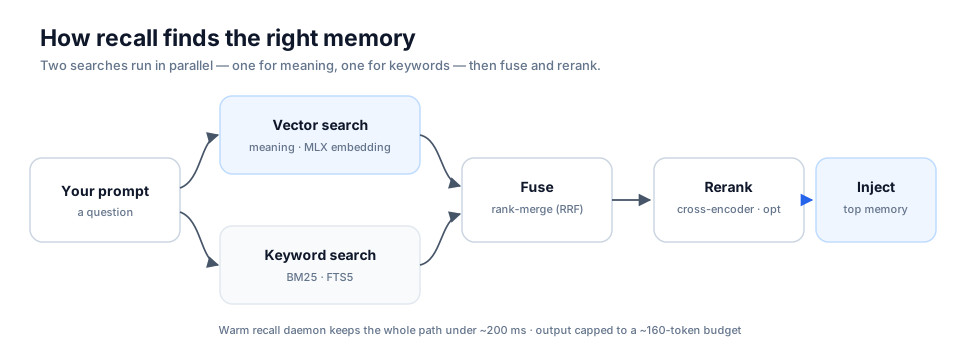
Ambient recall injects one relevant memory before the model answers. The bundled Claude Code hook caps that injection at ~160 tokens. memo roi reports the real grounding and re-ask counts — the estimated-savings figure it used to print was removed in 4.14.0, because multiplying those counts by hardcoded constants was a savings claim memo could not support. For measured savings, memo tokens reads the provider's own usage counters through the context-compression proxy.
memo roi       # value from grounded recalls and avoided re-asks
memo tokens    # usage-savings ledger
Three things nothing else does
🕰️ Time-machine — query your knowledge as it was
memo as-of ask "what was the deploy strategy?" --date 2026-02-01
memo diff --from 2026-01-01 --to 2026-03-01
Full historical reconstruction by reverse-replaying history.db. Useful when you need to know why past-you made a call, not just what past-you decided.
⚡ Contradiction radar — memory that notices when you change your mind
memo contradict scan      # find conflicting facts corpus-wide
memo contradict triage    # resolve: fuse / newer-wins / dismiss
Change a decision and memo flags the now-stale version, so the agent stops reintroducing what you already threw out.
🔮 Dream — it optimizes itself while you sleep
memo dream run
A 7-phase nightly pipeline: inventory → mine signals → resolve conflicts → prune stale → synthesize cross-cluster insights → optimize → pre-warm the top-100 query embeddings so tomorrow's recall stays under 200 ms. Every run writes a receipt you can audit. Zero intervention.
How it works
Hybrid retrieval. A vector leg (MLX on Apple Silicon, sentence-transformers on CPU) and a BM25 leg (FTS5, diacritic-folding for Spanish) run in parallel, fuse via Reciprocal Rank Fusion, then go through an optional MLX cross-encoder rerank.
Markdown is the source of truth. Every memory is a plain .md file you can read, grep, and version-control. SQLite is a derived index that rebuilds from the files at any time — hand-edit in Obsidian and your edit wins on the next memo reindex. Nothing is locked in a database you can't open.
Prompts and memories stay on your machine. Embedder, reranker, and LLM all run in-process. No telemetry. Memory travels only if you point memo sync at a git remote you own. Normal startup is fully offline; remote update checks and auto-update require an explicit opt-in. → Privacy and network policy
Also in the box: cross-agent memo resume (reopen any session from any agent), cross-Mac git sync, a knowledge graph with optional codegraph symbol edges, encrypted secret storage, OCR/audio ingestion, evidence packs, outcome learning, signed federation, and a local chat UI over your memory (memo chat serve). → Full feature reference
How it compares
Verified July 2026 against each project's own docs. Corrections welcome — open an issue and I'll fix the table.
| memo | mem0 | letta | cognee | basic-memory | cipher | |
|---|---|---|---|---|---|---|
| 100% local, no cloud API | ✅ | ⚠️ | ⚠️ | ⚠️ | ✅ | ⚠️ |
| Time-machine (rewind to any date) | ✅ | ❌ | ⚠️ | ❌ | ⚠️ | ⚠️ |
| Contradiction detection + resolution | ✅ | ⚠️ | ⚠️ | ❌ | ❌ | ❌ |
| Autonomous nightly maintenance | ✅ | ❌ | ❌ | ❌ | ❌ | ❌ |
| Token-economy MCP profiles | ✅ | ❌ | ❌ | ⚠️ | ✅ | ❌ |
| Markdown / Obsidian as source of truth | ✅ | ❌ | ⚠️ | ❌ | ✅ | ❌ |
✅ first-class · ⚠️ partial, config-gated, or add-on · ❌ absent
Closest comparators are basic-memory (local-first + Obsidian + MCP — same thesis) and cipher (memory for coding agents).
Requirements
| Support | |
|---|---|
| macOS, Apple Silicon (M1–M4) | Full — MLX embedder + reranker + ask/synthesize/dream |
| Linux / Ubuntu | Standalone CPU backend — search, recall, save. pipx install "mlx-memo[cpu]" · docs/ubuntu.md |
| Intel Mac | Unsupported — current PyTorch releases do not ship Python 3.13 wheels for this platform |
| Docker | Cross-platform, CPU backend · docs/docker.md |
Python ≥ 3.13 (the installer handles this via uv if you don't have it). First install pulls ~8 GB of models, 5–15 min. Optional: an Obsidian vault — without one, memo uses ~/Documents/memo/.
Docs
| Install detail, installer knobs, new-Mac migration | reference.md › Install |
| Per-client MCP setup (Claude Desktop, Cursor, Cline, Continue) | reference.md › MCP setup |
| Ambient recall, capture, and tuning | reference.md › Ambient memory |
Full CLI reference (145 commands) + memo tui | reference.md › CLI |
All MEMO_* flags and model profiles | reference.md › Configuration |
| Architecture and design notes | reference.md › Design |
| Privacy and network policy | PRIVACY.md |
All 145 top-level CLI commands
Complete command inventory (kept here so CI detects CLI/documentation drift)
Core: save search ask get edit rename delete list
Recall & Hooks: recall recall-hook context briefing continuity prewarm capture-tick capture-stop interject ask-gaps guard digest
Session & History: history as-of diff record-history session chat-session resume reflect mine-history episodes chronicle
Maintenance: reindex maintain review dream consolidate synthesize dedupe cross-dedup retier contradict coordinate terminal invalidate temporal compress-context ops
Analysis & Quality: health stats doctor journey-check lint drift analytics eval roi tokens token-savings usefulness gaps outcome profile confidence graduation hype definitive evidence
Knowledge Graph: graph entities entity extract-entities links version related
Advanced Search: embed rerank contextual retrieve context-pack chat chat-ask repo
Import / Export / Sync: import export backup restore sync ingest federation
Visualization: tui dashboard map logs hook-log
Setup & Config: init setup config install-mcp install-watcher uninstall-watcher install-slash install-statusline install-recall-hook install-shell-wrapper install-shims startup-banner migrate migrate-vault migrate-independence update upgrade self-update watch release onboard
Daemons: daemons recall-daemon ingest-daemon maint-daemon embed-daemon idle-daemon
Other: backend-native collaborative events feedback query mandate drift sleep-cycle operational ocr-image provenance secret verbatim mcp-command codex-badge debug-recall http-api proxy mine-git token-gate fix undo code-facts code-nudge code-health
Contributing
git clone https://github.com/jagoff/memo && cd memo
uv pip install -e '.[dev]'
Issues and PRs welcome — see CONTRIBUTING.md. If memo is useful to you, a ⭐ genuinely helps other people find it.
MIT licensed. Built on Apple MLX, sqlite-vec, and codegraph.
Comments
New to MCP?
From what the protocol is to installing your first server, these answers cover most first questions.
An open protocol that defines how AI applications connect to external tools and data in a uniform way. Clients talk to the model; MCP servers provide tools, resources and prompt templates. They exchange standard messages, so one server can be reused by many clients.