
About MepMail
MepMail is an MCP server for managing transactional email, contacts, and Correio agent mailboxes. It supports sending and tracking email, while mailbox replies can be drafted for owner approval when sending permission is unavailable.
Key features
- 01Send, schedule, and batch email
- 02Track delivery status and insights
- 03Manage contacts and inspect domains
- 04Read mailboxes and save drafts
- 05Send drafts or request approval
Use cases
- 01Send transactional messages or batches
- 02Review delivery and account status
- 03Look up and update contact records
- 04Let an agent draft mailbox replies for approval
MCP support
Exposes email, contact, and Correio mailbox tools to MCP clients. The package runs locally over stdio; a hosted MCP endpoint is also available.
Configuration
Remote servers need no local install. Pick your client, then copy the config or install in one click.
https://api.mepmail.dev/mcpclaude mcp add --transport http je4nvrg-mepmail https://api.mepmail.dev/mcp{"mcpServers":{"je4nvrg-mepmail":{"type":"http","url":"https://api.mepmail.dev/mcp"}}}Open in Cursor{"servers":{"je4nvrg-mepmail":{"type":"http","url":"https://api.mepmail.dev/mcp"}}}Open in VS Code{"mcpServers":{"je4nvrg-mepmail":{"type":"http","url":"https://api.mepmail.dev/mcp"}}}{"mcpServers":{"je4nvrg-mepmail":{"serverUrl":"https://api.mepmail.dev/mcp"}}}Run commands in a terminal; paste JSON into the client’s MCP config and restart. Servers that need sign-in will prompt on first connect.
Tools
Details
From the project README@mepmail/mcp
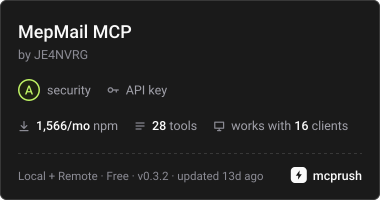
Official MepMail MCP server for local MCP clients — Claude Desktop, Claude Code, Cursor, Codex and anything that speaks stdio. It drives your MepMail instance over the public REST API (Resend-compatible wire) with a team API key, and, with a Correio agent key, your mailboxes: read the inbox, save replies as drafts and send them (or ask the owner to approve).
MepMail also runs a hosted MCP server (OAuth, no install) at
https://api.mepmail.dev/mcp. This package is for clients that launch
local servers from config. Tool names and result shapes match the hosted
server's; it covers a subset — the reading, sending and contact tools (22) —
and the write surfaces beyond contacts (segments, topics, broadcasts,
templates, webhooks, domains, API keys) plus the team picker are hosted-only.
Guide: https://docs.mepmail.dev/mcp ·
Packages: https://docs.mepmail.dev/packages · Published as
@mepmail/mcp on npm.
Requires Node.js 20 or newer.
Quickstart
- Create an API key in the MepMail dashboard (API keys) — a full-access
key, optionally scoped to the sender domain your agent sends from. A
sending-access key is confined to
/emails, so it would 403 on the contact tools (list_contacts,get_contact,create_contact,update_contact,delete_contact) withrestricted_api_key. - Add the server to your client:
Claude Desktop (claude_desktop_config.json) — and any client with the
same config shape (Cursor: mcp.json):
{
  "mcpServers": {
    "mepmail": {
      "command": "npx",
      "args": ["-y", "@mepmail/mcp"],
      "env": {
        "MEPMAIL_API_KEY": "ms_...",
        "MEPMAIL_BASE_URL": "https://api.mepmail.dev"
      }
    }
  }
}
Claude Code:
claude mcp add mepmail -e MEPMAIL_API_KEY=ms_... -e MEPMAIL_BASE_URL=https://api.mepmail.dev -- npx -y @mepmail/mcp
Correio mailboxes — create an agent key in Correio → Settings → Agents:
mmb_... for one mailbox, or "Connect an agent to several mailboxes" for an
mmt_... credential over the mailboxes you choose, with read, draft and
optionally send permission. Then add it to the same server (an API key is
optional when you only need mailboxes):
claude mcp add mepmail -e MEPMAIL_MAIL_TOKEN=mmt_... -- npx -y @mepmail/mcp
Environment
Set at least one of MEPMAIL_API_KEY and MEPMAIL_MAIL_TOKEN.
| Variable | Required | Default | Meaning |
|---|---|---|---|
MEPMAIL_API_KEY | for sending tools | — | Team API key (ms_...). Sent as Bearer to your instance only. |
MEPMAIL_BASE_URL | no | https://api.mepmail.dev | Your instance's API URL. |
MEPMAIL_MAIL_TOKEN | for mailbox tools | — | Correio agent key (mmb_... or mmt_...). Sent as Bearer to the dashboard origin only. |
MEPMAIL_MAIL_ORIGIN | no | https://mepmail.dev | Where your dashboard answers. |
Tools (22)
Send and manage email:
send_email— send or schedule one transactional email (cc/bcc/reply_to, tags, attachments, topic-scoped sends).send_email_batch— up to 100 emails in one call.get_email,list_emails— status and timeline (last_event: delivered, bounced, complained, ...).update_email,cancel_email— reschedule or cancel a scheduled email.get_email_insights— per-email best-practice report and score.get_deliverability,get_usage— account standing before bulk work.
Audience and account:
create_contact,update_contact,delete_contact(witherase=truefor GDPR/LGPD scrubbing),get_contact,list_contacts— with segment filters.list_domains,get_domain— DNS records and verification state.list_broadcasts,get_broadcast.list_templates,get_template.list_webhooks,list_suppressions.
Correio mailboxes (with MEPMAIL_MAIL_TOKEN, same five tools as the hosted
https://api.mepmail.dev/mcp/correio):
mailbox_list_accounts— the mailboxes the key reaches, with permissions and the default one.mailbox_list_messages,mailbox_read_message— inbox, drafts and sent; passmailboxwith a team credential. Listing is one page at a time, newest first: pass the returnednextCursorascursoruntilhasMoreis false (a cursor only works for the same mailbox, folder and filters). Filters run on the server before the page is cut:query(words, "quoted phrases",de:/from:,para:/to:,assunto:/subject:,tem:anexo,depois:/antes:),from,subject,unread,after,before;limitup to 100 (50 when searching). Mail that arrives while paging comes before the first page, so start over to see it. A short or empty page never proves a message is absent from the mailbox, and search reads an index that can lag about a minute behind new mail. Dates: a listing'safter/beforeuse the order time (arrival, or when a snoozed message came back; a draft's last edit), a search uses the arrival time, and a search also finds snoozed messages, which the listing leaves out until they return.mailbox_get_attachment— one attachment by message id, revision and index (frommailbox_read_message): filename, bytes and sha256. WithMEPMAIL_MAIL_DOWNLOAD_DIRset the file is saved there (never overwriting); otherwise it comes back ascontent_base64, up to 512 KiB.mailbox_save_draft— new draft, edit, reply or forward, from that mailbox's address and signature.attachmentsadds files as{ filename, content_base64 }, or{ path }for a file insideMEPMAIL_MAIL_UPLOAD_DIR(no other local path is ever read);keep_attachmentspicks the files to keep from the edited draft or the forwarded message (by default all of them; a reply keeps none). Limits: 10 files, 256 KiB each, about 700 KiB in all. Files travel only inside the draft request, so nothing is left behind when a draft is abandoned.mailbox_send_draft— sends with the send permission; otherwise the owner gets an approval request (awaiting_approval).
Every tool result is one JSON block envelope — { notice, untrusted_data } —
so agents can tell team-authored strings from tool output and never treat
recipient data as instructions.
Safe retries when sending
send_email and send_email_batch accept an optional top-level
idempotency_key. Keep the same key and identical arguments when retrying the
same send operation. Generate a new key for a new operation. The server passes
it as the HTTP Idempotency-Key header; it is not an email header or message
field.
Keys are scoped to the team and retained for 24 hours. A completed retry replays the original result. Reusing a key with different arguments returns a conflict; an operation still in progress can also return a conflict. An incomplete reservation can be recovered after 10 minutes. These limits apply to the server, so use an API version that supports this contract.
Agent discovery
- Machine catalog: https://mepmail.dev/.well-known/ai-catalog.json
- Auth guide for agents: https://mepmail.dev/auth.md
- API + errors + rate limits: https://docs.mepmail.dev
License
MIT
Comments
New to MCP?
From what the protocol is to installing your first server, these answers cover most first questions.
An open protocol that defines how AI applications connect to external tools and data in a uniform way. Clients talk to the model; MCP servers provide tools, resources and prompt templates. They exchange standard messages, so one server can be reused by many clients.