
About linkedin-company
linkedin-company is an Apify-hosted service that turns public LinkedIn company page URLs into structured JSON firmographic data. It is intended for developers and agents enriching company lists, with consistent rows and per-URL error results.
Key features
- 01Collect data from public company page URLs
- 02Return industry, size, and headquarters
- 03Include followers, specialties, and website
- 04Add office locations and country presence
- 05Process URL batches in parallel
- 06Return consistent JSON and error rows
Use cases
- 01Enrich a company prospect list
- 02Load firmographic data into a CRM
- 03Compare company profiles from LinkedIn pages
- 04Review company data through an AI agent
MCP support
The Apify MCP server exposes the Actor as a tool for clients such as Claude, Cursor, and other AI agents. It can be connected using the hosted MCP URL with OAuth or an Apify API token.
Configuration
Remote servers need no local install. Pick your client, then copy the config or install in one click.
https://mcp.apify.com/?tools=johnvc/linkedin-company-apiclaude mcp add --transport http johnisanerd-linkedin-company https://mcp.apify.com/?tools=johnvc/linkedin-company-api{"mcpServers":{"johnisanerd-linkedin-company":{"type":"http","url":"https://mcp.apify.com/?tools=johnvc/linkedin-company-api"}}}Open in Cursor{"servers":{"johnisanerd-linkedin-company":{"type":"http","url":"https://mcp.apify.com/?tools=johnvc/linkedin-company-api"}}}Open in VS Code{"mcpServers":{"johnisanerd-linkedin-company":{"type":"http","url":"https://mcp.apify.com/?tools=johnvc/linkedin-company-api"}}}{"mcpServers":{"johnisanerd-linkedin-company":{"serverUrl":"https://mcp.apify.com/?tools=johnvc/linkedin-company-api"}}}Run commands in a terminal; paste JSON into the client’s MCP config and restart. Servers that need sign-in will prompt on first connect.
Tools
Details
From the project README🏢 LinkedIn Company API: Firmographics to Structured JSON
The most efficient, reliable, and developer-friendly way to use the LinkedIn Company API.
Actor page: apify.com/johnvc/linkedin-company-api Input schema: apify.com/johnvc/linkedin-company-api/input-schema
Send one or many public LinkedIn company page URLs and get back one clean JSON row per company: name, industry, employee size, headquarters, followers, specialties, website, and a Crunchbase link. It is built API-first and MCP-ready, so you can call it from Python or drive it as a tool from an AI agent.
Video Walkthrough
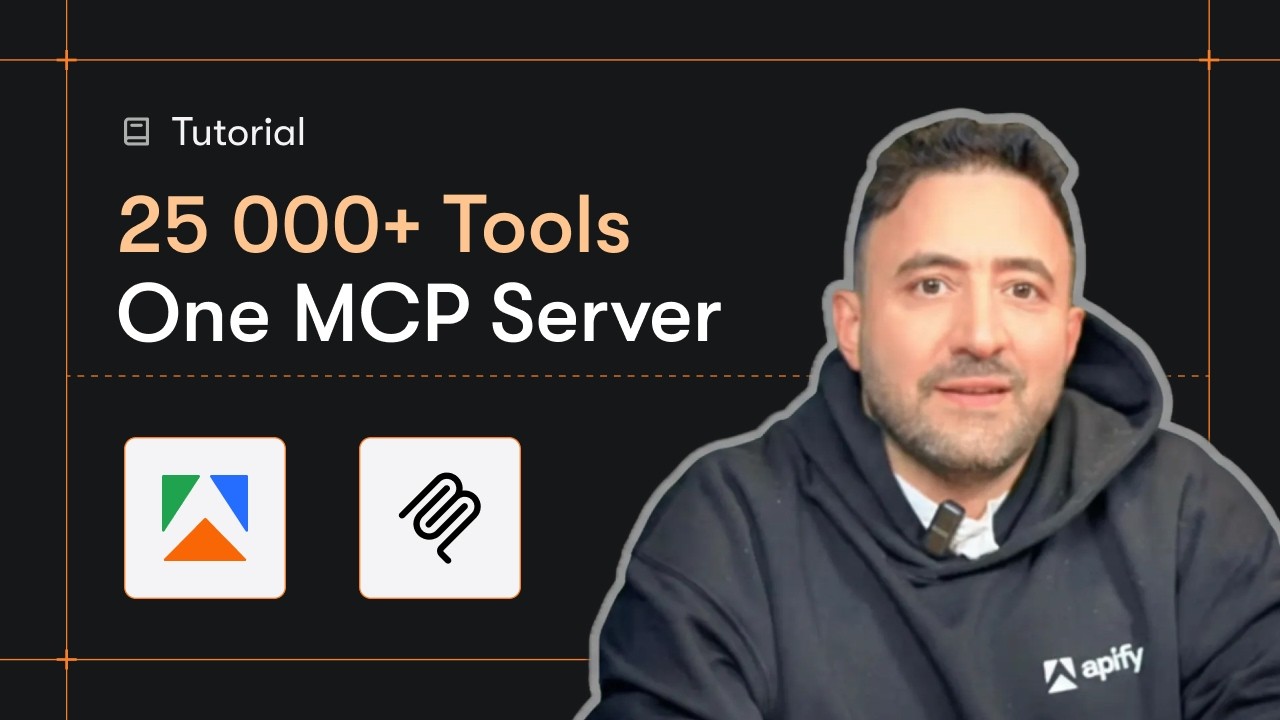
Quick Start
Prerequisites
- Python 3.11 or higher
- An Apify account and API key (get a free key here)
-
Clone the repository
git clone https://github.com/johnisanerd/Apify-LinkedIn-Company-API.git cd Apify-LinkedIn-Company-API -
Install dependencies with UV
# Install UV if you do not have it: curl -LsSf https://astral.sh/uv/install.sh | sh # Install project dependencies: uv sync -
Configure your API key
cp .env.example .env # Edit .env and add your Apify API key # Get your free API key at: https://apify.com?fpr=9n7kx3 -
Run the example
uv run python linkedin-company-api-example.py
Alternative: set the API key directly
export APIFY_API_TOKEN="your_api_key_here"
uv run python linkedin-company-api-example.py
Why Use This LinkedIn Company API?
A URL in, structured data out. You never touch collection infrastructure. Pass a public company URL and get flat, predictable firmographic fields you can load straight into a sheet, a database, or a CRM.
Batch friendly. Send up to 1000 company URLs in one run. They are collected in parallel and returned one row each, so enriching an account list is one call.
Pay per company. Billing is per company returned, with no per-run setup fee, so you only pay for what is delivered.
Reliable and predictable. Every company comes back with the same field shape, and a URL that cannot be collected returns a clear error row instead of failing the whole run.
MCP-ready. Call it as a tool from Claude, Cursor, and other AI agents (see the install sections below).
Features
Core Capabilities
- Collect one or many public LinkedIn company pages by URL
- Name, industry, employee size band, headquarters, and specialties
- Follower count, website, organization type, and a Crunchbase link
- Office locations and country presence, plus the company logo URL
Data Quality
- One consistent JSON row per company, every time
- A plain-language
summaryfield on every row for quick scanning and AI use - Clear per-URL error rows so a single bad link never sinks the batch
Usage Examples
Basic Example
{
  "companyUrls": ["https://www.linkedin.com/company/microsoft"]
}
Batch Example (collected in parallel)
{
  "companyUrls": [
    "https://www.linkedin.com/company/microsoft",
    "https://www.linkedin.com/company/google"
  ]
}
Input Parameters
| Parameter | Type | Required | Default | Description |
|---|---|---|---|---|
companyUrls | list[str] | YES | - | One or more public LinkedIn /company/ page URLs. Up to 1000 per run; non-/company/ URLs are skipped. |
Output Format
Each company is returned as one JSON row:
{
  "result_type": "company",
  "name": "Microsoft",
  "industries": "Software Development",
  "companySize": "10,001+ employees",
  "employeesInLinkedin": 233717,
  "followers": 28561289,
  "headquarters": "Redmond, Washington",
  "specialties": ["Business Software", "Developer Tools", "Cloud Computing"],
  "organizationType": "Public Company",
  "website": "https://news.microsoft.com/",
  "crunchbaseUrl": "https://www.crunchbase.com/organization/microsoft",
  "companyId": "1035",
  "publicUrl": "https://www.linkedin.com/company/microsoft",
  "summary": "Microsoft, Software Development, 10,001+ employees, Redmond, Washington, 28,561,289 followers"
}
The crunchbaseUrl and website fields are returned when the company lists them.
FAQ
Will this put my LinkedIn or LinkedIn Recruiter account at risk?
No. It reads public LinkedIn pages only, the ones anyone can open while signed out. It never logs in and never asks for your cookies: there is no input for an account, a password or an li_at session cookie. Nothing it does is tied to your LinkedIn account, your LinkedIn Recruiter seat or your Sales Navigator license. The requests run on Apify's servers, not in your browser, so nothing connects them to you, and you can keep working in Recruiter while a run is going.
Install in Claude Cowork Desktop
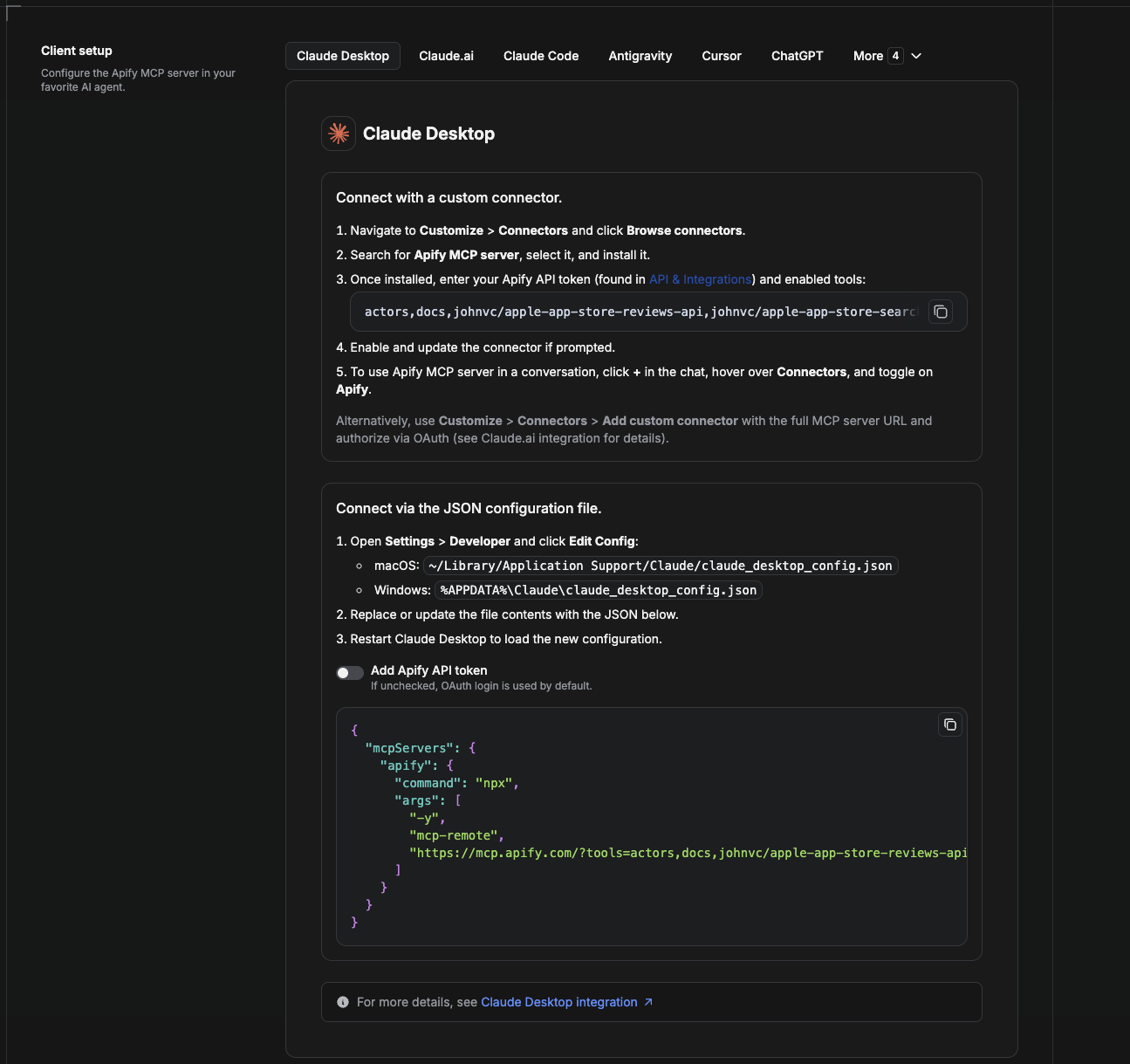
Cowork is the desktop app's automation mode. To give it the LinkedIn Company API as a tool, add the Apify MCP server as a connector.
- Open the Claude desktop app and go to Settings → Connectors (or Settings → Developer → Edit Config to edit
claude_desktop_config.jsondirectly).- macOS:
~/Library/Application Support/Claude/claude_desktop_config.json - Windows:
%APPDATA%\Claude\claude_desktop_config.json
- macOS:
- Add the Apify MCP server, preloaded with only this Actor:
{
  "mcpServers": {
    "apify": {
      "command": "npx",
      "args": [
        "-y",
        "mcp-remote",
        "https://mcp.apify.com/?tools=actors,docs,johnvc/linkedin-company-api"
      ]
    }
  }
}
- Restart the app. When Cowork first calls the tool, complete the OAuth prompt in your browser, or add your Apify API token in the connector settings to skip OAuth.
- In a Cowork chat, confirm the tool is available and ask it to run the LinkedIn Company API.
Download the desktop app and start a free trial: https://claude.ai/referral/uIlpa7nPLg More help: https://docs.apify.com/platform/integrations/claude-desktop
Install in Claude Code
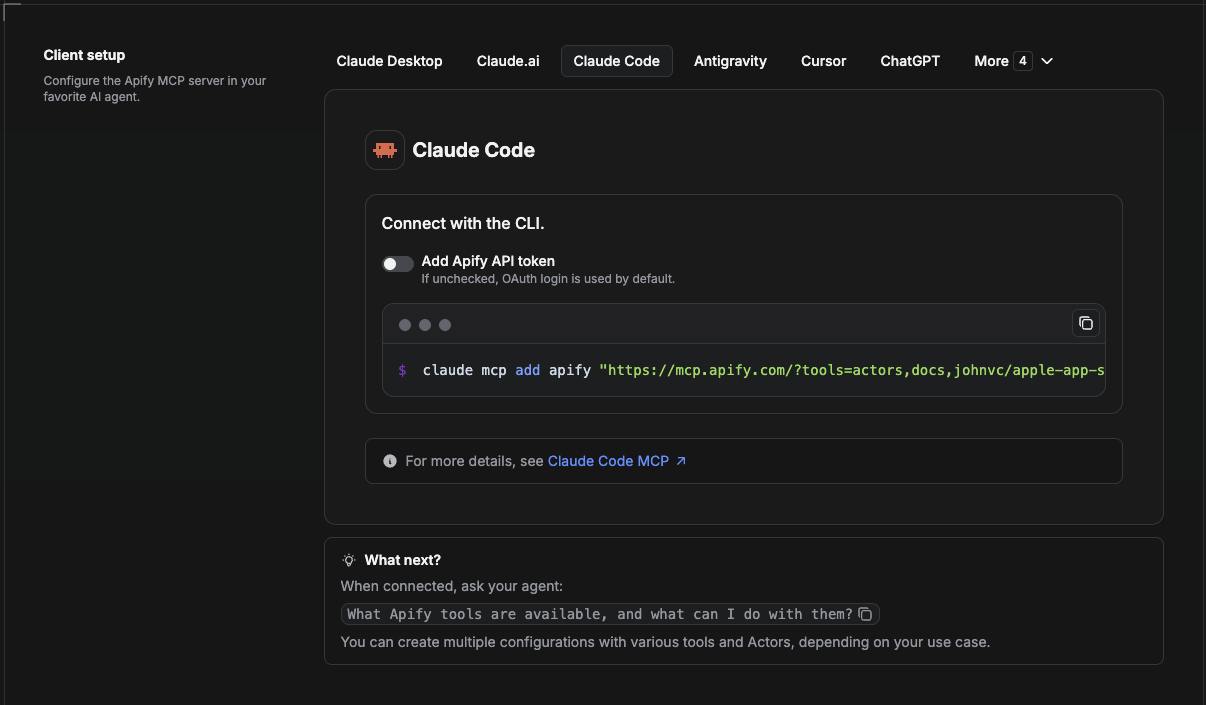
Claude Code is the command-line tool. Add the Actor's MCP server with one command:
claude mcp add --transport http apify \
  "https://mcp.apify.com/?tools=actors,docs,johnvc/linkedin-company-api"
To use a token instead of browser OAuth:
claude mcp add --transport http apify \
  "https://mcp.apify.com/?tools=actors,docs,johnvc/linkedin-company-api" \
  --header "Authorization: Bearer YOUR_APIFY_TOKEN"
Then verify with claude mcp list, or run /mcp inside a session. Ask Claude Code to call the LinkedIn Company API.
Try Claude Code free: https://claude.ai/referral/uIlpa7nPLg Claude Code MCP docs: https://code.claude.com/docs/en/mcp
Install in Claude (website)
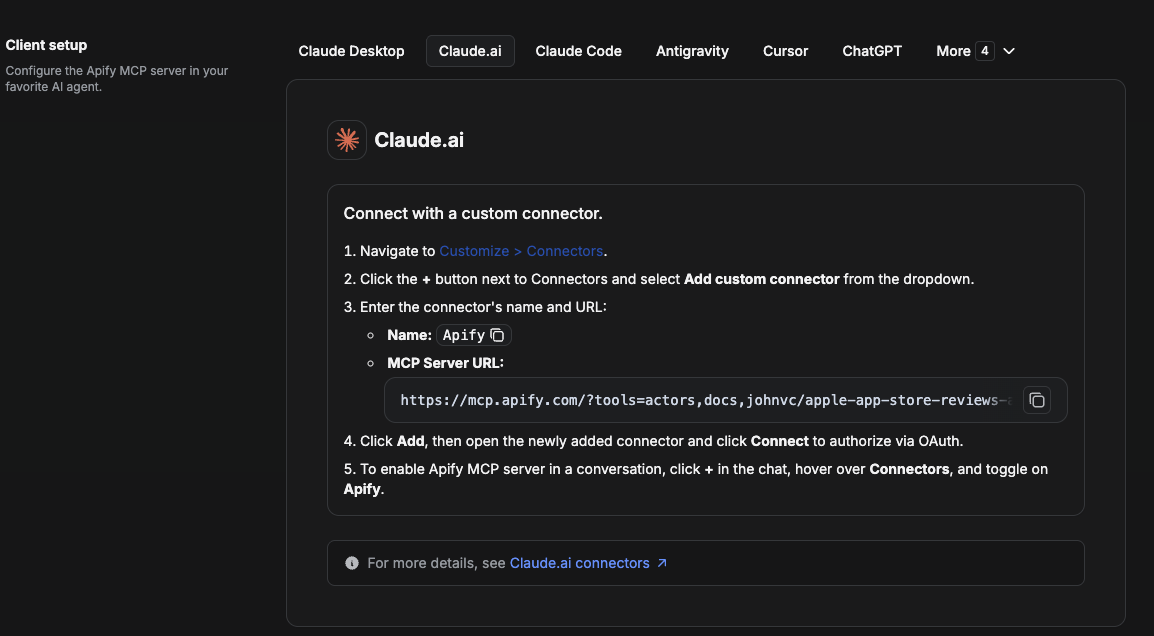
On claude.ai you add Apify as a connector, then enable just this Actor's tool.
- Go to Settings → Connectors → Browse connectors and search for Apify MCP server. Install it (enable or update if prompted).
- When connecting, authenticate with your Apify API token, and enable the tool
johnvc/linkedin-company-api. - In any chat, open + → Connectors and turn on Apify.
- Alternatively, choose Add custom connector and paste the full MCP URL
https://mcp.apify.com/?tools=actors,docs,johnvc/linkedin-company-api, using OAuth when prompted. - Ask Claude to run the LinkedIn Company API.
Open Claude on the web: https://claude.ai/referral/uIlpa7nPLg
Install in Cursor
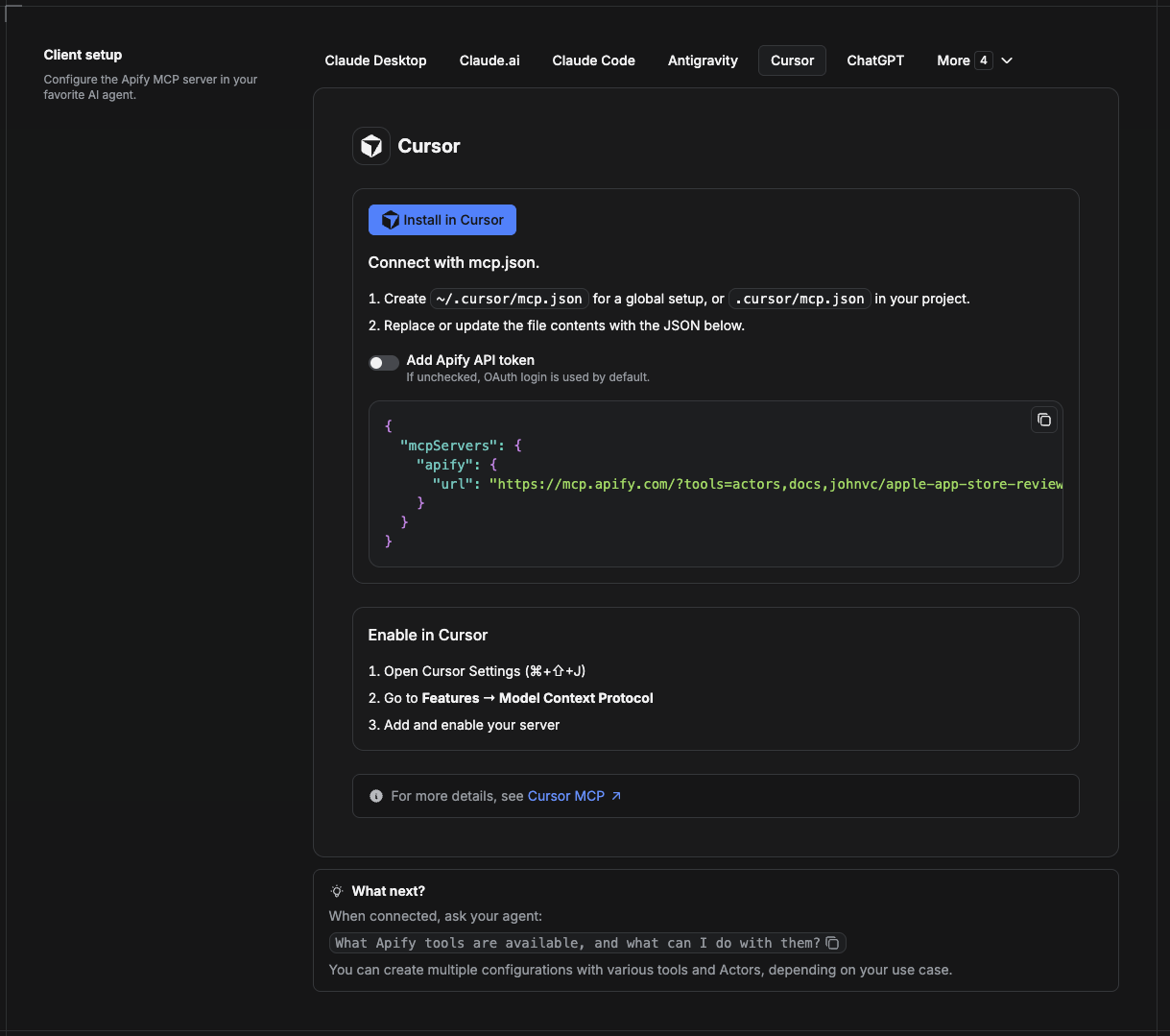
Cursor reads MCP servers from a project file at .cursor/mcp.json.
- In your project, create
.cursor/mcp.json:
{
  "mcpServers": {
    "apify": {
      "url": "https://mcp.apify.com/?tools=actors,docs,johnvc/linkedin-company-api"
    }
  }
}
- If you prefer token auth over browser OAuth, add a header:
{
  "mcpServers": {
    "apify": {
      "url": "https://mcp.apify.com/?tools=actors,docs,johnvc/linkedin-company-api",
      "headers": { "Authorization": "Bearer YOUR_APIFY_TOKEN" }
    }
  }
}
- Open Cursor → Settings → MCP and confirm the apify server is connected (green dot).
- In Composer or Chat, ask Cursor to call the LinkedIn Company API.
New to Cursor? Get it here: https://cursor.com/referral?code=XQP4VBLI3NNX
Install in ChatGPT
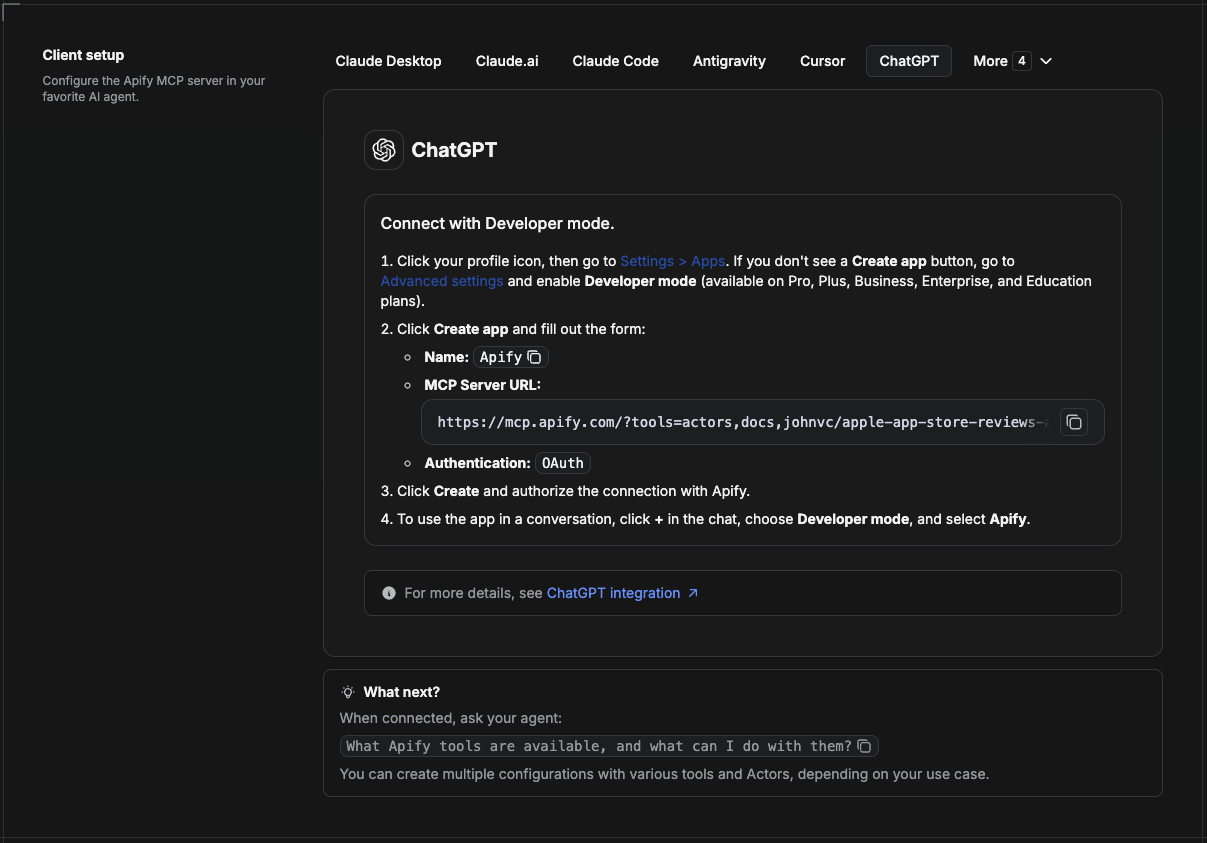
ChatGPT connects to the Apify MCP server through Developer mode (available on ChatGPT Pro, Plus, Business, Enterprise, and Education plans).
- Click your profile icon, then go to Settings > Apps. If you do not see a Create app button, open Advanced settings and enable Developer mode.
- Click Create app and fill out the form:
- Name: Apify
- MCP Server URL:
https://mcp.apify.com/?tools=actors,docs,johnvc/linkedin-company-api - Authentication: OAuth
- Click Create and authorize the connection with Apify.
- To use the app in a conversation, click + in the chat, choose Developer mode, and select Apify.
More help: https://docs.apify.com/platform/integrations/mcp
Use the LinkedIn Company API to power your sales intelligence, account enrichment, and CRM workflows with reliable, structured results.
🤖 Ask an AI assistant about this Actor
Open a ready-to-send prompt about the LinkedIn Company API in the AI of your choice:
- 💬 ChatGPT
- 🧠 Claude
- 🔍 Perplexity
- 🅒 Copilot
Last Updated: 2026.10.27
Comments
New to MCP?
From what the protocol is to installing your first server, these answers cover most first questions.
An open protocol that defines how AI applications connect to external tools and data in a uniform way. Clients talk to the model; MCP servers provide tools, resources and prompt templates. They exchange standard messages, so one server can be reused by many clients.