About linkedin-learning
linkedin-learning is an Apify-backed Python and MCP interface to LinkedIn Learning’s public course catalog. It supports course searches and detailed records, including reviews and lesson-level syllabus data, without login credentials.
Key features
- 01Search courses by keywords and filters
- 02Expand searches beyond the result cap
- 03Retrieve course reviews and ratings
- 04Read lesson syllabus and free-preview flags
- 05Export catalog results as JSON, CSV or Excel
Use cases
- 01Build a filtered course catalog
- 02Compare course ratings and reviews
- 03Identify lessons available as free previews
MCP support
The project provides an MCP interface to the Apify Actor, letting MCP clients search the public LinkedIn Learning catalog and retrieve course details.
Configuration
Remote servers need no local install. Pick your client, then copy the config or install in one click.
https://mcp.apify.com/?tools=johnvc/linkedin-learning-apiclaude mcp add --transport http johnisanerd-linkedin-learning https://mcp.apify.com/?tools=johnvc/linkedin-learning-api{"mcpServers":{"johnisanerd-linkedin-learning":{"type":"http","url":"https://mcp.apify.com/?tools=johnvc/linkedin-learning-api"}}}Open in Cursor{"servers":{"johnisanerd-linkedin-learning":{"type":"http","url":"https://mcp.apify.com/?tools=johnvc/linkedin-learning-api"}}}Open in VS Code{"mcpServers":{"johnisanerd-linkedin-learning":{"type":"http","url":"https://mcp.apify.com/?tools=johnvc/linkedin-learning-api"}}}{"mcpServers":{"johnisanerd-linkedin-learning":{"serverUrl":"https://mcp.apify.com/?tools=johnvc/linkedin-learning-api"}}}Run commands in a terminal; paste JSON into the client’s MCP config and restart. Servers that need sign-in will prompt on first connect.
Tools
Details
From the project README🎓 LinkedIn Learning API: Course Data, Reviews and Syllabus from Python and MCP
A Python and MCP quick-start for the LinkedIn Learning API on Apify. Search the public LinkedIn Learning course catalog by keyword, skill level, length or software, then pull the full record for any course: rating and rating count, written learner reviews, the complete syllabus with a description and a free-preview flag on every lesson, instructors with profile links, skills taught and certificate details. None of it needs a login, a cookie or a site license.
- Actor: LinkedIn Learning API on Apify
- Input schema: input parameters
- Get a free API token: apify.com
LinkedIn's own Learning API is available only through its Partner Program or a purchased site license, with OAuth keys an admin has to provision. This Actor reads the pages LinkedIn Learning already publishes to logged-out visitors and returns the same catalog metadata as JSON: course title, link, instructors, duration, viewer count and thumbnail from a search, or the full record with reviews and table of contents from a course URL. It covers the public catalog only. LinkedIn's reporting API, which returns learner activity for a licensed organization, is a different product and nothing here reads it. You pay per row: $0.10 per 1,000 search results and $0.50 per 1,000 full course records. Apify also applies its platform accounting events, $0.00001 per Actor start (one event per GB of run memory, at least one) and $0.00001 per stored dataset row.
Video: Build MCP servers with Apify
Text walkthrough
The LinkedIn Learning API has two modes, set by mode. In search mode you pass queries (up to 25 keywords) or topics, optionally narrowed by sortBy, difficultyLevel, entityType, duration and softwareNames, and each course comes back as a search_result row with title, courseUrl, courseId, entityType, instructors, durationText, viewersText, releaseText and thumbnailUrl. LinkedIn serves at most 50 results per query, so expandWithFilters re-runs the query across LinkedIn's own filter combinations and merges the unique courses when you need a fuller course list. In details mode you pass courseUrls (course, lesson or learning path links, up to 200) and get a course_detail row with ratingValue, ratingCount, enrollmentCount, reviews, tableOfContents with a per-lesson isFree flag, skills, instructors, lessonCount, freeLessonCount, hasCertificate and certificateName. Setting enrichDetails to true on a search opens each found course and returns the full record instead, billed once at the full-record rate. The published task Extract LinkedIn Learning Course Reviews and Ratings runs details mode on three course URLs and returns the written review text with each reviewer's name, job title and profile link; run_course_reviews() in the example file makes the same details-mode call from Python, trimmed to the first of those three URLs so the first run costs about $0.0005.
Quick Start
Prerequisites: Python 3.11 or newer, uv, and a free Apify API token from apify.com.
git clone https://github.com/johnisanerd/Apify-LinkedIn-Learning-API.git
cd Apify-LinkedIn-Learning-API
uv sync
cp .env.example .env          # paste your token into .env
uv run python linkedin-learning-api-example.py
Each example is a separate flag:
uv run python linkedin-learning-api-example.py --example default      # search "python", 5 rows
uv run python linkedin-learning-api-example.py --example catalog      # course catalog rows, each printed as JSON
uv run python linkedin-learning-api-example.py --example reviews      # written reviews for one course
uv run python linkedin-learning-api-example.py --example new-courses  # newest releases on a topic
uv run python linkedin-learning-api-example.py --example all
Every example asks for a small number of rows on purpose. You pay per row delivered, so confirm the shape of the data first, then raise maxItems.
If you do not want a .env file, export the token instead:
export APIFY_API_TOKEN="paste_your_real_token_here"   # replace with the token from your Apify account
uv run python linkedin-learning-api-example.py
Why use this LinkedIn Learning API
A short list of what the Actor returns and what it costs, before the field-level detail in Features and Output Format.
No login and no site license
The Actor reads only what LinkedIn Learning shows a logged-out visitor. There is no field for a session cookie and no OAuth step. Anyone with a free Apify token can run it.
The full syllabus, lesson by lesson
tableOfContents lists every section and lesson with its own title, description, durationSeconds, url and an isFree flag, with freeLessonCount totalled on the course. That is how you find the free preview lessons without opening each page.
Pay for the rows you receive
Search results are billed on the course-found event at $0.10 per 1,000; full records on course-detail at $0.50 per 1,000. Duplicates, error rows and the popular-courses page LinkedIn substitutes when a query matches nothing are never charged at the course-found or course-detail rate.
LinkedIn Learning reviews with the reviewer's identity
A full course record carries reviews whenever the course page publishes written reviews: the review text, its star rating, and the reviewer's authorName, authorJobTitle and authorProfileUrl, plus datePublished. Other course data tools stop at the star average and rating count; the written text and who wrote it are only on the course page.
LinkedIn Learning course catalog and course list past the 50-result cap
LinkedIn shows at most 50 results for any one search. Run search mode across a set of keywords or topic pages, turn on expandWithFilters to get past that ceiling, and export the dataset as JSON, CSV or Excel. expandWithFilters repeats each query across LinkedIn's own filter combinations and merges the unique courses; within each query rows deduplicate on courseId, lessons on their own URL, so a course reached through two slugs is returned once; a course that matches two different queries appears once under each searchQuery. It is the closest thing to a LinkedIn Learning course catalog download that needs no account.
LinkedIn Learning learning paths, lessons and courses, told apart
entityType separates COURSE, VIDEO and LEARNING PATH in search results. A learning path URL in details mode returns pathUrl, courseCount and the ordered courses inside it; a lesson URL returns that lesson joined to its parent courseId.
Features
Core Capabilities
- Search by
queriesortopics, narrowed withsortBy,difficultyLevel,entityType,durationandsoftwareNames. - LinkedIn Learning course catalog download:
expandWithFiltersre-runs a query across LinkedIn's own filter combinations, the only route past the 50-results-per-query cap, so a course list longer than 50 rows comes from one run. - LinkedIn Learning learning paths: details mode takes course, lesson and learning path URLs, up to 200 per run, and returns a
course_detail,lessonorlearning_pathrow for each. enrichDetailsturns a search into full course records in one run, billed once per row at the full-record rate.- LinkedIn Learning free courses:
freeLessonCountand the per-lessonisFreeflag intableOfContentsshow how much of each course is watchable without a subscription. - Online courses dataset: run many
queriesortopicsin one search and export the rows from every query, each labelled with itssearchQuery, as JSON, CSV or Excel.
Data Quality
- Each review carries
body,rating,authorName,authorJobTitle,authorProfileUrlanddatePublished. - Every lesson in
tableOfContentshas its owndescription,durationSeconds,urlandisFreeflag. courseUrlis the canonical link with tracking parameters stripped; within each query (and within a details run) rows deduplicate oncourseId, lessons on their own URL, so a course reached through two slugs is returned once; a course that matches two differentqueriesappears once under eachsearchQuery.no_resultsanderrorrows are pushed so you can see what failed, and are never billed at the course-found or course-detail rate.
Recipes
Ready-made configurations with their own Store landing pages:
- LinkedIn Learning Course Data as JSON, No Login: search mode on
"project management"withmaxItems25; each row has title, link, instructors, duration, viewer count and thumbnail. Local:uv run python linkedin-learning-api-example.py --example catalog - LinkedIn Learning Course Data Without a Login: the same search shape on
"cybersecurity", proving the catalog reads with no account and no session cookie. - Extract LinkedIn Learning Course Reviews and Ratings: details mode on three course URLs; each row carries
ratingValue,ratingCountand the writtenreviews. Local:uv run python linkedin-learning-api-example.py --example reviews - Build a LinkedIn Learning Course Ratings Dataset: search
"python"withenrichDetailstrue andmaxItems5, so each course row is a full record with rating, rating count, learner numbers, level and duration (learning path hits stay as search rows). - Track New LinkedIn Learning Course Releases: search
"artificial intelligence"withsortByRECENCY, newest first. Local:uv run python linkedin-learning-api-example.py --example new-courses
Schedule tip. Save any of these inputs as a Task on the Actor page and schedule it to run weekly. With sortBy set to RECENCY the dataset lists the newest courses on a topic every week, and with enrichDetails on it refreshes ratingValue, ratingCount and the written reviews for every course, without anyone touching it.
Usage Examples
Basic, matching the default run:
{
  "mode": "search",
  "queries": ["python"],
  "sortBy": "RELEVANCE",
  "difficultyLevel": "ANY",
  "entityType": "COURSE",
  "duration": "ANY",
  "maxItems": 5
}
Advanced, a filtered search enriched to full records:
{
  "mode": "search",
  "queries": ["excel"],
  "softwareNames": ["Microsoft Excel"],
  "difficultyLevel": "BEGINNER",
  "duration": "BETWEEN_1_TO_2_HOURS",
  "sortBy": "POPULARITY",
  "maxItems": 10,
  "enrichDetails": true,
  "maxConcurrency": 5
}
Details mode, full records for URLs you already have:
{
  "mode": "details",
  "courseUrls": [
    "https://www.linkedin.com/learning/python-essential-training-18764650",
    "https://www.linkedin.com/learning/paths/getting-started-with-python"
  ]
}
Input Parameters
Only mode is required. Search settings apply when mode is search; courseUrls applies when mode is details. In search mode at least one of queries or topics must be non-empty.
| Parameter | Type | Required | Default | Description |
|---|---|---|---|---|
mode | string | yes | search | search to find courses by keyword with filters, or details to pull the full record for course URLs you already have. |
queries | array of string | search mode, unless topics is set | prefilled ["python"] | Keywords to search, one per line. Each query is searched separately and its rows are labelled with the query that found them. Up to 25. |
topics | array of string | search mode, unless queries is set | [] | LinkedIn Learning topic slugs or topic URLs to browse, such as python or https://www.linkedin.com/learning/topics/python. Up to 25. |
sortBy | string | no | RELEVANCE | RELEVANCE, POPULARITY or RECENCY. |
difficultyLevel | string | no | ANY | ANY, BEGINNER, INTERMEDIATE or ADVANCED. |
entityType | string | no | ANY | ANY, COURSE, VIDEO or LEARNING_PATH. |
duration | string | no | ANY | ANY, BETWEEN_0_TO_10_MIN, BETWEEN_10_TO_30_MIN, BETWEEN_30_TO_60_MIN, BETWEEN_1_TO_2_HOURS, BETWEEN_2_TO_3_HOURS or MORE_THAN_3_HOURS. |
softwareNames | array of string | no | [] | Keep only courses that teach this tool, using LinkedIn's own label such as Python, Microsoft Excel, SQL, ChatGPT or Claude. The schema accepts up to 10 values, but LinkedIn applies only the first label it receives, so pass one label per run and start a separate run for each additional label. |
maxItems | integer | no | 50 | Courses to return per query, 1 to 1000. LinkedIn serves at most 50 per query and filter combination, so ask for more only with expandWithFilters on. |
expandWithFilters | boolean | no | false | Run the same query again across LinkedIn's own filter combinations and merge the unique courses. The only way past the 50-per-query ceiling; returns more billable rows. |
enrichDetails | boolean | no | false | Open each course found by the search and return its full record. Enriched rows are billed at the full-record rate instead of the search rate, never both. |
courseUrls | array of string | details mode | prefilled with one course URL, default [] | Course, lesson or learning path URLs to collect in full, one per line. Up to 200 per run. |
maxConcurrency | integer | no | 5 | How many course pages to read at once, 1 to 10, in details mode and during enrichment. |
requestTimeoutSecs | integer | no | 40 | How long to wait for a single page before retrying it, 10 to 120 seconds. |
Output Format
A search_result row:
{
  "position": 1,
  "title": "Python Essential Training",
  "courseUrl": "https://www.linkedin.com/learning/python-essential-training-18764650",
  "courseId": "18764650",
  "entityType": "COURSE",
  "instructors": [{ "name": "Ryan Mitchell" }],
  "durationText": "4h 23m",
  "durationSeconds": 15780,
  "thumbnailUrl": "https://media.licdn.com/dms/image/v2/D560DAQEruxcXLwzu_A/l...",
  "viewersText": "646,624 viewers",
  "releaseText": "Released Jan 25, 2023",
  "resultType": "search_result",
  "searchQuery": "python",
  "searchType": "query",
  "appliedFilters": { "sortBy": "RELEVANCE" },
  "approximateTotalResults": 9816,
  "fetchedAt": "2026-08-27T18:14:05.123456+00:00"
}
A course_detail row, trimmed to one syllabus section and one review:
{
  "resultType": "course_detail",
  "sourceUrl": "https://www.linkedin.com/learning/python-essential-training-18764650",
  "courseUrl": "https://www.linkedin.com/learning/python-essential-training-18764650",
  "courseId": "18764650",
  "title": "Python Essential Training",
  "description": "Get a comprehensive overview of the Python programming language.",
  "difficultyLevel": "Beginner",
  "provider": "LinkedIn Learning",
  "language": "en",
  "instructors": [
    {
      "name": "Ryan Mitchell",
      "jobTitle": "Principal Software Engineer",
      "profileUrl": "https://www.linkedin.com/in/remitchell",
      "imageUrl": "https://media.licdn.com/dms/image/v2/C5603AQHi4kzL_mpFUQ/p..."
    }
  ],
  "skills": [
    { "name": "Python (Programming Language)", "url": "https://www.linkedin.com/learning/topics/python" }
  ],
  "categoryPath": ["All topics", "Technology", "Software Development", "Programming Languages"],
  "dateCreated": "2023-01-25",
  "datePublished": "2023-01-25",
  "durationText": "PT4H23M9S",
  "durationSeconds": 15789,
  "enrollmentCount": 646624,
  "ratingValue": 4.7,
  "ratingCount": 17489,
  "reviews": [
    {
      "rating": 5,
      "body": "Clear and well paced.",
      "authorName": "Takaaki Iwai",
      "authorJobTitle": "Supply Chain Lead",
      "authorProfileUrl": "https://jp.linkedin.com/in/example",
      "datePublished": "2026-08-21T05:38:27.264Z"
    }
  ],
  "tableOfContents": [
    {
      "section": "Introduction",
      "items": [
        {
          "title": "Getting started with Python",
          "durationText": "50s",
          "durationSeconds": 50,
          "url": "https://www.linkedin.com/learning/python-essential-training-18764650/getting-started-with-python",
          "isFree": true,
          "description": "Meet the instructor and preview key topics."
        }
      ]
    }
  ],
  "lessonCount": 56,
  "freeLessonCount": 10,
  "hasCertificate": true,
  "certificateName": "LinkedIn Learning Certificate of Completion",
  "accessModel": "Subscription",
  "thumbnailUrl": "https://media.licdn.com/dms/image/v2/D560DAQEruxcXLwzu_A/l...",
  "parseSource": "jsonld",
  "fetchedAt": "2026-08-27T18:14:05.123456+00:00"
}
Fields you will use most:
| Field | Type | Rows | Description |
|---|---|---|---|
resultType | string | all | search_result, course_detail, lesson, learning_path, no_results or error. |
title | string | search, detail, lesson, path | Course, lesson or learning path title as published. |
courseUrl | string | search, detail, lesson | Canonical course link with tracking parameters removed. |
courseId | string | search, detail, lesson | Identifier taken from the trailing number in the course URL, or the URL slug when the course has no number; lesson rows carry their parent course's id. |
entityType | string | search | COURSE, VIDEO or LEARNING PATH. |
instructors | array | search, detail, lesson | Name on search rows; name, job title, profile link and photo on full records. |
durationText, durationSeconds | string, integer | search, detail, lesson | Length as displayed on search rows, ISO 8601 on detail rows, plus whole seconds. |
viewersText, releaseText | string | search | Viewer count and release date as shown on the search card. |
approximateTotalResults | integer | search | How many courses LinkedIn reports for the query. A size signal, not an exact count. |
ratingValue, ratingCount | number, integer | detail | Average learner rating out of 5 and how many learners rated. |
enrollmentCount | integer | detail | How many people have taken the course. |
reviews | array | detail | Written reviews: rating, body, authorName, authorJobTitle, authorProfileUrl, datePublished. |
tableOfContents | array | detail | Every section and lesson with title, description, durationSeconds, url and isFree. |
lessonCount, freeLessonCount | integer | detail | Lessons in the course and how many can be watched without a subscription. |
skills | array | detail | Skills taught, each linked to its LinkedIn Learning topic page. |
hasCertificate, certificateName | boolean, string | detail | Whether a certificate of completion is awarded, and its name. |
pathUrl, courses, courseCount | string, array, integer | learning path | The path link, its ordered member courses and how many there are. |
httpStatus | integer | error | Status code LinkedIn returned, when there was one. |
fetchedAt | string | all | When the row was collected, in UTC. |
no_results rows carry resultType, searchQuery, message and fetchedAt; error rows carry resultType, errorType, errorMessage, fetchedAt, plus sourceUrl and httpStatus when the failure concerns one URL. An invalid-input error carries no URL or query at all. Learning path rows use pathUrl in place of courseUrl.
🤖 Ask an AI assistant about this Actor
Open a ready-to-send prompt about the LinkedIn Learning API in the AI of your choice:
- 💬 ChatGPT
- 🧠 Claude
- 🔍 Perplexity
- 🅒 Copilot
People also search for
Will this put my LinkedIn or LinkedIn Recruiter account at risk?
No. It reads public LinkedIn pages only, the ones anyone can open while signed out. It never logs in and never asks for your cookies: there is no input for an account, a password or an li_at session cookie. Nothing it does is tied to your LinkedIn account, your LinkedIn Learning license, your LinkedIn Recruiter seat or your Sales Navigator license. The requests run on Apify's servers, not in your browser, so nothing connects them to you, and you can keep working in Recruiter while a run is going.
Does LinkedIn Learning give certificates?
Yes, a certificate of completion, and every full course record reports it in hasCertificate and certificateName (for example LinkedIn Learning Certificate of Completion). It is a certificate of completion rather than an accredited qualification.
Are LinkedIn Learning courses free?
Most courses need a subscription (accessModel reads Subscription wherever the course page publishes an offer, and is left out of the row otherwise), but courses expose individual lessons as free previews. The API flags each one with isFree inside tableOfContents and totals them in freeLessonCount, so you can sort a set of courses by how much is watchable for free.
How do you get a list of LinkedIn Learning courses?
Run the Actor in search mode with one or more queries, or point it at topics. Each row is one course with its title, link, instructors, duration and viewer count. LinkedIn caps any single query at 50 results, so a longer LinkedIn Learning course list comes from more queries or from expandWithFilters, which re-runs a query across LinkedIn's own filter combinations and merges the unique courses. The official course list download and the official API both need a site license or Partner Program access, provisioned by an admin. The task LinkedIn Learning Course Data Without a Login is that search with no account and no session cookie.
Do all LinkedIn Learning courses have certificates?
Most do, but check rather than assume: run a search with enrichDetails set to true and filter the dataset on hasCertificate. Learning path and single-lesson rows carry no hasCertificate field at all, so filter on resultType equal to course_detail before reading it.
What is a learning path in LinkedIn Learning?
A learning path is a curated sequence of several courses on one topic. In search results it appears with entityType LEARNING PATH, and you can restrict a search to paths with entityType: "LEARNING_PATH". Pass a /learning/paths/... URL in details mode and you get a learning_path row with pathUrl, courseCount and the ordered courses inside it.
What is the difference between a LinkedIn Learning path and a course?
A course is one multi-lesson unit with its own syllabus, rating and certificate. A path is a container that orders several courses. The entityType field tells them apart in search results (COURSE against LEARNING PATH), and in details mode a course URL returns a course_detail row while a path URL returns a learning_path row listing its member courses.
How do you find the free courses on LinkedIn Learning?
Pull full records with details mode or enrichDetails, then read isFree on every lesson in tableOfContents and freeLessonCount on the course. The published task Find Free Preview Lessons in LinkedIn Learning Courses does this for three courses.
Can you download the LinkedIn Learning course catalogue?
LinkedIn's own course list download is an admin feature of a purchased site license. Without one, run this Actor in search mode across the keywords or topic pages you care about, turn on expandWithFilters, and export the dataset as JSON, CSV or Excel from the run's Output tab or through the dataset endpoint. A broad catalog is assembled from many queries because LinkedIn caps each one at 50 results.
Is this the official LinkedIn Learning API or the reporting API?
Neither. The official LinkedIn Learning API and the LinkedIn Learning reporting API are LinkedIn products for organizations with a Partner Program agreement or a site license, provisioned by an admin with OAuth keys, and the reporting API returns learner activity such as who completed what. This Actor reads only the public course pages, so it returns course metadata, reviews and syllabus content and no learner activity at all.
Where is the LinkedIn Learning API documentation for this Actor?
The input schema documents every parameter, the Output Format section above documents the fields you will use most, and the two sample rows show the full shape of a search result and a full course record. The Actor page's API tab shows the REST API calls that start a run from curl, Node or Python, for any API integration that cannot use this Python client.
How do I use the LinkedIn Learning API from Python?
Clone this repo, run uv sync, put your Apify token in .env, and run uv run python linkedin-learning-api-example.py. The rows() helper shows the whole pattern: call the Actor with a run_input dictionary, then iterate the run's default dataset.
Can I use the LinkedIn Learning API with MCP or Claude?
Yes. The install sections below add the Actor as an MCP tool in Claude Code (free trial), Claude Cowork Desktop (free trial), Claude on the web, Cursor and ChatGPT. Once connected, an agent can search the catalog and pull full course records on its own.
Install in Claude Cowork Desktop
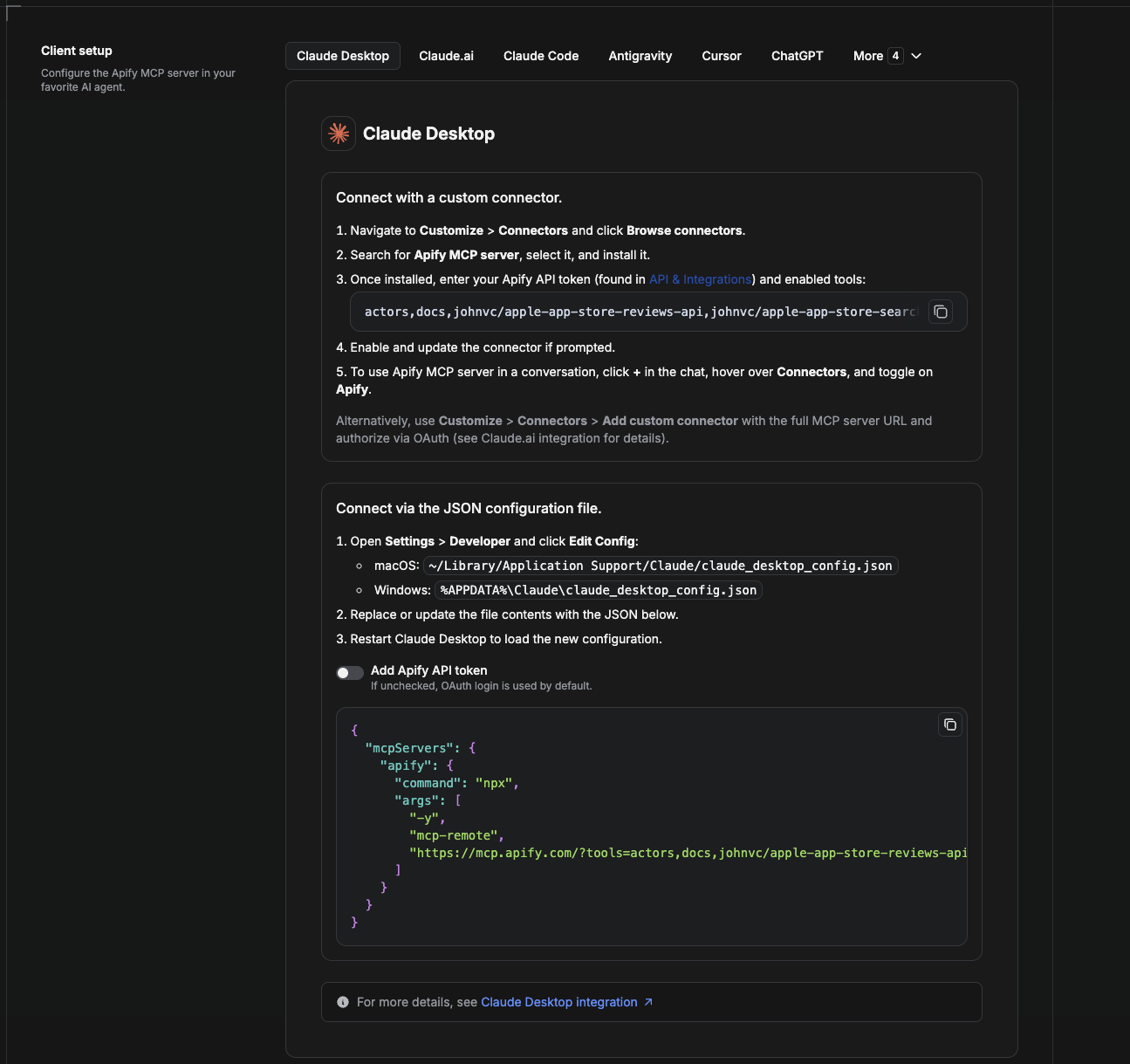
Cowork is the desktop app's automation mode. To give it the LinkedIn Learning API as a tool, add the Apify MCP server as a connector.
- Open the Claude desktop app and go to Settings → Connectors (or Settings → Developer → Edit Config to edit
claude_desktop_config.jsondirectly).- macOS:
~/Library/Application Support/Claude/claude_desktop_config.json - Windows:
%APPDATA%\Claude\claude_desktop_config.json
- macOS:
- Add the Apify MCP server, preloaded with only this Actor:
{
  "mcpServers": {
    "apify": {
      "command": "npx",
      "args": [
        "-y",
        "mcp-remote",
        "https://mcp.apify.com/?tools=actors,docs,johnvc/linkedin-learning-api"
      ]
    }
  }
}
- Restart the app. When Cowork first calls the tool, complete the OAuth prompt in your browser, or add your Apify API token in the connector settings to skip OAuth.
- In a Cowork chat, confirm the tool is available and ask it to run the LinkedIn Learning API.
Download the desktop app and start a free trial: https://claude.ai/referral/uIlpa7nPLg More help: https://docs.apify.com/platform/integrations/claude-desktop
Install in Claude Code
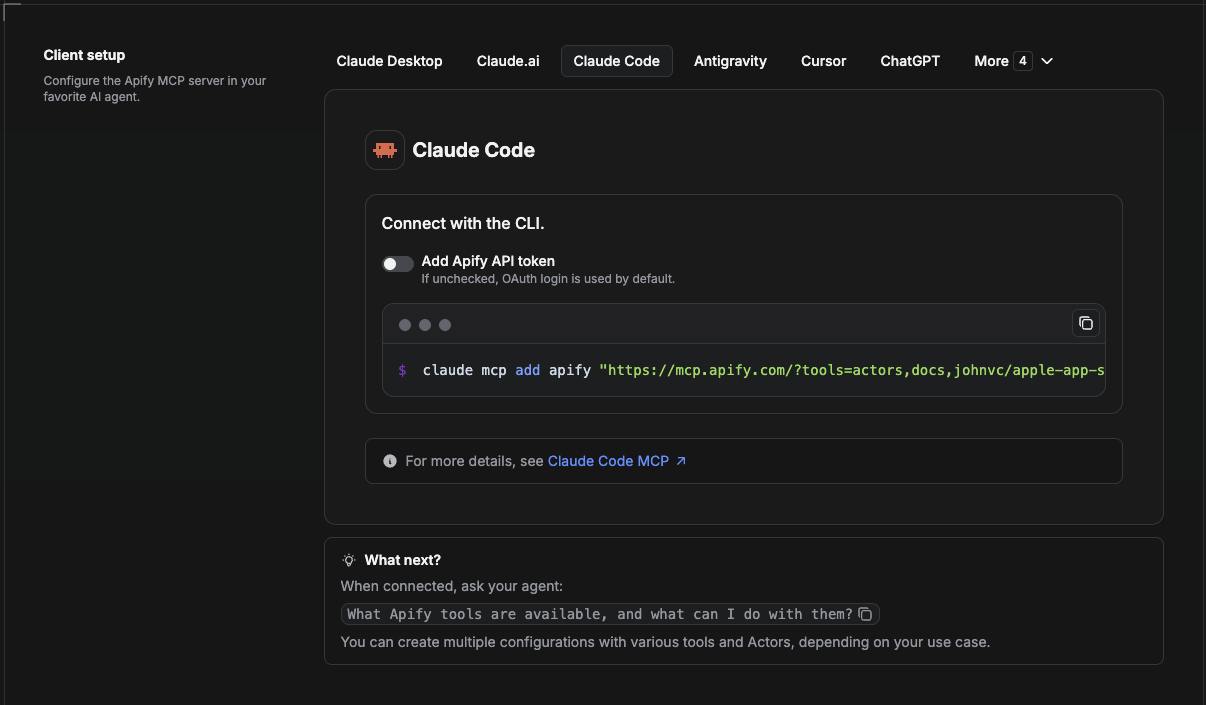
Claude Code is the command-line tool. Add the Actor's MCP server with one command:
claude mcp add --transport http apify \
  "https://mcp.apify.com/?tools=actors,docs,johnvc/linkedin-learning-api"
To use a token instead of browser OAuth:
claude mcp add --transport http apify \
  "https://mcp.apify.com/?tools=actors,docs,johnvc/linkedin-learning-api" \
  --header "Authorization: Bearer YOUR_APIFY_TOKEN"
Then verify with claude mcp list, or run /mcp inside a session. Ask Claude Code to call the LinkedIn Learning API.
Try Claude Code free: https://claude.ai/referral/uIlpa7nPLg Claude Code MCP docs: https://code.claude.com/docs/en/mcp
Install in Claude (website)
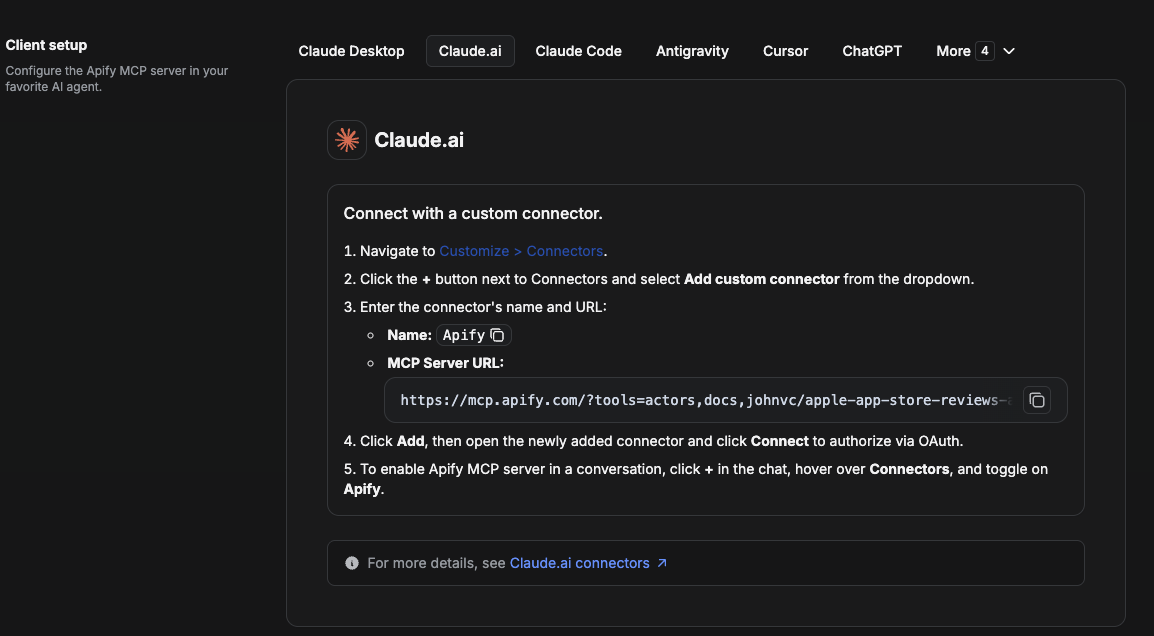
On claude.ai you add Apify as a connector, then enable just this Actor's tool.
- Go to Settings → Connectors → Browse connectors and search for Apify MCP server. Install it (enable or update if prompted).
- When connecting, authenticate with your Apify API token, and enable the tool
johnvc/linkedin-learning-api. - In any chat, open + → Connectors and turn on Apify.
- Alternatively, choose Add custom connector and paste the full MCP URL
https://mcp.apify.com/?tools=actors,docs,johnvc/linkedin-learning-api, using OAuth when prompted. - Ask Claude to run the LinkedIn Learning API.
Open Claude on the web: https://claude.ai
Install in Cursor
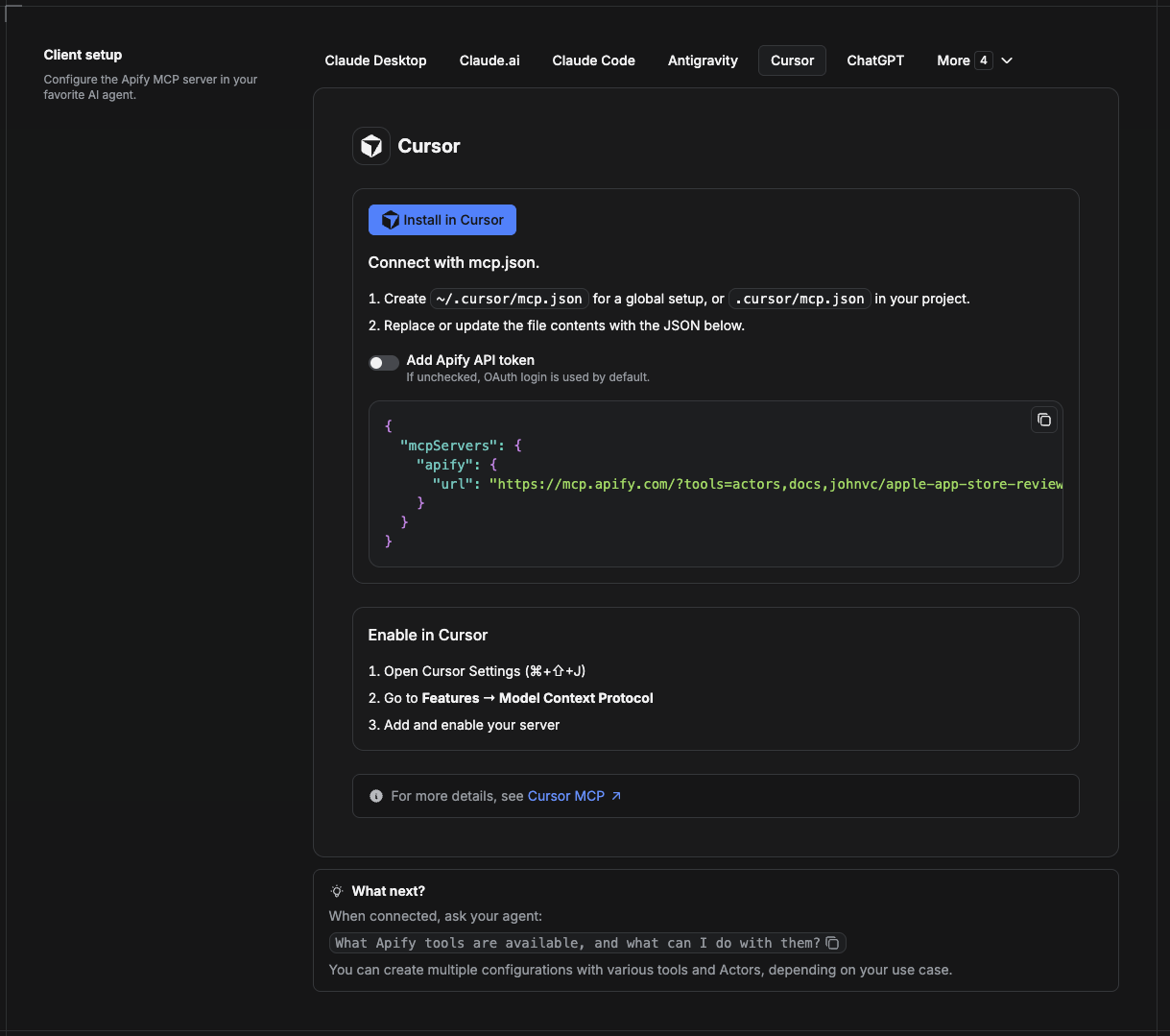
Cursor reads MCP servers from a project file at .cursor/mcp.json.
- In your project, create
.cursor/mcp.json:
{
  "mcpServers": {
    "apify": {
      "url": "https://mcp.apify.com/?tools=actors,docs,johnvc/linkedin-learning-api"
    }
  }
}
- If you prefer token auth over browser OAuth, add a header:
{
  "mcpServers": {
    "apify": {
      "url": "https://mcp.apify.com/?tools=actors,docs,johnvc/linkedin-learning-api",
      "headers": { "Authorization": "Bearer YOUR_APIFY_TOKEN" }
    }
  }
}
- Open Cursor → Settings → MCP and confirm the apify server is connected (green dot).
- In Composer or Chat, ask Cursor to call the LinkedIn Learning API.
New to Cursor? Get it here: https://cursor.com/referral?code=XQP4VBLI3NNX
Install in ChatGPT
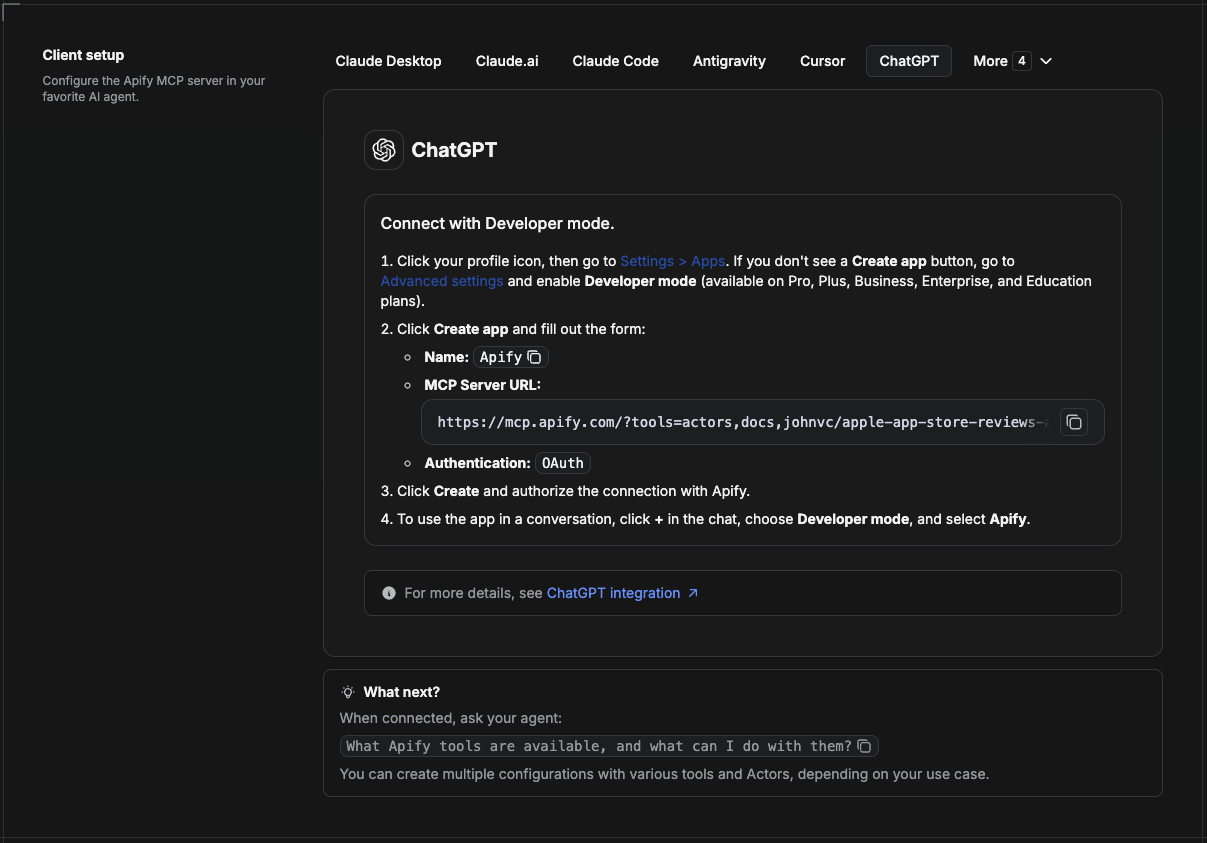
ChatGPT connects to the Apify MCP server through Developer mode (available on ChatGPT Pro, Plus, Business, Enterprise, and Education plans).
- Click your profile icon, then go to Settings > Apps. If you do not see a Create app button, open Advanced settings and enable Developer mode.
- Click Create app and fill out the form:
- Name: Apify
- MCP Server URL:
https://mcp.apify.com/?tools=actors,docs,johnvc/linkedin-learning-api - Authentication: OAuth
- Click Create and authorize the connection with Apify.
- To use the app in a conversation, click + in the chat, choose Developer mode, and select Apify.
More help: https://docs.apify.com/platform/integrations/mcp
🌐 About Alpha OSINT
This example repo is part of Alpha OSINT, toolset of financial and operations data sources and APIs. See the LinkedIn Learning API source page for related tools and use cases. For support or requests for this actor, please start a ticket directly on our support page.
Made with care by johnvc on Apify.
Last Updated: 2026.10.27
Comments
New to MCP?
From what the protocol is to installing your first server, these answers cover most first questions.
An open protocol that defines how AI applications connect to external tools and data in a uniform way. Clients talk to the model; MCP servers provide tools, resources and prompt templates. They exchange standard messages, so one server can be reused by many clients.