
About yandex-per-result
yandex-per-result is a hosted MCP server and API for retrieving Yandex search results as structured JSON. It supports regional domains, language and region targeting, pagination, and multiple result types in a page-based billing model.
Key features
- 01Search across six Yandex domains
- 02Target language and region
- 03Choose result types independently
- 04Filter by date or sort order
- 05Paginate with a configurable page cap
Use cases
- 01Compare search results across regions
- 02Research Russian-language search results
- 03Inspect ads and knowledge graph entries
- 04Collect image and video search results
MCP support
The hosted MCP server exposes the Yandex Search API as a tool for assistants and other MCP clients. Connect through the Apify MCP URL and authenticate with OAuth or an Apify API token.
Configuration
Remote servers need no local install. Pick your client, then copy the config or install in one click.
https://mcp.apify.com/?tools=johnvc/yandex-scrape-yandex-search-results-at-scale---per-resultclaude mcp add --transport http johnisanerd-yandex-per-result https://mcp.apify.com/?tools=johnvc/yandex-scrape-yandex-search-results-at-scale---per-result{"mcpServers":{"johnisanerd-yandex-per-result":{"type":"http","url":"https://mcp.apify.com/?tools=johnvc/yandex-scrape-yandex-search-results-at-scale---per-result"}}}Open in Cursor{"servers":{"johnisanerd-yandex-per-result":{"type":"http","url":"https://mcp.apify.com/?tools=johnvc/yandex-scrape-yandex-search-results-at-scale---per-result"}}}Open in VS Code{"mcpServers":{"johnisanerd-yandex-per-result":{"type":"http","url":"https://mcp.apify.com/?tools=johnvc/yandex-scrape-yandex-search-results-at-scale---per-result"}}}{"mcpServers":{"johnisanerd-yandex-per-result":{"serverUrl":"https://mcp.apify.com/?tools=johnvc/yandex-scrape-yandex-search-results-at-scale---per-result"}}}Run commands in a terminal; paste JSON into the client’s MCP config and restart. Servers that need sign-in will prompt on first connect.
Tools
Details
From the project READMEEnglish | Русский
🔍 Yandex Search API: Search Results in Clean JSON, Billed Per Page
One flat fee per page of results, every result type included. The developer-friendly way to use the Yandex Search API.
Actor page: apify.com/johnvc/yandex-scrape-yandex-search-results-at-scale---per-result Input schema: apify.com/johnvc/yandex-scrape-yandex-search-results-at-scale---per-result/input-schema
This Yandex Search API bills a one-time Search Start fee per run plus a flat fee per page of results, so cost scales with the number of pages you fetch, not with how many result types you enable. It queries Yandex, the dominant search engine across Russia and several Eastern European and Central Asian markets, and returns clean, structured JSON, one item per result type per page. Each item carries the search parameters, result counts, and arrays for organic results, ads, knowledge graph, inline images, and inline videos. Supports regional domains, language and region targeting, and pagination.
This Actor was originally billed per result and keeps "per-result" in its URL and this repo name so existing links keep working. It now bills per page, at the same prices as our other Yandex listing, Scrape Yandex.
Video Walkthrough
Quick Start
Prerequisites
- Python 3.11 or higher
- An Apify account and API key (get a free key here)
-
Clone the repository
git clone https://github.com/johnisanerd/Apify-Yandex-Pay-Per-Result.git cd Apify-Yandex-Pay-Per-Result -
Install dependencies with UV
# Install UV if you do not have it: curl -LsSf https://astral.sh/uv/install.sh | sh # Install project dependencies: uv sync -
Configure your API key
cp .env.example .env # Edit .env and add your Apify API key # Get your free API key at: https://apify.com?fpr=9n7kx3 -
Run the example
uv run python yandex-pay-per-result-scraper.py
Alternative: set the API key directly
export APIFY_API_TOKEN="your_api_key_here"
uv run python yandex-pay-per-result-scraper.py
Why Use This Yandex Search API?
One price per page. A page is billed once however many result types it returns, and a page that returns nothing for your selection is not billed, which suits exploratory research, keyword testing, and workloads where result density varies between queries.
An independent search index. Yandex maintains its own web index with distinct rankings, regional content, and Cyrillic-language coverage not replicated elsewhere. For Russian-language research, Eastern European markets, or comparative SEO, it is a unique source.
Multi-domain support. Target yandex.ru, yandex.com, yandex.com.tr, yandex.by, yandex.kz, and yandex.uz, then combine with lang and lr for precise control over the regional index and language variant.
Rich result types. Beyond organic results, each page returns ads, knowledge graph entries, inline image blocks, and inline video carousels in one structured output.
Predictable, pay-per-use pricing. Billing is per page plus a one-time Search Start fee per run, with no subscription, and the max_pages cap keeps cost under your control.
Easy to automate. Call it from Python in a few lines, or load it as an MCP tool so assistants like Claude and Cursor can run Yandex searches for you on demand.
Features
Core Capabilities
- Yandex search across 6 supported regional domains
- A la carte result types: toggle organic, ads, knowledge graph, inline images, and inline videos independently; enabling more types does not raise the per-page price
- Language and region control with
langandlr - Sort and recency filters:
sort_mode(relevance or date) andperiod(all, day, last_two_weeks, month) - Parallel multi-page pagination with a configurable
max_pagescap - Per-page billing: one Search Start fee per run, then a flat fee per page delivered
Data Quality
- One item per result type per page, tagged with
item_typeandresult_count organic_resultsarray with position, title, link, snippet, and displayed link- Result counts and metadata echoed on every item
- Separate arrays for ads, knowledge graph, images, and videos
- Consistent JSON shape across every query
Usage Examples
Basic search
{
  "text": "machine learning tutorial",
  "max_pages": 1
}
Regional domain with language and region targeting
{
  "text": "машинное обучение учебник",
  "yandex_domain": "yandex.ru",
  "lang": "ru",
  "lr": "213",
  "max_pages": 1
}
Input Parameters
| Parameter | Type | Required | Default | Description |
|---|---|---|---|---|
text | string | Yes | - | Search query. Supports any operator Yandex supports, e.g. site:wikipedia.org python. |
include_organic_results | boolean | No | true | Return organic results (item_type organic). |
include_ads | boolean | No | false | Return paid ads when present (item_type ads). |
include_knowledge_graph | boolean | No | false | Return the knowledge graph card when present (item_type knowledge_graph). |
include_inline_images | boolean | No | false | Return the inline image strip (item_type inline_images). |
include_inline_videos | boolean | No | false | Return the inline video carousel (item_type inline_videos). |
yandex_domain | string | No | yandex.com | Yandex domain, e.g. yandex.ru, yandex.com.tr (6 supported). |
lang | string | No | (domain default) | Language code, e.g. en, ru. Comma-separated for multi-language. |
lr | string | No | (domain default) | Country or region ID, e.g. 84 (USA), 213 (Moscow), 225 (Russia). |
max_pages | integer | No | 2 | Maximum pages to fetch; 0 = unlimited. Applies to every selected result type. |
sort_mode | string | No | relevance | Result ordering: relevance or date (newest first). |
period | string | No | all | Recency window: all, day, last_two_weeks, month. |
output_file | string | No | - | Optional filename to save results. |
Output Format
Each selected result type present on a page is returned as its own dataset item, tagged with item_type (organic, ads, knowledge_graph, inline_images, or inline_videos) and a result_count; each item is billed as one result. A representative organic item for machine learning tutorial is shown below (the organic_results array is trimmed to a single result here).
{
  "item_type": "organic",
  "result_count": 10,
  "text": "machine learning tutorial",
  "yandex_domain": "yandex.com",
  "lang": "en",
  "lr": "84",
  "max_pages": 1,
  "search_timestamp": "2026-05-29T11:51:33",
  "total_results_found": 10,
  "pages_processed": 1,
  "page_number": 1,
  "search_domain_description": "United States",
  "search_language_description": "English",
  "results_per_page": 10,
  "organic_results": [
    {
      "position": 2,
      "title": "Machine Learning Tutorial - GeeksforGeeks",
      "link": "https://www.geeksforgeeks.org/machine-learning/machine-learning/",
      "snippet": "Machine Learning is mainly divided into three core types: Supervised Learning: Trains models on labeled data to predict or classify new, unseen data.",
      "displayed_link": "geeksforgeeks.org > machine-learning > machine"
    }
  ],
  "ads_results": [],
  "knowledge_graph": [],
  "inline_images": [],
  "inline_videos": []
}
Each page item echoes the search parameters and result counts, lists every organic listing in organic_results (with position, title, link, snippet, and displayed link; video and news results may also include duration and date), and returns separate ads_results, knowledge_graph, inline_images, and inline_videos arrays.
Use as an MCP tool
You can load the Yandex Search API as an MCP tool so assistants call it for you. The MCP server URL preloads just this one Actor:
https://mcp.apify.com/?tools=actors,docs,johnvc/yandex-scrape-yandex-search-results-at-scale---per-result
Authenticate with OAuth in the browser when offered, or with your Apify API token (the same APIFY_API_TOKEN used by the Python example). Get a token at https://console.apify.com/settings/integrations and a free Apify account at https://apify.com?fpr=9n7kx3 .
Install in Claude Cowork Desktop
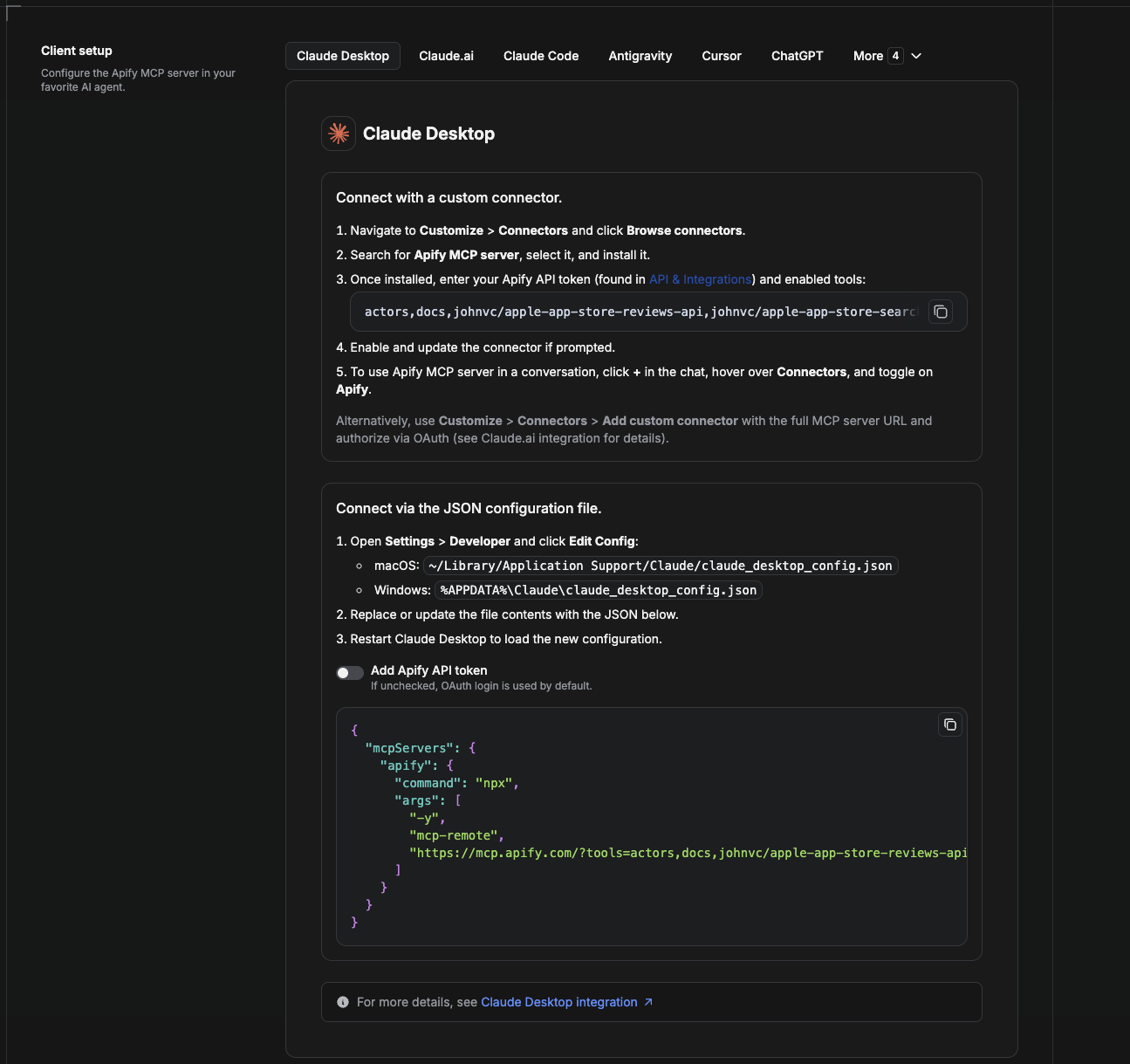
Cowork is the desktop app's automation mode. To give it the Yandex Search API as a tool, add the Apify MCP server as a connector.
- Open the Claude desktop app and go to Settings → Connectors (or Settings → Developer → Edit Config to edit
claude_desktop_config.jsondirectly).- macOS:
~/Library/Application Support/Claude/claude_desktop_config.json - Windows:
%APPDATA%\Claude\claude_desktop_config.json
- macOS:
- Add the Apify MCP server, preloaded with only this Actor:
{
  "mcpServers": {
    "apify": {
      "command": "npx",
      "args": [
        "-y",
        "mcp-remote",
        "https://mcp.apify.com/?tools=actors,docs,johnvc/yandex-scrape-yandex-search-results-at-scale---per-result"
      ]
    }
  }
}
- Restart the app. When Cowork first calls the tool, complete the OAuth prompt in your browser, or add your Apify API token in the connector settings to skip OAuth.
- In a Cowork chat, confirm the tool is available and ask it to run the Yandex Search API.
Download the desktop app and start a free trial: https://claude.ai/referral/uIlpa7nPLg More help: https://docs.apify.com/platform/integrations/claude-desktop
Install in Claude Code
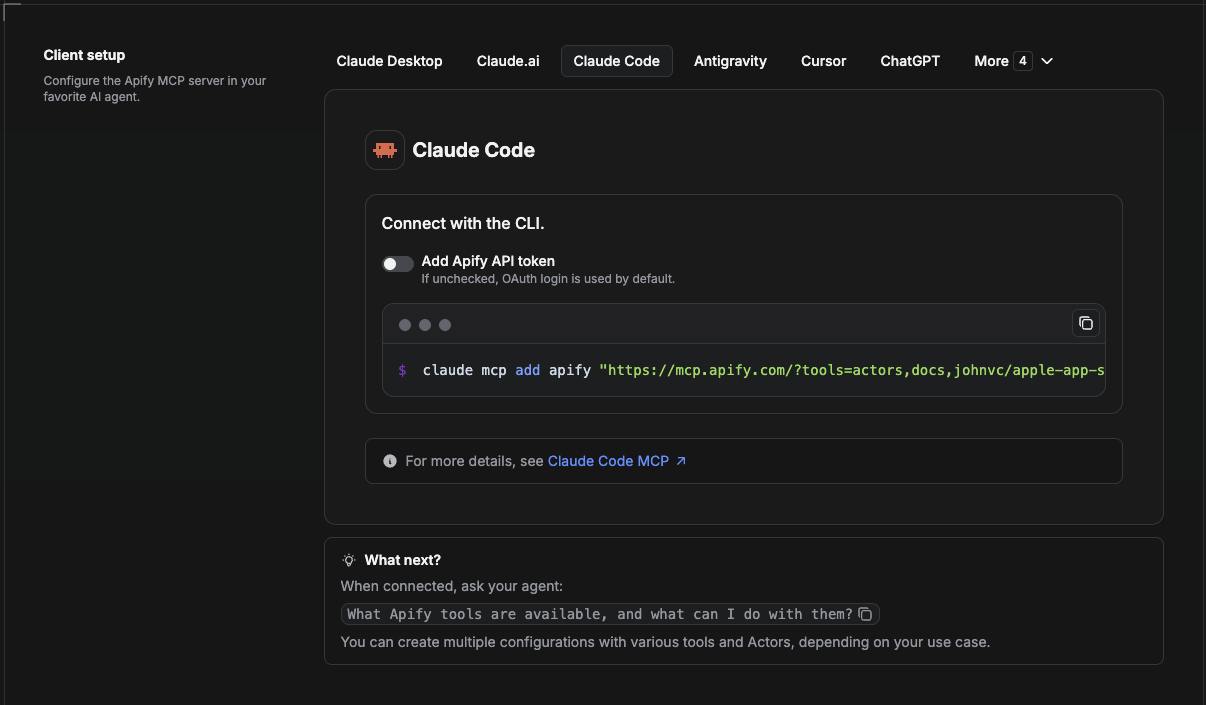
Claude Code is the command-line tool. Add the Actor's MCP server with one command:
claude mcp add --transport http apify \
  "https://mcp.apify.com/?tools=actors,docs,johnvc/yandex-scrape-yandex-search-results-at-scale---per-result"
To use a token instead of browser OAuth:
claude mcp add --transport http apify \
  "https://mcp.apify.com/?tools=actors,docs,johnvc/yandex-scrape-yandex-search-results-at-scale---per-result" \
  --header "Authorization: Bearer YOUR_APIFY_TOKEN"
Then verify with claude mcp list, or run /mcp inside a session. Ask Claude Code to call the Yandex Search API.
Try Claude Code free: https://claude.ai/referral/uIlpa7nPLg Claude Code MCP docs: https://code.claude.com/docs/en/mcp
Install in Claude (website)
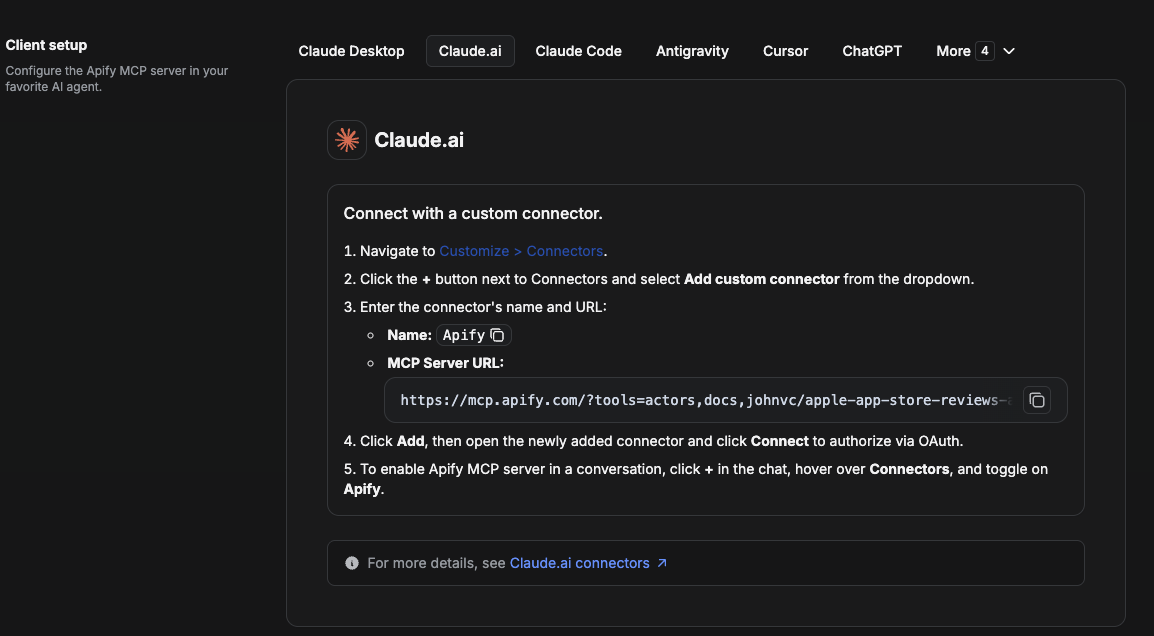
On claude.ai you add Apify as a connector, then enable just this Actor's tool.
- Go to Settings → Connectors → Browse connectors and search for Apify MCP server. Install it (enable or update if prompted).
- When connecting, authenticate with your Apify API token, and enable the tool
johnvc/yandex-scrape-yandex-search-results-at-scale---per-result. - In any chat, open + → Connectors and turn on Apify.
- Alternatively, choose Add custom connector and paste the full MCP URL
https://mcp.apify.com/?tools=actors,docs,johnvc/yandex-scrape-yandex-search-results-at-scale---per-result, using OAuth when prompted. - Ask Claude to run the Yandex Search API.
Open Claude on the web: https://claude.ai/referral/uIlpa7nPLg
Install in Cursor
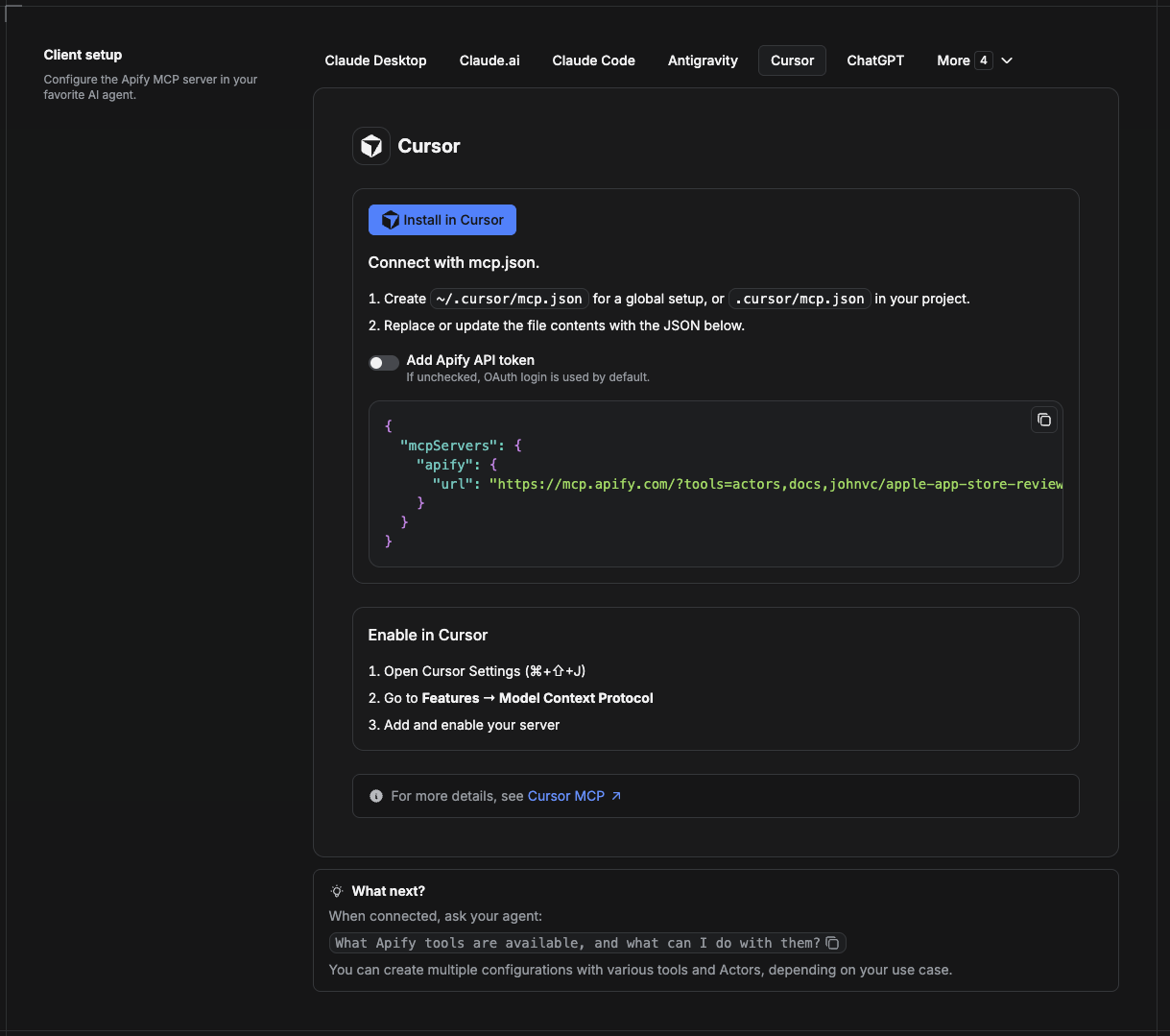
Cursor reads MCP servers from a project file at .cursor/mcp.json.
- In your project, create
.cursor/mcp.json:
{
  "mcpServers": {
    "apify": {
      "url": "https://mcp.apify.com/?tools=actors,docs,johnvc/yandex-scrape-yandex-search-results-at-scale---per-result"
    }
  }
}
- If you prefer token auth over browser OAuth, add a header:
{
  "mcpServers": {
    "apify": {
      "url": "https://mcp.apify.com/?tools=actors,docs,johnvc/yandex-scrape-yandex-search-results-at-scale---per-result",
      "headers": { "Authorization": "Bearer YOUR_APIFY_TOKEN" }
    }
  }
}
- Open Cursor → Settings → MCP and confirm the apify server is connected (green dot).
- In Composer or Chat, ask Cursor to call the Yandex Search API.
New to Cursor? Get it here: https://cursor.com/referral?code=XQP4VBLI3NNX
Install in ChatGPT
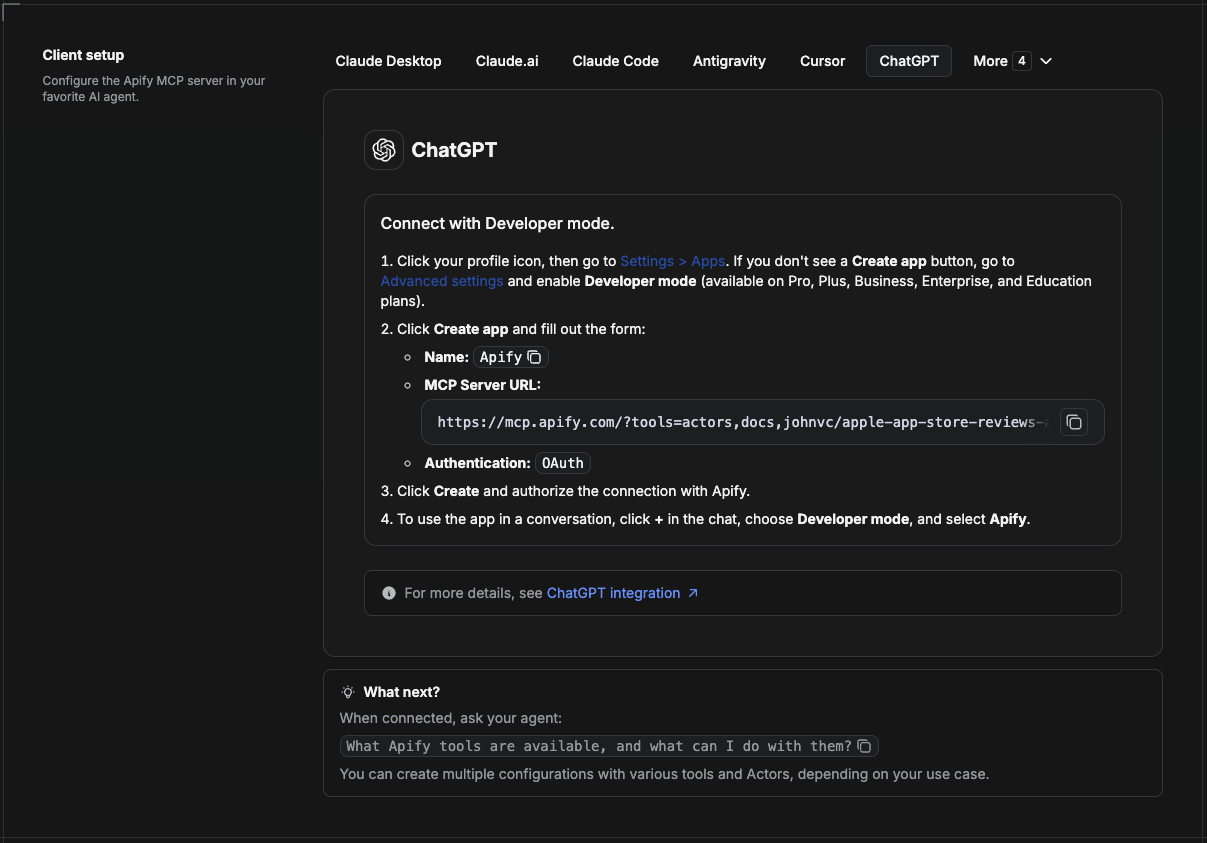
ChatGPT connects to the Apify MCP server through Developer mode (available on ChatGPT Pro, Plus, Business, Enterprise, and Education plans).
- Click your profile icon, then go to Settings > Apps. If you do not see a Create app button, open Advanced settings and enable Developer mode.
- Click Create app and fill out the form:
- Name: Apify
- MCP Server URL:
https://mcp.apify.com/?tools=actors,docs,johnvc/yandex-scrape-yandex-search-results-at-scale---per-result - Authentication: OAuth
- Click Create and authorize the connection with Apify.
- To use the app in a conversation, click + in the chat, choose Developer mode, and select Apify.
More help: https://docs.apify.com/platform/integrations/mcp
Use the Yandex Search API to power SEO research, market intelligence, and multilingual content analysis with reliable, structured results.
Featured Tasks
Ready-to-run examples on the Apify Store.
🤖 Ask an AI assistant about this Actor
Open a ready-to-send prompt about the Yandex Search API in the AI of your choice:
- 💬 ChatGPT
- 🧠 Claude
- 🔍 Perplexity
- 🅒 Copilot
Last Updated: 2026.10.27
Comments
New to MCP?
From what the protocol is to installing your first server, these answers cover most first questions.
An open protocol that defines how AI applications connect to external tools and data in a uniform way. Clients talk to the model; MCP servers provide tools, resources and prompt templates. They exchange standard messages, so one server can be reused by many clients.