
About Lazycow Studio
Lazycow Studio’s package lets people and agents create, plan, and post short reels and trip films from photos and videos on a local studio. Human approval is required before any reel can be posted.
Key features
- 01Create and remix reels
- 02Plan and publish approved reels
- 03Research ideas and events
- 04Check performance summaries
- 05Install and control the studio
- 06Node.js API and CLI
Use cases
- 01Turn unedited footage into reels
- 02Plan posts for social accounts
- 03Research places and events for films
MCP support
Its MCP server exposes tools for controlling the local Lazycow Studio, including reel creation, research, planning, and publishing approved reels. Agents cannot approve reels; account secrets remain in the studio.
Configuration
Local server config is the same for every client. Copy it into your client’s MCP config file.
npx -y lazycowSTUDIO_PORTThe studio's port (default: the studio's .env, else 4317)STUDIO_API_TOKENSecretThe studio's API token, only if you set one (default: read from the studio's .env)LAZYCOW_DIRThe studio folder, if it is not where the double-click setup put itLocal servers need a runtime on your machine (e.g. Node.js 18+). Config file locations differ by client; see your client’s docs.
Tools
Local servers expose tools only once running on your machine, and the maintainer has not provided a tool list.
Details
From the project READMElazycow
Lazycow Studio from the command line, from your AI agent and from your code.
Lazycow Studio turns the photos and videos you never edited into short vertical reels and YouTube trip films. It runs on your own computer, and a person approves every post. This package connects to it in three ways:
| You want to… | Run |
|---|---|
| Install the studio (no terminal skills needed after this line) | npx lazycow install |
| Let Claude Code, Claude Desktop or Cursor drive it | claude mcp add lazycow -- npx -y lazycow mcp |
| Script it from Node | import { createClient } from "lazycow" |
Approving a reel stays a person's job in the studio. Agents and scripts can make, plan and post approved reels. They cannot approve.
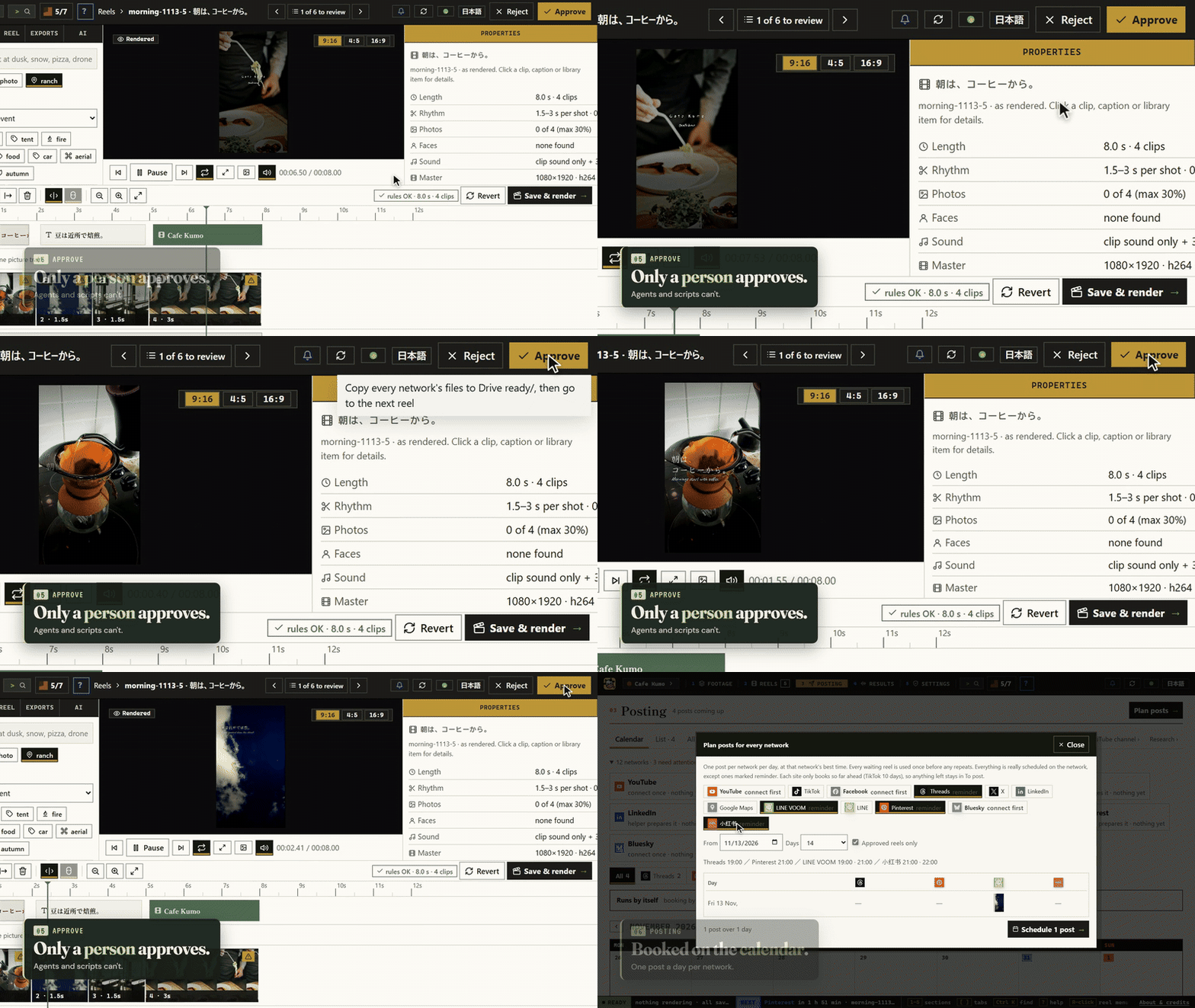
Watch the 40-second demo · See the studio's pages
Install the studio
npx lazycow install
It downloads this version's release zip from GitHub, checks it against the SHA-256 built into the package, unpacks it to ~/Lazycow Studio, and starts the double-click setup. The setup installs Node, Python and ffmpeg for Lazycow only, in about 10 minutes. Options: --dir <empty folder>, --yes (take every suggestion).
Prefer to click? Download the zip from Releases, unzip it, read README.TXT, and double-click Start Lazycow.
Connect an AI agent (MCP)
Claude Code:
claude mcp add lazycow -- npx -y lazycow mcp
Claude Desktop or Cursor (claude_desktop_config.json / .cursor/mcp.json):
{
  "mcpServers": {
    "lazycow": { "command": "npx", "args": ["-y", "lazycow", "mcp"] }
  }
}
The server finds the studio by itself: STUDIO_PORT and STUDIO_API_TOKEN when set, else the .env in LAZYCOW_DIR, else the folder the setup recorded. So your agent config never holds a copy of the token.
The 27 tools ("reads" change nothing; "spends" means paid AI, priced first and kept inside the studio's limits):
| Area | Tools |
|---|---|
| The studio | studio_status, list_projects, switch_project, read_log (reads, except switching) |
| Reels | list_reels, reel_details, list_themes (reads); make_reels, make_reel, remix_reel (render in the background) |
| Jobs | job_status, cancel_job |
| Posting | list_posts, list_accounts (reads); plan_post, publish_reel, schedule_reel (approved reels only) |
| Research | research_ideas, research_events, research_page, research_site_check, research_links (reads the web through the studio; suggestions, never posted) |
| AI assist | ai_estimate, ai_review (reads); ai_run (spends, never changes an approved reel) |
| Results | perf_summary, perf_suggest (reads) |
Every tool, its inputs and examples: docs/mcp.md.
Each tool answers with a plain sentence and the data, and the same data as structuredContent for programs (a list
arrives as { "items": [...] }). Account secrets never leave the studio.
Listed in the official MCP Registry as io.github.kensaurus/lazycow.
Use the API from code
import { createClient } from "lazycow";

const studio = createClient();            // or createClient({ port: 4318, token: "..." })
const health = await studio.health();
const { reels } = await studio.overview();
const anything = await studio.request("GET", "/api/posts");
Every route is in the studio's OpenAPI document. Errors are StudioError with status, path and body. Types are included.
From a shell:
npx lazycow status
npx lazycow api GET /api/posts
npx lazycow open
Requirements
Node 20 or newer. The studio itself runs on Windows 10/11 and macOS 14+ (Apple silicon); Linux works from source.
Credits and licence
Made by kensaurus (Kenji Sakuramoto, kensaur.us). Apache-2.0: if you redistribute it or build on it, keep the NOTICE file, and please keep the line "Based on Lazycow Studio by kensaurus". "Lazycow" and the sleepy-cow icon are trademarks of kensaurus LLC (TRADEMARKS.md).
Like it? Support Lazycow: supporters get their feature requests looked at first.
Comments
New to MCP?
From what the protocol is to installing your first server, these answers cover most first questions.
An open protocol that defines how AI applications connect to external tools and data in a uniform way. Clients talk to the model; MCP servers provide tools, resources and prompt templates. They exchange standard messages, so one server can be reused by many clients.