
About RAGMap MCP
RAGMap MCP is a local stdio bridge for finding and inspecting RAG-capable MCP servers through the RAGMap API. The listing marks the hosted backend and npm package as deprecated, so its former discovery functions may no longer be available.
Key features
- 01Search and filter RAG servers
- 02Fetch server records
- 03List RAG categories
- 04Explain server scores
Use cases
- 01Locate retrieval servers by query and filters
- 02Inspect a server's metadata and score
MCP support
It exposes search, lookup, category, and score tools to MCP clients over stdio; a hosted HTTP MCP endpoint is also documented. The listing says the hosted backend was discontinued and the npm package deprecated.
Configuration
Local server config is the same for every client. Copy it into your client’s MCP config file.
Tools
6Saved tool list · updated 2w ago
| Parameter | Type | Required | Description |
|---|---|---|---|
| limit | integer | No | |
| query | string | No | |
| minScore | integer | No | |
| citations | boolean | No | |
| hasRemote | boolean | No | |
| localOnly | boolean | No | |
| reachable | boolean | No | |
| transport | enum | No | stdio | streamable-http |
| categories | array | No | |
| serverKind | enum | No | retriever | evaluator | indexer | router | other |
| registryType | string | No | |
| reachableMaxAgeHours | integer | No |
Details
From the project READMERAGMap MCP (Local)
Find and filter RAG-capable MCP servers in seconds. This package is the local stdio MCP bridge to the hosted RAGMap subregistry API.
Why teams use it
- Zero glue code: run via
npx, speak MCP, done. - Agent-first: small, stable tool contracts with predictable output.
- Production by default: connects to the hosted API out of the box.
- Read-only: no keys required.
What you get
- Primary use: MCP stdio transport for Claude Desktop, Cursor, and any MCP host.
- Tools:
rag_find_servers,rag_get_server,rag_list_categories,rag_explain_score.
For agents (zero config): GET https://ragmap-api.web.app/.well-known/agent.json for discovery; use apiEndpoints to call the REST API or mcpInstall to run this package. See AGENT-USAGE.md in the repo.
MapRag (RAGMap)
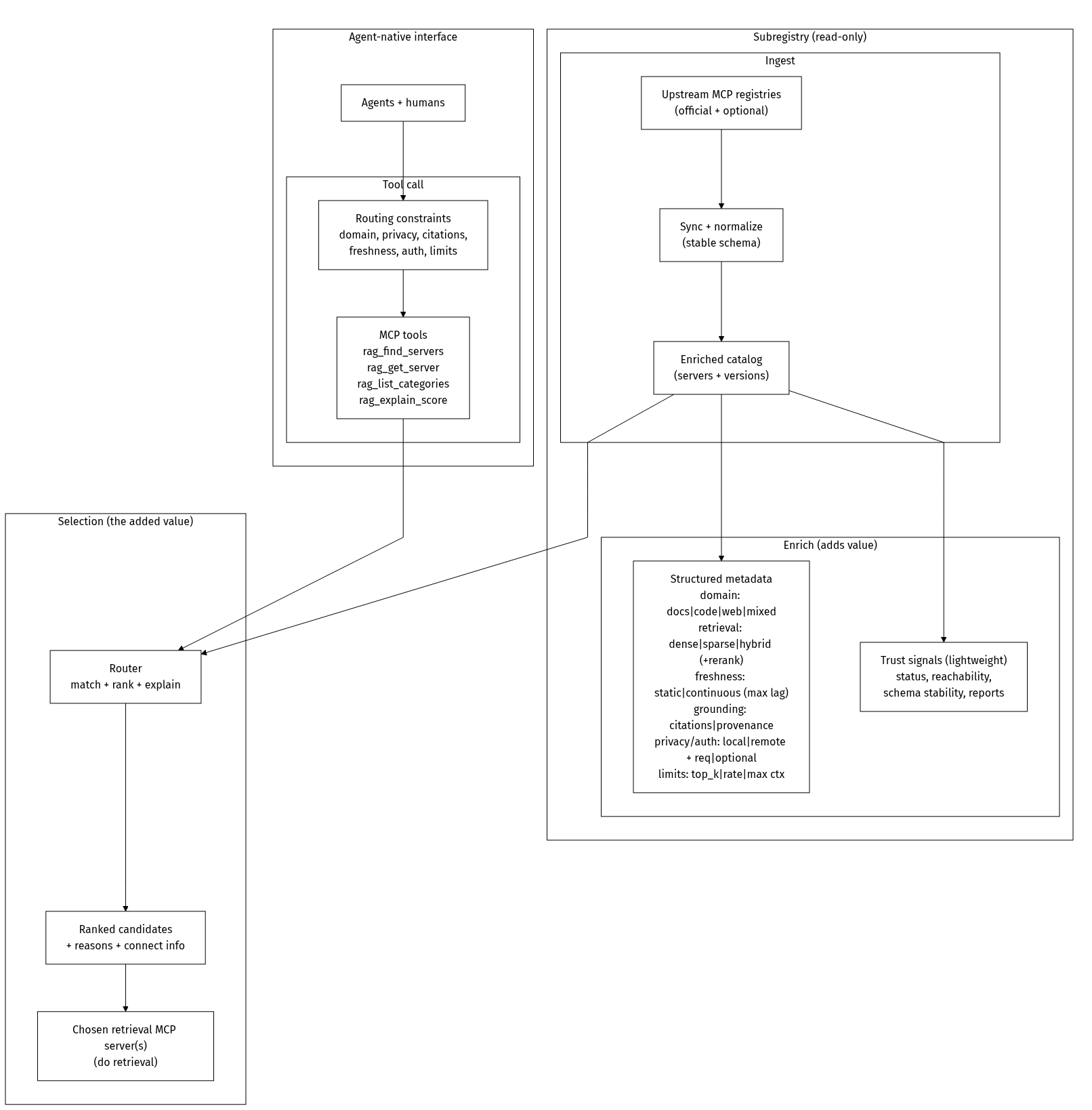
MapRag is a discovery + routing layer for retrieval. It indexes RAG-capable MCP servers, enriches them with structured metadata, and helps agents (and humans) quickly find the right retrieval server for a task under constraints like citations, freshness, privacy, domain, and latency.
MapRag does not do RAG itself. It helps you choose the best RAG tool/server to do the retrieval.
Status (v1.0)
- Ingests the official MCP Registry (read-only) and enriches server records for retrieval use-cases.
- Semantic + keyword search when the API has embeddings enabled (OpenAI key); otherwise keyword-only.
- Enrichment:
categories,ragScore,reasons,hasRemote, and reachability metadata for remote transports. - Filters:
query,categories,minScore,transport,registryType,hasRemote,reachable, andreachableMaxAgeHours. - Exposes two programmable interfaces: registry-compatible REST API (subregistry) + MCP servers (remote HTTP + local stdio).
Roadmap
- Richer capability model (domain, grounding/citations, freshness, privacy/residency, auth, limits).
- Trust signals (reachability, schema stability, latency/uptime).
- Human UI for browsing/filtering/comparing servers.
Full overview: https://github.com/khalidsaidi/ragmap/blob/main/docs/OVERVIEW.md
Architecture (at a glance)
Quick start (60 seconds)
MCP_AGENT_NAME=local-test \
npx -y @khalidsaidi/ragmap-mcp@latest
By default it uses the hosted API base https://ragmap-api.web.app.
For local dev:
RAGMAP_API_BASE_URL=http://localhost:3000 \
npx -y @khalidsaidi/ragmap-mcp@latest
Install (optional)
If you prefer a global install:
npm i -g @khalidsaidi/ragmap-mcp
ragmap-mcp
Smoke test (one command)
printf '%s\n' \
'{"jsonrpc":"2.0","id":1,"method":"initialize","params":{"protocolVersion":"0.1","capabilities":{},"clientInfo":{"name":"quick","version":"0.0.1"}}}' \
'{"jsonrpc":"2.0","id":2,"method":"tools/list","params":{}}' \
'{"jsonrpc":"2.0","id":3,"method":"tools/call","params":{"name":"rag_find_servers","arguments":{"query":"rag","limit":3}}}' \
| npx -y @khalidsaidi/ragmap-mcp@latest
Claude Desktop config
{
  "mcpServers": {
    "ragmap": {
      "command": "npx",
      "args": ["-y", "@khalidsaidi/ragmap-mcp@latest"],
      "env": {
        "MCP_AGENT_NAME": "claude-desktop",
        "RAGMAP_API_BASE_URL": "https://ragmap-api.web.app"
      }
    }
  }
}
Remote MCP (no install)
If you prefer MCP over streamable HTTP (no local install), use the hosted endpoint:
claude mcp add --transport http ragmap https://ragmap-api.web.app/mcp
Tools
rag_find_servers- search/filter RAG-capable MCP serversrag_get_server- fetch a server record by name (latest version)rag_list_categories- list known RAG categoriesrag_explain_score- explain the RAG score for a server
Notes:
- Tool responses are returned as JSON text (so any MCP host can display them verbatim).
- Filtering is done server-side via the RAGMap API.
Example tool calls
- Find remote (streamable-http) servers that look RAG-y:
rag_find_servers({ query: "rag", minScore: 30, transport: "streamable-http", hasRemote: "true", limit: 10 }) - Find servers published via a specific registry type:
rag_find_servers({ query: "qdrant", registryType: "pypi" }) - List categories:
rag_list_categories({}) - Get RAGMap’s own record or explain its score (use the published registry name):
rag_get_server({ name: "io.github.khalidsaidi/ragmap" }),rag_explain_score({ name: "io.github.khalidsaidi/ragmap" })
Example: “privacy-first docs RAG with citations”
This is the kind of query MapRag is designed for. Today, you can approximate it with categories and transport filters:
{
  "tool": "rag_find_servers",
  "input": {
    "query": "docs rag citations",
    "categories": ["documents"],
    "minScore": 30,
    "transport": "stdio",
    "hasRemote": "true",
    "limit": 5
  }
}
Environment variables
| Variable | Required | Description |
|---|---|---|
RAGMAP_API_BASE_URL | No | REST API base (default: https://ragmap-api.web.app) |
API_BASE_URL | No | Alias for RAGMAP_API_BASE_URL |
MCP_AGENT_NAME | No | Client identifier (added as X-Agent-Name to API calls) |
SERVICE_VERSION | No | Version string reported to MCP hosts |
Troubleshooting (fast)
- No results
- Try a broader query like
rag,retrieval,vector,qdrant. - Lower
minScoreor omit it.
- Try a broader query like
- Connection errors
- Confirm
RAGMAP_API_BASE_URLis reachable from your environment. - For the hosted API, try opening
https://ragmap-api.web.app/healthin a browser.
- Confirm
Links
- Docs/OpenAPI:
https://ragmap-api.web.app/docs - Agent card:
https://ragmap-api.web.app/.well-known/agent.json - MCP remote (HTTP):
https://ragmap-api.web.app/mcp - Repo:
https://github.com/khalidsaidi/ragmap
Comments
New to MCP?
From what the protocol is to installing your first server, these answers cover most first questions.
An open protocol that defines how AI applications connect to external tools and data in a uniform way. Clients talk to the model; MCP servers provide tools, resources and prompt templates. They exchange standard messages, so one server can be reused by many clients.