
About tinyprobe
tinyprobe is a command-line API testing tool that describes endpoints and test workflows in YAML. It also offers a desktop app and a VS Code extension, while its MCP tools let agents inspect, call, and run tests.
Key features
- 01Describe endpoints and workflows in YAML
- 02Inspect and call APIs, then check responses
- 03Run workflows and produce JUnit reports
- 04Use the desktop app or VS Code extension
- 05Provide agents with an integrated guide
Use cases
- 01Validate API endpoints and responses locally
- 02Run end-to-end workflows in CI
- 03Convert Postman collections into test files
MCP support
`tinyprobe mcp` starts a stdio MCP server with guide, inspect, call, and run tools. The call and run tools send requests to the backend.
Configuration
Local server config is the same for every client. Copy it into your client’s MCP config file.
docker run -i --rm ghcr.io/kikutano/tinyprobe:0.22.0Local servers need a runtime on your machine (e.g. Node.js 18+). Config file locations differ by client; see your client’s docs.
ghcr.io/kikutano/tinyprobe:0.22.0stdioTools
Local servers expose tools only once running on your machine, and the maintainer has not provided a tool list.
Details
From the project README

tinyprobe


Install · The app · VS Code extension · Try the example · Workflow format · Guide for coding agents · Roadmap
Tired of paying for Postman? Try tinyprobe: fast, light, and your favorite AI writes the endpoints and the end-to-end tests of your API, then runs them against your environment. Describe test flows in YAML files and make sure your API never breaks again.
Moving from Postman? Your coding agent converts the collection and tells you what it could not convert: one prompt.
tinyprobe is API testing from the command line. Describe your endpoints once in YAML, then write workflows that call them like functions, pass arguments and check the responses. tinyprobe is a single Native AOT binary: no runtime to install, and it starts instantly.

Install
Linux / macOS
curl -fsSL https://raw.githubusercontent.com/kikutano/tinyprobe/main/install.sh | sh
Windows (PowerShell)
irm https://raw.githubusercontent.com/kikutano/tinyprobe/main/install.ps1 | iex
Or download the archive for your platform from Releases (win-x64, linux-x64, linux-arm64, linux-musl-x64 and linux-musl-arm64 for Alpine, osx-arm64) and put tinyprobe on your PATH.
Docker
docker run --rm -v "$PWD:/work" ghcr.io/kikutano/tinyprobe:0.21.0 run tinyprobe/workflows -e tinyprobe/env.local.yaml
The image is the release's Alpine binary on Microsoft's .NET runtime-deps Alpine base, for linux/amd64 and linux/arm64; tags are the version (0.21.0), the minor (0.21) and latest. The current folder is mounted as /work. Inside the container localhost is the container itself: on Linux add --network host to test an API running on your machine, on macOS and Windows use host.docker.internal as the host. Add --user "$(id -u):$(id -g)" so that a report written with --junit belongs to you.
Check that it works:
tinyprobe --version
Update
tinyprobe update
It downloads the latest release for your platform, verifies its SHA-256 checksum and replaces the binary in place. tinyprobe update --check only tells you whether a newer version exists. Re-running the install script works too, and TINYPROBE_VERSION=0.10.0 pins a specific version.
The app
tinyprobe-app is tinyprobe for people who use neither the terminal nor VS Code: one small download for Windows, macOS and Linux that opens in the browser. Open the folder of your tests, send any request from a form, run workflows and watch them as a diagram that shows how values pass from step to step, and change endpoints and workflows with forms instead of YAML.
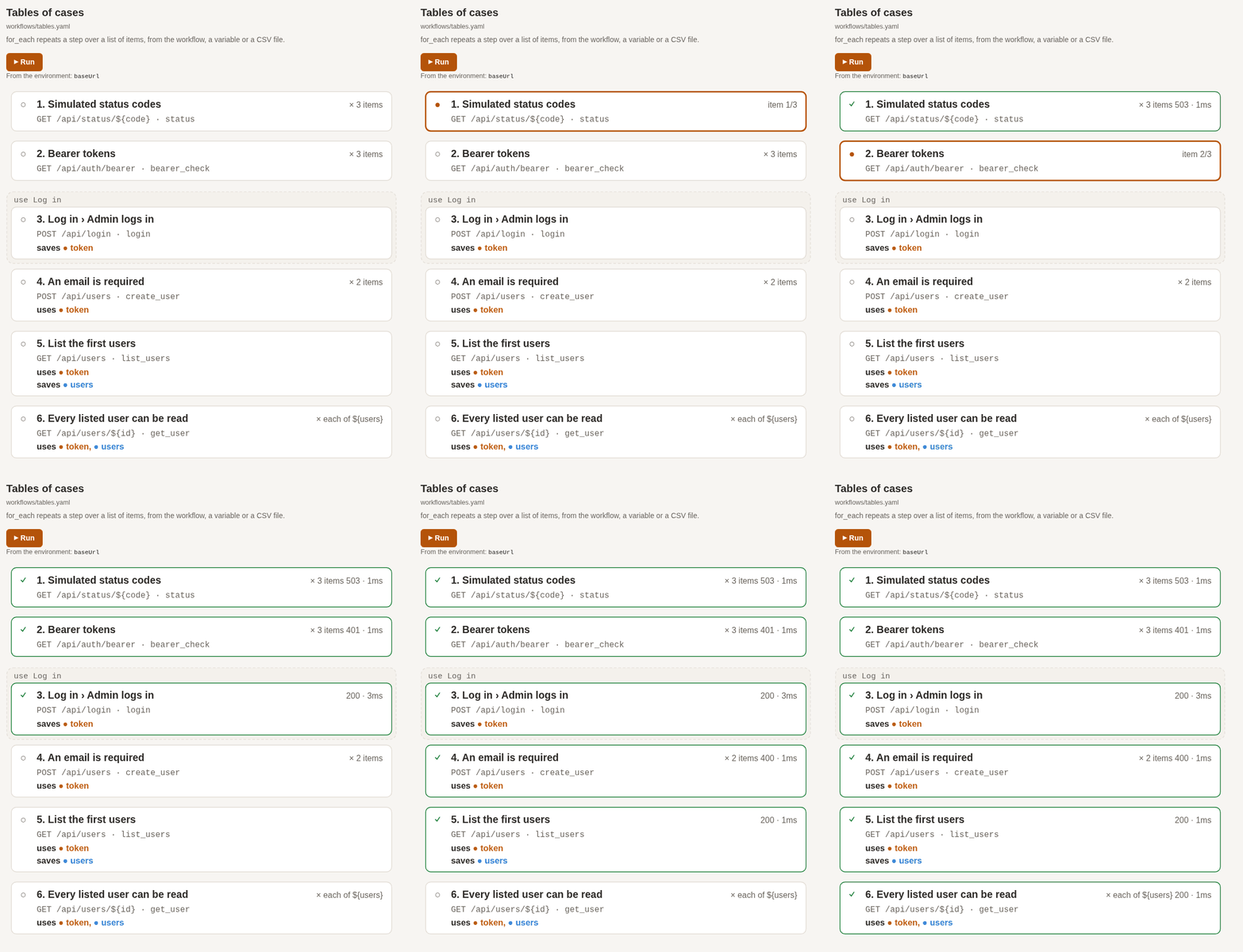
It works on the same YAML files and runs the same tinyprobe, so what you do in the app runs unchanged in a terminal and in CI. Download it from its releases.
VS Code extension
tinyprobe for VS Code runs the same files from the editor:
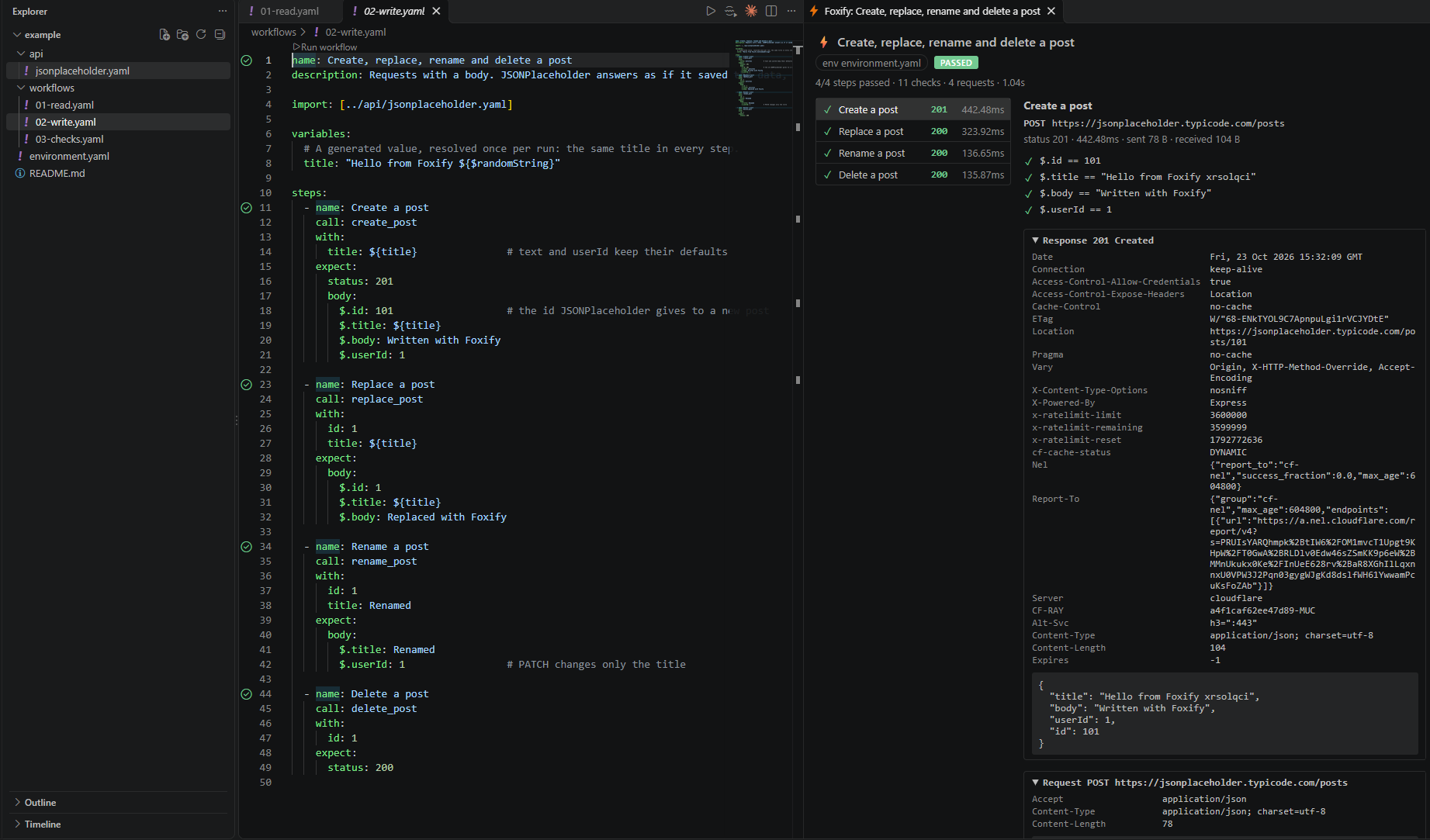
- problems underlined as you save, with the suggestions of
tinyprobe; completion, hover and go to definition while you type; - ▶ Call above every endpoint: it asks for the arguments and shows the response;
- ▶ Run workflow, and workflows in the Test Explorer, one test per step and one per
for_eachitem; - Run to here on every step: runs the workflow up to that step and shows its response;
- the request and response of every step in the run view;
- a sidebar with the History of your calls, to send them again, and an Environment editor for the selected env file, secrets hidden;
- the tinyprobe tools for Copilot and the other chat agents of the editor, and Generate Tests with AI / Migrate with AI, which hand the right prompt to your agent.
Install it from the VS Code Marketplace, or Open VSX for Cursor, Windsurf and VSCodium, or from a terminal:
code --install-extension kikutano.tinyprobe-vscode
It needs tinyprobe installed as above.
Try the example
example/ is a small, complete project that tests JSONPlaceholder, a free fake REST API: nothing to start, nothing else to install. Three short, commented workflows show reads, writes and every kind of check.
git clone https://github.com/kikutano/tinyprobe.git
cd tinyprobe/example
tinyprobe run workflows/01-read.yaml -e environment.yaml
Or open the example folder in VS Code and click ▶ Run workflow. See example/README.md.
Quick start
hello.yaml:
name: Hello tinyprobe
base_url: https://jsonplaceholder.typicode.com

endpoints:
  create_post:
    method: POST
    path: /posts
    body:
      title: ${title}
      userId: 1
  get_user:
    path: /users/${id}

steps:
  - name: Create a post
    call: create_post
    with:
      title: hello
    expect:
      status: 201
      body:
        $.id: 101
        $.title: hello
    save:
      postId: $.id              # available as ${postId} in the next steps

  - call: get_user
    with:
      id: 1
    expect:
      body:
        $.email: [email protected]
        $.address.city: { contains: Gwen }
      duration: { lt: 2s }
Run it:
tinyprobe run hello.yaml
  ⚡ tinyprobe 0.21.0

  workflow : Hello tinyprobe
  file     : hello.yaml
  steps    : 2

  ✓ Create a post  POST   201   587.33ms  /posts
  ✓ get_user id=1  GET    200    76.89ms  /users/1

  checks..............: 100.00%  ✓ 6  ✗ 0
  steps...............: 2/2 passed
  http_reqs...........: 2  3/s
  http_req_duration...: avg=332.11ms min=76.89ms med=332.11ms max=587.33ms p(90)=536.28ms p(95)=561.8ms
  data_received.......: 559 B
  data_sent...........: 28 B
  workflow_duration...: 666.86ms

   PASSED   2 steps
When a step fails, every check of that step is listed with the actual value, and the steps after it are not run:
  ✗ Wrong expectations  GET    200     4.73ms  /api/headers
      ✗ header X-Custom-Header == "something-else"  actual "hello-world"
      ✓ $.message contains "headers"
      ✗ duration < 1ms  actual 4.73ms
A mistake in the YAML is reported before any request is sent, with every problem and its location:
  ✗ The workflow is not valid (2 problems)

  tests/users.yaml:12:5: unknown endpoint 'logn' (did you mean 'login'?)
  tests/users.yaml:16:5: unknown key 'expcet' in a step (did you mean 'expect'?)
Generate tests with a coding agent
Let a coding agent (Claude Code, Cursor, Copilot, Codex, ...) write the tinyprobe files for you, from your backend's code, a Postman collection or an OpenAPI document. Give it docs/llm-guide.md: the format, the rules that are easy to get wrong, a step-by-step procedure and complete examples. Then paste one of the prompts below.
tinyprobe guide prints the same guide from the installed binary, so it always matches your version, also offline. If the agent cannot open links, paste the file into the chat.
Start with tinyprobe init at the root of your repository. It creates the tinyprobe/ folder of the guide (api/, workflows/, sequences/, the env files), adds the env files with credentials to .gitignore, and adds a section to AGENTS.md that tells every coding agent to run tinyprobe guide before touching the tests. It never overwrites a file.
The agent can check its own work: an invalid file is reported with file:line:column and a suggestion before any request is sent, and a failing check shows the actual value.
Give your agent the tinyprobe tools (MCP)
tinyprobe mcp is an MCP server: your agent gets the tools guide, inspect, call and run, and uses them without a shell, with JSON arguments and JSON results. Add it once:
claude mcp add tinyprobe -- tinyprobe mcp # Claude Code (--scope project shares it in .mcp.json)
{ "servers": { "tinyprobe": { "type": "stdio", "command": "tinyprobe", "args": ["mcp"] } } }
That is .vscode/mcp.json for VS Code. Cursor reads .cursor/mcp.json with { "mcpServers": { "tinyprobe": { "command": "tinyprobe", "args": ["mcp"] } } }, Codex ~/.codex/config.toml with [mcp_servers.tinyprobe], command = "tinyprobe", args = ["mcp"]. call and run send requests to your backend, so your agent may ask you before using them. The tools and their results are described in docs/protocol.md.
It is listed in the MCP Registry as io.github.kikutano/tinyprobe, with the Docker image as its package, so clients that read the registry can add it from there.
Agent packages
agents/ has ready-made instructions that send an agent to tinyprobe guide: a Claude Code plugin with a skill and the MCP server, a Cursor rule, Copilot instructions, and llms.txt. In Claude Code:
/plugin install tinyprobe --marketplace kikutano/tinyprobe
From the backend code
Read https://raw.githubusercontent.com/kikutano/tinyprobe/main/docs/llm-guide.md (or run `tinyprobe guide`)
and follow it: look at this backend's routes, authentication and seed data, write the tinyprobe API
file and workflows in tinyprobe/, then run them with tinyprobe until they pass. Put credentials only in
tinyprobe/env.local.yaml and add it to .gitignore. Tell me which failures look like backend bugs.
From a Postman collection
In Postman, export the collection (Collection v2.1) and each environment, and put the files in the repository, for example in postman/. Then:
Read https://raw.githubusercontent.com/kikutano/tinyprobe/main/docs/llm-guide.md (or run `tinyprobe guide`)
and follow its section on migrating from Postman: convert the collection and the environments in postman/
to tinyprobe files in tinyprobe/, one folder at a time, and run each workflow until it passes. Put secrets
only in tinyprobe/env.local.yaml and add it to .gitignore. Write tinyprobe/MIGRATION.md with what you
converted, what you skipped and why, and tell me which failures look like backend bugs.
Variants of the same request ("Login", "Login - wrong password") become one endpoint called with different arguments, and the values your scripts saved become save. What has no equivalent yet (scripts that compute a signature, pm.sendRequest) is not guessed: the agent lists it in MIGRATION.md, so you know what the tests do not cover. The same prompt works for the exports of Insomnia, Bruno or another API tool: name the folder and the tool.
From an OpenAPI document
Read https://raw.githubusercontent.com/kikutano/tinyprobe/main/docs/llm-guide.md (or run `tinyprobe guide`)
and follow it, starting from the OpenAPI document openapi.yaml: write one tinyprobe endpoint per operation
and workflows that check the documented status codes and response fields, then run them against the
local backend until they pass. Take test values from the seed data, not from the examples in the
document. Put credentials only in tinyprobe/env.local.yaml and add it to .gitignore. Tell me where the
backend does not do what the document says.
Usage
  tinyprobe run <workflow.yaml | folder>... [options]
  tinyprobe call <file.yaml> <endpoint> [--with name=value]... [options]
  tinyprobe inspect <file.yaml> [--json [--source]]
  tinyprobe init [folder] [--base-url <url>]
  tinyprobe update [--check] [--force]
  tinyprobe guide       Print the guide for coding agents (LLMs) that write tinyprobe files.
  tinyprobe mcp         MCP server on stdin/stdout: the tools guide, inspect, call and run, for agents.
  tinyprobe schema      Print the JSON Schema of tinyprobe files, for editors.
  tinyprobe --help
  tinyprobe --version

'run' runs workflows. A folder is read recursively: every YAML file with a top-level
'steps' key is a workflow, other files are skipped. With several workflows, each one
starts from zero, a failing one does not stop the others, and a summary comes last.
'call' sends one request to an endpoint of an API or workflow file and prints the response.
'inspect' validates a file and lists its endpoints, variables and steps.
'init' creates the tinyprobe/ folder, the .gitignore lines and an AGENTS.md section for
coding agents, in the current folder or the one given. It never overwrites a file.

Options for 'run' and 'call':
  -e, --env <file>        Environment file (YAML) with initial variables, e.g. baseUrl, apiKey.
  --var <name=value>      Set a variable, over the environment file. Repeatable.
  --with <name=value>     ('call' only) An argument of the endpoint, like a step's 'with'. Repeatable.
  --reporter <name>       console (default) or ndjson: one JSON event per line, for tools.
  --junit <file>          ('run' only) Also write a JUnit XML report, for CI servers.
  --to <step>             ('run' only, one workflow) Run up to this step, included, and stop:
                          its number, as 'inspect' lists the steps, or its name.
  -v, --verbose           Print variables, requests and responses while running.
  --no-color              Disable colors (also honored: the NO_COLOR environment variable).

Values of --var and --with are typed like YAML: 42 is a number, true a boolean,
'"42"' a string, '[a, b]' a list.

Options for 'inspect':
  --json                  Print JSON, for tools.
  --source                With --json, also the file as written and where its blocks are, for editors.
  --no-color              Disable colors.

Options for 'init':
  --base-url <url>        baseUrl of the env files (default: http://localhost:8080).

Options for 'update':
  --check                 Only tell whether a newer version is available.
  --force                 Reinstall the latest version, also over a development build.

  -h, --help              Show this help.
  --version               Show the version.

Exit codes ('run', 'call', 'inspect'):
  0  all steps passed ('call': a response was received; 'inspect': the file is valid)
  1  at least one step failed (several workflows: at least one workflow failed)
  2  invalid arguments, file not found, invalid file, or a folder without workflows
A workflow stops at its first failing step. Given a folder or several files, tinyprobe run runs every workflow, also after a failing one, and ends with one summary of all of them; exit code 0 means every workflow passed:
tinyprobe run tinyprobe/workflows -e tinyprobe/env.local.yaml
A folder is read recursively, and only workflows run: API files and env files in it are skipped. Each workflow starts from zero, so values saved in one are not seen by the next. The exit code makes tinyprobe easy to use in CI. When the output is not a terminal (CI logs, pipes) the spinner is turned off and each step is printed on its own line.
Run in CI
Run the whole folder, and write a JUnit report that your CI server shows in its test tab: every step is a test, with its file and line, and a failed one shows the request line and every check with its actual value. The report has no headers and no bodies, since CI servers keep it and requests carry secrets.
GitHub Actions, with the action of this repository:
- uses: actions/checkout@v4
- uses: kikutano/[email protected]      # installs tinyprobe 0.21.0
  with:
    path: tinyprobe/workflows
    env-file: tinyprobe/env.ci.yaml
    vars: |
      token=${{ secrets.API_TOKEN }}
It installs the binary of the same release (checksum verified), runs the folder, writes tinyprobe-report.xml, puts a summary on the job page, and marks each failing step as an error at its line in the workflow file, in the run and in pull requests. Inputs: path (files or folders), env-file, vars (one name=value per line; the log shows the names only), version, junit, summary, annotations, and tinyprobe-path to use a binary already on the runner. It runs on Linux, macOS and Windows runners. Upload the report with actions/upload-artifact to keep it.
GitLab CI, with the Docker image:
api-tests:
  image:
    name: ghcr.io/kikutano/tinyprobe:0.21.0
    entrypoint: [""]     # GitLab runs the script in a shell, not through tinyprobe
  script:
    - tinyprobe run tinyprobe/workflows -e tinyprobe/env.ci.yaml --junit reports/tinyprobe.xml
  artifacts:
    when: always
    reports:
      junit: reports/tinyprobe.xml
The same image works on any CI that runs jobs in a container (Bitbucket Pipelines, CircleCI, Woodpecker, Jenkins with Docker). In a job that needs its own image, install the binary instead: curl -fsSL https://raw.githubusercontent.com/kikutano/tinyprobe/main/install.sh | TINYPROBE_VERSION=0.21.0 sh, then run ~/.local/bin/tinyprobe. The script picks the Alpine build on Alpine.
Pin the version (the action's tag, the image tag, or TINYPROBE_VERSION), so a new release does not change your pipeline without you choosing it. Keep credentials in the CI's secrets and write env.ci.yaml from them, or pass them with --var.
Explore an API
inspect lists what a file defines, and call sends a single request and prints the whole response, without writing a workflow:
tinyprobe inspect docs/example/api/testserver.yaml
tinyprobe call docs/example/api/testserver.yaml status --with code=404 -e docs/environment.yaml
call accepts any status, so a 404 is shown, not reported as a failure. Arguments are validated like a step's with: a missing required param or a misspelled name is an error.
To look at one step of a flow, the one that needs the token and the ids of the steps before it, run the workflow up to it with --to: its number, as inspect lists the steps, or its name. The steps before it run again, so no state is kept between runs; the steps after it don't run and aren't counted.
tinyprobe run docs/example/workflows/users.yaml -e docs/environment.yaml --to 3 -v
tinyprobe run docs/example/workflows/users.yaml -e docs/environment.yaml --to "Only active users"
In VS Code, ▶ Run to here above each step does the same and shows that step's response.
Use tinyprobe from other tools
inspect --json and run --reporter ndjson (also call) print JSON for programs: editors, CI dashboards, a local UI. The format is versioned and documented in docs/protocol.md.
tinyprobe run docs/example/workflows/users.yaml -e docs/environment.yaml --var baseUrl=http://127.0.0.1:5122/ --reporter ndjson
Workflow format
Endpoints and tests live in separate files, so the same endpoints serve many workflows:
# api/server.yaml: endpoints only, no expectations
base_url: ${baseUrl}
auth:
  bearer:
    Authorization: "Bearer ${token}"
  service:                   # or basic: { username, password }
    oauth2:                  # OAuth2 client credentials: the token is fetched and reused for you
      token_url: ${baseUrl}oauth/token
      client_id: ${clientId}
      client_secret: ${clientSecret}
endpoints:
  login:
    method: POST
    path: /api/login
    params:
      username: admin        # default
      password:              # required
    body:
      username: ${username}
      password: ${password}
  get_user:
    path: /api/users/${id}
    auth: bearer
  upload_avatar:
    method: POST
    path: /api/users/${id}/avatar
    auth: bearer
    params: { id:, avatar: }
    multipart:               # a file upload; form: sends an urlencoded form
      description: Profile picture
      avatar:
        file: ${avatar}
# workflows/users.yaml: steps that call the endpoints
name: Users
import:
  - ../api/server.yaml
  - billing: ../api/billing.yaml     # another service: its endpoints are billing.<name>
steps:
  - call: login
    with: { password: password }
    save: { token: $.access_token }

  - call: get_user
    with: { id: 1 }
    expect:
      status: 200
      headers:
        Content-Type: { contains: json }
      body:
        $.email: [email protected]
        $.orders: { gt: 0, lt: 100 }       # several conditions on one value: all must pass
        $.name: { eq: Gaetano, contains: Gae }
        $.role: { in: [admin, owner] }     # OR: one of these values
        $.deletedAt: { any: [ null, { exists: false } ] }   # OR: one of these conditions

  - sleep: 500ms
| In a step | Description |
|---|---|
call / with | The endpoint to call and its arguments. |
use | Run a shared sequence of steps here (a login), e.g. use: ../sequences/log-in.yaml with with for its params. |
expect.status | Expected status code, or a list ([200, 204]); without it any 2xx is accepted. |
expect.body | Checks by JSONPath: a plain value means equal; operators eq, ne, gt, gte, lt, lte, exists, contains, matches (a regular expression, e.g. { matches: '^ORD-[0-9]+$' }), schema (a JSON Schema file, a schema of an OpenAPI document or one written in place: $: { schema: openapi.yaml#/components/schemas/User }). Combine them on one value, e.g. { gt: 0, lt: 10 }: all must pass. For OR use in: [a, b] (one of these values) or any: [ { lt: 0 }, { gt: 100 } ] (one of these conditions). |
expect.headers | Checks on response headers. |
expect.cookies | Checks on cookies, e.g. { sid: { exists: true } }. Each workflow keeps the cookies the server sets and sends them with the next requests. |
expect.duration | Response time, e.g. { lt: 500ms }. |
save | Values from the response body for the next steps, or a cookie's value: csrf: { cookie: XSRF-TOKEN }. |
for_each | Repeat the call once per item: a list of { arguments }, a variable (${users}) or a CSV or JSON file. Each item can set the expected status: status: ${status}. |
until | Polling: repeat the call until conditions pass, e.g. until: { body: { $.status: Confirmed }, every: 1s, timeout: 30s }. |
sleep | A pause, e.g. sleep: 2s. |
${name} reads the step's arguments, saved values, the environment file (-e) and the workflow's variables, in this order. Names starting with $ are generated: ${$uuid}, ${$timestamp}, ${$randomString}, ${$now+2h}, ${$today+1d}; define one in variables to reuse the same value in every step. The complete reference is in docs/workflow-format.md.
Test server example
docs/example/ is a complete project that uses every feature of the format against a test server you start with one command, and is what CI runs: two API files and eight workflows covering authentication (bearer, API key, Basic, OAuth2), CRUD, nested JSON, AND/OR checks, query strings, headers, status codes, slow responses, forms and file uploads, regular expressions and JSON Schema checks, a cookie session, tables of cases with for_each, polling with until, generated values, a login shared through a sequence and a named import. Its README walks through them one workflow at a time. For a first look with nothing to start, example/ calls a public API.
# terminal 1: the test server on http://localhost:5122 (only your machine reaches it)
docker run --rm -p 127.0.0.1:5122:5122 ghcr.io/kikutano/tinyprobe-testserver
# terminal 2: run a workflow, or all of them
tinyprobe run docs/example/workflows/users.yaml -e docs/environment.yaml
tinyprobe run docs/example/workflows -e docs/environment.yaml
Without Docker, start it from the sources with the .NET SDK: dotnet run --project tests/Tinyprobe.RealServer.Tests. The workflows can be run again and again without restarting the server.
Build from source
Requires the .NET 10 SDK. Native AOT also needs the platform toolchain: the "Desktop development with C++" workload on Windows, clang and zlib1g-dev on Linux, Xcode command line tools on macOS.
git clone https://github.com/kikutano/tinyprobe.git
cd tinyprobe
dotnet test Tinyprobe.slnx

# run without installing
dotnet run --project src/Tinyprobe.Cli -- run docs/example/workflows/users.yaml -e docs/environment.yaml

# build the native binary (use your RID: win-x64, linux-x64, linux-arm64, osx-arm64)
dotnet publish src/Tinyprobe.Cli/Tinyprobe.Cli.csproj -c Release -r linux-x64 -o publish
Roadmap
See ROADMAP.md.
License
MIT. See License.md.
Comments
New to MCP?
From what the protocol is to installing your first server, these answers cover most first questions.
An open protocol that defines how AI applications connect to external tools and data in a uniform way. Clients talk to the model; MCP servers provide tools, resources and prompt templates. They exchange standard messages, so one server can be reused by many clients.