
About Martin Kaiser
Kitsune MCP is a hub for developers building MCP servers and agents that need tools from changing server sets. It can connect, mount, call, and reload servers during a session, including searching registries and running community packages in a Docker cage when available.
Key features
- 01Hot-reload local MCP servers
- 02Search seven server registries
- 03Mount all or selected server tools
- 04Connect across multiple transports
- 05Contain community packages with Docker
Use cases
- 01Test server edits without restarting the client
- 02Use a server without permanent configuration
- 03Evaluate community packages in a container
- 04Add credentials during an active session
MCP support
Kitsune is itself an MCP server that exposes tools for connecting to, searching, mounting, calling, and reloading other MCP servers. Mounted tools are registered with their original schemas and can be removed without ending the client session.
Configuration
Local server config is the same for every client. Copy it into your client’s MCP config file.
npx -y kitsune-mcpSMITHERY_API_KEYSecretSmithery API key for accessing 3,000+ verified MCP servers. Get yours at smithery.ai/account/api-keysLocal servers need a runtime on your machine (e.g. Node.js 18+). Config file locations differ by client; see your client’s docs.
Tools
9Saved tool list · updated 3w ago
| Parameter | Type | Required | Description |
|---|---|---|---|
| limit | integer | No | |
| query | string | Yes | Keywords, capability description, or natural-language phrase |
| compare | boolean | No | Return a side-by-side token-cost comparison table |
| registry | string | No |
Details
From the project README
🦊 Kitsune MCP
Let your agent test the MCP server it's building.
Edit a tool, reload("dev"), call it again. No client restart.
⭐ Saved you a restart? Star it on GitHub so others find it.







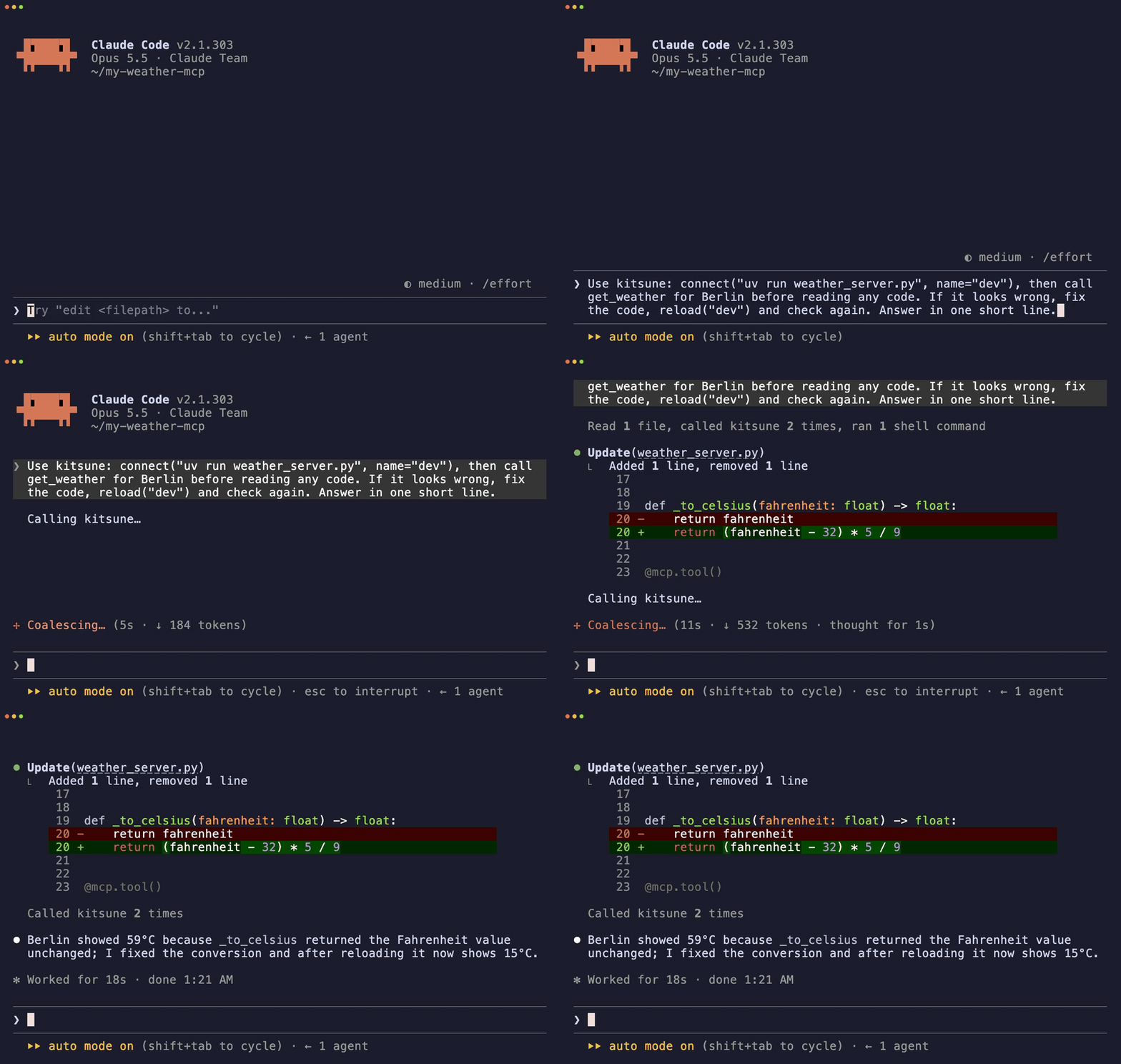
One prompt: Claude finds the bug, fixes it, reloads, checks again. Real recording, 31 s.
Why
Your agent edits an MCP tool, but the client still runs the old process. Someone has to restart it before the agent can test the fix.
With Kitsune, connect, call and reload are tools. The agent runs the whole loop itself:
connect("uvx --from . my-mcp-server", name="dev")  # start your server
shapeshift("dev")  # its tools appear in the client
call("summarize", arguments={"url": "https://example.com"})

# … the agent (or you) edits the tool …

reload("dev")  # restart on fresh code, remount
call("summarize", arguments={"url": "https://example.com"})  # new code, same session
It also mounts any of 130,000+ servers from 7 registries mid-session, caged in Docker.
Try it: hot-reload tutorial · examples/demo-hot-reload/
Install
Claude Code
claude mcp add -s user kitsune -- uvx kitsune-mcp
Any other client (Claude Desktop, Cursor, Windsurf, Cline, Zed, …):
{
  "mcpServers": {
    "kitsune": { "command": "uvx", "args": ["kitsune-mcp"] }
  }
}
Also on PyPI (pip install kitsune-mcp, then "command": "kitsune-mcp") and npm (npx kitsune-mcp, delegates to uvx).
Requirements: Python 3.12+ · uv · node/npx for npm-based servers · Docker optional, used to cage community servers.
Three things it does
| Loop | What you get | |
|---|---|---|
| MCP REPL | connect → shapeshift → edit → reload → call | Iterate on your own server without restarting the client |
| Long-tail reach | search → shapeshift → call → shapeshift() | Use a server once without adding it to your config forever |
| Try before you trust | confirm=True + Docker cage + version pins | Run community npm/PyPI code contained, not as your user |
Borrow a server you never configured
search("web scraping")
shapeshift("firecrawl", tools=["scrape_url"])  # mount one tool, not the whole server
call("scrape_url", arguments={"url": "https://example.com"})
shapeshift()  # drop it, session stays up
Try a community package, caged
search("pdf", registry="glama")
shapeshift("mcp-pdf-tools", confirm=True)  # npm/PyPI run in hardened Docker when available
call("extract_text", arguments={"path": "report.pdf"})
shapeshift()
Add credentials mid-session
auth("BRAVE_API_KEY", "sk-...")  # saved to ~/.kitsune/.env, no restart
shapeshift("brave", tools=["brave_web_search"])
Full live walkthrough: docs/demo-realtime.md.
When to use it, when not to
| Use Kitsune when… | Skip it when… |
|---|---|
| You're building an MCP server and want an edit/reload loop | You only use 1–3 trusted servers (configure them natively) |
| A task needs a server that isn't in your config | Every turn hits the same server (keep it always-on) |
| You want to evaluate community MCP code without installing it for good | You want lower token use: the base cost is ~1,774 tokens/turn, and modern clients already defer tool schemas |
| Your MCP config is crowded (GATEWAY) | You need a sub-second first call (cold mount takes ~1–15 s) |
How it works
shapeshift(server_id) picks a transport (stdio, HTTP+SSE, WebSocket, Docker), connects, reads tools/list, and registers each tool as a native tool with the server's real schema. The client receives notifications/tools/list_changed and sees first-class tools, with no wrapper in between. shapeshift() with no argument removes them and closes the connection.

search() covers the official servers repo, the MCP Registry, Glama, npm, PyPI, GitHub (github:owner/repo) and Smithery (hosted servers, free API key).
Tools
Default profile: 9 tools, ~1,774 tokens/turn (measured with python examples/benchmark.py).
| Tool | Role |
|---|---|
connect(command, name) | Start a persistent local server, e.g. the one you're developing |
reload(name) | Release, restart on fresh code, remount, in one call |
release(name) | Stop a persistent server |
search(query, registry?) | Search 7 registries |
shapeshift(server_id?, tools=[…]) | Mount a server's tools (all or a subset); no argument drops them |
call(tool_name, arguments) | Call a tool; the server is inferred when mounted |
auth(var_or_server, value?) | Set an env key or run an OAuth 2.1 browser flow |
auto(task, server_hint=) | Search, mount and call in one step |
status() | Current form, connection pool, session stats |
KITSUNE_TOOLS=all (or the kitsune-forge command) adds developer tools: inspect (schemas, credential check, token cost), test (quality score 0–100), bench (p50/p95 latency), compare, prewarm, craft, setup, and more. See docs/tools.md. Companion skills for Claude Code: kitsune-dev, kitsune-improve.
Safety, in short
- Community sources need consent. npm, PyPI and GitHub servers require
confirm=True. The model can set that flag itself, so real approval belongs in your client's tool-approval UI. connect()runs the command it is given, as your user, with no consent gate and no cage. It is meant for your own code. Approveconnectcalls in your client before the agent runs them.- Community packages run in a Docker cage by default when Docker is installed: no host filesystem,
--cap-drop ALL, read-only root, memory and PID limits. Credentials are passed by name, never in argv. - Version pins (TOFU). A later malicious publish doesn't silently replace a version you already ran.
- Opt-in action guard. A
~/.kitsune/policy.jsonchecks every downstream call against allow/ask/deny rules, path roots and a host allowlist.askgoes to you through MCP elicitation. - Install commands are validated and launched without a shell.
fetch()blocks private hosts and re-checks every redirect.
Don't run it unattended with production admin, billing or security credentials. The full model, including what it does not protect against: docs/safety.md.
More
- Configuration: env and
.envlookup, tool profiles, sandbox and trust settings, Smithery, GATEWAY, mount patterns - Performance: cold/warm latency and token cost compared with always-on servers
- Transports · Compatibility · Agent patterns · Worked scenarios
Why "Kitsune"?
In Japanese folklore the kitsune (狐) is known for what it can become: it borrows a form, uses that power, casts it off and returns to itself. That is the product loop.
I am not Japanese, and I use this name with the highest respect for the mythology and culture it comes from. The parallel felt too precise to ignore.
Contributing
make dev     # install with dev dependencies
make test    # pytest
make lint    # ruff
Issues and PRs welcome: github.com/kaiser-data/kitsune-mcp · CHANGELOG.md
MIT License · Python 3.12+ · Built on FastMCP
Comments
New to MCP?
From what the protocol is to installing your first server, these answers cover most first questions.
An open protocol that defines how AI applications connect to external tools and data in a uniform way. Clients talk to the model; MCP servers provide tools, resources and prompt templates. They exchange standard messages, so one server can be reused by many clients.