
About causly-server
causly-server is a local-first MCP server for founders and AI agents, combining software delivery with sales, meetings, calendar, and reminders. Its on-demand tool packs, persistent SQLite data, and safety controls keep these workflows in one server.
Key features
- 01Code, GitHub, CI, and deployment tools
- 02Lead research and sales pipeline
- 03Meeting notes and action-item tracking
- 04Calendar and local reminders
- 05On-demand tool packs and SQLite storage
- 06Confirmations, workspace limits, and secret redaction
Use cases
- 01Run checks, open a pull request, and verify CI
- 02Add prospective companies to a sales pipeline
- 03Save meeting notes and schedule follow-ups
- 04Find calendar availability and create events
MCP support
Agents connect to causly-server over MCP using stdio. It provides a tool router and grouped tools that load on demand.
Configuration
Local server config is the same for every client. Copy it into your client’s MCP config file.
Tools
Local servers expose tools only once running on your machine, and the maintainer has not provided a tool list.
Details
From the project READMECausly Server
The open-source MCP server that turns any AI agent into your technical co-founder.


Most agents can write text. Causly Server gives them hands: they ship code, hunt for clients, track deals, take meeting notes, handle your calendar and remind you on Telegram, all from one conversation, all on your own machine.
npm install -g causly-server
causly-server init

Contents
- Why Causly Server
- Quick start
- What you can ask
- How it works
- Tool packs
- Workflow tools
- Configuration
- Google setup
- Works with
- Security and privacy
- Command reference
- Troubleshooting
- FAQ
- Compatibility
- Contributing, roadmap, license
Why Causly Server
A founder's week is not only code. It is also finding clients, following up, remembering what was promised in a call, and shipping without breaking things. Causly Server puts all of that behind one MCP server.
- One server for build, sell, operate and grow. Git, GitHub, CI and deploys, but also leads, a sales pipeline, meeting notes, calendar, reminders and SEO.
- Memory that survives the chat. Your pipeline, meetings and reminders live in a local SQLite file, so the agent can pick up tomorrow where it stopped today.
- Local-first. Keys and data stay on your machine. There is no Causly cloud in the loop.
- Safe by default. Risky actions need explicit confirmation, file access can be limited to one folder, and secrets are redacted from logs.
- Light on your agent's context. Tools load in packs on demand instead of flooding the agent with hundreds of definitions.
- One command setup.
initfinds Claude Desktop, Cursor and Windsurf and wires them up.
Quick start
Requires Node.js 20 or newer.
1. Install
npm install -g causly-server
2. Connect your editors
causly-server init
init adds Causly Server to Claude Desktop, Cursor and Windsurf, whichever you have. It also prints the one-line command for Claude Code. Restart the editor afterwards.
3. Check everything
causly-server doctor
4. Add keys for the services you use (optional)
causly-server setup
Files, git, shell, Docker and Terraform work with no keys at all. Add keys only for the services you want. Each key is checked live as you enter it.
Useful init options:
causly-server init --client cursor                    # pick editors instead of auto-detecting
causly-server init --workspace D:\my-project          # limit file tools to one folder
causly-server init --toolsets research,pipeline,meetings   # choose which packs load at startup
What you can ask
- "Find companies hiring React developers and add the best three to my pipeline."
- "Save notes from my call with Acme: they want a demo next week, follow up on Friday."
- "What is due this week? Include meeting action items and reminders."
- "Prep me for my next meeting." (needs Google Calendar)
- "Transcribe this recording and list the action items." (needs a Groq key)
- "Ship this change: run the checks, open a pull request, tell me when CI is green."
- "Audit this page for SEO and suggest keywords."
- "Find a free slot on Thursday and create the event."
How it works
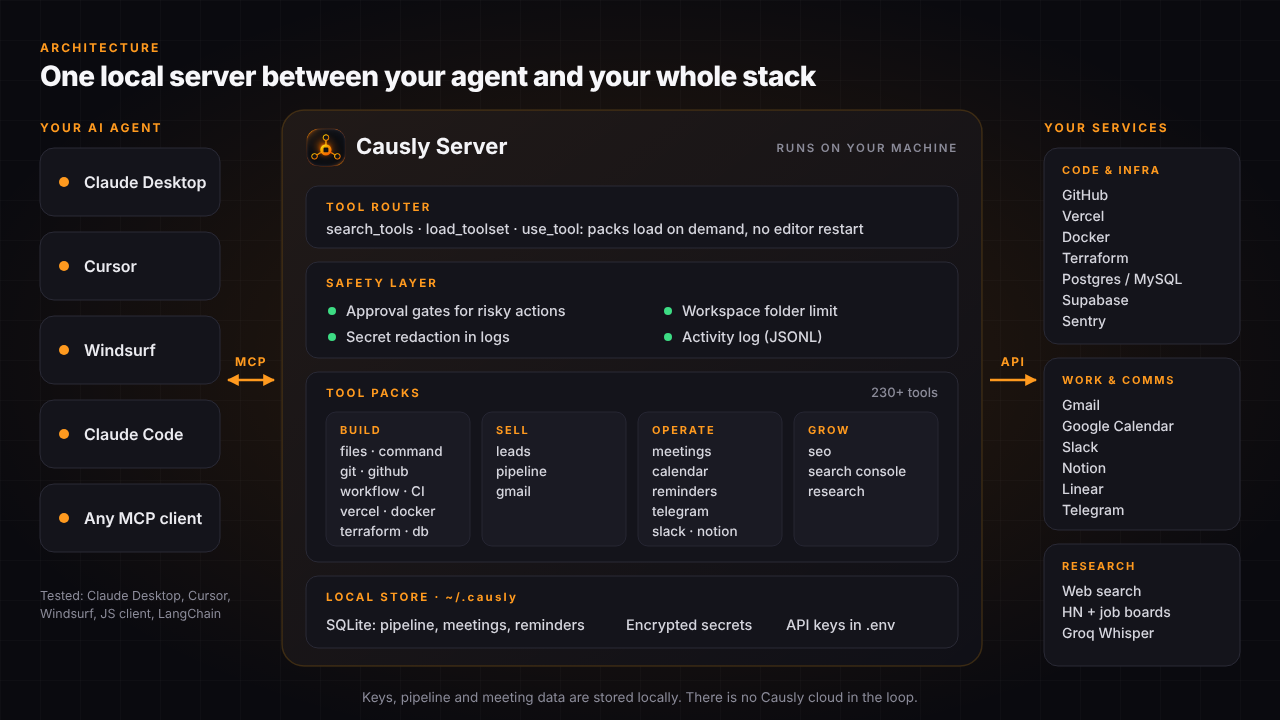
Your agent talks to Causly Server over MCP (stdio). Inside the server:
- Tool router.
search_tools,load_toolsetanduse_toollet the agent find a tool and call it by name. Packs load on demand, anduse_toolworks even in editors that do not refresh their tool list mid-chat, so you do not need to restart. - Safety layer. Permission levels, confirmation for risky actions, an optional workspace limit, secret redaction and an activity log.
- Tool packs. About 230 tools grouped into packs (below).
- Local store. SQLite for pipeline, meetings and reminders in
~/.causly, encrypted secrets, and your API keys in~/.causly/.env. - Your services. GitHub, Vercel, Docker, Terraform, Postgres, Slack, Notion, Linear, Gmail, Google Calendar, Telegram and more, reached with your own keys.
Tool packs
These packs load at startup by default:
| Pack | Tools | What it does |
|---|---|---|
| files | 9 | Read, write, edit, copy, move and inspect files |
| directory | 5 | List, create and delete directories; search file names |
| command | 1 | Run shell commands with safety checks |
| project | 7 | Detect project type and health; run build, tests, lint and typecheck |
| research | 2 | Search the web and read pages as clean text |
| leads | 3 | Find companies hiring (Hacker News, remote job boards) and public company contact details |
| pipeline | 9 | Local sales pipeline: leads, deals, contacts, activity log, report, CSV export |
| meetings | 9 | Transcribe recordings, save summaries, track action items, link to deals and calendar, prep for calls |
| reminders | 3 | Follow-ups saved locally; ask what is due |
These load on demand, or you can add them to startup with causly-server toolsets add <name>:
| Pack | Tools | What it does |
|---|---|---|
| calendar | 8 | Google Calendar: events, free/busy, find meeting slots, create, update, delete |
| gmail | 8 | Search, read, send, reply and forward |
| telegram | 5 | Alert yourself, read messages sent to your bot |
| seo | 4 | Keyword ideas, page audit, draft check, Search Console |
| git | 20 | Status, diff, commit, branch, merge, stash, tags, remotes |
| github | 27 | Repos, issues, pull requests, reviews, Actions |
| workflow | 4 | ship_change, fix_ci, verify_ci_fix, deploy_project |
| vercel | 11 | Projects, deployments, HTTP health checks |
| docker | 18 | Build, run, logs, images, exec, Compose |
| terraform | 20 | Init, plan, apply, state, workspaces, PR plan comments |
| database | 8 | Postgres and MySQL queries and schema inspection |
| supabase | 6 | Projects, organizations and SQL |
| slack | 8 | Channels, messages and threads |
| notion | 15 | Pages, databases, blocks and comments |
| linear | 7 | List, read, create, update and comment on issues |
| sentry | 8 | Projects and issues |
| secrets | 6 | Encrypted local secrets store |
Manage startup packs:
causly-server toolsets                      # show what loads at startup
causly-server toolsets add github,gmail
causly-server toolsets remove seo
causly-server toolsets reset                # back to the defaults
Workflow tools
Single tools are building blocks. These combine them into verified outcomes:
ship_change: inspects changes, creates a branch, runs project checks, commits, pushes and opens a pull request.fix_ci: finds a failing GitHub Actions run and fetches the real failure output.verify_ci_fix: commits and pushes the fix, polls the workflow and confirms CI is green.deploy_project: checks health, runs tests and build, deploys, polls, and HTTP-verifies the live URL.
flowchart TD
    A["You describe a task"] --> B["Agent edits files"]
    B --> C["ship_change runs checks"]
    C --> D["Commit, push, open PR"]
    D --> E{"CI passes?"}
    E -- "No" --> F["fix_ci gets failure logs"]
    F --> G["Agent fixes the code"]
    G --> H["verify_ci_fix pushes and confirms CI"]
    H --> E
    E -- "Yes" --> I["deploy_project deploys"]
    I --> J["HTTP verification"]
    J --> K["Shipped"]
Configuration
Settings live in ~/.causly/.env (on Windows, C:\Users\<you>\.causly\.env). Manage them with the CLI instead of editing by hand:
causly-server setup            # step by step, each key checked live
causly-server keys list        # which keys are set (never the full value)
causly-server keys set NAME    # hidden prompt
causly-server keys unset NAME
causly-server doctor --test    # check every configured service live
Changes are picked up without restarting your editor.
| Service | Variables | Notes |
|---|---|---|
| GitHub | GITHUB_TOKEN | Fine-grained token: contents, issues, pull requests |
| Vercel | VERCEL_TOKEN | Project must be Git-linked for deploys |
| Supabase | SUPABASE_ACCESS_TOKEN | Management API |
| Slack | SLACK_BOT_TOKEN | search:read needs a user token |
| Notion | NOTION_API_KEY | Share each page or database with the integration |
| Linear | LINEAR_API_KEY | Personal API key |
| Sentry | SENTRY_AUTH_TOKEN | Add event:write to resolve or comment |
| Gmail | GMAIL_CLIENT_ID, GMAIL_CLIENT_SECRET, GMAIL_REFRESH_TOKEN | Run causly-server login google |
| Google Calendar | CALENDAR_REFRESH_TOKEN | Same Google client as Gmail |
| Telegram | TELEGRAM_BOT_TOKEN, TELEGRAM_CHAT_ID | Create a bot with @BotFather, message it, then find your chat id with telegram_get_updates |
| Groq (meeting transcription) | GROQ_API_KEY | Free tier available. Audio is uploaded to Groq only when you confirm a transcription |
| Secrets manager | SECRETS_MASTER_KEY | 32-byte hex key you generate and keep |
| Timezone (optional) | CAUSLY_TIMEZONE | IANA name, e.g. Asia/Kolkata; defaults to your machine's zone |
Docker and Terraform need no key, only the CLI on your PATH. Postgres and MySQL take a connection string on each call. Transcribing recordings over 25 MB needs ffmpeg on your PATH.
Google setup (Gmail, Calendar, Search Console)
Google needs a one-time OAuth client that you own. It takes about five minutes.
- Open Google Cloud Console and create or pick a project.
- Enable the APIs you want: Gmail API, Google Calendar API, and optionally Google Search Console API.
- Open Google Auth Platform. Under Branding, fill in the app name and your support email. Under Audience, choose External and add your own Google account as a test user.
- Under Clients, choose Create client and pick Desktop app. A "Web application" client fails with
redirect_uri_mismatch. Copy the client ID and secret. - Save them in Causly: run
causly-server setup, orcausly-server keys set GMAIL_CLIENT_IDandcausly-server keys set GMAIL_CLIENT_SECRET. - Sign in once in your browser:
causly-server login google            # Gmail and Calendar
causly-server login google all        # also Search Console
Avoid the 7-day expiry. While your Google app is in Testing, Google expires the sign-in token every 7 days. Renew it any time with causly-server login google, or stop the expiry for good: in Google Auth Platform → Audience, click Publish app (In production). The Branding page from step 3 must be filled in first. For personal use you do not need Google verification; at sign-in you will see an "unverified app" warning, which is expected for your own client: choose Advanced, then continue.
Works with
| Client | Setup |
|---|---|
| Claude Desktop | causly-server init |
| Cursor | causly-server init |
| Windsurf | causly-server init |
| Claude Code | init prints the command: claude mcp add causly-server -- node <path>/index.js |
| Any MCP client or agent framework | Spawn causly-server over stdio |
Tested with Claude Desktop, Cursor and Windsurf (the same use_tool call on a real repository in each), a plain JavaScript MCP client, and LangChain (JS) through @langchain/mcp-adapters.
A minimal custom agent in JavaScript:
import { Client } from "@modelcontextprotocol/sdk/client/index.js";
import { StdioClientTransport } from "@modelcontextprotocol/sdk/client/stdio.js";

const client = new Client({ name: "my-agent", version: "1.0.0" });
// Find the install folder with: npm root -g
await client.connect(new StdioClientTransport({
  command: "node",
  args: ["<npm-root>/causly-server/index.js"],
}));

const { tools } = await client.listTools();           // search_tools, load_toolset, use_tool, ...
const result = await client.callTool({
  name: "use_tool",
  arguments: { tool: "git_status", arguments: { repo_path: "." } },
});
console.log(result.content[0].text);
Security and privacy
Causly can touch your files, repositories and infrastructure, so the controls live in the server itself. See SECURITY.md to report a vulnerability.
- Permission levels. Every tool is
READ,LOW,MEDIUM,HIGHorDESTRUCTIVE.HIGHandDESTRUCTIVEactions (deploys, merges, shell commands, deletes, raw SQL, Terraform apply and destroy, Docker removal) need an explicitconfirm: true. - Workspace limit.
causly-server init --workspace <folder>restricts file and command tools to one folder. - Command risk checks. Drive wipes, formatting and shutdown commands are blocked. Force-pushes,
DROP TABLE,curl | bashandsudoare flagged. - Path protection. Writes and deletes inside protected system directories are blocked.
- Secret redaction. Tokens, passwords and API keys are redacted before anything is written to logs.
- Local encrypted secrets. The built-in secrets manager uses AES-256-GCM with a key you control. No external vault needed.
- Activity log. Every call is recorded in
logs/activity.logas structured JSONL (timestamp, operation ID, risk level, status, redacted input, duration).
Privacy. Causly Server has no Causly cloud and no Causly account. Your pipeline, meetings and reminders are stored in a local SQLite file, and your keys stay in ~/.causly/.env. Data leaves your machine only when you use a service you configured, for example GitHub, Gmail, Telegram, or Groq for transcription, and only to that service.
Optional BoundaryAttest receipts for ship_change, verify_ci_fix and deploy_project are described in the docs.
Command reference
causly-server                          Start the MCP server (your editor runs this)
causly-server init                     Set up Claude Desktop, Cursor and Windsurf
    --client claude|cursor|windsurf|all
    --workspace <folder>
    --toolsets <list>
    --no-setup
causly-server status                   One screen: editors, keys, pipeline, reminders, backup, updates
causly-server doctor [--test]          Check your setup; --test also checks every key live
causly-server setup [service]          Add API keys step by step
causly-server keys list | set NAME | unset NAME | open
causly-server login google [gmail,calendar,gsc|all]
causly-server toolsets [add|remove|reset]
causly-server backup [file]            Save a copy of your pipeline, meetings and reminders
causly-server restore <file> [--yes]   Put a backup back (current data is kept as a copy)
causly-server remove [--client <name>] Remove it from your editors
causly-server --version
Troubleshooting
Start with causly-server doctor. It tells you what is missing.
| Problem | Fix |
|---|---|
causly-server is not recognized after install | Open a new terminal so your PATH refreshes. Check that your npm global folder (npm config get prefix) is on PATH. |
Editor does not show the tools after init | Quit the editor completely (including the system tray) and open it again. |
| The agent cannot see a tool that is not loaded | Ask it to call the tool with use_tool, or run causly-server toolsets add <pack>. |
| Gmail or Calendar stopped working | Your Google token expired (7 days in Testing mode). Run causly-server login google. |
redirect_uri_mismatch during Google sign-in | Your OAuth client is a "Web application". Create a Desktop app client instead. |
| A reminder never reached Telegram | Set both TELEGRAM_BOT_TOKEN and TELEGRAM_CHAT_ID, then run causly-server doctor --test. |
| Transcription fails on a large file | Install ffmpeg and make sure it is on your PATH. Files above 25 MB are compressed first. |
restore cannot replace the data file | Quit Claude Desktop, Cursor and any app using Causly Server, then run it again. |
| A file or command is refused | A workspace limit may be on. Check causly-server doctor, or re-run init with the folder you want. |
FAQ
Is it free? Yes. It is MIT licensed, including for commercial use. The services you connect have their own pricing.
Does my data go to Causly? No. There is no Causly cloud in the loop. See Security and privacy.
Do I need every key? No. Add keys only for the services you use.
Which agents work with it? Any MCP client. It is tested with Claude Desktop, Cursor, Windsurf, a plain JavaScript client and LangChain (JS).
Why is my agent not calling a tool? It may be in a pack that is not loaded. Tell the agent to use use_tool, or add the pack with causly-server toolsets add <pack>.
How do I update? npm update -g causly-server. status and doctor tell you when a new version is out.
How do I back up my data? causly-server backup saves your pipeline, meetings and reminders to a file. causly-server restore <file> puts it back.
How do I remove it? causly-server remove takes it out of your editors. Then npm uninstall -g causly-server.
Is there a hosted version? Causly Hosted is in development. Join the waitlist.
Compatibility
| Status | |
|---|---|
| Node.js | 20 or newer |
| Windows | Tested |
| macOS and Linux | Expected to work; not yet tested on real machines. Reports welcome. |
| Editors | Claude Desktop, Cursor, Windsurf (tested); Claude Code (command printed by init) |
Known limitations
vercel_create_deploymentanddeploy_projectneed the Vercel project to be Git-linked already.supabase_run_sqluses the Supabase Management API; some personal access tokens get a403for SQL.slack_search_messagesneeds a Slack user token with thesearch:readscope.docker_pushneeds registry authentication already configured on the host.- Sentry
resolve_issue,ignore_issueandadd_commentneed a token with theevent:writescope.
Contributing, roadmap, license
- Docs: agenv.causly.in/docs/server
- CONTRIBUTING.md explains how to add a tool pack and the manual testing checklist. Please read the Code of Conduct too.
- ROADMAP.md has what is planned next. CHANGELOG.md has release history.
- License: MIT.
Want something custom built on this?
Need a custom MCP server, a specific integration, or a related service for your product or team? Reach out: [email protected]
Causly Hosted
Do not want to run Causly Server yourself? Causly Hosted is a managed version, currently in development.
Comments
New to MCP?
From what the protocol is to installing your first server, these answers cover most first questions.
An open protocol that defines how AI applications connect to external tools and data in a uniform way. Clients talk to the model; MCP servers provide tools, resources and prompt templates. They exchange standard messages, so one server can be reused by many clients.