
About Spendlog
Spendlog is a local-first MCP server for solo entrepreneurs to track business expenses and invoices through natural language in Claude and other supported environments. It stores data in SQLite and also handles budgets, recurring expenses, project tracking, and analysis.
Key features
- 01Record expenses and income
- 02Create and manage invoices
- 03Set budgets and recurring expenses
- 04Analyze by category and time period
- 05Manage multiple projects
- 06Export transaction and invoice data
Use cases
- 01Log business expenses and income as they occur
- 02Create invoices and mark payment status
- 03Review budget usage and spending trends
- 04Export transaction records for an advisor
MCP support
The MCP server provides expense, income, invoice, budget, analysis, and export tools to clients such as Claude. Data is stored in a local SQLite file.
Configuration
Local server config is the same for every client. Copy it into your client’s MCP config file.
Tools
Local servers expose tools only once running on your machine, and the maintainer has not provided a tool list.
Details
From the project READMESpendlog
Cost & expense tracking for solo entrepreneurs, right inside Claude Code. No apps. No spreadsheets. No account.
Track what your business spends, manage budgets, write invoices — all in natural language. Your data stays 100% local in SQLite. Nothing leaves your machine.




Works with
Claude Code | Claude Desktop | VS Code | Cursor
Quick Start
npx spendlog
Or one-click install:


The installer auto-configures Claude Desktop and Claude Code. Restart Claude, then try:
"Track 50€ for hosting"
That's it. Requires Node.js 20+.
Why Spendlog?
- Zero context-switching — log costs while you build, right where you already work
- Local-first — all data in
~/.spendlog/spendlog.db, no account, no cloud - Natural language — no forms, no menus, just tell Claude what you spent
- 38 tools — invoicing, budgets, recurring expenses, CSV export, multi-project tracking
- Multilingual — English and German (EN/DE), with i18n ready for more
Examples
Tracking:
You: "29€ for ChatGPT subscription"
Claude: Expense saved: 29.00 € — Category: IT & Software

You: "Export 2025 for my accountant"
Claude: 247 transactions written to ~/spendlog-export-2025.csv
Invoices:
You: "Create invoice for TechCorp, web development, 8h at 95€/h"
Claude: Invoice #2026-004 created — 760.00 €

You: "Mark it as paid"
Claude: Invoice #2026-004 marked as paid, income recorded.
Analysis:
You: "How much did I spend on software this quarter?"
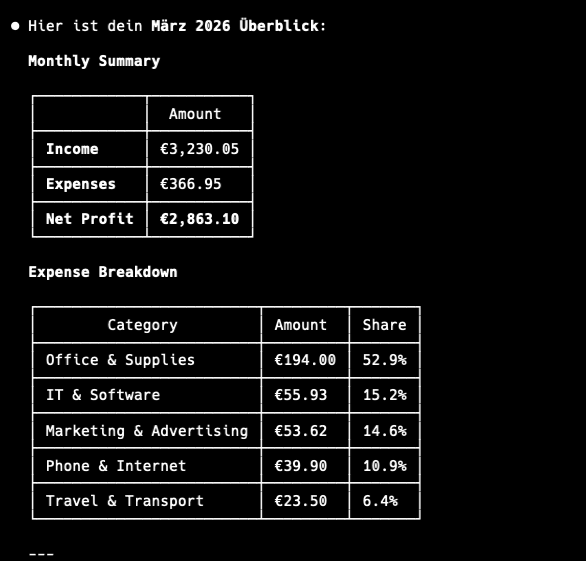
Claude: IT & Software: 287.00 € (12 transactions) — 23% of total expenses

You: "Compare January vs February"
Claude: Expenses up 15%. Biggest increase: Marketing (+120€)
Tools
38 tools across 9 categories:
| Category | Tools |
|---|---|
| Transactions | add_expense add_income list_transactions update_transaction delete_transaction |
| Analysis | get_summary get_category_breakdown compare_periods get_tax_summary |
| Invoices | create_invoice list_invoices get_invoice mark_invoice_sent mark_invoice_paid delete_invoice duplicate_invoice |
| Budgets | set_budget get_budget_status list_budgets update_budget delete_budget |
| Recurring | create_recurring list_recurring delete_recurring process_recurring |
| Projects | create_project list_projects rename_project delete_project |
| Categories | list_categories add_category delete_category |
| Export | export_transactions export_invoices export_for_tax_advisor |
| Settings | get_profile set_profile get_notifications |
Configuration
Manual setup (if the installer didn't work)
Claude Desktop — edit your config file:
{
  "mcpServers": {
    "spendlog": {
      "command": "npx",
      "args": ["-y", "--package=spendlog", "spendlog-mcp"]
    }
  }
}
Claude Code:
claude mcp add spendlog -- npx -y --package=spendlog spendlog-mcp
Environment variables
| Variable | Description | Default |
|---|---|---|
SPENDLOG_LANGUAGE | en or de | en |
SPENDLOG_DATA_DIR | Data directory path | ~/.spendlog |
DATABASE_PATH | Full path to SQLite database | $SPENDLOG_DATA_DIR/spendlog.db |
SPENDLOG_PROJECT | Default project for all transactions | none |
Privacy
All data stays on your machine, in a local SQLite file. No account, no cloud, no telemetry — nothing is ever sent anywhere.
Note: Spendlog is a cost tracker, not accounting software. Use it for your own insights, not official bookkeeping or tax filing.
Development
TypeScript (strict), Vitest for tests, TypeORM + SQLite for storage.
git clone https://github.com/makz81/spendlog.git
cd spendlog
npm install
npm run dev       # MCP server with watch mode
npm run test      # 382 tests
npm run typecheck # type check (no emit)
See CONTRIBUTING.md for architecture details and how to add new tools.
License
Comments
New to MCP?
From what the protocol is to installing your first server, these answers cover most first questions.
An open protocol that defines how AI applications connect to external tools and data in a uniform way. Clients talk to the model; MCP servers provide tools, resources and prompt templates. They exchange standard messages, so one server can be reused by many clients.